Virtual DBA application – part 2
Table of contents
Preamble
In a first part we have installed everything, enough to start playing and discover painful points from real life AI experience.
In RAG (Retrieval-Augmented Generation) a big part of the job is to find the most relevant information from a large set of documents to answer a specific query. My large set of documents is the Oracle Skills repository.
As you might have experimented you cannot inject in the prompt all the markdown files so another big part of the job will be to cut those markdown files into smaller, manageable chunks.
Ranking those chunk is a crucial part of the RAG process, because submitting the user query with not relevant chunks will produce bad result. Which I would sum up by “garbage in, garbage out”.
In first article we have loaded llama3.2:latest model and this model is 3 billion parameters model for 2GB in size. Quite fast but not really clever for too complex questions. I have also done some tests with gemma4:e2b (7.2 GB) and gemma4:latest (9.6 GB). Obviously it takes longer to generate the answer but the answer quality is exploding so if your hardware allows give it a try !
You have to find a balance between your hardware, model complexity and average response time you expect…
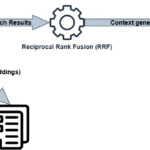
The big picture is the following:
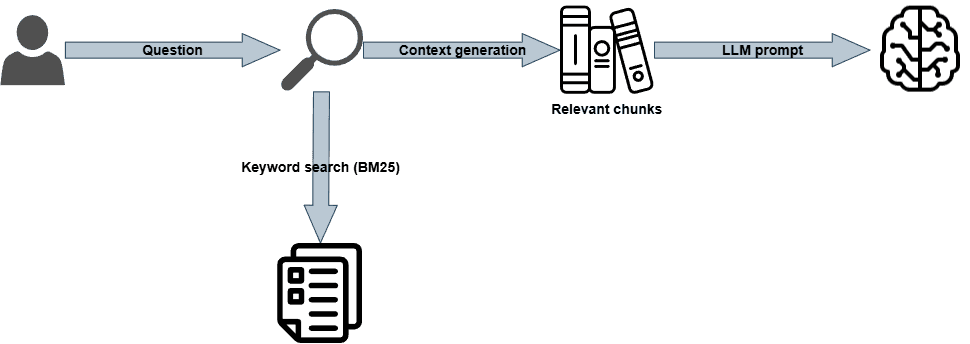
My full code is in this GitHub repository. I have create a release called “Release 1” and a tag called “1.0” to identify this first “keyword only” version.
Chunking of markdown files
As we have seen injecting complete markdown files into LLM (Large Language Model) prompts is not sustainable so we have to split those files into smaller, manageable chunks. Also inject a complete file would not be interesting to do as maybe only a small part (paragraph, section) of the file is relevant to the query.
Chunk files method is closely related to the source content and structure of your documents. If you have markdown, HTML or code then they are already organized and a chunk by section is the obvious method. If you have un-organized text documents then you can chunk by fixed size or better by semantic meaning so chunking only when the semantic meaning changes (really more complex to implement as accessing a LLM will be required).
The Oracle Skills repository is made of markdown files and I could have written a script to split per headers that are made of #, ## or ###. Then I found the langchain-text-splitters open source project with a bunch of already developed splitters.
For my case they have the MarkdownHeaderTextSplitter. But they have also splitters for Latex, HTML, Latex and other formats. They have also the HTMLSemanticPreservingSplitter to split HTML by semantic meaning.
If you want to test some Python code I highly recommend working with a ipynb file and install the required VS Code extensions for Jupyter notebooks. You will be then in a Jupyter notebook (similar to Databricks Notebook) and it will be very easy to test and display results.
My langchain-text-splitters.ipynb notebook is an example to read the markdown files and split them in chunks.
The result is the chunk with some other interesting metadata:

Why is it important to have metadata ? Because when you are searching by keyword it is important to keep the context and source information. A typical construction to search by keyword from the picture just above:
awr reports automatic workload repository
overview
the automatic workload repository (awr) is oracle's built-in ...
awr-reports.md
For embeddings a typical construction would be:
awr reports — automatic workload repository > overview
the automatic workload repository (awr) is oracle's built-in ...
Then you will inject this construction to the LLM prompt:
source: skills-main/db/performance/awr-reports.md
section: awr reports — automatic workload repository > overview
content:
the automatic workload repository (awr) is oracle's built-in ...
Keyword search (BM25)
To rank document by keyword the de-facto method is Okapi BM25 (Best Match for BM and 25 because it is 25th iteration of the algorithm).
The statistical formulas behind BM25 are quite complex, but it essentially scores documents based on the frequency of query terms in each document, adjusted for document length and term saturation (avoid repeating stupidely a term to be well ranked).
I have decided to use Github project bm25s and I have written the bm25.ipynb notebook to experiment it.
If I take the five first chunks for the query “How to generate an AWR report in HTML format ?”, I am already impressed by the result. I would say that I even learned something: there is a wrapper in SQLcl to generate an AWR report and using @?/rdbms/admin/awrrpt.sql script is not mandatory:
Rank 1 (score: 9.59), File: skills-main\db\sqlcl\sqlcl-awr.md
Chunk: ```sql
-- List snapshots to find the relevant time window
awr list snapshots

-- Generate an HTML report for that window (e.g., snapshots 142 to 145)
awr create html 142 145
```
Open the resulting `.html` file in a browser for the full formatted report including Top SQL, wait events, load profile, and instance efficiency metrics.
--------------------------------------------------------------------------------
Rank 2 (score: 8.76), File: skills-main\db\sqlcl\sqlcl-awr.md
Chunk: - Run `awr list snapshots` before generating a report to confirm the snapshot IDs exist and span the time window you want.
- Use HTML format for human review; use text format when the output needs to be parsed programmatically or sent in plain-text email.
- Keep snapshot intervals short (15-30 minutes) during active problem investigation so you can isolate the exact period when performance degraded.
- The default AWR snapshot interval is 60 minutes. For fine-grained baselining during a test, take manual snapshots at shorter intervals with `awr create snapshot`.
- Run AWR reports on a non-production replica when possible — generating large AWR reports against a heavily loaded production database consumes I/O and memory.
---
--------------------------------------------------------------------------------
Rank 3 (score: 8.31), File: skills-main\db\performance\awr-reports.md
Chunk: ```sql
SELECT output
FROM   TABLE(
DBMS_WORKLOAD_REPOSITORY.AWR_REPORT_HTML(
l_dbid      => (SELECT dbid FROM v$database),
l_inst_num  => 1,
l_bid       => 200,
l_eid       => 201
)
);
```
--------------------------------------------------------------------------------
Rank 4 (score: 8.04), File: skills-main\db\sqlcl\sqlcl-awr.md
Chunk: Generates an AWR report as a file in the current working directory:
```sql
awr create html <begin-snapshot-id> <end-snapshot-id>
awr create text <begin-snapshot-id> <end-snapshot-id>
```
The output file is named automatically:
```
AWR-<DB_Name>-<PDB_Name>-<Timestamp>.html
AWR-<DB_Name>-<PDB_Name>-<Timestamp>.txt
```
**Default behavior when snapshot IDs are omitted:**
```sql
-- Uses the last two snapshots (second-to-last as begin, last as end)
awr create html
awr create text
```
---
--------------------------------------------------------------------------------
Rank 5 (score: 7.72), File: skills-main\db\sqlcl\sqlcl-awr.md
Chunk: ```sql
awr create text 142 145
```
Text format is useful for automated parsing, email delivery, or logging to a file with SPOOL:
```sql
SPOOL /var/reports/awr_latest.txt
awr create text
SPOOL OFF
```
---
First version of the application
As stated my application is around Streamlit and to be honest even if I am happy with the result it it clearly not the easiest choice to implement.
I have split my application in multiple files:
- virtual_dba.py: this is the main file that will be executed by Streamlit (streamlit run virtual_dba.py). It contains the UI and the main logic to handle user interactions. It displays answers to user queries and displays SQL results. The script itself does not contain any back end processing that is delegated to other scripts. I have to say that there is one part that might look overcomplicated that is just to handle the “Cancel Request” button. This “Cancel Request” button that allow users to cancel a request submitted to the LLM requires management of a queue (to handle result) and threading library to run the LLM in another thread due to the nature of Streamlit. Is it worth the effort ? Surely not but I really wanted to be able to cancel a wrongly submitted request…
- services.py: this file contains the logic, in two classes called KnowlegeService and SQLService, to execute the backend procedures in other files. The goal is to have a virtual_dba.py file a bit lighter without the burden of error handling.
- answer_and_execute.py: this file contains the backend functions to answer user query and execute SQL commands.
- constants.py: this file contains constant values used throughout the application. This is the (only) file where you will customize settings and parameters for the application.
- BM25.py: this file is the heart of the RAG process and has the procedure to read the markdown files, generate the chunks, compute the ranking for BM25. As you might guess with the file name generates the ranking. It also contains utility functions used throughout the application.
First step is to customize constants.py file to map your specific environment and preferences. Customize your default model (OLLAMA_MODEL), the list of Ollama available models (OLLAMA_MODEL_LIST), the directory of the Oracle Skills repository (ORACLE_SKILLS) and the location of SQlcl (SQLCL_COMMAND).
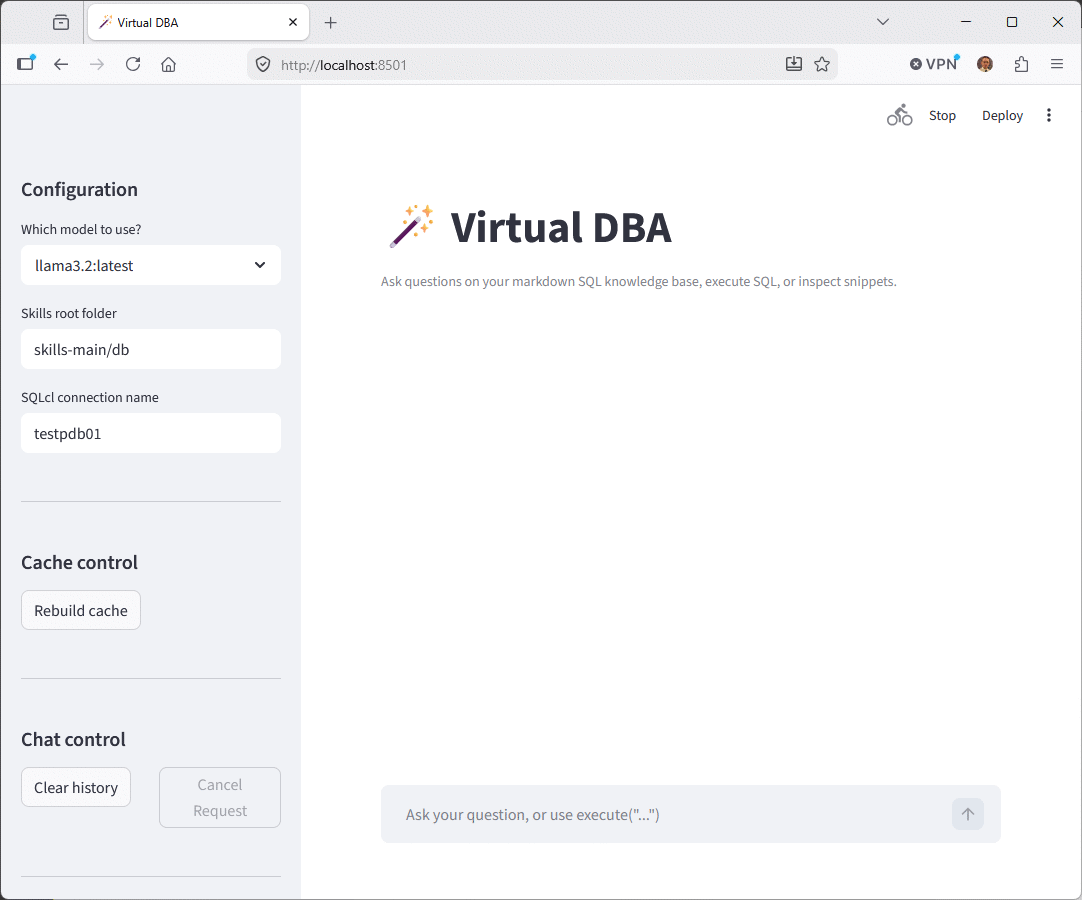
Run the application with `streamlit run virtual_dba.py` and your default browser will open the application and you should see something like below screenshot. Wait 30 seconds to 1 minutes as the first run will read all the markdown, generate the chunks and compute the retriever to be ready to compute the BM25 ranking based on user query:
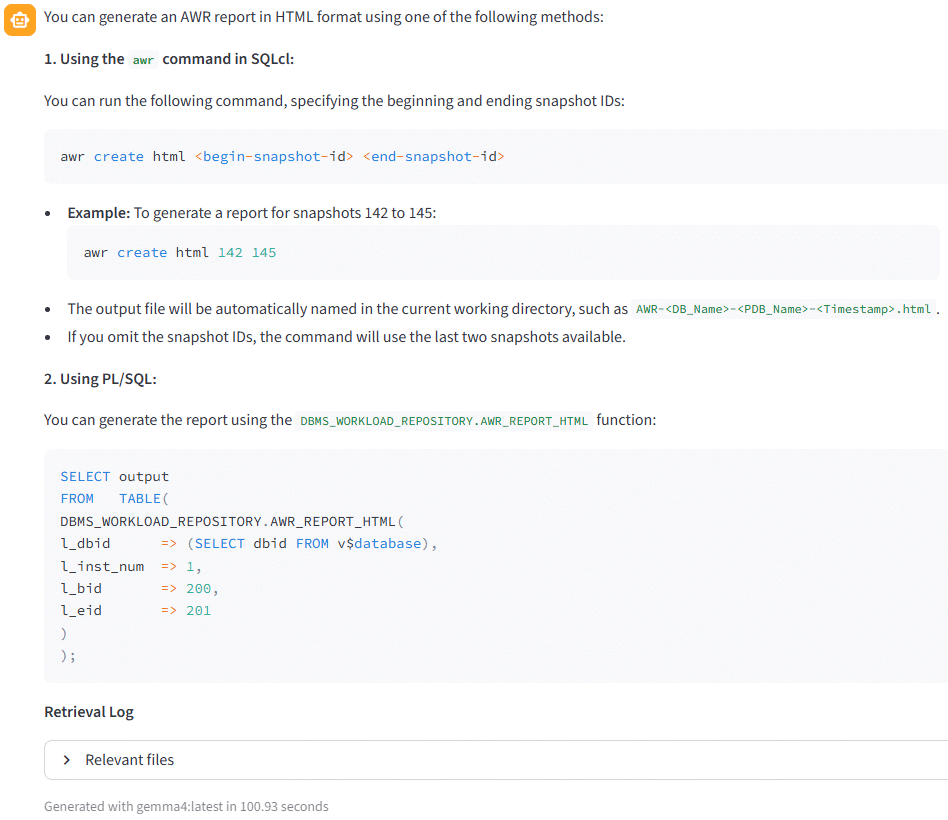
I have asked the famous question to Llama3.2, “How to generate an AWR report in HTML format?”:
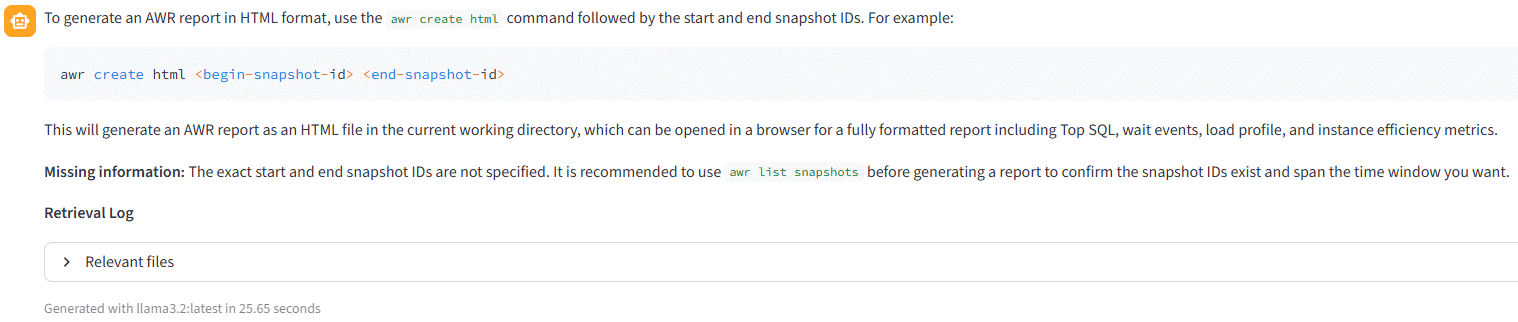
The answer is not too bad, at least the response time is acceptable. But we do not have any mention of DBMS_WORKLOAD_REPOSITORY.AWR_REPORT_HTML included in awr-reports.md markdown file. If you ask to gemma4:latest you will see that the answer is almost perfect as mentioning the awr command of SQLcl and the DBMS_WORKLOAD_REPOSITORY.AWR_REPORT_HTML procedure. But the response time is not exactly the same 25 seconds versus 100 seconds so four times slower:
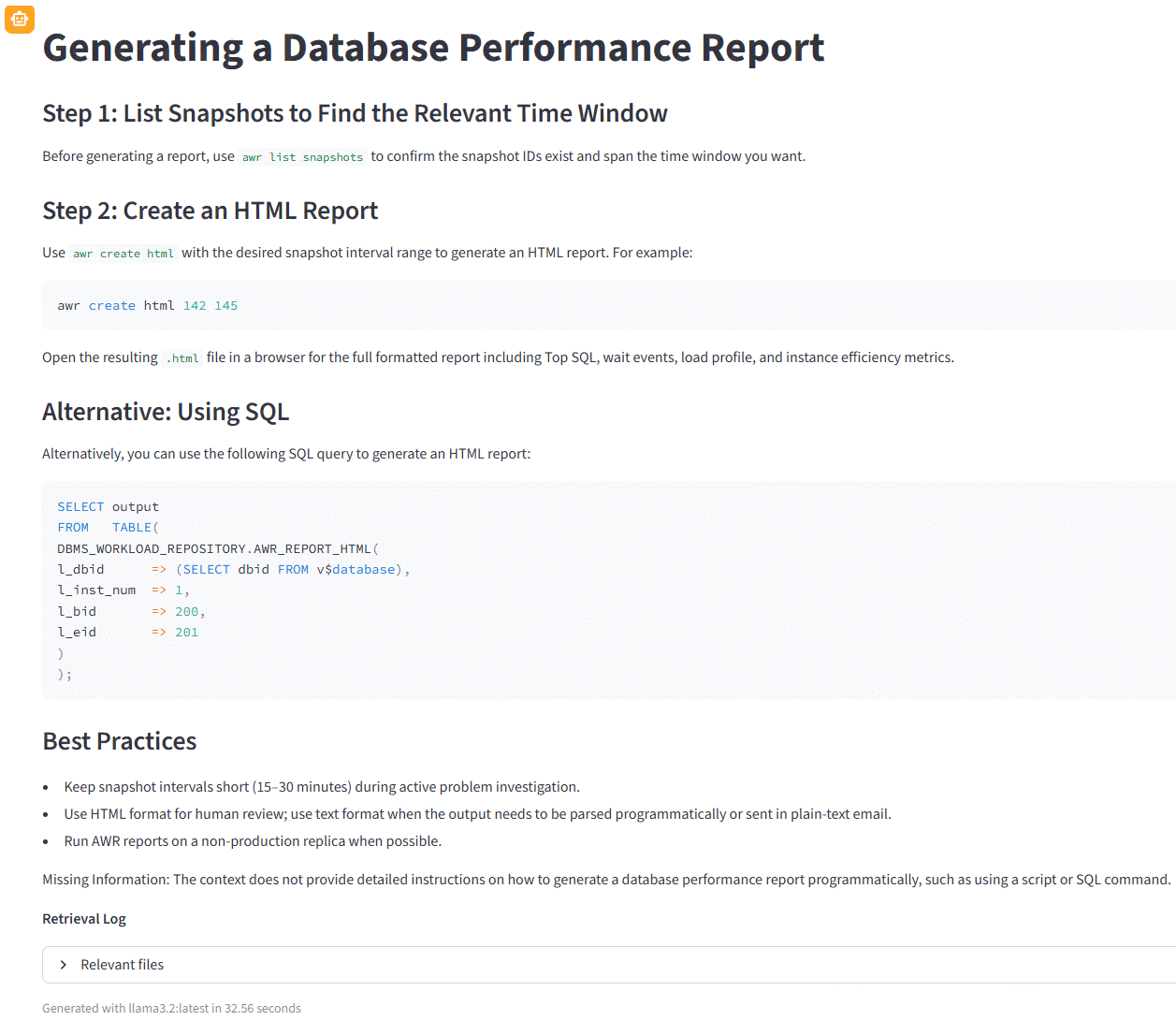
Another funny test with Llama3.2 is the question “how to generate a database performance report ?” that generate a perfect answer:
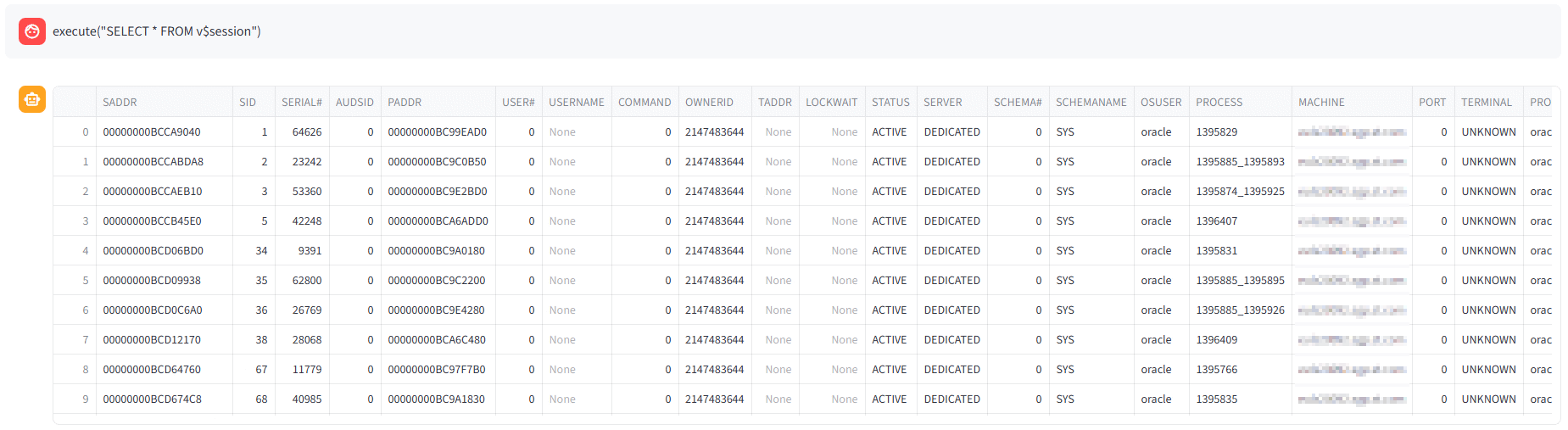
Last but not least, I have also implemented the SQLcl MCP interaction, which means that with the execute keyword you can run SQL commands directly from the application. In the “SQLcl connection name” textbox you can setup a SQLcl connection name that we have seen in first part on how to customize and then if I run one of the example, execute(“SELECT * FROM v$session”) I get:
About Post Author