Virtual DBA application – part 3
Table of contents
Preamble
After a first version of the application with only keyword search (BM25) I wanted to add something more to my RAG (Retrieval-Augmented Generation) approach. One very well known limitation with keyword search is the exact nature of the search terms, so if the user is using a synonym or a more vague meaning then you might miss to include an important context chunk in your LLM prompt. The answer to this is semantic search and so comparing the distance between vector like we have already see in the similarity picture blog post. How those two methods differ::
| Method | Limitations |
| Search by keyword (BM25) | Will find for “AWR” but might miss “performance report” |
| Semantic search (embeddings) | Understands synonyms and context but might not be good for exact match |
They have both their pros and cons so which one to take ? Both ! The version 2 of my RAG will perform a BM25 search and an embedding search. When you have those two ranking how to combine them ? Overall this is like comparing pears and apples. The well famous algorithm to do so is Reciprocal Rank Fusion (RRF) that aggregates rankings from multiple searches—for example, a keyword search, vector search, and so on—into a single ranking that is more accurate…
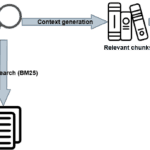
The high level picture is the following:
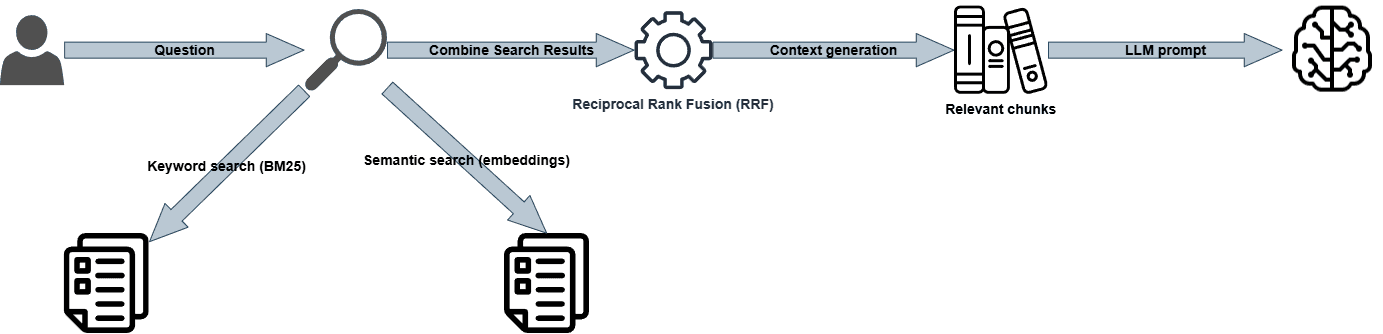
My full code is in this Github repository (git clone https://github.com/yjaquier/ollama.git). I have create a release called “Release 2” and a tag called “2.0” to identify this second version with both keyword (BM25) and embeddings search.
Embeddings
Computing vector embeddings (or embeddings for short) is something we have already seen on pictures in PostgreSQL and in MariaDB.
For text input there is a famous project called Sentence Transformers, that has everything included to compute vector embeddings on chunk of text. To make some experiments I have written the embeddings.ipynb Jupyter notebook.
We can see with the last cell that the result is a bit different that the BM25 one:
--------------------------------------------------------------------------------
Rank 1 (score: 0.72), File: skills-main\db\performance\awr-reports.md
Chunk: ```sql
SELECT output
FROM   TABLE(
DBMS_WORKLOAD_REPOSITORY.AWR_REPORT_HTML(
l_dbid      => (SELECT dbid FROM v$database),
l_inst_num  => 1,
l_bid       => 200,
l_eid       => 201
)
);
```
--------------------------------------------------------------------------------
Rank 2 (score: 0.60), File: skills-main\db\monitoring\top-sql-queries.md
Chunk: ```sql
-- Get the latest sql_exec_id for this SQL
SELECT sql_exec_id, sql_exec_start, elapsed_time/1e6 AS elapsed_sec, status
FROM   v$sql_monitor
WHERE  sql_id = 'abc123def456g'
ORDER BY sql_exec_start DESC
FETCH FIRST 1 ROW ONLY;
```
Then generate the HTML report as shown above.
---
--------------------------------------------------------------------------------
Rank 3 (score: 0.59), File: skills-main\db\sqlcl\sqlcl-awr.md
Chunk: ```sql
-- No IDs needed — uses the most recent interval automatically
awr create html
```
--------------------------------------------------------------------------------
Rank 4 (score: 0.57), File: skills-main\db\sqlcl\sqlcl-awr.md
Chunk: Generates an AWR report as a file in the current working directory:
```sql
awr create html <begin-snapshot-id> <end-snapshot-id>
awr create text <begin-snapshot-id> <end-snapshot-id>
```
The output file is named automatically:
```
AWR-<DB_Name>-<PDB_Name>-<Timestamp>.html
AWR-<DB_Name>-<PDB_Name>-<Timestamp>.txt
```
**Default behavior when snapshot IDs are omitted:**
```sql
-- Uses the last two snapshots (second-to-last as begin, last as end)
awr create html
awr create text
```
---
--------------------------------------------------------------------------------
Rank 5 (score: 0.56), File: skills-main\db\sqlcl\sqlcl-awr.md
Chunk: ```sql
-- List snapshots to find the relevant time window
awr list snapshots

-- Generate an HTML report for that window (e.g., snapshots 142 to 145)
awr create html 142 145
```
Open the resulting `.html` file in a browser for the full formatted report including Top SQL, wait events, load profile, and instance efficiency metrics.
FAISS
I initially thought of using a MariaDB database 12.2 and the new vector datatype to store the vector embeddings. Then reading articles around I came to the conclusion that for a small projects it might be over kill. I do have this MariaDB available somewhere but this would be a hard requirement for this project.
So decided to use a Python library with a local storage. You have plenty of option available:
- FAISS
- Annoy
- HNSWlib
- NumPy
I have decided to use FAISS for this project as there are plenty of documentation and the library is backed by a big corporation (Meta).
Even if my desktop has a NVidia car, I have faced difficulties to install FAISS with GPU support:
$ nvidia-smi
Thu May  7 15:02:13 2026
+-----------------------------------------------------------------------------------------+
| NVIDIA-SMI 581.42                 Driver Version: 581.42         CUDA Version: 13.0     |
+-----------------------------------------+------------------------+----------------------+
| GPU  Name                  Driver-Model | Bus-Id          Disp.A | Volatile Uncorr. ECC |
| Fan  Temp   Perf          Pwr:Usage/Cap |           Memory-Usage | GPU-Util  Compute M. |
|                                         |                        |               MIG M. |
|=========================================+========================+======================|
|   0  NVIDIA T400 4GB              WDDM  |   00000000:47:00.0  On |                  N/A |
| 49%   61C    P0            N/A  /   31W |    3395MiB /   4096MiB |     99%      Default |
|                                         |                        |                  N/A |
+-----------------------------------------+------------------------+----------------------+
So finally decided to go for the CPU version by doing:
pip install faiss-cpu # Or faiss-gpu-cu11, faiss-gpu-cu12, faiss-gpu-cuvs if you have a CUDA GPU available, the CPU version is the one that will work everywhere
I have prepared a faiss.ipynb Jupyter notebook to demonstrate its usage. There is a nice wiki website to explain all the functions of FAISS. The last cell of the notebook is providing the exact same order with FAISS library than the previous example with Sentence Transformers.
But at the end I have not used a library to store the embeddings anymore, the Oracle Skills repository is not (yet) made of thousand of files and computing the embeddings at first run was not super long and keeping the embeddings in memory was acceptable (30 seconds on my quite powerful desktop)…
Reciprocal Rank Fusion (RRF)
As we have seen RRF is combining the score of chunks from multiple ranking system (BM25 and embeddings for me). The algorithm works by assigning a good score of chunks that appear high in multiple ranking system. If a chunk has only a high rank in one scoring system then it will not be favored in RRF. Said differently RRF favor chunks that are consistently ranked high across different ranking systems, so converging chunks rank towards multiple scoring systems.
To demonstrate RRF, I have prepared a reciprocal_rank_fusion.ipynb Jupyter notebook. The last cell of the notebook shows why the chunk with the call to DBMS_WORKLOAD_REPOSITORY.AWR_REPORT_HTML from awr-reports.md markdown file is ranked first in RRF. The chunk had a good score with BM25 and a top position with embeddings score:
2553 - skills-main\db\performance\awr-reports.md - BM25 Score: 8.3097 - Embedding Score: 0.7180 - RRF Score: 0.0323
3273 - skills-main\db\sqlcl\sqlcl-awr.md - BM25 Score: 9.5919 - Embedding Score: 0.5585 - RRF Score: 0.0318
3272 - skills-main\db\sqlcl\sqlcl-awr.md - BM25 Score: 8.0374 - Embedding Score: 0.5728 - RRF Score: 0.0312
3276 - skills-main\db\sqlcl\sqlcl-awr.md - BM25 Score: 7.7209 - Embedding Score: 0.5424 - RRF Score: 0.0305
2233 - skills-main\db\monitoring\top-sql-queries.md - BM25 Score: 6.7770 - Embedding Score: 0.6037 - RRF Score: 0.0298
3278 - skills-main\db\sqlcl\sqlcl-awr.md - BM25 Score: 7.2235 - Embedding Score: 0.5102 - RRF Score: 0.0296
3279 - skills-main\db\sqlcl\sqlcl-awr.md - BM25 Score: 8.7643 - Embedding Score: 0.4428 - RRF Score: 0.0295
2554 - skills-main\db\performance\awr-reports.md - BM25 Score: 7.0742 - Embedding Score: 0.5157 - RRF Score: 0.0294
3275 - skills-main\db\sqlcl\sqlcl-awr.md - BM25 Score: 6.4640 - Embedding Score: 0.5949 - RRF Score: 0.0292
2229 - skills-main\db\monitoring\top-sql-queries.md - BM25 Score: 7.0427 - Embedding Score: 0.4769 - RRF Score: 0.0284
Now in my Python script I can combine the result of the two scoring system and apply RRF to get a final ranking. The advantage of this is the capability to use a smaller model and get good responses…
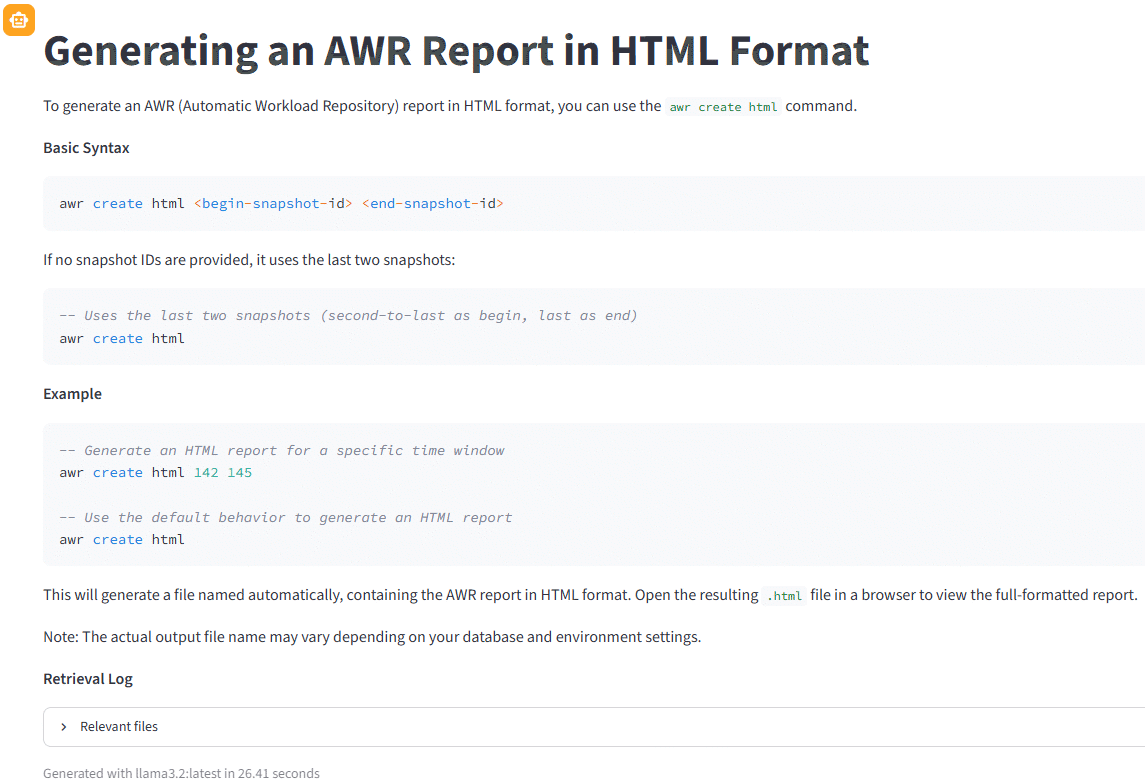
Few examples with the virtual DBA application. The Llama3.2 answer has greatly improved and the response time is still excellent:
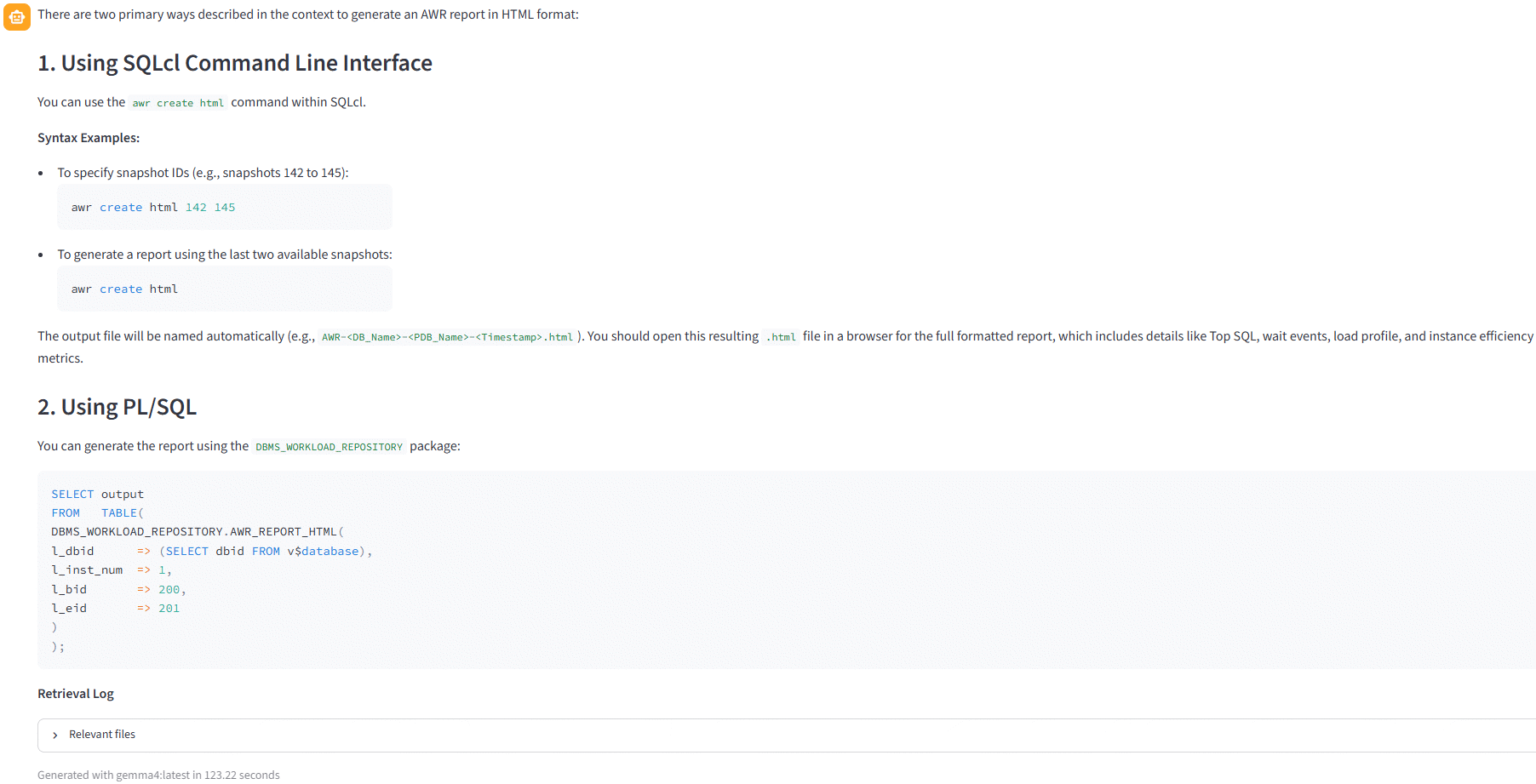
In this case the extra resource consumption of gemma4:latest is not really interesting:
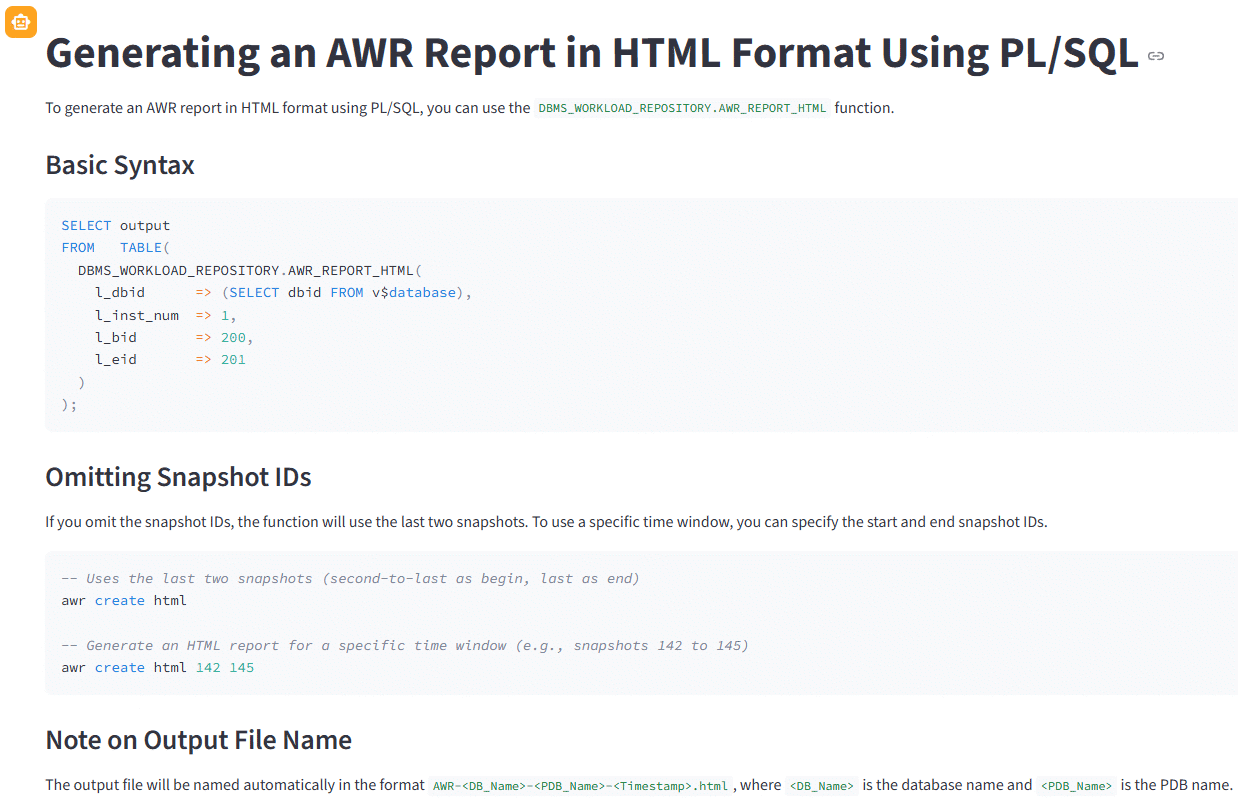
If you are more precise with Llama3.2 you also get a very good answer with an excellent response time asking something like “How to generate an AWR report in HTML format using PL/SQL ?”:
Next steps
What are te potential next steps ?
- Evaluate if splitting text and code in markdown files could be of any helps, it would require to make some links between pure code chunks and pure text chunks to not lose the context…
- Knowledge Graph RAG
About Post Author