Confluent Kafka REST API setup and testing
Table of contents
- Preamble
- Confluent Community Platform and Confluent Kafka REST API installation
- Data model creation
- Pushing from Oracle to Confluent Kafka REST API
- Pushing from Python to Confluent Kafka REST API
- Using curl for rapid testing
- Secure Standalone Confluent Kafka REST API Proxy
- Issues encountered
- References
Preamble
We have started to leverage Apache Kafka and more precisely the Confluent version to distribute real time information from our different system to our new coming DataHub and all the application we have running with Databricks.
Many applications have been modified or latest vendor edition is natively handling message transfer to Kafka. But for some legacy ones the question I got is how to push from Oracle database, after the end of an elaboration process, a query on multiple table summarizing what we would like to distribute through Kafka. The trigger could also be a database trigger on a table to submit the push process…
So the idea is to use the Kafka REST API to post data directly from the database to Kafka in http(s).
In the case of Oracle database the package is UTL_HTTP. With SQL Server you would use sp_invoke_external_rest_endpoint (SQL Server 2025 and upper only) so really recent. With PostgreSQL you would use PL/Python (so Python). But for MariaDB there is no solution. That’s why I have a chapter only in Python as I know that the request, in future, might not be only with Oracle…
I have used Confluent Community Platform 7.9.1. My test database is a pluggable database in Oracle Enterprise Edition 21c (21.18). My test server is running Red Hat Enterprise Linux release 8.10 (Ootpa) with 64GB of memory and 12 cores. On my Windows client I have used Insomnia 11.1.0 and Python 3.13.3.
I have not used confluent-kafka or kafka-python Python packages in this blog post because the Kafka security configuration to address directly the consumer and the producer deserve a blog post in itself… Coming soon…
Confluent Community Platform and Confluent Kafka REST API installation
Created a dedicated kafka account in users group:
[root@server01 ~]# useradd -m -g users kafka
I have opnJDK 17 on my server already (if not take it from hte repository of your Linux provider):
[kafka@server01 ~]$ java -version
openjdk version "17.0.14" 2025-01-21 LTS
OpenJDK Runtime Environment (Red_Hat-17.0.14.0.7-1) (build 17.0.14+7-LTS)
OpenJDK 64-Bit Server VM (Red_Hat-17.0.14.0.7-1) (build 17.0.14+7-LTS, mixed mode, sharing)
I have started by installing the real Apache Kafka edition with:
[kafka@server01 ~]$ gtar xvf kafka_2.13-4.0.0.tgz
And added the directory in the PATH of my kafka account:
export KAFKA_HOME=~/kafka_2.13-4.0.0
export PATH=$PATH:$KAFKA_HOME/bin
[kafka@server01 ~]$ KAFKA_CLUSTER_ID="$(kafka-storage.sh random-uuid)"
[kafka@server01 ~]$ echo $KAFKA_CLUSTER_ID
yOZ9gxIHQ4GTSyO0sKP27A
[kafka@server01 ~]$ echo "export KAFKA_CLUSTER_ID=yOZ9gxIHQ4GTSyO0sKP27A" >> .bash_profile
[kafka@server01 ~]$ kafka-storage.sh format --standalone -t $KAFKA_CLUSTER_ID -c ~/kafka_2.13-4.0.0/config/server.properties
Formatting dynamic metadata voter directory /tmp/kraft-combined-logs with metadata.version 4.0-IV3.
Start the Kafka server. I have used nohup not to lock one of my terminal:
[kafka@server01 bin]$ nohup kafka-server-start.sh  ~/kafka_2.13-4.0.0/config/server.properties > ~/kafka-server-start.log 2>&1 &
[1] 1425135
Create a Kafka topic with:
[kafka@server01 ~]$ kafka-topics.sh --create --topic oracle-kafka --bootstrap-server localhost:9092
Created topic oracle-kafka.
[kafka@server01 ~]$ kafka-topics.sh --describe --topic oracle-kafka --bootstrap-server localhost:9092
Topic: oracle-kafka     TopicId: OAckcaRiRs6ylTXsaDLVCw PartitionCount: 1       ReplicationFactor: 1    Configs: segment.bytes=1073741824
        Topic: oracle-kafka     Partition: 0    Leader: 1       Replicas: 1     Isr: 1  Elr:    LastKnownElr:
[kafka@server01 ~]$ kafka-console-producer.sh --topic oracle-kafka --bootstrap-server localhost:9092
>My first event
>^C
[kafka@server01 ~]$ kafka-console-consumer.sh --topic oracle-kafka --from-beginning --bootstrap-server localhost:9092
My first event
^CProcessed a total of 1 messages
So it (obviously) works well but I have really been surprised to discover that REST Proxy for Apache Kafka is NOT available with Apache Kafka and you need the Confluent Apache Kafka to have it… So restarted everything with Confluent Apache Kafka Community edition (confluent-community-7.9.1.zip). Change the .bash_profile of your account to have now:
export CONFLUENT_HOME=~/confluent-7.9.1
export PATH=$PATH:$CONFLUENT_HOME/bin
I have slightly modified the $CONFLUENT_HOME/etc/kafka/kraft/server.properties file to have something like (as explained in official documentation Zookeeper is deprecated in favor of KRaft):
process.roles=broker,controller
node.id=1
controller.quorum.voters=1@localhost:9093
listeners=BROKER://:9092,CONTROLLER://:9093
inter.broker.listener.name=BROKER
advertised.listeners=BROKER://localhost:9092,CONTROLLER://localhost:9093
controller.listener.names=CONTROLLER
listener.security.protocol.map=BROKER:PLAINTEXT,CONTROLLER:PLAINTEXT,PLAINTEXT:PLAINTEXT,SSL:SSL,SASL_PLAINTEXT:SASL_PLAINTEXT,SASL_SSL:SASL_SSL
Generate a cluster id and format storage with:
[kafka@server01 ~]$ kafka-storage random-uuid
PYNUg5Q3TnqyqmT8FzEsIg
[kafka@server01 ~]$ echo "export KAFKA_CLUSTER_ID=PYNUg5Q3TnqyqmT8FzEsIg" >> ~/.bash_profile
[kafka@server01 ~]$ export KAFKA_CLUSTER_ID=PYNUg5Q3TnqyqmT8FzEsIg
[kafka@server01 ~]$ kafka-storage format -t $KAFKA_CLUSTER_ID -c $CONFLUENT_HOME/etc/kafka/kraft/server.properties
Formatting metadata directory /tmp/kraft-combined-logs with metadata.version 3.9-IV0.
Start Kafka server with (broker and controller):
[kafka@server01 ~]$ nohup kafka-server-start $CONFLUENT_HOME/etc/kafka/kraft/server.properties > ~/kafka-server-start.log 2>&1 &
[1] 2883998
Start Schema Registry with:
[kafka@server01 ~]$ nohup schema-registry-start $CONFLUENT_HOME/etc/schema-registry/schema-registry.properties > ~/schema-registry-start.log 2>&1 &
[2] 2893299
Start Confluent Kafka RST API service with:
[kafka@server01 ~]$ nohup kafka-rest-start $CONFLUENT_HOME/etc/kafka-rest/kafka-rest.properties > ~/kafka-rest.log 2>&1 &
[3] 2904722
Create an oracle-kafka topic with:
[kafka@server01 ~]$ kafka-topics --create --topic oracle-kafka --bootstrap-server localhost:9092
Created topic oracle-kafka.
[kafka@server01 ~]$ kafka-topics --describe --topic oracle-kafka --bootstrap-server localhost:9092
Topic: oracle-kafka     TopicId: pL0H3RTtQne9_EAYDTn4rw PartitionCount: 1       ReplicationFactor: 1    Configs: segment.bytes=1073741824
        Topic: oracle-kafka     Partition: 0    Leader: 1       Replicas: 1     Isr: 1  Elr:    LastKnownElr:
[kafka@server01 ~]$ kafka-topics --list --bootstrap-server localhost:9092
__consumer_offsets
_dek_registry_keys
_schema_encoders
_schemas
oracle-kafka
Test with internal tool that you can produce and consume a test message:
[kafka@server01 ~]$ kafka-console-producer --topic oracle-kafka --bootstrap-server localhost:9092
>My first event
>^C
[kafka@server01 ~]$ kafka-console-consumer --topic oracle-kafka --from-beginning --bootstrap-server localhost:9092
My first event
^CProcessed a total of 1 messages
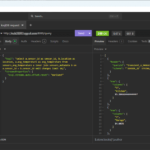
You can also do it with a REST APLI client like Postman or Insomnia in my case:

Data model creation
To simulate the initial question I got I have created a small data model with drawDB:
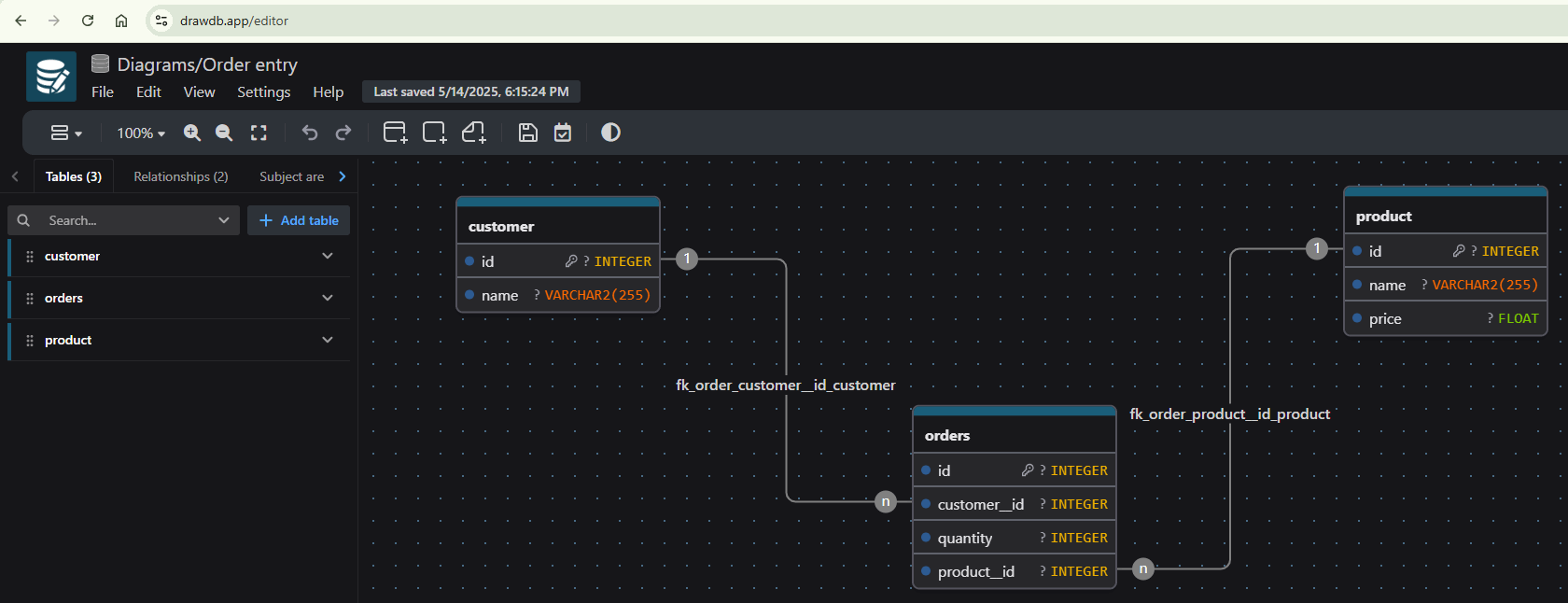
The Oracle SQL code is (web site not yet fully compatible with Oracle):
create table customer (
	id integer generated always as identity,
	name varchar2(255),
	primary key(id)
);


create table orders (
	id integer generated always as identity,
	customer__id integer,
	quantity integer,
	product__id integer,
	primary key(id)
);


create table product (
	id integer generated always as identity,
	name varchar2(255),
	price float,
	primary key(id)
);

alter table orders add constraint fk_orders_customer__id_customer foreign key (customer__id) references customer (id);
alter table orders add constraint fk_orders_product__id_product foreign key (product__id) references product (id);
Then ChatGPT has generated for me a bunch of sample rows:
truncate table customer;
alter table customer modify (id generated always as identity (start with 1));
truncate table product;
alter table product modify (id generated always as identity (start with 1));
truncate table orders;
alter table orders modify (id generated always as identity (start with 1));

insert into customer (name) values ('Alice Johnson');
insert into customer (name) values ('Bob Smith');
insert into customer (name) values ('Charlie Brown');

insert into product (name, price) values ('Laptop', 999.99);
insert into product (name, price) values ('Smartphone', 499.99);
insert into product (name, price) values ('Headphones', 199.99);

insert into orders (customer__id, quantity, product__id) values (1, 2, 1);  -- Alice Johnson orders 2 Laptops
insert into orders (customer__id, quantity, product__id) values (2, 1, 2);  -- Bob Smith orders 1 Smartphone
insert into orders (customer__id, quantity, product__id) values (3, 3, 3);  -- Charlie Brown orders 3 Headphones
insert into orders (customer__id, quantity, product__id) values (1, 1, 3);  -- Alice Johnson orders 1 Headphone

commit;
The query to get the sales per customer is, that I have embedded with JSON_OBJECT to have a JSON output:
select json_object('customer_name' is customer_name, 'total_sales' is total_sales)
from (select c.name as customer_name,
    sum(o.quantity * p.price) as total_sales
from customer c join orders o on c.id = o.customer__id
join product p on o.product__id = p.id
group by c.name);
Pushing from Oracle to Confluent Kafka REST API
Let’s do a simple PL/SQL code, with UTL_HTTP, to test the feature:
set serveroutput on size 40000

declare
  req   utl_http.req;
  resp  utl_http.resp;
  url varchar2(4000) := 'http://server01.domain.com:8082/topics/oracle-kafka';
  content varchar2(4000) := '{"records": [{"key": "key01", "value": {"column01": "value01"}}]}';
  value varchar2(1024);
begin
  --utl_http.set_proxy('proxy.my-company.com', 'corp.my-company.com');
  req := utl_http.begin_request(url => url, method =>'POST', http_version => 'http/1.1');
  utl_http.set_header(req, 'User-Agent', 'PL/SQL');
  utl_http.set_header(req, 'Content-Type', 'application/vnd.kafka.json.v2+json');
  utl_http.set_header(req, 'Content-Length', length(content));

  utl_http.write_text(req, content);

  resp := utl_http.get_response(req);
  loop
    utl_http.read_line(resp, value, true);
    dbms_output.put_line(value);
  end loop;
  utl_http.end_response(resp);
exception
  when utl_http.end_of_body then
    utl_http.end_response(resp);
end;
Once executed I can get the message using Kafka internal tool:
[kafka@server01 ~]$ kafka-console-consumer --topic oracle-kafka --bootstrap-server localhost:9092
{"column01":"value01"}
Now with a cursor to execute the above sales per customer query:
set serveroutput on size 40000

declare
  req   utl_http.req;
  resp  utl_http.resp;
  url varchar2(4000) := 'http://server01.domain.com:8082/topics/oracle-kafka';
  content varchar2(4000) := '{"records": [{"key": "key01", "value": {"column02": "value02"}}]}';
  value varchar2(1024);
  cursor cursor01 is select json_object('customer_name' is customer_name, 'total_sales' is total_sales) as value
from (select c.name as customer_name,
    sum(o.quantity * p.price) as total_sales
from customer c join orders o on c.id = o.customer__id
join product p on o.product__id = p.id
group by c.name);
  item01 cursor01%rowtype;
begin
  --utl_http.set_proxy('proxy.my-company.com', 'corp.my-company.com');
  req := utl_http.begin_request(url => url, method =>'POST', http_version => 'http/1.1');
  utl_http.set_header(req, 'User-Agent', 'PL/SQL');
  utl_http.set_header(req, 'Content-Type', 'application/vnd.kafka.json.v2+json');

  content := '{"records": [';
  open cursor01;
  loop
    fetch cursor01 into item01;
    exit when cursor01%notfound;
    content := content || '{"value": ' || item01.value || '},';
  end loop;
  close cursor01;

  content := substr(content, 1, length(content) -1) || ']}'; --remove trailing comma and close JSON
  dbms_output.put_line(content);

  --content := '{"records": [{"value": {"customer_name":"Alice Johnson","total_sales":2199.97}}, {"value": {"customer_name":"Bob Smith","total_sales":499.99}}]}';
  utl_http.set_header(req, 'Content-Length', length(content));
  utl_http.write_text(req, content);

  resp := utl_http.get_response(req);
  loop
    utl_http.read_line(resp, value, true);
    dbms_output.put_line(value);
  end loop;
  utl_http.end_response(resp);
exception
  when utl_http.end_of_body then
    utl_http.end_response(resp);
end;

{"records": [{"value": {"customer_name":"Alice Johnson","total_sales":2199.97}},{"value": {"customer_name":"Bob Smith","total_sales":499.99}},{"value": {"customer_name":"Charlie Brown","total_sales":599.97}}]}
{"offsets":[{"partition":0,"offset":23,"error_code":null,"error":null},{"partition":0,"offset":24,"error_code":null,"error":null},{"partition":0,"offset":25,"error_code":null,"error":null}],"key_schema_id":null,"value_schema_id":null}


PL/SQL procedure successfully completed.
Working also very well:
[kafka@server01 ~]$ kafka-console-consumer --topic oracle-kafka --bootstrap-server localhost:9092
{"customer_name":"Alice Johnson","total_sales":2199.97}
{"customer_name":"Bob Smith","total_sales":499.99}
{"customer_name":"Charlie Brown","total_sales":599.97}
Pushing from Python to Confluent Kafka REST API
To be more generic with Python code I start by creating a Conda environment with:
conda env create --file='C:\Users\yjaquier\environment.yml'
And this environment.yml file:
name: oracle
dependencies:
  - python=3.13
I also have this requirements.txt file (pip install -r requirements.txt):
oracledb
requests
Remark:
If you are on Linux I highly recommend uv, on my RedHat 8.10 box it gives:
pip3.9 install uv
uv venv --python 3.13 kafka
uv pip install -r requirements.txt
I have already used Python Oracle connector in a previous blog post on Transactional Event Queues (TxEventQ).
Here the Python code is similar to the PL/SQL one and I’m using requests Python package to submit http calls:
import oracledb
import requests

# Connect to Oracle database
try:
  connection = oracledb.connect(user = "yjaquier", password = "secure_password", dsn = "server01.domain.com:1531/pdb1")
except oracledb.Error as e:
  print(f"Error connecting to Oracle database: {e}")
  exit(1)
else:
  print("Successfully connected to Oracle Database")

kafka_rest_api_url = 'http://server01.domain.com:8082/topics/oracle-kafka'

headers = {
    "Content-Type": "application/vnd.kafka.json.v2+json",
    "User-Agent": "Python Requests"
}

data = '{"records": ['

cursor01 = connection.cursor()
for row in cursor01.execute("select json_object('customer_name' is customer_name, 'total_sales' is total_sales) \
from (select c.name as customer_name, \
    sum(o.quantity * p.price) as total_sales \
from customer c join orders o on c.id = o.customer__id \
join product p on o.product__id = p.id \
group by c.name)"):
  data += '{"value": ' + row[0] + '},'

if data.endswith(','):
  data = data[:-1]
data += ']}'
cursor01.close()
connection.close()

response = requests.post(f"{kafka_rest_api_url}", headers = headers, data = data)
# Print the status code, the headers, and the content of the response
print(f"Status code: {response.status_code}")
print(f"Headers: {response.headers}")
print(f"Content: {response.content}")
The output is:
Successfully connected to Oracle Database
Status code: 200
Headers: {'Date': 'Thu, 15 May 2025 12:56:23 GMT', 'Content-Type': 'application/vnd.kafka.v2+json', 'Vary': 'Accept-Encoding, User-Agent', 'Content-Encoding': 'gzip', 'Transfer-Encoding': 'chunked'}
Content: b'{"offsets":[{"partition":0,"offset":35,"error_code":null,"error":null},{"partition":0,"offset":36,"error_code":null,"error":null},{"partition":0,"offset":37,"error_code":null,"error":null}],"key_schema_id":null,"value_schema_id":null}'
And same as before the consumer tool is displaying the data of all messages:
[kafka@server01 ~]$ kafka-console-consumer --topic oracle-kafka --bootstrap-server localhost:9092
{"customer_name":"Alice Johnson","total_sales":2199.97}
{"customer_name":"Bob Smith","total_sales":499.99}
{"customer_name":"Charlie Brown","total_sales":599.97}
Using curl for rapid testing
If you don’t want to install a REST API client (which I highly recommend) and if you are allergic to Python you can still use curl. On my Windows desktop I use it under Git Bash:
# Create a consumer in its consumer group
$ curl -X POST -H "Content-Type: application/vnd.kafka.v2+json" \
--data '{"name": "my_json_consumer_instance", "format": "json", "auto.offset.reset": "latest"}' \
http://server01.domain.com:8082/consumers/my_json_consumer_group

{"instance_id":"my_json_consumer_instance","base_uri":"http://server01.domain.com:8082/consumers/my_json_consumer_group/instances/my_json_consumer_instance"}

# Subscribe to the topic
$ curl -X POST -H "Content-Type: application/vnd.kafka.v2+json" --data '{"topics":["oracle-kafka"]}' \
http://server01.domain.com:8082/consumers/my_json_consumer_group/instances/my_json_consumer_instance/subscription

# Produce a JSON message
curl -X POST -H "Content-Type: application/vnd.kafka.json.v2+json" \
--data '{"records":[{"value":{"foo":"bar"}}]}' "http://server01.domain.com:8082/topics/oracle-kafka"

# Get records (latest as configured)
curl -X GET -H "Accept: application/vnd.kafka.json.v2+json" \
http://server01.domain.com:8082/consumers/my_json_consumer_group/instances/my_json_consumer_instance/records

[{"topic":"oracle-kafka","key":null,"value":{"foo":"bar"},"partition":0,"offset":73}]

# Delete the consumer instance
# Automatic cleaning is quite aggressive and it's not uncommon to get {"error_code":40403,"message":"Consumer instance not found."}
curl -X DELETE -H "Content-Type: application/vnd.kafka.v2+json" \
http://server01.domain.com:8082/consumers/my_json_consumer_group/instances/my_json_consumer_instance
You can control the consumer group creation with Confluent Kafka tool with (I have not found how to get consumer instances list):
[kafka@server01 ~]$ kafka-consumer-groups --bootstrap-server localhost:9092 --list
my_json_consumer_group
[kafka@server01 ~]$ kafka-consumer-groups --bootstrap-server localhost:9092 --describe --group my_json_consumer_group

GROUP                  TOPIC           PARTITION  CURRENT-OFFSET  LOG-END-OFFSET  LAG             CONSUMER-ID                                                            HOST            CLIENT-ID
my_json_consumer_group oracle-kafka    0          73              74              1               consumer-my_json_consumer_group-8-8b10e2dc-831b-40ad-aabd-ffc5a679f1be /127.0.0.1      consumer-my_json_consumer_group-8
Secure Standalone Confluent Kafka REST API Proxy
With the default REST Proxy anyone can send message to your REST API endpoint. Is it possible to restrict this ? Yes with HTTP Basic Authentication and Mutual TLS authentication (HTTPS). As I am in HTTP let’s try the HTTP Basic Authentication.
I have modified my $CONFLUENT_HOME/etc/kafka-rest/kafka-rest.properties with:
bootstrap.servers=BROKER://localhost:9092
schema.registry.url=http://localhost:8081 # To avoid warning
authentication.method=BASIC
authentication.realm=KafkaRest
authentication.roles=myrole01
Then created $CONFLUENT_HOME/etc/kafka-rest/rest-jaas.properties:
KafkaRest {
  org.eclipse.jetty.jaas.spi.PropertyFileLoginModule required
  debug="true"
  file="/home/kafka/confluent-7.9.1/etc/kafka-rest/password.properties";
};
And $CONFLUENT_HOME/etc/kafka-rest/password.properties:
yjaquier: secure_password,myrole01
Then restart Kafka Confluent REST Proxy exporting, first, KAFKAREST_OPTS environment variable:
[kafka@server01 ~]$ export KAFKAREST_OPTS="-Djava.security.auth.login.config=/home/kafka/confluent-7.9.1/etc/kafka-rest/rest-jaas.properties"
[kafka@server01 ~]$ kafka-rest-start $CONFLUENT_HOME/etc/kafka-rest/kafka-rest.properties
You have to specify this account either in Insomnia with Auth tab:
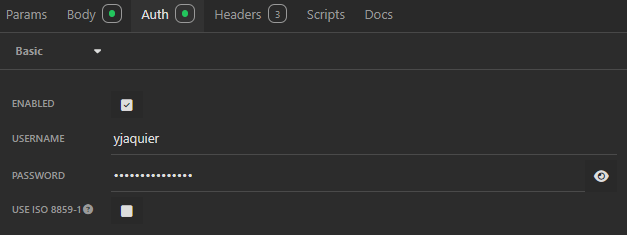
Or with –user (-u) option of curl:
$ curl -X POST -H "Content-Type: application/vnd.kafka.json.v2+json" --user yjaquier:secure_password --data '{"records":[{"value":{"foo":"bar"}}]}' "http://server01.domain.com:8082/topics/oracle-kafka"
{"offsets":[{"partition":0,"offset":76,"error_code":null,"error":null}],"key_schema_id":null,"value_schema_id":null}(base)
Issues encountered
Oracle Access Control List (ACL)
declare
*
ERROR at line 1:
ORA-29273: HTTP request failed
ORA-24247: network access denied by access control list (ACL)
ORA-06512: at "SYS.UTL_HTTP", line 380
ORA-06512: at "SYS.UTL_HTTP", line 1148
ORA-06512: at line 11

https://docs.oracle.com/error-help/db/ora-29273/


More Details :
https://docs.oracle.com/error-help/db/ora-29273/
https://docs.oracle.com/error-help/db/ora-24247/
https://docs.oracle.com/error-help/db/ora-06512/
As SYS on my pluggable database:
exec dbms_network_acl_admin.append_host_ace(host => 'server01.domain.com', lower_port => 8082, upper_port => 8082, ace => xs$ace_type(privilege_list => xs$name_list('http'), principal_name => 'yjaquier', principal_type => xs_acl.ptype_db));
To remove the access:
exec dbms_network_acl_admin.remove_host_ace(host => 'server01.domain.com', lower_port => 8082, upper_port => 8082, ace => xs$ace_type(privilege_list => xs$name_list('http'), principal_name => 'yjaquier', principal_type => xs_acl.ptype_db), remove_empty_acl => true);
Few queries to control what is currently granted:
SQL> set lines 200
sql> col host for a20
sql> col acl for a50
sql> col acl_owner for a15
SQL> select * from dba_network_acls;

HOST                 LOWER_PORT UPPER_PORT ACL                                                ACLID            ACL_OWNER
-------------------- ---------- ---------- -------------------------------------------------- ---------------- ---------------
server01.domain.com        8082       8082 NETWORK_ACL_351954B88A71B275E063402B4B0A44ED       0000000080002761 SYS
*                                          NETWORK_ACL_C821566D75D73DC1E053362EE80AA91B       0000000080002724 SYS

SQL> select * from dba_host_acls;

HOST                 LOWER_PORT UPPER_PORT ACL                                                ACLID            ACL_OWNER
-------------------- ---------- ---------- -------------------------------------------------- ---------------- ---------------
server01.domain.com        8082       8082 NETWORK_ACL_351954B88A71B275E063402B4B0A44ED       0000000080002761 SYS
*                                          NETWORK_ACL_C821566D75D73DC1E053362EE80AA91B       0000000080002724 SYS

SQL> col principal for a15
SQL> col privilege for a20
SQL> col start_date for a15
SQL> col end_date for a15
SQL> select * from dba_network_acl_privileges where acl='NETWORK_ACL_351954B88A71B275E063402B4B0A44ED';

ACL                                                ACLID            PRINCIPAL       PRIVILEGE       IS_GR INVER START_DATE      END_DATE        ACL_OWNER
-------------------------------------------------- ---------------- --------------- --------------- ----- ----- --------------- --------------- ---------------
NETWORK_ACL_351954B88A71B275E063402B4B0A44ED       0000000080002761 YJAQUIER        http            true  false                                 SYS

SQL> select * from dba_host_aces;

HOST                 LOWER_PORT UPPER_PORT  ACE_ORDER START_DATE      END_DATE        GRANT INV PRINCIPAL            PRINCIPAL_T PRIVILEGE
-------------------- ---------- ---------- ---------- --------------- --------------- ----- --- -------------------- ----------- ---------------
*                                                   1                                 GRANT NO  GSMADMIN_INTERNAL    DATABASE    RESOLVE
*                                                   2                                 GRANT NO  GGSYS                DATABASE    RESOLVE
server01.domain.com        8082       8082          1                                 GRANT NO  YJAQUIER             DATABASE    HTTP
HTTP 405 Method Not Allowed
Complete display of my PL/SQL code is:
{"error_code":405,"message":"HTTP 405 Method Not Allowed"}
Solution is to keep the method parameter of utl_http.begin_request in uppercase so POST and not post, strangely Oracle has not handled this internally…
Content length not set
{"error_code":422,"message":"produceJson.arg2 must not be null (was null)"}
utl_http.set_header(req, 'Content-Length', length(content));
40801
In my first trial I have configured:
"auto.offset.reset": "earliest" #Possible value are earliest, latest (default), none
And this generated this error:
{"error_code":40801,"message":"com.fasterxml.jackson.core.JsonParseException: Unrecognized token 'My': was expecting (JSON String, Number, Array, Object or token 'null', 'true' or 'false')\n at [Source: REDACTED (`StreamReadFeature.INCLUDE_SOURCE_IN_LOCATION` disabled); line: 1, column: 4]"}
Problem is that I was trying to get all message of my topic since the beginning (earliest) but I had non-JSON message in the topic:
[kafka@server01 ~]$ kafka-console-consumer --topic oracle-kafka --bootstrap-server localhost:9092 --from-beginning
My first event

{"foo":"bar"}
{"foo":"bar"}
So either use latest, start with a fresh topic or ensure you have only valid JSON in the messages topic…
When I have configured JAAS configuration I stupidely copy/paste the example:
KafkaRest {
    org.eclipse.jetty.jaas.spi.PropertyFileLoginModule required
    debug="true"
    file="${CONFLUENT_HOME}/etc/kafka-rest/password.properties";
};
But it is not possible to use $CONFLUENT_HOME environement variable, you must specify the path like:
KafkaRest {
    org.eclipse.jetty.jaas.spi.PropertyFileLoginModule required
    debug="true"
    file="/path_to_your/confluent/home_directory/etc/kafka-rest/password.properties";
};
References
- Getting Started with Apache Kafka and Confluent REST Proxy
- Resolving the ORA-24247: network access denied by access control list (ACL) error
- Fine-Grained Access to Network Services Enhancements in Oracle Database 12c Release 1
- Invoke a REST service from PL/SQL – make an HTTP POST request using UTL_HTTP in Oracle Database 11g XE
- How to Use Kafka REST Proxy with Python to Access Kafka via HTTP
- Kafka Ecosystem
About Post Author