Flink CDC for database replication to big data
Table of contents
Preamble
Flink CDC is the parallel product of Flink for data movement, as the official documentation states:
Flink CDC is a distributed data integration tool for real time data and batch data. Flink CDC brings the simplicity and elegance of data integration via YAML to describe the data movement and transformation.
I had a lot of difficulties to understand the relationship between Flink and Flink CDC. In fact Flink CDC is a kind of framework where you describe your pipelines in YAML and submit them to Flink via Flink CDC (with flink-cdc.sh script). So the very first step is to create a Flink cluster. This is also in this Flink cluster where you will put all the required jar dependencies to access your source and target systems.
I initially planned to synchronize data between a source Oracle database to a target MariaDB. But digging deeper in the official documentation, I realized that it is not possible as MariaDB as a sink is not supported.
So my source system will be an Oracle 26ai database and my target system will be Iceberg. This is something I wanted to experiment since long with my Spark standalone cluster.
I initially tried to use my 26ai (23.26.2) database but Flink 2.2.1 is not (yet) compatible with it:
[ERROR] Could not execute SQL statement. Reason:
java.lang.RuntimeException: Failed to resolve Oracle database version
So I had to fall back to a 19c (19.31) database (non-CDB for my trial)…
Product version list:
- Flink 2.2.1
- Flink CDC 3.6.0 (compatible with Flink 2.2.1)
- Oracle 19c (19.31)
- MariaDB 12.3.2
- PostgreSQL 18.4
- Spark 4.1.2 with Spark Connect
- iceberg-spark-runtime-4.1_2.13-1.11.0.jar
Overall the testing of Flink CDC has been a complete failure and I have not been able to make working MariaDB and Oracle. Their certified official releases are from the previous century and I don’t think the product is ready to handle complex pipelines !
What is also annoying is the few articles on Internet where they have been able to make it working, with simple example. I have not been that lucky, but not alone…
So I decided to give a go for PostgreSQL, even if we have few interest into it, and this time it worked not so bad. My sink was Iceberg, I could have tested Kafka. And when I say it worked , I mean except the update and deletes that are not propagated to Iceberg, annoying…
This Flink 2.2.1 is my second trial with Flink. I already failed with Flink 1.20.5 a few weeks before deciding to give a go to Flink 2.2.x…
Conclusion: for production pipelines avoid Flink CDC ! The official documentation is also a bit crappy…
Iceberg installation in Spark
You need OpenJDK, I have installed and make Java 21 the default on my server with:
[spark@server01 ~]$ alternatives --config java

There are 2 programs which provide 'java'.

  Selection    Command
-----------------------------------------------
*  1           java-17-openjdk.x86_64 (/usr/lib/jvm/java-17-openjdk-17.0.19.0.10-2.el9.x86_64/bin/java)
 + 2           java-21-openjdk.x86_64 (/usr/lib/jvm/java-21-openjdk-21.0.11.0.10-2.el9.x86_64/bin/java)

Enter to keep the current selection[+], or type selection number:
To separate Spark installation from Flink installation I create a dedicated Spark user:
[root@server01 oracle]# useradd -m -g users spark
Since my last trial on Spark Time Series capabilities the Apache foundation is now providing directly providing a Spark tar file with Spark Connect (spark-4.1.2-bin-hadoop3-connect.tgz):
[spark@server01 ~]$ ll spark-4.1.2-bin-hadoop3-connect/jars/spark-connect*
-rw-r--r-- 1 spark dba 13947876 May 16 10:04 spark-4.1.2-bin-hadoop3-connect/jars/spark-connect_2.13-4.1.2.jar
In the profile of my account this time I add:
export SPARK_HOME=/spark/spark-4.1.2-bin-hadoop3-connect
export PATH=$PATH:$SPARK_HOME/bin:$SPARK_HOME/sbin
Spark 4.1.2 runs on Java 17/21, Scala 2.13, Python 3.10+. This is why I have used OpenJDK 21 for Flink. On my desktop I plan to use the latest available Python i.e. 3.14.
Copy the Iceberg jar file to $SPARK_HOME/jars directory.
Then I have used Spark connect that I already tested and I create the Miniforge environment with this YAML file and “conda env create –file=’C:\environment.yml'” command:
name: flink
dependencies:
  - python=3.14
I have this requirements.txt (pip install -r requirements.txt):
pyspark-connect
As my Spark installation is standalone I do not need NFS or HDFS and can work with a traditional filesystem (I also prepare the temporary folder):
[spark@server01 spark]$ mkdir -p /spark/iceberg-warehouse /spark/tmp
In $SPARK_HOME/conf I create the spark-defaults.conf file from spark-defaults.conf.template and add the following configuration (my /tmp is in noexec so I also redirect the temporary files):
[spark@server01 ~]$ cat $SPARK_HOME/conf/spark-defaults.conf
spark.sql.extensions=org.apache.iceberg.spark.extensions.IcebergSparkSessionExtensions
spark.sql.catalog.ice=org.apache.iceberg.spark.SparkCatalog
spark.sql.catalog.ice.type=hadoop
spark.sql.catalog.ice.warehouse=file:///spark/iceberg-warehouse

# tmp dir in noexec
spark.driver.extraJavaOptions=-Djava.io.tmpdir=/spark/tmp
spark.executor.extraJavaOptions=-Djava.io.tmpdir=/spark/tmp
Start the master, two workers and spark connect with:
[spark@server01 ~]$ start-master.sh
starting org.apache.spark.deploy.master.Master, logging to /spark/spark-4.1.2-bin-hadoop3-connect/logs/spark-spark-org.apache.spark.deploy.master.Master-1-server01.domain.com.out
[spark@server01 ~]$ export SPARK_IDENT_STRING=worker1
[spark@server01 ~]$ start-worker.sh spark://server01.domain.com:7077 --cores 4 --memory 16G --webui-port 8081
starting org.apache.spark.deploy.worker.Worker, logging to /spark/spark-4.1.2-bin-hadoop3-connect/logs/spark-worker1-org.apache.spark.deploy.worker.Worker-1-server01.domain.com.out
[spark@server01 ~]$ export SPARK_IDENT_STRING=worker2
[spark@server01 ~]$ start-worker.sh spark://server01.domain.com:7077 --cores 4 --memory 16G --webui-port 8082
starting org.apache.spark.deploy.worker.Worker, logging to /spark/spark-4.1.2-bin-hadoop3-connect/logs/spark-worker2-org.apache.spark.deploy.worker.Worker-1-server01.domain.com.out
[spark@server01 ~]$ start-connect-server.sh --master spark://server01.domain.com:7077
starting org.apache.spark.sql.connect.service.SparkConnectServer, logging to /spark/spark-4.1.2-bin-hadoop3-connect/logs/spark-worker2-org.apache.spark.sql.connect.service.SparkConnectServer-1-server01.domain.com.out
My start_cluster script is:
# Start Master
start-master.sh
sleep 2
# Start first worker
export SPARK_IDENT_STRING=worker1
start-worker.sh spark://server01.domain.com:7077 --cores 4 --memory 16G --webui-port 8081
sleep 2
# Start second worker
export SPARK_IDENT_STRING=worker2
start-worker.sh spark://server01.domain.com:7077 --cores 4 --memory 16G --webui-port 8082
sleep 2
# Start Spark Connect server
start-connect-server.sh --master spark://server01.domain.com:7077
My (dirty) stop_cluster script is:
ps aux | grep $SPARK_HOME | grep -v "grep" | awk '{print $2}' | xargs killI also add a small error for the default compression library that was missing:
26/06/12 17:54:33 ERROR MapOutputTrackerMaster: null
java.lang.reflect.InvocationTargetException
        at java.base/jdk.internal.reflect.NativeConstructorAccessorImpl.newInstance0(Native Method)
        at java.base/jdk.internal.reflect.NativeConstructorAccessorImpl.newInstance(NativeConstructorAccessorImpl.java:75)
        at java.base/jdk.internal.reflect.DelegatingConstructorAccessorImpl.newInstance(DelegatingConstructorAccessorImpl.java:53)
        at java.base/java.lang.reflect.Constructor.newInstanceWithCaller(Constructor.java:502)
        at java.base/java.lang.reflect.Constructor.newInstance(Constructor.java:486)
        at org.apache.spark.io.CompressionCodec$.createCodec(CompressionCodec.scala:92)
        at org.apache.spark.MapOutputTracker$.serializeOutputStatuses(MapOutputTracker.scala:1562)
        at org.apache.spark.ShuffleStatus.$anonfun$serializedMapStatus$2(MapOutputTracker.scala:391)
        at scala.runtime.java8.JFunction0$mcV$sp.apply(JFunction0$mcV$sp.scala:18)
        at org.apache.spark.ShuffleStatus.withWriteLock(MapOutputTracker.scala:80)
        at org.apache.spark.ShuffleStatus.serializedMapStatus(MapOutputTracker.scala:388)
        at org.apache.spark.MapOutputTrackerMaster$MessageLoop.handleStatusMessage(MapOutputTracker.scala:792)
        at org.apache.spark.MapOutputTrackerMaster$MessageLoop.run(MapOutputTracker.scala:809)
        at java.base/java.util.concurrent.ThreadPoolExecutor.runWorker(ThreadPoolExecutor.java:1144)
        at java.base/java.util.concurrent.ThreadPoolExecutor$Worker.run(ThreadPoolExecutor.java:642)
        at java.base/java.lang.Thread.run(Thread.java:1583)
Caused by: java.lang.UnsatisfiedLinkError: /tmp/libzstd-jni-1.5.7-616732214518254779975.so: /tmp/libzstd-jni-1.5.7-616732214518254779975.so: failed to map segment from shared object
no zstd-jni-1.5.7-6 in java.library.path: /usr/java/packages/lib:/usr/lib64:/lib64:/lib:/usr/lib
Unsupported OS/arch, cannot find /linux/amd64/libzstd-jni-1.5.7-6.so or load zstd-jni-1.5.7-6 from system libraries. Please try building from source the jar or providing libzstd-jni-1.5.7-6 in your system.
        at java.base/java.lang.ClassLoader.loadLibrary(ClassLoader.java:2458)
        at java.base/java.lang.Runtime.loadLibrary0(Runtime.java:916)
        at java.base/java.lang.System.loadLibrary(System.java:2064)
        at com.github.luben.zstd.util.Native$1.run(Native.java:72)
        at com.github.luben.zstd.util.Native$1.run(Native.java:70)
        at java.base/java.security.AccessController.doPrivileged(AccessController.java:319)
        at com.github.luben.zstd.util.Native.loadLibrary(Native.java:70)
        at com.github.luben.zstd.util.Native.load(Native.java:162)
        at com.github.luben.zstd.util.Native.load(Native.java:90)
        at com.github.luben.zstd.ZstdOutputStreamNoFinalizer.(ZstdOutputStreamNoFinalizer.java:18)
        at com.github.luben.zstd.RecyclingBufferPool.(RecyclingBufferPool.java:17)
        at org.apache.spark.io.ZStdCompressionCodec.(CompressionCodec.scala:234)
        ... 16 more
I have taken the jar file from its web site and put zstd-jni-1.5.7-10.jar in $SPARK_HOME/jars directory.
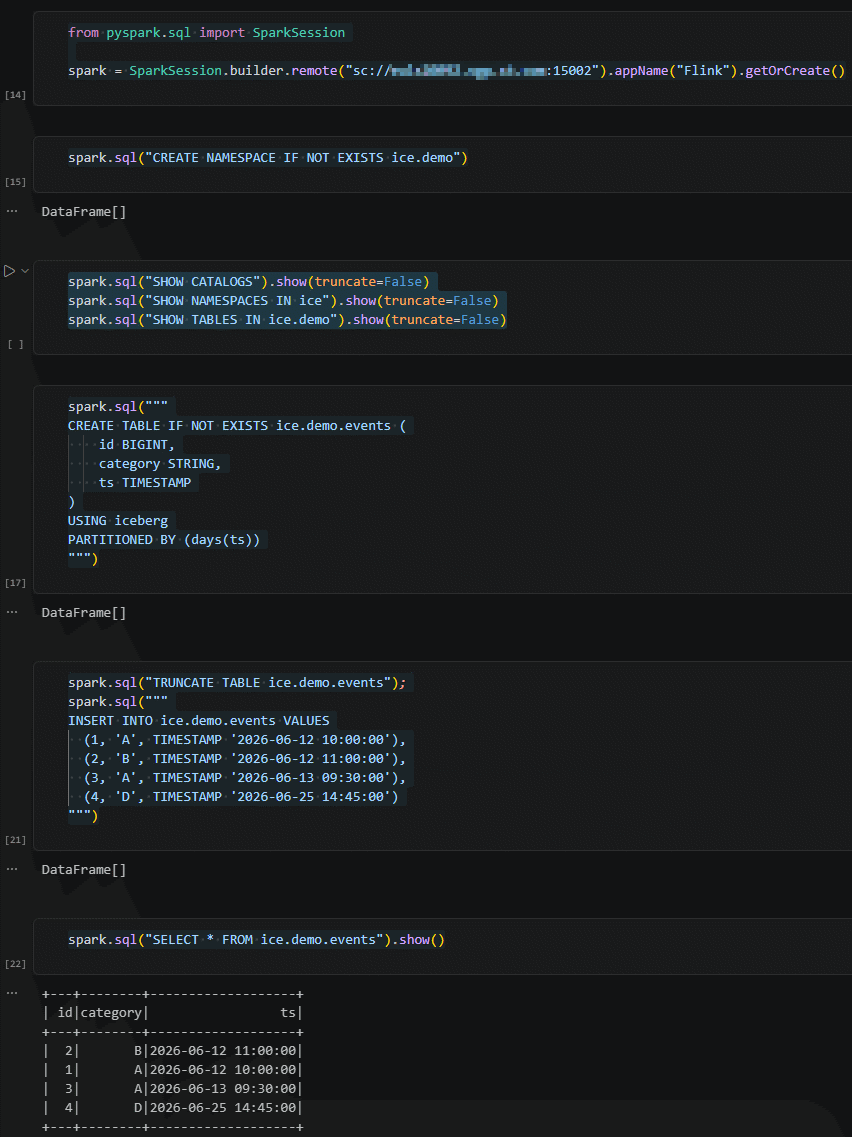
To test that all is working file I have created a Jupyter notebook (ipynb file in VS Code) and executed in multiple cells below trail code that is the one of Iceberg official site:
from pyspark.sql import SparkSession

spark = SparkSession.builder.remote("sc://server01.domain.com:15002").appName("Flink").getOrCreate()

spark.sql("CREATE NAMESPACE IF NOT EXISTS ice.demo")

spark.sql("SHOW CATALOGS").show(truncate=False)
spark.sql("SHOW NAMESPACES IN ice").show(truncate=False)
spark.sql("SHOW TABLES IN ice.demo").show(truncate=False)

spark.sql("""
CREATE TABLE IF NOT EXISTS ice.demo.events (
    id BIGINT,
    category STRING,
    ts TIMESTAMP
)
USING iceberg
PARTITIONED BY (days(ts))
""")

spark.sql("TRUNCATE TABLE ice.demo.events");
spark.sql("""
INSERT INTO ice.demo.events VALUES
  (1, 'A', TIMESTAMP '2026-06-12 10:00:00'),
  (2, 'B', TIMESTAMP '2026-06-12 11:00:00'),
  (3, 'A', TIMESTAMP '2026-06-13 09:30:00'),
  (4, 'D', TIMESTAMP '2026-06-25 14:45:00')
""")

spark.sql("SELECT * FROM ice.demo.events").show()
The result:
Flink installation
To use Flink CDC you need a Flink cluster. Flink CDC 3.6.0 is compatible with Flink 2.2.x so I have installed Flink 2.2.1. I create a dedicated Flink account:
[root@server01 ~]# useradd -m -g users flink
Java 21 is only in experimental support with Flink 2. so it sounds a better approach to stick to Java 17. As I have set Java 21 as default Java version for the server to run Spark I set JAVA_HOME and the PATH for my flink account with:
export JAVA_HOME=/usr/lib/jvm/java-17-openjdk-17.0.19.0.10-2.el9.x86_64
export PATH=$JAVA_HOME/bin:$PATH # Before PATH to bypass the link is /usr/bin
Check it works with:
[flink@server01 ~]$ java -version
openjdk version "17.0.19" 2026-04-21 LTS
OpenJDK Runtime Environment (Red_Hat-17.0.19.0.10-1) (build 17.0.19+10-LTS)
OpenJDK 64-Bit Server VM (Red_Hat-17.0.19.0.10-1) (build 17.0.19+10-LTS, mixed mode, sharing)
I have added below variable and alias to start/stop Flink cluster:
export FLINK_HOME=/home/flink/flink-2.2.1
alias start=$FLINK_HOME/bin/start-cluster.sh
alias stop=$FLINK_HOME/bin/stop-cluster.sh
alias sql=$FLINK_HOME/bin/sql-client.sh
And change few configuration parameters. I add for example to change the Flink UI webport as 8081 is already taken by Spark UI that is running for me on same server:
[flink@server01 ~]$ grep -Ev '^[[:space:]]*(#|$)' $FLINK_HOME/conf/config.yaml
env:
  java:
    opts:
      all: --add-exports=java.rmi/sun.rmi.registry=ALL-UNNAMED --add-exports=jdk.compiler/com.sun.tools.javac.api=ALL-UNNAMED --add-exports=jdk.compiler/com.sun.tools.javac.file=ALL-UNNAMED --add-exports=jdk.compiler/com.sun.tools.javac.parser=ALL-UNNAMED --add-exports=jdk.compiler/com.sun.tools.javac.tree=ALL-UNNAMED --add-exports=jdk.compiler/com.sun.tools.javac.util=ALL-UNNAMED --add-exports=java.security.jgss/sun.security.krb5=ALL-UNNAMED --add-opens=java.base/java.lang=ALL-UNNAMED --add-opens=java.base/java.net=ALL-UNNAMED --add-opens=java.base/java.io=ALL-UNNAMED --add-opens=java.base/java.nio=ALL-UNNAMED --add-opens=java.base/sun.nio.ch=ALL-UNNAMED --add-opens=java.base/java.lang.reflect=ALL-UNNAMED --add-opens=java.base/java.text=ALL-UNNAMED --add-opens=java.base/java.time=ALL-UNNAMED --add-opens=java.base/java.util=ALL-UNNAMED --add-opens=java.base/java.util.concurrent=ALL-UNNAMED --add-opens=java.base/java.util.concurrent.atomic=ALL-UNNAMED --add-opens=java.base/java.util.concurrent.locks=ALL-UNNAMED -Djava.io.tmpdir=/home/flink/flink-2.2.1/tmp
jobmanager:
  bind-host: 0.0.0.0
  rpc:
    address: server01.domain.com
    port: 6123
  memory:
    process:
      size: 1600m
  execution:
    failover-strategy: region
taskmanager:
  bind-host: 0.0.0.0
  host: server01.domain.com
  numberOfTaskSlots: 2
  memory:
    process:
      size: 1728m
parallelism:
  default: 1
rest:
  address: server01.domain.com
  bind-address: 0.0.0.0
  port: 8091
io:
  tmp:
    dirs: /home/flink/flink-2.2.1/tmp
The Flink startup script will ask for flink user password so it is convenient to configure password less access for flink user from flink user with:
[flink@server01 ~]$ ssh-keygen -t rsa -b 4096 -N "" -f ~/.ssh/id_rsa
Generating public/private rsa key pair.
Created directory '/home/flink/.ssh'.
Your identification has been saved in /home/flink/.ssh/id_rsa
Your public key has been saved in /home/flink/.ssh/id_rsa.pub
The key fingerprint is:
SHA256:gbzFcoqieYzMmwugz+Oh+YYEBwyh5n+D9Dl3ZLxl59I flink@server01.domain.com
The key's randomart image is:
+---[RSA 4096]----+
|=.               |
|o.   . o         |
|.o    + =        |
|+ .  . *..       |
|oo... o S+ o .   |
|=*o.o . o + +    |
|B++o * . o . E   |
|o*=.. + .   .    |
|oB*.             |
+----[SHA256]-----+
[flink@server01 ~]$ cat ~/.ssh/id_rsa.pub >> ~/.ssh/authorized_keys
[flink@server01 ~]$ chmod 600 ~/.ssh/authorized_keys
[flink@server01 ~]$ ll .ssh
total 12
-rw------- 1 flink users  752 Jun 26 16:42 authorized_keys
-rw------- 1 flink users 3389 Jun 26 16:42 id_rsa
-rw-r--r-- 1 flink users  752 Jun 26 16:42 id_rsa.pub
[flink@server01 ~]$ ssh server01.domain.com
.
.
.
Start Flink cluster:
[flink@server01 ~]$ start
Starting cluster.
Starting standalonesession daemon on host server01.
Starting taskexecutor daemon on host server01.
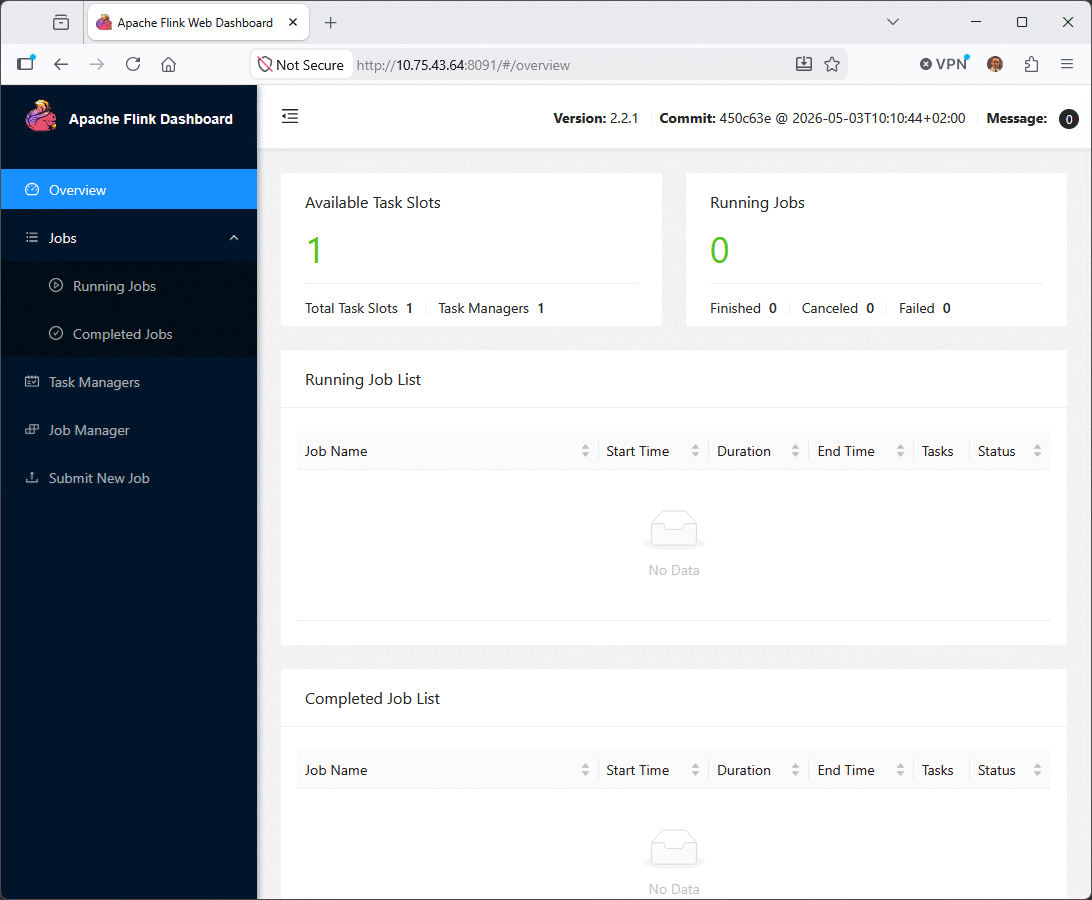
You can then go to Flink web UI:
Flink CDC installation
Download and untar the Flink CDC package:
[flink@server01 ~]$ gtar xf flink-cdc-3.6.0-2.2-bin.tar.gz
And that’s it for Flink CDC. Remain the connector configuration for source and target systems. As I plan to test Oracle and MariaDB as source system I download the Flink source connectors (Oracle for Flink 2.2 and MySQL for Flink 2.2) from official url:
-rw-r--r-- 1 flink users 38439767 Jun 25 16:54 flink-cdc-pipeline-connector-iceberg-3.6.0-2.2.jar
-rw-r--r-- 1 flink users 21383626 Jul  9 14:41 flink-cdc-pipeline-connector-mysql-3.6.0-2.2.jar
-rw-r--r-- 1 flink users 25356827 Jul  9 14:40 flink-cdc-pipeline-connector-oracle-3.6.0-2.2.jar
-rw-r--r-- 1 flink users   432509 Jul  9 14:41 flink-connector-mysql-cdc-3.6.0-2.2.jar
-rw-r--r-- 1 flink users   175989 Jun 15 12:59 flink-connector-oracle-cdc-3.6.0-2.2.jar
I have written YAML files to describe the Flink CDC pipeline configurations I plan to test (oracle-to-iceberg-employees.yaml):
source:
  type: oracle
  name: Oracle Source
  hostname: server01.domain.com
  port: 1531
  username: c##flinkuser
  password: secure_password
  tables: APP01.EMPLOYEES
  database: pdb1

sink:
  type: iceberg
  name: Iceberg Sink
  catalog.properties.type: hadoop
  catalog.properties.warehouse: /spark/iceberg-warehouse/

pipeline:
  name: "oracle-to-iceberg-employees"
Or (mariadb-to-iceberg-employees.yaml):
source:
  type: mysql
  name: MariaDB Source
  hostname: server01.domain.com
  port: 3316
  username: app01
  password: secure_password
  tables: test.employees
  server-id: 1

sink:
  type: iceberg
  name: Iceberg Sink
  catalog.properties.type: hadoop
  catalog.properties.warehouse: /spark/iceberg-warehouse/

pipeline:
  name: "mariadb-to-iceberg-employees"
Or (postgresql-to-iceberg-employees.yaml):
source:
  type: postgres
  name: PostgreSQL Source
  hostname: server01.domain.com
  port: 5433
  username: flinkuser
  password: secure_password
  tables: testdb.public.employees
  decoding.plugin.name:  pgoutput
  slot.name: flink

sink:
  type: iceberg
  name: Iceberg Sink
  catalog.properties.type: hadoop
  catalog.properties.warehouse: /spark/iceberg-warehouse/

pipeline:
  name: "postgresql-to-iceberg-employees"
Those YAML files will be submitted with $FLINK_CDC_HOME/bin/flink-cdc.sh script… At the end I have not been able to submit any of those Flink CDC pipelines successfully. I defaulted to Flink SQL for my testing…
PostgreSQL source database configuration
I prepare my test database and table as follows:
postgres=# create database testdb;
CREATE DATABASE
postgres=# \c testdb
You are now connected to database "testdb" as user "postgres".
testdb=# create table employees(id integer, name varchar(50), constraint employees_pk_id primary key (id));
CREATE TABLE
testdb=# insert into employees values(1, 'Yannick Jaquier');
INSERT 0 1
There is nothing in the documentation on what privileges you should give to a potential flinkuser database account:
postgres=# create role flinkuser with superuser login password 'secure_password';
CREATE ROLE
postgres=# \c testdb
You are now connected to database "testdb" as user "postgres".
testdb=# grant select on all tables in schema public to flinkuser;
GRANT
Then in Flink SQL:
Flink SQL> drop table if exists employees_source;
[INFO] Execute statement succeeded.

Flink SQL> create table employees_source (
  id int,
  name string
) with (
  'connector' = 'postgres-cdc',
  'hostname' = 'server01.domain.com',
  'port' = '5433',
  'username' = 'flinkuser',
  'password' = 'secure_password',
  'database-name' = 'testdb',
  'schema-name' = 'public',
  'table-name' = 'employees',
  'slot.name' = 'flink',
  'decoding.plugin.name' = 'pgoutput',
  'scan.incremental.snapshot.enabled' = 'true'
);

Flink SQL> set 'sql-client.execution.result-mode' = 'tableau';
[INFO] Execute statement succeeded.

Flink SQL> select * from employees_source;
+----+-------------+--------------------------------+
| op |          id |                           name |
+----+-------------+--------------------------------+
[ERROR] Could not execute SQL statement. Reason:
org.postgresql.util.PSQLException: FATAL: permission denied to start WAL sender
  Detail: Only roles with the REPLICATION attribute may start a WAL sender process.
The flinkuser must have the REPLICATION privilege:
Flink SQL> select * from employees_source;
+----+-------------+--------------------------------+
| op |          id |                           name |
+----+-------------+--------------------------------+
[ERROR] Could not execute SQL statement. Reason:
org.postgresql.util.PSQLException: ERROR: logical decoding requires "wal_level" >= "logical"
The server must have wal_level = “logical”:
Flink SQL> select * from employees_source;
+----+-------------+--------------------------------+
| op |          id |                           name |
+----+-------------+--------------------------------+
[ERROR] Could not execute SQL statement. Reason:
org.postgresql.util.PSQLException: ERROR: could not access file "decoderbufs": No such file or directory
You should set ‘decoding.plugin.name’ = ‘pgoutput’:
Flink SQL> drop table if exists employees_source;
[INFO] Execute statement succeeded.

Flink SQL> create table employees_source (
  id int,
  name string
) with (
  'connector' = 'postgres-cdc',
  'hostname' = 'server01.domain.com',
  'port' = '5433',
  'username' = 'flinkuser',
  'password' = 'secure_password',
  'database-name' = 'testdb',
  'schema-name' = 'public',
  'table-name' = 'employees',
  'slot.name' = 'flink',
  'decoding.plugin.name' = 'pgoutput',
  'scan.incremental.snapshot.enabled' = 'true'
);
[INFO] Execute statement succeeded.

Flink SQL> select * from employees_source;
+----+-------------+--------------------------------+
| op |          id |                           name |
+----+-------------+--------------------------------+
[ERROR] Could not execute SQL statement. Reason:
org.apache.flink.runtime.jobmanager.scheduler.NoResourceAvailableException: Could not acquire the minimum required resources.

End of exception on server side>]
The user must be a superuser to create a publication for all tables:
2026-07-10 11:24:45.779 CEST [1836741] ERROR: must be superuser to create FOR ALL TABLES publication
2026-07-10 11:24:45.779 CEST [1836741] STATEMENT: CREATE PUBLICATION dbz_publication FOR ALL TABLES;
The default taskmanager.numberOfTaskSlots must be increased:
Flink SQL> select * from employees_source;
+----+-------------+--------------------------------+
| op |          id |                           name |
+----+-------------+--------------------------------+
[ERROR] Could not execute SQL statement. Reason:
org.apache.flink.runtime.jobmanager.scheduler.NoResourceAvailableException: Could not acquire the minimum required resources.

End of exception on server side>]
In Flink config.yaml set:
taskmanager:
  numberOfTaskSlots: 2
The table should have a primary key or use a trick (this is generic to any replication tools):
Flink SQL> select * from employees_source;
+----+-------------+--------------------------------+
| op |          id |                           name |
+----+-------------+--------------------------------+
[ERROR] Could not execute SQL statement. Reason:
org.apache.flink.table.api.ValidationException: To use incremental snapshot, 'scan.incremental.snapshot.chunk.key-column' must be set when the table doesn't have primary keys.
Recreated the table with a primary key and finally:
Flink SQL> select * from employees_source;
+----+-------------+--------------------------------+
| op |          id |                           name |
+----+-------------+--------------------------------+
| +I |           1 |                Yannick Jaquier |
At least !! The only database where I have been able to make Flink working…
Iceberg sink configuration
Again a strange situation where parameters in iceberg Pipeline Connectors are different from the one of the example. Spoiler alert, only the ones of the example are really working, trying to use the “official” one produce weird errors…
I am using my PostgreSQL source table that I try to sink in Iceberg:
Flink SQL> set execution.checkpointing.interval = 3s;
[INFO] Execute statement succeeded.

Flink SQL> set sql-client.execution.result-mode = 'tableau';
[INFO] Execute statement succeeded.

Flink SQL> drop table if exists employees_source;
[INFO] Execute statement succeeded.

Flink SQL> create table employees_source (
  id int,
  name string
) with (
  'connector' = 'postgres-cdc',
  'hostname' = 'server01.domain.com',
  'port' = '5433',
  'username' = 'flinkuser',
  'password' = 'secure_password',
  'database-name' = 'testdb',
  'schema-name' = 'public',
  'table-name' = 'employees',
  'slot.name' = 'flink',
  'decoding.plugin.name' = 'pgoutput',
  'scan.incremental.snapshot.enabled' = 'true'
);
[INFO] Execute statement succeeded.

Flink SQL> drop table if exists employees_sink;
[INFO] Execute statement succeeded.

Flink SQL> create table employees_sink (
  `id` int not null,
  name varchar(50),
  primary key (`id`) not enforced
) with (
  'connector'='iceberg',
  'catalog-name'='iceberg_catalog',
  'catalog-type'='hadoop',
  'warehouse'='file:////spark/iceberg-warehouse/',
  'format-version'='2'
);
[INFO] Execute statement succeeded.

Flink SQL> insert into employees_sink select * from employees_source;
[ERROR] Could not execute SQL statement. Reason:
java.lang.ClassNotFoundException: org.apache.hadoop.conf.Configuration
I am missing the dependencies described in the documentation for the Haddop catalog:
| Catalog Type | Dependency Item | Description |
| all | org.apache.iceberg:iceberg-flink-runtime-1.20 | Iceberg Flink runtime. Required for all catalog types when not pre-installed in the runtime environment (e.g., standalone Flink clusters). |
| hadoop | org.apache.flink:flink-shaded-hadoop-2-uber:2.8.3-10.0 | Provides Hadoop filesystem dependencies. |
So in $FLINK_HOME/lib I have added:
-rw-r--r-- 1 flink users 43317025 Jul 10 14:19 flink-shaded-hadoop-2-uber-2.8.3-10.0.jar
-rw-r--r-- 1 flink users 39118327 Jul 10 14:43 iceberg-flink-runtime-1.20-1.11.0.jar
The second trial is more a problem of write access:
Flink SQL> insert into employees_sink select * from employees_source;
[ERROR] Could not execute SQL statement. Reason:
java.io.IOException: Mkdirs failed to create file:/spark/iceberg-warehouse/default_database/employees_sink/metadata (exists=false, cwd=file:/home/flink)
I have corrected it the dirty way as the documentation is not explicit enough:
[root@server01 ~]# cd /spark/iceberg-warehouse/
[root@server01 iceberg-warehouse]# ll
total 0
drwxr-xr-x 3 spark dba 96 Jun 12 17:41 demo
[root@server01 iceberg-warehouse]# mkdir default_database
[root@server01 iceberg-warehouse]# chown flink:users default_database
Finally:
Flink SQL> insert into employees_sink select * from employees_source;
[INFO] Submitting SQL update statement to the cluster...
[INFO] SQL update statement has been successfully submitted to the cluster:
Job ID: 9b3909a0932fec467c49148c4d724ff1

Flink SQL> show jobs;
+----------------------------------+----------------------------------------------------------------------------------------------------------------------------------------------+----------+-------------------------+
|                           job id |                                                                                                                                     job name |   status |              start time |
+----------------------------------+----------------------------------------------------------------------------------------------------------------------------------------------+----------+-------------------------+
| 9b3909a0932fec467c49148c4d724ff1 |                                                                                  insert-into_default_catalog.default_database.employees_sink |  RUNNING | 2026-07-10T13:23:21.326 |
+----------------------------------+----------------------------------------------------------------------------------------------------------------------------------------------+----------+-------------------------+
1 rows in set
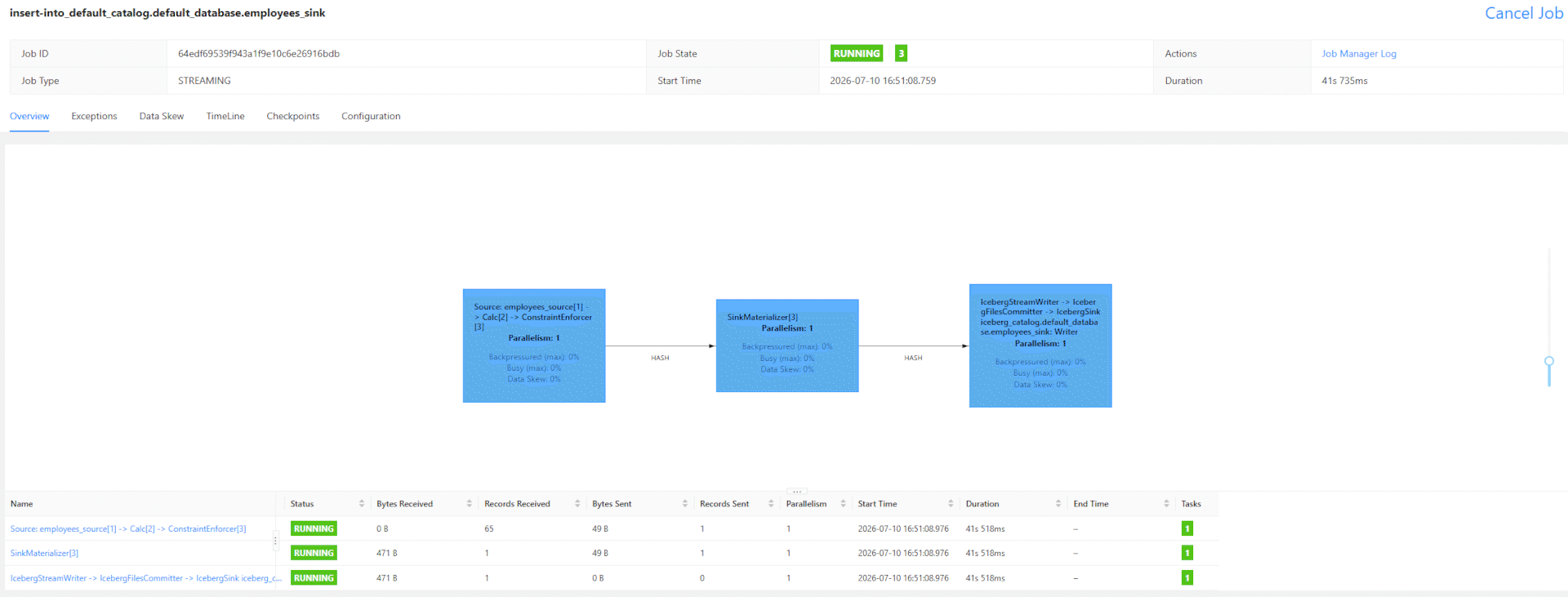
With the graphical interface:
And if I select in my Jupyter notebook:
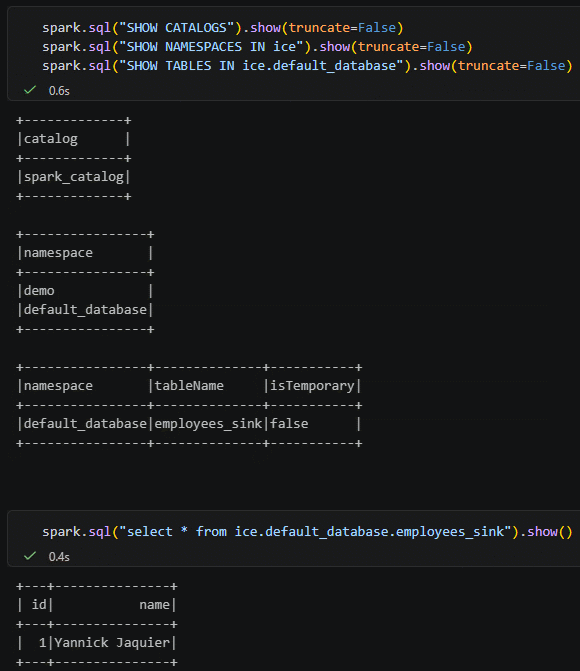
Then I have started to play with my PostgreSQL table by inserting, updating, and deleting records. The insertion is working fine, the rest is a complete failure…
MariaDB source database configuration
My first trial has been with MariaDB. As described in the documentation put the required jar files in $FLINK_HOME/lib (and not in Flink CDC lib):
-rw-r--r-- 1 flink users   2481560 Jul  9 12:08 mysql-connector-j-8.0.33.jar
-rw-r--r-- 1 flink users  21735343 Jul  9 12:08 flink-sql-connector-mysql-cdc-3.6.0-2.2.jar
Do not put the MySQL Source Connector Jars from Flink CDC lib into $FLINK_HOME/lib
-rw-r----- 1 flink users 439729 Feb 27 15:43 flink-connector-jdbc-3.3.0-1.20.jar
Or you will end up with weird behavior like:
Flink SQL> select * from employees_source;
[ERROR] Could not execute SQL statement. Reason:
java.lang.ClassNotFoundException: com.fasterxml.jackson.databind.ObjectMapper
Prepare your MariaDB database:
MariaDB [(none)]> create database test character set utf8mb4 collate utf8mb4_general_ci comment 'My test database';
Query OK, 1 row affected (0.001 sec)

MariaDB [(none)]> create user 'flinkuser'@'%' identified by 'secure_password';
Query OK, 0 rows affected (0.001 sec)

MariaDB [(none)]> grant select, show databases, replication slave, replication client on *.* to 'flinkuser'@'%';
Query OK, 0 rows affected (0.001 sec)

MariaDB [(none)]> grant all on test.* to 'flinkuser'@'%';
Query OK, 0 rows affected (0.168 sec)

MariaDB [(none)]> flush privileges;
Query OK, 0 rows affected (0.007 sec)

MariaDB [test]> create table test.employees (
    -> id int not null,
    -> name varchar(50),
    -> primary key (id)
    -> );
Query OK, 0 rows affected (0.013 sec)

MariaDB [test]> insert into test.employees values(1, 'Yannick Jaquier');
Query OK, 1 row affected (0.002 sec)
Remark:
Always check the Data Type Mapping between MariaDB and Flink !
Then try to get the rows from Flink:
Flink SQL> set 'execution.checkpointing.interval' = '3s';
[INFO] Execute statement succeeded.

Flink SQL> set 'sql-client.execution.result-mode' = 'tableau'; -- To have an inline display and not the dedicated refreshed window
[INFO] Execute statement succeeded.

Flink SQL> create table employees_source (
  id int,
  name varchar(50),
  primary key(id) not enforced
) with (
  'connector' = 'mysql-cdc',
  'hostname' = 'server01.domain.com',
  'port' = '3316',
  'username' = 'flinkuser',
  'password' = 'secure_password',
  'database-name' = 'test',
  'table-name' = 'employees',
  'scan.startup.mode' = 'initial'
);
[INFO] Execute statement succeeded.

Flink SQL> show tables;
+------------------+
|       table name |
+------------------+
| employees_source |
+------------------+
1 row in set

Flink SQL> select * from employees_source;
+----+-------------+--------------------------------+
| op |          id |                           name |
+----+-------------+--------------------------------+
Checking in Job Manager log I found:
2026-07-09 12:55:05,288 INFO  org.apache.flink.runtime.executiongraph.ExecutionGraph       [] - Source: employees_source[1] -> ConstraintEnforcer[2] -> Sink: Collect table sink (1/1)
(66a6c2c9e845b704191eae9a22a360d6_cbc357ccb763df2852fee8c4fc7d55f2_0_8) switched from RUNNING to FAILED on server01.domain.com:34633-470191 @ server01.domain.com (dataPort=10807).
java.lang.RuntimeException: One or more fetchers have encountered exception
  at org.apache.flink.connector.base.source.reader.fetcher.SplitFetcherManager.checkErrors(SplitFetcherManager.java:307) ~[flink-connector-files-2.2.1.jar:2.2.1]
  at org.apache.flink.connector.base.source.reader.SourceReaderBase.getNextFetch(SourceReaderBase.java:269) ~[flink-connector-files-2.2.1.jar:2.2.1]
  at org.apache.flink.connector.base.source.reader.SourceReaderBase.pollNext(SourceReaderBase.java:181) ~[flink-connector-files-2.2.1.jar:2.2.1]
  at org.apache.flink.streaming.api.operators.SourceOperator.emitNext(SourceOperator.java:507) ~[flink-dist-2.2.1.jar:2.2.1]
  at org.apache.flink.streaming.runtime.io.StreamTaskSourceInput.emitNext(StreamTaskSourceInput.java:68) ~[flink-dist-2.2.1.jar:2.2.1]
  at org.apache.flink.streaming.runtime.io.StreamOneInputProcessor.processInput(StreamOneInputProcessor.java:65) ~[flink-dist-2.2.1.jar:2.2.1]
  at org.apache.flink.streaming.runtime.tasks.StreamTask.processInput(StreamTask.java:646) ~[flink-dist-2.2.1.jar:2.2.1]
  at org.apache.flink.streaming.runtime.tasks.mailbox.MailboxProcessor.runMailboxLoop(MailboxProcessor.java:231) ~[flink-dist-2.2.1.jar:2.2.1]
  at org.apache.flink.streaming.runtime.tasks.StreamTask.runMailboxLoop(StreamTask.java:988) ~[flink-dist-2.2.1.jar:2.2.1]
  at org.apache.flink.streaming.runtime.tasks.StreamTask.invoke(StreamTask.java:925) ~[flink-dist-2.2.1.jar:2.2.1]
  at org.apache.flink.runtime.taskmanager.Task.runWithSystemExitMonitoring(Task.java:973) ~[flink-dist-2.2.1.jar:2.2.1]
  at org.apache.flink.runtime.taskmanager.Task.restoreAndInvoke(Task.java:955) ~[flink-dist-2.2.1.jar:2.2.1]
  at org.apache.flink.runtime.taskmanager.Task.doRun(Task.java:760) ~[flink-dist-2.2.1.jar:2.2.1]
  at org.apache.flink.runtime.taskmanager.Task.run(Task.java:569) ~[flink-dist-2.2.1.jar:2.2.1]
  at java.base/java.lang.Thread.run(Thread.java:840) ~[?:?]
Caused by: java.lang.RuntimeException: SplitFetcher thread 0 received unexpected exception while polling the records
  at org.apache.flink.connector.base.source.reader.fetcher.SplitFetcher.runOnce(SplitFetcher.java:196) ~[flink-connector-files-2.2.1.jar:2.2.1]
  at org.apache.flink.connector.base.source.reader.fetcher.SplitFetcher.run(SplitFetcher.java:130) ~[flink-connector-files-2.2.1.jar:2.2.1]
  at java.base/java.util.concurrent.Executors$RunnableAdapter.call(Executors.java:539) ~[?:?]
  at java.base/java.util.concurrent.FutureTask.run(FutureTask.java:264) ~[?:?]
  at java.base/java.util.concurrent.ThreadPoolExecutor.runWorker(ThreadPoolExecutor.java:1136) ~[?:?]
  at java.base/java.util.concurrent.ThreadPoolExecutor$Worker.run(ThreadPoolExecutor.java:635) ~[?:?]
  ... 1 more
Caused by: org.apache.flink.util.FlinkRuntimeException: Read split MySqlSnapshotSplit{tableId=test.employees, splitId='test.employees:0', splitKeyType=[`id` INT NOT NULL], splitStart=null, splitEnd=null, highWatermark=null} error due to begin 0, end -1, length 12.
  at org.apache.flink.cdc.connectors.mysql.debezium.reader.SnapshotSplitReader.checkReadException(SnapshotSplitReader.java:387) ~[flink-sql-connector-mysql-cdc-3.6.0-2.2.jar:3.6.0-2.2]
  at org.apache.flink.cdc.connectors.mysql.debezium.reader.SnapshotSplitReader.pollWithBuffer(SnapshotSplitReader.java:323) ~[flink-sql-connector-mysql-cdc-3.6.0-2.2.jar:3.6.0-2.2]
  at org.apache.flink.cdc.connectors.mysql.debezium.reader.SnapshotSplitReader.pollSplitRecords(SnapshotSplitReader.java:288) ~[flink-sql-connector-mysql-cdc-3.6.0-2.2.jar:3.6.0-2.2]
  at org.apache.flink.cdc.connectors.mysql.source.reader.MySqlSplitReader.pollSplitRecords(MySqlSplitReader.java:122) ~[flink-sql-connector-mysql-cdc-3.6.0-2.2.jar:3.6.0-2.2]
  at org.apache.flink.cdc.connectors.mysql.source.reader.MySqlSplitReader.fetch(MySqlSplitReader.java:84) ~[flink-sql-connector-mysql-cdc-3.6.0-2.2.jar:3.6.0-2.2]
  at org.apache.flink.connector.base.source.reader.fetcher.FetchTask.run(FetchTask.java:58) ~[flink-connector-files-2.2.1.jar:2.2.1]
  at org.apache.flink.connector.base.source.reader.fetcher.SplitFetcher.runOnce(SplitFetcher.java:193) ~[flink-connector-files-2.2.1.jar:2.2.1]
  at org.apache.flink.connector.base.source.reader.fetcher.SplitFetcher.run(SplitFetcher.java:130) ~[flink-connector-files-2.2.1.jar:2.2.1]
  at java.base/java.util.concurrent.Executors$RunnableAdapter.call(Executors.java:539) ~[?:?]
  at java.base/java.util.concurrent.FutureTask.run(FutureTask.java:264) ~[?:?]
  at java.base/java.util.concurrent.ThreadPoolExecutor.runWorker(ThreadPoolExecutor.java:1136) ~[?:?]
  at java.base/java.util.concurrent.ThreadPoolExecutor$Worker.run(ThreadPoolExecutor.java:635) ~[?:?]
  ... 1 more
Caused by: java.lang.StringIndexOutOfBoundsException: begin 0, end -1, length 12
  at java.base/java.lang.String.checkBoundsBeginEnd(String.java:4606) ~[?:?]
  at java.base/java.lang.String.substring(String.java:2709) ~[?:?]
  at com.github.shyiko.mysql.binlog.GtidSet.(GtidSet.java:58) ~[flink-sql-connector-mysql-cdc-3.6.0-2.2.jar:3.6.0-2.2]
  at io.debezium.connector.mysql.GtidSet.(GtidSet.java:50) ~[flink-sql-connector-mysql-cdc-3.6.0-2.2.jar:3.6.0-2.2]
  at org.apache.flink.cdc.connectors.mysql.source.offset.BinlogOffset.compareTo(BinlogOffset.java:191) ~[flink-sql-connector-mysql-cdc-3.6.0-2.2.jar:3.6.0-2.2]
  at org.apache.flink.cdc.connectors.mysql.source.offset.BinlogOffset.isAfter(BinlogOffset.java:278) ~[flink-sql-connector-mysql-cdc-3.6.0-2.2.jar:3.6.0-2.2]
  at org.apache.flink.cdc.connectors.mysql.debezium.reader.SnapshotSplitReader.isBackfillRequired(SnapshotSplitReader.java:218) ~[flink-sql-connector-mysql-cdc-3.6.0-2.2.jar:3.6.0-2.2]
  at org.apache.flink.cdc.connectors.mysql.debezium.reader.SnapshotSplitReader.backfill(SnapshotSplitReader.java:189) ~[flink-sql-connector-mysql-cdc-3.6.0-2.2.jar:3.6.0-2.2]
  at org.apache.flink.cdc.connectors.mysql.debezium.reader.SnapshotSplitReader.lambda$submitSplit$1(SnapshotSplitReader.java:165) ~[flink-sql-connector-mysql-cdc-3.6.0-2.2.jar:3.6.0-2.2]
  at java.base/java.util.concurrent.ThreadPoolExecutor.runWorker(ThreadPoolExecutor.java:1136) ~[?:?]
  at java.base/java.util.concurrent.ThreadPoolExecutor$Worker.run(ThreadPoolExecutor.java:635) ~[?:?]
  ... 1 more
The important part:
Caused by: java.lang.StringIndexOutOfBoundsException: begin 0, end -1, length 12
...
at com.github.shyiko.mysql.binlog.GtidSet.(GtidSet.java:58)
...
at io.debezium.connector.mysql.GtidSet.(GtidSet.java:50)
...
at org.apache.flink.cdc.connectors.mysql.source.offset.BinlogOffset.compareTo(BinlogOffset.java:191)
And then I realized that MariaDB has changed the GTID from MySQL and this is probably why only MariaDB10.x is supported. This release of MariaDB being obsolete now it makes this Flink CDC MariaDB useless…
Oracle source database configuration
My second trail has been with Oracle 19c (19.31). Your database must be in archivelog mode add you must enable minimum supplemental logging (or in your pluggable database):
SQL> select log_mode from v$database;

LOG_MODE
------------
ARCHIVELOG

SQL> alter database add supplemental log data;

Database altered.

SQL> select supplemental_log_data_min from v$database;

SUPPLEME
--------
YES
Create a (global) Flink user as suggested (as a global user, in the CDB, it must start with C## and you must add container=all to all grants):
create user flinkuser identified by secure_password default tablespace users quota unlimited on users;
grant create session to flinkuser;
grant set container to flinkuser;
grant select on v_$database to flinkuser;
grant flashback any table to flinkuser;
grant select any table to flinkuser;
grant select_catalog_role to flinkuser;
grant execute_catalog_role to flinkuser;
grant select any transaction to flinkuser;
grant logmining to flinkuser;
grant analyze any to flinkuser;

grant create table to flinkuser;
-- need not to execute if set scan.incremental.snapshot.enabled=true(default)
grant lock any table to flinkuser;
grant alter any table to flinkuser;
grant create sequence to flinkuser;

grant execute on dbms_logmnr to flinkuser;
grant execute on dbms_logmnr_d to flinkuser;

grant select on v_$log to flinkuser;
grant select on v_$log_history to flinkuser;
grant select on v_$logmnr_logs to flinkuser;
grant select on v_$logmnr_contents to flinkuser;
grant select on v_$logmnr_parameters to flinkuser;
grant select on v_$logfile to flinkuser;
grant select on v_$archived_log to flinkuser;
grant select on v_$archive_dest_status to flinkuser;
Remark:
The Flink CDC documentation has a mistake as a global (CDB) user must start with C## !
On my database (or pluggable database) I create an applicative user:
SQL> create user app01 identified by "secure_password"
     default tablespace users
     quota unlimited on users
     temporary tablespace temp;

User created.

SQL> grant connect, resource to app01;

Grant succeeded.
As app01 user I create my test table, the one I will try to replicate to MariaDB:
SQL> drop table if exists app01.employees purge;

Table dropped.

SQL> create table if not exists app01.employees (
       id number(10) not null,
       name varchar2(50),
       constraint employees_pk primary key (id) enable
     );

Table created.

SQL> alter table app01.employees add supplemental log data (primary key) columns;

Table altered.

SQL> select * from all_log_groups where owner='APP01' and table_name='EMPLOYEES';

OWNER    LOG_GROUP_NAME    TABLE_NAME    LOG_GROUP_TYPE         ALWAYS    GENERATED
________ _________________ _____________ ______________________ _________ _________________
APP01    SYS_C008800       EMPLOYEES     PRIMARY KEY LOGGING    ALWAYS    GENERATED NAME
Finally either you use something like Mockaroo to generate data or manually insert rows:
SQL> insert into app01.employees values (1, 'Yannick Jaquier');

1 row created.

SQL> commit;

Commit complete.
As suggested in official documentation I have put below jar files in $FLINK_HOME/lib (and not in Flink CDC lib directory):
-rw-r--r-- 1 flink users 20412033 Jul 9 14:14 flink-sql-connector-oracle-cdc-3.6.0-2.2.jar
-rw-r--r-- 1 flink users 4538270 Jul 9 14:14 ojdbc8-19.31.0.0.jar
-rw-r--r-- 1 flink users 132015 Jul 9 14:14 xdb-19.31.0.0.jar
In Flink SQL I create the source table with (check the Data Type Mapping to choose the Flink datatype, I have been conservative using BIGINT):
Flink SQL> set 'sql-client.execution.result-mode' = 'tableau';
[INFO] Execute statement succeeded.

Flink SQL> drop table if exists employees_source;
[INFO] Execute statement succeeded.

Flink SQL> create table employees_source (
    id bigint not null,
    name string,
    primary key(id) not enforced
  ) with (
  'connector' = 'oracle-cdc',
  'hostname' = 'server01.domain.com',
  'port' = '1541',
  'username' = 'flinkuser',
  'password' = 'secure_password',
  'database-name' = 'orcl2',
  'schema-name' = 'app01',
  'table-name' = 'employees',
  'scan.startup.mode' = 'initial'
);
[INFO] Execute statement succeeded.

Flink SQL> show tables;
+------------------+
|       table name |
+------------------+
| employees_source |
+------------------+
1 row in set

Flink SQL> select * from employees_source; --limit 10;
[ERROR] Could not execute SQL statement. Reason:
org.apache.flink.table.runtime.operators.sink.constraint.EnforcerException: Column 'id' is NOT NULL, however, a null value is being written into it.
You can set job configuration 'table.exec.sink.not-null-enforcer'='DROP' to suppress this exception and drop such records silently.
in the job manager log:
2026-07-09 14:16:43,231 WARN  org.apache.flink.runtime.taskmanager.Task                    [] - Source: employees_source[1] -> ConstraintEnforcer[2] -> Sink: Collect table sink (1/1)#0 (53131f36a06a8902f1553ad0c078e4cf_cbc357ccb763df2852fee8c4fc7d55f2_0_0) switched from RUNNING to FAILED with failure cause:
org.apache.flink.table.runtime.operators.sink.constraint.EnforcerException: Column 'id' is NOT NULL, however, a null value is being written into it. You can set job configuration 'table.exec.sink.not-null-enforcer'='DROP' to suppress this exception and drop such records silently.
  at org.apache.flink.table.runtime.operators.sink.constraint.NotNullConstraint.enforce(NotNullConstraint.java:55) ~[flink-table-runtime-2.2.1.jar:2.2.1]
  at org.apache.flink.table.runtime.operators.sink.constraint.ConstraintEnforcerExecutor.enforce(ConstraintEnforcerExecutor.java:445) ~[flink-table-runtime-2.2.1.jar:2.2.1]
  at org.apache.flink.table.runtime.operators.sink.constraint.ConstraintEnforcer.processElement(ConstraintEnforcer.java:66) ~[flink-table-runtime-2.2.1.jar:2.2.1]
  at org.apache.flink.streaming.runtime.tasks.CopyingChainingOutput.pushToOperator(CopyingChainingOutput.java:75) ~[flink-dist-2.2.1.jar:2.2.1]
  at org.apache.flink.streaming.runtime.tasks.CopyingChainingOutput.collect(CopyingChainingOutput.java:50) ~[flink-dist-2.2.1.jar:2.2.1]
  at org.apache.flink.streaming.runtime.tasks.CopyingChainingOutput.collect(CopyingChainingOutput.java:29) ~[flink-dist-2.2.1.jar:2.2.1]
  at org.apache.flink.streaming.runtime.tasks.SourceOperatorStreamTask$AsyncDataOutputToOutput.emitRecord(SourceOperatorStreamTask.java:315) ~[flink-dist-2.2.1.jar:2.2.1]
  at org.apache.flink.streaming.api.operators.source.SourceOutputWithWatermarks.collect(SourceOutputWithWatermarks.java:110) ~[flink-dist-2.2.1.jar:2.2.1]
  at org.apache.flink.streaming.api.operators.source.SourceOutputWithWatermarks.collect(SourceOutputWithWatermarks.java:101) ~[flink-dist-2.2.1.jar:2.2.1]
  at org.apache.flink.cdc.connectors.base.source.reader.IncrementalSourceRecordEmitter$OutputCollector.collect(IncrementalSourceRecordEmitter.java:199) ~[flink-sql-connector-oracle-cdc-3.6.0-2.2.jar:3.6.0-2.2]
  at org.apache.flink.cdc.debezium.table.RowDataDebeziumDeserializeSchema.emit(RowDataDebeziumDeserializeSchema.java:168) ~[flink-sql-connector-mysql-cdc-3.6.0-2.2.jar:3.6.0-2.2]
  at org.apache.flink.cdc.debezium.table.RowDataDebeziumDeserializeSchema.deserialize(RowDataDebeziumDeserializeSchema.java:133) ~[flink-sql-connector-mysql-cdc-3.6.0-2.2.jar:3.6.0-2.2]
  at org.apache.flink.cdc.connectors.base.source.reader.IncrementalSourceRecordEmitter.emitElement(IncrementalSourceRecordEmitter.java:165) ~[flink-sql-connector-oracle-cdc-3.6.0-2.2.jar:3.6.0-2.2]
  at org.apache.flink.cdc.connectors.base.source.reader.IncrementalSourceRecordEmitter.processElement(IncrementalSourceRecordEmitter.java:117) ~[flink-sql-connector-oracle-cdc-3.6.0-2.2.jar:3.6.0-2.2]
  at org.apache.flink.cdc.connectors.base.source.reader.IncrementalSourceRecordEmitter.emitRecord(IncrementalSourceRecordEmitter.java:90) ~[flink-sql-connector-oracle-cdc-3.6.0-2.2.jar:3.6.0-2.2]
  at org.apache.flink.cdc.connectors.base.source.reader.IncrementalSourceRecordEmitter.emitRecord(IncrementalSourceRecordEmitter.java:59) ~[flink-sql-connector-oracle-cdc-3.6.0-2.2.jar:3.6.0-2.2]
  at org.apache.flink.connector.base.source.reader.SourceReaderBase.pollNextWithoutRateLimiting(SourceReaderBase.java:202) ~[flink-connector-files-2.2.1.jar:2.2.1]
  at org.apache.flink.connector.base.source.reader.SourceReaderBase.pollNext(SourceReaderBase.java:189) ~[flink-connector-files-2.2.1.jar:2.2.1]
  at org.apache.flink.streaming.api.operators.SourceOperator.emitNext(SourceOperator.java:507) ~[flink-dist-2.2.1.jar:2.2.1]
  at org.apache.flink.streaming.runtime.io.StreamTaskSourceInput.emitNext(StreamTaskSourceInput.java:68) ~[flink-dist-2.2.1.jar:2.2.1]
  at org.apache.flink.streaming.runtime.io.StreamOneInputProcessor.processInput(StreamOneInputProcessor.java:65) ~[flink-dist-2.2.1.jar:2.2.1]
  at org.apache.flink.streaming.runtime.tasks.StreamTask.processInput(StreamTask.java:646) ~[flink-dist-2.2.1.jar:2.2.1]
  at org.apache.flink.streaming.runtime.tasks.mailbox.MailboxProcessor.runMailboxLoop(MailboxProcessor.java:231) ~[flink-dist-2.2.1.jar:2.2.1]
  at org.apache.flink.streaming.runtime.tasks.StreamTask.runMailboxLoop(StreamTask.java:988) ~[flink-dist-2.2.1.jar:2.2.1]
  at org.apache.flink.streaming.runtime.tasks.StreamTask.invoke(StreamTask.java:925) ~[flink-dist-2.2.1.jar:2.2.1]
  at org.apache.flink.runtime.taskmanager.Task.runWithSystemExitMonitoring(Task.java:973) [flink-dist-2.2.1.jar:2.2.1]
  at org.apache.flink.runtime.taskmanager.Task.restoreAndInvoke(Task.java:955) [flink-dist-2.2.1.jar:2.2.1]
  at org.apache.flink.runtime.taskmanager.Task.doRun(Task.java:760) [flink-dist-2.2.1.jar:2.2.1]
  at org.apache.flink.runtime.taskmanager.Task.run(Task.java:569) [flink-dist-2.2.1.jar:2.2.1]
  at java.base/java.lang.Thread.run(Thread.java:840) [?:?]
But my column being not null as a primary key in Oracle this error message does not make sense ! So trying the suggested trick:
Flink SQL> set 'table.exec.sink.not-null-enforcer'='DROP';
[INFO] Execute statement succeeded.

Flink SQL> select * from employees_source;
+----+----------------------+--------------------------------+
| op |                   id |                           name |
+----+----------------------+--------------------------------+
I have also tried with this debug table (I have two rows in initial Oracle table):
Flink SQL> drop table if exists employees_source;
[INFO] Execute statement succeeded.

Flink SQL> create table employees_source (
  id bigint,
  name string
) with (
  'connector' = 'oracle-cdc',
  'hostname' = 'server01.domain.com',
  'port' = '1541',
  'username' = 'flinkuser',
  'password' = 'secure_password',
  'database-name' = 'orcl2',
  'schema-name' = 'app01',
  'table-name' = 'employees',
  'scan.startup.mode' = 'initial'
);
[INFO] Execute statement succeeded.

Flink SQL> select * from employees_source;
Flink SQL> select * from employees_source;
+----+----------------------+--------------------------------+
| op |                   id |                           name |
+----+----------------------+--------------------------------+
| +I |                |                          |
| +I |                |                          |
^CQuery terminated, received a total of 2 rows (135.01 seconds)

Flink SQL> show jobs;
+----------------------------------+----------------------------------------------------------------------------------------------------------------------------------------------+----------+-------------------------+
|                           job id |                                                                                                                                     job name |   status |              start time |
+----------------------------------+----------------------------------------------------------------------------------------------------------------------------------------------+----------+-------------------------+
| 8debe674a517d0217e8ebcf74ccff700 | SELECT `employees_source`.`id`, `employees_source`.`name`
FROM `default_catalog`.`default_database`.`employees_source` AS `employees_source` | CANCELED | 2026-07-09T12:22:44.871 |
| e831d1a92cae04b864fb25625804f382 | SELECT `employees_source`.`id`, `employees_source`.`name`
FROM `default_catalog`.`default_database`.`employees_source` AS `employees_source` | CANCELED | 2026-07-09T12:17:59.753 |
| 6c1ad1907b81662f05a0f5fbe99fe66e | SELECT `employees_source`.`id`, `employees_source`.`name`
FROM `default_catalog`.`default_database`.`employees_source` AS `employees_source` |   FAILED | 2026-07-09T12:16:14.191 |
+----------------------------------+----------------------------------------------------------------------------------------------------------------------------------------------+----------+-------------------------+
3 rows in set
So if I enforce columns as being not null now rows are coming. If I release the constraint rows are coming but all values are null… And at the end I have not been able to get the rows from Oracle. The official Flink documentation says Oracle has been tested up to 12c but this release being unsupported it does not make sense to try with it… So Oracle as a source is a complete failure for me, any heads up are welcome…
I wanted to try to access my Oracle database with JDBC but not yet possible:
There is no connector (yet) available for Flink version 2.2.
Issues encountered
Connection refused
If you get:
[flink@server01 ~]$ sql


Exception in thread "main" org.apache.flink.table.client.SqlClientException: Failed to create the executor.
        at org.apache.flink.table.client.gateway.ExecutorImpl.(ExecutorImpl.java:230)
        at org.apache.flink.table.client.gateway.ExecutorImpl.(ExecutorImpl.java:126)
        at org.apache.flink.table.client.gateway.Executor.create(Executor.java:37)
        at org.apache.flink.table.client.SqlClient.start(SqlClient.java:110)
        at org.apache.flink.table.client.SqlClient.startClient(SqlClient.java:228)
        at org.apache.flink.table.client.SqlClient.main(SqlClient.java:179)
Caused by: org.apache.flink.table.client.gateway.SqlExecutionException: Failed to get response.
        at org.apache.flink.table.client.gateway.ExecutorImpl.getResponse(ExecutorImpl.java:508)
        at org.apache.flink.table.client.gateway.ExecutorImpl.getResponse(ExecutorImpl.java:497)
        at org.apache.flink.table.client.gateway.ExecutorImpl.negotiateVersion(ExecutorImpl.java:536)
        at org.apache.flink.table.client.gateway.ExecutorImpl.(ExecutorImpl.java:193)
        ... 5 more
Caused by: org.apache.flink.shaded.netty4.io.netty.channel.AbstractChannel$AnnotatedConnectException: Connection refused: localhost/127.0.0.1:26007
Caused by: java.net.ConnectException: Connection refused
        at java.base/sun.nio.ch.Net.pollConnect(Native Method)
        at java.base/sun.nio.ch.Net.pollConnectNow(Net.java:672)
        at java.base/sun.nio.ch.SocketChannelImpl.finishConnect(SocketChannelImpl.java:946)
        at org.apache.flink.shaded.netty4.io.netty.channel.socket.nio.NioSocketChannel.doFinishConnect(NioSocketChannel.java:337)
        at org.apache.flink.shaded.netty4.io.netty.channel.nio.AbstractNioChannel$AbstractNioUnsafe.finishConnect(AbstractNioChannel.java:334)
        at org.apache.flink.shaded.netty4.io.netty.channel.nio.NioEventLoop.processSelectedKey(NioEventLoop.java:776)
        at org.apache.flink.shaded.netty4.io.netty.channel.nio.NioEventLoop.processSelectedKeysOptimized(NioEventLoop.java:724)
        at org.apache.flink.shaded.netty4.io.netty.channel.nio.NioEventLoop.processSelectedKeys(NioEventLoop.java:650)
        at org.apache.flink.shaded.netty4.io.netty.channel.nio.NioEventLoop.run(NioEventLoop.java:562)
        at org.apache.flink.shaded.netty4.io.netty.util.concurrent.SingleThreadEventExecutor$4.run(SingleThreadEventExecutor.java:997)
        at org.apache.flink.shaded.netty4.io.netty.util.internal.ThreadExecutorMap$2.run(ThreadExecutorMap.java:74)
        at java.base/java.lang.Thread.run(Thread.java:840)
in $FLINK_HOME/conf/config.yaml I have changed the bind-address to 0.0.0.0 to listen from outside and from localhost (stop/start the Flink cluster):
rest:
  # The address to which the REST client will connect to
  address: server01.domain.com
  # The address that the REST & web server binds to
  # By default, this is localhost, which prevents the REST & web server from
  # being able to communicate outside of the machine/container it is running on.
  #
  # To enable this, set the bind address to one that has access to outside-facing
  # network interface, such as 0.0.0.0.
  bind-address: 0.0.0.0
/tmp in noexec
If you see in Flink log files:
2026-03-02 11:52:53,174 INFO  org.apache.flink.runtime.taskexecutor.TaskManagerServices    [] - Temporary file directory '/tmp': total 29 GB, usable 29 GB (100.00% usable)
2026-03-02 11:52:53,178 INFO  org.apache.flink.runtime.io.disk.iomanager.IOManager         [] - Created a new FileChannelManager for spilling of task related data to disk (joins, sorting, ...). Used directories:
  /tmp/flink-io-a6122897-9569-4afb-a63b-057f2172aafc
2026-03-02 11:52:53,187 INFO  org.apache.flink.runtime.io.network.netty.NettyConfig        [] - NettyConfig [server address: /0.0.0.0, server port range: 0, ssl enabled: false, memory segment size (bytes): 32768,
transport type: AUTO, number of server threads: 1 (manual), number of client threads: 1 (manual), server connect backlog: 0 (use Netty's default), client connect timeout (sec): 120, send/receive buffer size (bytes): 0 (use Netty's default)]
2026-03-02 11:52:53,197 INFO  org.apache.flink.runtime.io.network.NettyShuffleServiceFactory [] - Created a new FileChannelManager for storing result partitions of BLOCKING shuffles. Used directories:
  /tmp/flink-netty-shuffle-43016f96-0938-4fdf-9fe2-de08ebab9c58
2026-03-02 11:52:53,303 INFO  org.apache.flink.runtime.io.network.buffer.NetworkBufferPool [] - Allocated 128 MB for network buffer pool (number of memory segments: 4096, bytes per segment: 32768).
2026-03-02 11:52:53,317 INFO  org.apache.flink.runtime.io.network.NettyShuffleEnvironment  [] - Starting the network environment and its components.
2026-03-02 11:52:53,330 INFO  org.apache.flink.shaded.netty4.io.netty.util.internal.NativeLibraryLoader [] - /tmp/liborg_apache_flink_shaded_netty4_netty_transport_native_epoll_x86_6414417148290732534396.so exists but cannot be
executed even when execute permissions set; check volume for "noexec" flag; use -Dorg.apache.flink.shaded.netty4.io.netty.native.workdir=[path] to set native working directory separately.
Change the config.yaml configuration file to change the temporary directories:
env:
  java:
    opts:
      all: ...... -Dorg.apache.flink.shaded.netty4.io.netty.native.workdir=/home/flink/flink-1.20.3/tmp

#==============================================================================
# Advanced
#==============================================================================

 io:
   tmp:
     dirs: /home/flink/flink-1.20.3/tmp
REST/Web UI upload handler still in /tmp
Not really sure if it is a problem but saw that the REST/Web UI upload handler is still using /tmp as a temporary directory:
2026-03-02 12:28:59,871 INFO  org.apache.flink.runtime.dispatcher.DispatcherRestEndpoint   [] - Upload directory /tmp/flink-web-5df593a4-0fc4-48f3-92da-e8b5aec26c70/flink-web-upload does not exist.
2026-03-02 12:28:59,872 INFO  org.apache.flink.runtime.dispatcher.DispatcherRestEndpoint   [] - Created directory /tmp/flink-web-5df593a4-0fc4-48f3-92da-e8b5aec26c70/flink-web-upload for file uploads.
.
.
.
2026-03-02 12:29:04,230 INFO  org.apache.flink.runtime.resourcemanager.slotmanager.FineGrainedSlotManager [] - Registering task executor server01.domain.com:39615-b04b9d under dea095fb925a5320009c7bdbe46ab600 at the slot manager.
2026-03-02 12:29:13,546 ERROR org.apache.flink.runtime.rest.handler.taskmanager.TaskManagerDetailsHandler [] - Unhandled exception.
org.apache.flink.runtime.resourcemanager.exceptions.UnknownTaskExecutorException: No TaskExecutor registered under server01.domain.com:35787-8bfd37.
  at org.apache.flink.runtime.resourcemanager.ResourceManager.requestTaskManagerDetailsInfo(ResourceManager.java:698) ~[flink-dist-1.20.3.jar:1.20.3]
  at java.base/jdk.internal.reflect.NativeMethodAccessorImpl.invoke0(Native Method) ~[?:?]
  at java.base/jdk.internal.reflect.NativeMethodAccessorImpl.invoke(NativeMethodAccessorImpl.java:77) ~[?:?]
  at java.base/jdk.internal.reflect.DelegatingMethodAccessorImpl.invoke(DelegatingMethodAccessorImpl.java:43) ~[?:?]
  at java.base/java.lang.reflect.Method.invoke(Method.java:569) ~[?:?]
  at org.apache.flink.runtime.rpc.pekko.PekkoRpcActor.lambda$handleRpcInvocation$1(PekkoRpcActor.java:318) ~[?:?]
  at org.apache.flink.runtime.concurrent.ClassLoadingUtils.runWithContextClassLoader(ClassLoadingUtils.java:83) ~[flink-dist-1.20.3.jar:1.20.3]
  at org.apache.flink.runtime.rpc.pekko.PekkoRpcActor.handleRpcInvocation(PekkoRpcActor.java:316) ~[?:?]
  at org.apache.flink.runtime.rpc.pekko.PekkoRpcActor.handleRpcMessage(PekkoRpcActor.java:229) ~[?:?]
  at org.apache.flink.runtime.rpc.pekko.FencedPekkoRpcActor.handleRpcMessage(FencedPekkoRpcActor.java:88) ~[?:?]
  at org.apache.flink.runtime.rpc.pekko.PekkoRpcActor.handleMessage(PekkoRpcActor.java:174) ~[?:?]
  at org.apache.pekko.japi.pf.UnitCaseStatement.apply(CaseStatements.scala:33) ~[?:?]
  at org.apache.pekko.japi.pf.UnitCaseStatement.apply(CaseStatements.scala:29) ~[?:?]
  at scala.PartialFunction.applyOrElse(PartialFunction.scala:127) ~[flink-scala_2.12-1.20.3.jar:1.20.3]
  at scala.PartialFunction.applyOrElse$(PartialFunction.scala:126) ~[flink-scala_2.12-1.20.3.jar:1.20.3]
  at org.apache.pekko.japi.pf.UnitCaseStatement.applyOrElse(CaseStatements.scala:29) ~[?:?]
  at scala.PartialFunction$OrElse.applyOrElse(PartialFunction.scala:175) ~[flink-scala_2.12-1.20.3.jar:1.20.3]
  at scala.PartialFunction$OrElse.applyOrElse(PartialFunction.scala:176) ~[flink-scala_2.12-1.20.3.jar:1.20.3]
  at scala.PartialFunction$OrElse.applyOrElse(PartialFunction.scala:176) ~[flink-scala_2.12-1.20.3.jar:1.20.3]
  at org.apache.pekko.actor.Actor.aroundReceive(Actor.scala:547) ~[?:?]
  at org.apache.pekko.actor.Actor.aroundReceive$(Actor.scala:545) ~[?:?]
  at org.apache.pekko.actor.AbstractActor.aroundReceive(AbstractActor.scala:229) ~[?:?]
  at org.apache.pekko.actor.ActorCell.receiveMessage(ActorCell.scala:590) ~[?:?]
  at org.apache.pekko.actor.ActorCell.invoke(ActorCell.scala:557) ~[?:?]
  at org.apache.pekko.dispatch.Mailbox.processMailbox(Mailbox.scala:272) ~[?:?]
  at org.apache.pekko.dispatch.Mailbox.run(Mailbox.scala:233) ~[?:?]
  at org.apache.pekko.dispatch.Mailbox.exec(Mailbox.scala:245) ~[?:?]
  at java.base/java.util.concurrent.ForkJoinTask.doExec(ForkJoinTask.java:373) ~[?:?]
  at java.base/java.util.concurrent.ForkJoinPool$WorkQueue.topLevelExec(ForkJoinPool.java:1182) ~[?:?]
  at java.base/java.util.concurrent.ForkJoinPool.scan(ForkJoinPool.java:1655) ~[?:?]
  at java.base/java.util.concurrent.ForkJoinPool.runWorker(ForkJoinPool.java:1622) ~[?:?]
  at java.base/java.util.concurrent.ForkJoinWorkerThread.run(ForkJoinWorkerThread.java:165) ~[?:?]
I have added in config.yaml file:
env:
  java:
    opts:
      all: ... -Djava.io.tmpdir=/home/flink/flink-1.20.3/tmp
References
- Oracle to PostgreSQL Migration with Flink CDC
- PostgreSQL CDC to JDBC Sink – minimal event driven architecture
- Flink CDC Series
- Migrate MySQL with Flink CDC
- Flink CDC Blog
- Exploring Flink CDC
- Realtime synchronization from MySQL
- Learning Apache Flink S01E04: A [Partial] Exploration of the Flink SQL Client
About Post Author