ksqlDB to load and transform in SQL your data and flows
Table of contents
Preamble
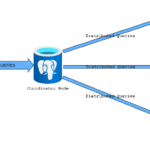
Positioning ksqlDB in Kafka ecosystem is difficult, at least it has been for me. ksqlDB aim at process, transform and query data in real time from Kafka topics using SQL in a declarative approach (of course if you don’t know SQL then the interest drops). KsqlDB does not replace a traditional RDBMS but live alongside your database, processing in real time Kafka events. Similarly of what you would do with Kafka Streams. KsqlDB is, by the way, built on top of Kafka Streams:

You can then eventually, with ksqlDB, sink or source figures from your durable RDBMS to join them in SQL with ksqlDB streams. On top of ksqlDB streams (historical sequence of events) you can build ksqlDB tables, that will often aggregate streams, and provide an “as of now” picture of your events.
I have used the latest Confluent Kafka community edition (8.1.0) and the Zookeeper phase-out is completed so the only option is to use KRaft. Which I have already done in 7.9.1 so not a big deal…
My MariaDB instance is running MariaDB Community edition release 11.8.4.
My test test server is running Red Hat 8.10 with 12 cores and 64GB of memory. I will use my Windows desktop as a client with a Miniforge Conda environment with Python 3.14.0 and Confluent Kafka Python library 2.12.2.
Confluent Kafka cluster configuration
Kafka server
I have still the same kafka Linux account and I put in .bash_profile:
export CONFLUENT_HOME=~/confluent-8.1.0
export PATH=$PATH:$CONFLUENT_HOME/bin
export KSQL_OPTS="-Dorg.xerial.snappy.tempdir=$CONFLUENT_HOME/tmp -Djava.io.tmpdir=$CONFLUENT_HOME/tmp"
export KAFKA_OPTS=$KSQL_OPTS
I have this $CONFLUENT_HOME/etc/kafka/server.properties file:
# The role of this server. Setting this puts us in KRaft mode process.roles=broker,controller # The node id associated with this instance's roles node.id=1 controller.quorum.voters=1@server01.domain.com:9093 # List of controller endpoints used connect to the controller cluster controller.quorum.bootstrap.servers=server01.domain.com:9093 ############################# Socket Server Settings ############################# # The address the socket server listens on. listeners=BROKER://:9092,CONTROLLER://:9093 # Name of listener used for communication between brokers. inter.broker.listener.name=BROKER # Listener name, hostname and port the broker or the controller will advertise to clients. # If not set, it uses the value for "listeners". advertised.listeners=BROKER://server01.domain.com:9092,CONTROLLER://server01.domain.com:9093 # A comma-separated list of the names of the listeners used by the controller. # If no explicit mapping set in `listener.security.protocol.map`, default will be using PLAINTEXT protocol # This is required if running in KRaft mode. controller.listener.names=CONTROLLER # Maps listener names to security protocols, the default is for them to be the same. See the config documentation for more details #listener.security.protocol.map=CONTROLLER:PLAINTEXT,PLAINTEXT:PLAINTEXT,SSL:SSL,SASL_PLAINTEXT:SASL_PLAINTEXT,SASL_SSL:SASL_SSL listener.security.protocol.map=BROKER:SASL_PLAINTEXT,CONTROLLER:SASL_PLAINTEXT # SASL_PLAINTEXT sasl.enabled.mechanisms=PLAIN sasl.mechanism.inter.broker.protocol=PLAIN sasl.mechanism.controller.protocol=PLAIN security.protocol=SASL_PLAINTEXT listener.name.broker.plain.sasl.jaas.config = org.apache.kafka.common.security.plain.PlainLoginModule required \ username="admin" \ password="admin-secret" \ user_admin="admin-secret" \ user_schemaregistry="schemaregistry-secret" \ user_ksqldb="ksqldb-secret" \ user_kafkaconnect="kafkaconnect-secret" \ user_yjaquier="secure_password"; listener.name.controller.plain.sasl.jaas.config = org.apache.kafka.common.security.plain.PlainLoginModule required \ username="admin" \ password="admin-secret" \ user_admin="admin-secret" \ user_schemaregistry="schemaregistry-secret" \ user_ksqldb="ksqldb-secret" \ user_kafkaconnect="kafkaconnect-secret" \ user_yjaquier="secure_password"; # ksqlDB doesn’t clean up internal topics delete.topic.enable=true # Rest is default....
Generate a new cluster id with:
[kafka@server01 ~]$ kafka-storage random-uuid
Sv9MJt6JSqGMQiRa9t9qNA
[kafka@server01 ~]$ echo "export KAFKA_CLUSTER_ID=Sv9MJt6JSqGMQiRa9t9qNA" >> ~/.bash_profile
[kafka@server01 ~]$ export KAFKA_CLUSTER_ID=Sv9MJt6JSqGMQiRa9t9qNA
[kafka@server01 ~]$ kafka-storage format -t $KAFKA_CLUSTER_ID -c $CONFLUENT_HOME/etc/kafka/server.properties
Formatting metadata directory /tmp/kraft-combined-logs with metadata.version 4.1-IV1.
Start Kafka server with:
[kafka@server01 ~]$ nohup kafka-server-start $CONFLUENT_HOME/etc/kafka/server.properties > ~/kafka-server-start.log 2>&1 &
[1] 1713900
Schema Registry server
I have this $CONFLUENT_HOME/etc/schema-registry/schema-registry.properties file to match the new SASL_PLAINTEXT configuration:
#     listeners = PLAINTEXT://your.host.name:9092
listeners=http://0.0.0.0:8081

# Use this setting to specify the bootstrap servers for your Kafka cluster and it
# will be used both for selecting the leader schema registry instance and for storing the data for
# registered schemas.
kafkastore.bootstrap.servers=SASL_PLAINTEXT://server01.domain.com:9092

# SASL_PLAINTEXT
kafkastore.security.protocol=SASL_PLAINTEXT
kafkastore.sasl.mechanism=PLAIN
kafkastore.sasl.jaas.config=org.apache.kafka.common.security.plain.PlainLoginModule required \
  username="schemaregistry" \
  password="schemaregistry-secret";

# The name of the topic to store schemas in
kafkastore.topic=_schemas

# If true, API requests that fail will include extra debugging information, including stack traces
debug=false

metadata.encoder.secret=REPLACE_ME_WITH_HIGH_ENTROPY_STRING

resource.extension.class=io.confluent.dekregistry.DekRegistryResourceExtension
Start Schema Registry server with:
[kafka@server01 ~]$ nohup schema-registry-start $CONFLUENT_HOME/etc/schema-registry/schema-registry.properties > ~/schema-registry-start.log 2>&1 &
[2] 1735888
Basic testing
I have these client configuration files (non-admin and admin):
[kafka@server01 ~]$ cat ~/client.conf
security.protocol=SASL_PLAINTEXT
sasl.mechanism=PLAIN
sasl.jaas.config=org.apache.kafka.common.security.plain.PlainLoginModule required \
    username="yjaquier" \
    password="secure_password";
[kafka@server01 ~]$ cat ~/adminclient.conf
security.protocol=SASL_PLAINTEXT
sasl.mechanism=PLAIN
sasl.jaas.config=org.apache.kafka.common.security.plain.PlainLoginModule required \
    username="admin" \
    password="admin-secret";
Get the default topics with:
[kafka@server01 ~]$ kafka-topics --bootstrap-server server01.domain.com:9092 --command-config ~/client.conf --list
__consumer_offsets
_dek_registry_keys
_schema_encoders
_schemas
Create/delete topics with:
[kafka@server01 ~]$ kafka-topics --bootstrap-server server01.domain.com:9092 --command-config ~/client.conf --create --topic oracle-kafka
Created topic oracle-kafka.
[kafka@server01 ~]$ kafka-topics --bootstrap-server server01.domain.com:9092 --command-config ~/client.conf --delete --topic oracle-kafka
Try to produce a JSON message with:
[kafka@server01 ~]$ echo "{'sensor_id': 1, 'temperature': 20, 'event_ts': 1764249127}" | kafka-console-producer --topic oracle-kafka --bootstrap-server server01.domain.com:9092 --producer.config ~/client.conf
And consumme it with:
[kafka@server01 ~]$ kafka-console-consumer --bootstrap-server server01.domain.com:9092 --consumer.config ~/client.conf --topic oracle-kafka --from-beginning
{'sensor_id': 1, 'temperature': 20, 'event_ts': 1764249127}
^CProcessed a total of 1 messages
Remark:
If you want to also see the key of your events use something like:
[kafka@server01 ~]$ kafka-console-consumer --bootstrap-server server01.domain.com:9092 --consumer.config ~/client.conf --topic sensors-temperature --from-beginning --property print.key=true
Python environment and script
I have Miniforge on my desktop and this environment.yml file:
name: ksqldb
dependencies:
  - python=3.14
Create the conda environment with (Git Bash for me):
conda env create --file='C:\Users\yjaquier\environment.yml'
conda activate ksqldb
The requirements.txt file (pip install –requirement requirements.txt):
confluent-kafka
My Python script simulate sensors that are sending temperature information over time. Message are formed as JSON objects with sensor ID, temperature, and event_ts. Temperature are randomly between 1° and 30°. Sensors are randomly sending an event between 10 seconds to 5 minutes:
import threading
import random
import time
import json
from confluent_kafka import Producer, Consumer, KafkaException, TopicPartition

KAFKA_TOPIC = 'sensors-temperature'
KAFKA_BROKER = 'server01.domain.com:9092'
NUM_SENSORS = 10

def createProducer() -> Producer:
  config_producer = {
    'bootstrap.servers': KAFKA_BROKER,
    'security.protocol': 'SASL_PLAINTEXT',
    'sasl.mechanism':   'PLAIN',
    'sasl.username':     'yjaquier',
    'sasl.password':     'secure_password'
  }
  try:
    producer = Producer(**config_producer)
  except Exception as e:
    print(f"Error creating Kafka producer: {e}")
    exit(1)
  else:
    print("Successfully created Kafka producer")
    return producer

def delivery_report(err, msg):
  if err is not None:
    print(f"Delivery failed for message {msg.key()}: {err}")
  else:
    print(f"Message {msg.key().decode('utf-8')} successfully delivered to {msg.topic()} [{msg.partition()}]")

def sensor_simulation(sensor_id: int, producer: Producer) -> None:
  while True:
    event = {
      'sensor_id': sensor_id,
      'temperature': round(random.uniform(1.0, 30.0), 2), # Simulate temperature between 1.0 and 30.0 degrees (Celsius)
      'event_ts': int(time.time() * 1000) # Current timestamp in miliseconds to match ksqlDB TIMESTAMP data type
    }
    print(f"Sensor {sensor_id} sending: {event}")
    producer.produce(topic = KAFKA_TOPIC, value = json.dumps(event), key = str(sensor_id), callback = delivery_report)
    # Wait random time between 10 seconds and 5 minutes
    time.sleep(random.randint(10, 300))

def main():
  # Create Kafka producer
  producer = createProducer()

  # Start a thread for each sensor
  threads = []
  for sensor_id in range(1, NUM_SENSORS + 1):
    t = threading.Thread(target = sensor_simulation, args = (sensor_id, producer))
    t.daemon = True
    t.start()
    threads.append(t)

  # Keep the main thread alive
  try:
    while True:
      time.sleep(1)
  except KeyboardInterrupt:
    print("Simulation stopped.")
    producer.flush()

if __name__ == "__main__":
  main()
ksqlDB configuration
The configuration file $CONFLUENT_HOME/etc/ksqldb/ksql-server.properties:
listeners=http://0.0.0.0:8088

# SASL_PLAINTEXT
security.protocol=SASL_PLAINTEXT
sasl.mechanism=PLAIN
sasl.jaas.config=org.apache.kafka.common.security.plain.PlainLoginModule required \
  username="ksqldb" \
  password="ksqldb-secret";

ksql.logging.processing.topic.auto.create=true

ksql.logging.processing.stream.auto.create=true

ksql.streams.state.dir=/home/kafka/confluent-8.1.0/tmp/kafka-streams

bootstrap.servers=server01.domain.com:9092

compression.type=snappy

ksql.schema.registry.url=http://server01.domain.com:8081

ksql.resource.extension.class=io.confluent.ksql.security.license.KsqlLicenseValidatorExtension
Start ksqlDB server with:
[kafka@server01 ~]$ mkdir $CONFLUENT_HOME/tmp
[kafka@server01 ~]$ export KSQL_OPTS="-Dorg.xerial.snappy.tempdir=$CONFLUENT_HOME/tmp"
[kafka@server01 ~]$ nohup ksql-server-start $CONFLUENT_HOME/etc/ksqldb/ksql-server.properties > ~/ksql-server-start.log 2>&1 &
[4] 3101706
[kafka@server01 ~]$ ksql http://server01.domain.com:8088
Debug Options:

                  ===========================================
                  =       _              _ ____  ____       =
                  =      | | _____  __ _| |  _ \| __ )      =
                  =      | |/ / __|/ _` | | | | |  _ \      =
                  =      |   <\__ \ (_| | | |_| | |_) |     =
                  =      |_|\_\___/\__, |_|____/|____/      =
                  =                   |_|                   =
                  =        The Database purpose-built       =
                  =        for stream processing apps       =
                  ===========================================

Copyright 2017-2022 Confluent Inc.
CLI v8.1.0, Server v8.1.0 located at http://server01.domain.com:8088
Server Status: RUNNING

Having trouble? Type 'help' (case-insensitive) for a rundown of how things work!

ksql>
ksqlDB testing
To prepare running the script create the Kafka topic:
[kafka@server01 ~]$ kafka-topics --bootstrap-server server01.domain.com:9092 --command-config ~/client.conf --create --topic sensors-temperature
Created topic sensors-temperature.
Execute the Python script on your desktop and then in ksqlDB you can create an immutable, append only object call a stream. This stream will map what happen in the topic. The column names must match exactly the JSON message keys::
ksql> set 'auto.offset.reset' = 'earliest';
Successfully changed local property 'auto.offset.reset' to 'earliest'. Use the UNSET command to revert your change.
ksql> create or replace stream sensors_temperature
  (sensor_id varchar key,
  temperature double,
  event_ts timestamp)
with (kafka_topic='sensors-temperature', value_format='json');

 Message
----------------
 Stream created
----------------
ksql> show streams;

 Stream Name         | Kafka Topic                 | Key Format | Value Format | Windowed
------------------------------------------------------------------------------------------
 KSQL_PROCESSING_LOG | default_ksql_processing_log | KAFKA      | JSON         | false
 SENSORS_TEMPERATURE | sensors-temperature         | KAFKA      | JSON         | false
------------------------------------------------------------------------------------------
You can start selecting (with emit changes) from this stream and get the exact same figures you would get from a kafka-console-consumer:
ksql> select * from sensors_temperature emit changes;
+------------------------------------------------------------------------------------------------------+------------------------------------------------------------------------------------------------------+------------------------------------------------------------------------------------------------------+
|SENSOR_ID                                                                                             |TEMPERATURE                                                                                           |EVENT_TS                                                                                              |
+------------------------------------------------------------------------------------------------------+------------------------------------------------------------------------------------------------------+------------------------------------------------------------------------------------------------------+
|1                                                                                                     |10.66                                                                                                 |2025-12-17T16:38:57.506                                                                               |
|2                                                                                                     |1.94                                                                                                  |2025-12-17T16:38:57.507                                                                               |
|3                                                                                                     |4.31                                                                                                  |2025-12-17T16:38:57.509                                                                               |
.
.
.
Funnily you can also insert into this stream and it will append events to the underlining topic:
ksql> insert into sensors_temperature VALUES ('1', 37.2, '2025-12-17T16:20:05');
Caused by: line 1:48: Syntax error at line 1:48
ksql> select * from sensors_temperature where sensor_id='1' and event_ts='2025-12-17T16:20:05';
+------------------------------------------------------------------------------------------------------+------------------------------------------------------------------------------------------------------+------------------------------------------------------------------------------------------------------+
|SENSOR_ID                                                                                             |TEMPERATURE                                                                                           |EVENT_TS                                                                                              |
+------------------------------------------------------------------------------------------------------+------------------------------------------------------------------------------------------------------+------------------------------------------------------------------------------------------------------+
|1                                                                                                     |37.2                                                                                                  |2025-12-17T16:20:05.000                                                                               |
Query Completed
Query terminated
Before going further let’s see if we can create an aggregated query (I had of errors to correct to see this working, see Issues encountered section). Example average temperature per sensor:
ksql> select
  sensor_id,
  avg(temperature) as avg_temperature
  from sensors_temperature
  group by sensor_id
  emit changes;
+----------------------------------------------------------------------------------------------------------------------------------------------------------+----------------------------------------------------------------------------------------------------------------------------------------------------------+
|SENSOR_ID                                                                                                                                                 |AVG_TEMPERATURE                                                                                                                                           |
+----------------------------------------------------------------------------------------------------------------------------------------------------------+----------------------------------------------------------------------------------------------------------------------------------------------------------+
|4                                                                                                                                                         |22.35                                                                                                                                                     |
|9                                                                                                                                                         |19.009999999999998                                                                                                                                        |
.
.
.
Based on this query let’s create an mutable object that model change over time called a table. Few example with a latest pushed tempearature by sensor or the average temperature per sensor fast last 24 hours:
drop table if exists sensors_latest_temperature delete topic;
create or replace table sensors_latest_temperature
with (kafka_topic='sensors_latest_temperature', value_format='json', key_format='json')
as select
  sensor_id,
  latest_by_offset(temperature) as latest_temperature
  from sensors_temperature
group by sensor_id
emit changes;
drop table if exists sensors_avg_temperature delete topic;
create or replace table sensors_avg_temperature
with (kafka_topic='sensors_avg_temperature', value_format='json', key_format='json')
as select
  sensor_id,
  avg(temperature) as avg_temperature
from sensors_temperature
window tumbling (size 1 days)
group by sensor_id
emit changes;
I have finally chosen the most simple one with average temperature per sensor since the beginning:
ksql> drop table if exists sensors_avg_temperature delete topic;
ksql> create or replace table sensors_avg_temperature as
select
  sensor_id,
  avg(temperature) as avg_temperature
from sensors_temperature
group by sensor_id
emit changes;

 Message
-------------------------------------------------------
 Created query with ID CTAS_SENSORS_AVG_TEMPERATURE_31
-------------------------------------------------------
ksql> show tables;

 Table Name              | Kafka Topic             | Key Format | Value Format | Windowed
------------------------------------------------------------------------------------------
 SENSORS_AVG_TEMPERATURE | SENSORS_AVG_TEMPERATURE | KAFKA      | JSON         | false
------------------------------------------------------------------------------------------
What’s interesting with this table is that when the events of the Kafka topic will have been aged out by the log retention/compaction policies then you can still have access to this table and get your expected result…
ksqlDB joining other tables
I create a dedicated database and an account in my MariaDB instance:
MariaDB [(none)]> create database kafka character set utf8mb4 collate utf8mb4_general_ci comment 'My Kafka database';
Query OK, 1 row affected (0.046 sec)

MariaDB [(none)]> grant all on kafka.* to 'kafkauser'@'%' identified by 'secure_password';
Query OK, 0 rows affected (0.032 sec)

MariaDB [(none)]> flush privileges;
Query OK, 0 rows affected (0.007 sec)
Then I create metadata for my sensors specifying their location:
MariaDB [kafka]> create table kafka.sensors_metadata
       (
         sensor_id int primary key,
         location varchar(100)
       ) comment 'Sensors metadata table';
Query OK, 0 rows affected (0.178 sec)

MariaDB [kafka]> insert into kafka.sensors_metadata (sensor_id, location) values (1, 'Kitchen'), (2, 'Garage'), (3, 'Garden'), (4, 'Cellar'), (5, 'Attic'), (6, 'Living Room'), (7, 'Bathroom'), (8, 'Office'), (9, 'Bedroom'), (10, 'Balcony');
Query OK, 10 rows affected (0.056 sec)
Records: 10  Duplicates: 0  Warnings: 0

MariaDB [kafka]> select * from kafka.sensors_metadata;
+-----------+-------------+
| sensor_id | location    |
+-----------+-------------+
|         1 | Kitchen     |
|         2 | Garage      |
|         3 | Garden      |
|         4 | Cellar      |
|         5 | Attic       |
|         6 | Living Room |
|         7 | Bathroom    |
|         8 | Office      |
|         9 | Bedroom     |
|        10 | Balcony     |
+-----------+-------------+
10 rows in set (0.001 sec)
To use source and sink connectors you must start Kafka connect. I modify default distributed configuration file named $CONFLUENT_HOME/etc/kafka/connect-distributed.properties to add the plugin path and configure security:
#bootstrap.servers=localhost:9092
bootstrap.servers=server01.domain.com:9092

# Security
sasl.mechanism=PLAIN
security.protocol=SASL_PLAINTEXT
sasl.jaas.config=org.apache.kafka.common.security.plain.PlainLoginModule required \
  username="kafkaconnect" \
  password="kafkaconnect-secret";

# Security Source Connector
producer.sasl.mechanism=PLAIN
producer.security.protocol=SASL_PLAINTEXT
producer.sasl.jaas.config=org.apache.kafka.common.security.plain.PlainLoginModule required \
  username="kafkaconnect" \
  password="kafkaconnect-secret";

# Security Sink Connector
consumer.sasl.mechanism=PLAIN
consumer.security.protocol=SASL_PLAINTEXT
consumer.sasl.jaas.config=org.apache.kafka.common.security.plain.PlainLoginModule required \
  username="kafkaconnect" \
  password="kafkaconnect-secret";

# unique name for the cluster, used in forming the Connect cluster group. Note that this must not conflict with consumer group IDs
group.id=connect-cluster

# The converters specify the format of data in Kafka and how to translate it into Connect data. Every Connect user will
# need to configure these based on the format they want their data in when loaded from or stored into Kafka
key.converter=org.apache.kafka.connect.json.JsonConverter
value.converter=org.apache.kafka.connect.json.JsonConverter
# Converter-specific settings can be passed in by prefixing the Converter's setting with the converter we want to apply
# it to
key.converter.schemas.enable=true
value.converter.schemas.enable=true

offset.storage.topic=connect-offsets
offset.storage.replication.factor=1
#offset.storage.partitions=25

config.storage.topic=connect-configs
config.storage.replication.factor=1

status.storage.topic=connect-status
status.storage.replication.factor=1
#status.storage.partitions=5

# Flush much faster than normal, which is useful for testing/debugging
offset.flush.interval.ms=10000

# Plugin path
plugin.path=/home/kafka/confluent-8.1.0/plugins
Start Kafka Connect distributed server, in the background, with:
[kafka@server01 ~]$ nohup connect-distributed $CONFLUENT_HOME/etc/kafka/connect-distributed.properties > ~/connect-distributed-start.log 2>&1 &
I have then search the JDBC Source connector page and downloaded the zip file of the connector. I unzip this zip file in $CONFLUENT_HOME/plugins:
[kafka@server01 ~]$ ll $CONFLUENT_HOME/plugins
total 0
drwxr-x--- 6 kafka users 74 Jan  9 12:38 confluentinc-kafka-connect-jdbc-10.9.2
In ksqlDB I create the source connector with below command. See connector documentation for full list of parameters:
ksql> drop connector if exists mariadb_sensors_metadata;

 Message
------------------------------------------------------
 Connector 'MARIADB_SENSORS_METADATA' does not exist.
------------------------------------------------------

ksql> create source connector mariadb_sensors_metadata with (
  "connector.class" = 'io.confluent.connect.jdbc.JdbcSourceConnector',
  "tasks.max"       = '1',

  "connection.url"      = 'jdbc:mariadb://server01.domain.com:3316/kafka',
  "connection.user"     = 'kafkauser',
  "connection.password" = 'secure_password',

  -- Read mode
  "mode"                    = 'bulk',

  -- Which tables
  "table.whitelist" = 'sensors_metadata',

  -- Topic naming
  "topic.prefix"    = 'mariadb-',

  -- Poll interval: 6 hours = 6 * 60 * 60 * 1000 ms
  "poll.interval.ms" = '21600000',

  -- JSON values (no Schema Registry)
  "key.converter"                  = 'org.apache.kafka.connect.storage.StringConverter',
  "value.converter"                = 'org.apache.kafka.connect.json.JsonConverter',
  "value.converter.schemas.enable" = 'false',

  -- Transforms
  "transforms"                  = 'createKey,extractInt',
  "transforms.createKey.type"   = 'org.apache.kafka.connect.transforms.ValueToKey',
  "transforms.createKey.fields" = 'sensor_id',
  "transforms.extractInt.type"   = 'org.apache.kafka.connect.transforms.ExtractField$Key',
  "transforms.extractInt.field"  = 'sensor_id'
);

 Message
--------------------------------------------
 Created connector MARIADB_SENSORS_METADATA
--------------------------------------------
The message key part, even if extra configuation, is mandatory or Kafka will filter the records as “not containing a key”:
[2026-01-09 17:07:56,606] WARN Skipping record due to null key. topic=[mariadb-sensors_metadata] partition=[0] offset=[0] (org.apache.kafka.streams.kstream.internals.KTableSource:126)
[2026-01-09 17:07:56,606] WARN Skipping record due to null key. topic=[mariadb-sensors_metadata] partition=[0] offset=[1] (org.apache.kafka.streams.kstream.internals.KTableSource:126)
[2026-01-09 17:07:56,607] WARN Skipping record due to null key. topic=[mariadb-sensors_metadata] partition=[0] offset=[2] (org.apache.kafka.streams.kstream.internals.KTableSource:126)
[2026-01-09 17:07:56,607] WARN Skipping record due to null key. topic=[mariadb-sensors_metadata] partition=[0] offset=[3] (org.apache.kafka.streams.kstream.internals.KTableSource:126)
[2026-01-09 17:07:56,608] WARN Skipping record due to null key. topic=[mariadb-sensors_metadata] partition=[0] offset=[4] (org.apache.kafka.streams.kstream.internals.KTableSource:126)
[2026-01-09 17:07:56,608] WARN Skipping record due to null key. topic=[mariadb-sensors_metadata] partition=[0] offset=[5] (org.apache.kafka.streams.kstream.internals.KTableSource:126)
[2026-01-09 17:07:56,608] WARN Skipping record due to null key. topic=[mariadb-sensors_metadata] partition=[0] offset=[6] (org.apache.kafka.streams.kstream.internals.KTableSource:126)
[2026-01-09 17:07:56,609] WARN Skipping record due to null key. topic=[mariadb-sensors_metadata] partition=[0] offset=[7] (org.apache.kafka.streams.kstream.internals.KTableSource:126)
[2026-01-09 17:07:56,609] WARN Skipping record due to null key. topic=[mariadb-sensors_metadata] partition=[0] offset=[8] (org.apache.kafka.streams.kstream.internals.KTableSource:126)
[2026-01-09 17:07:56,610] WARN Skipping record due to null key. topic=[mariadb-sensors_metadata] partition=[0] offset=[9] (org.apache.kafka.streams.kstream.internals.KTableSource:126)
And creating a table with no primary key is not allowed (you would need to create a stream and then table on this stream instead):
ksql> create or replace table if not exists sensors_metadata
(
  id       int,
  location varchar
)
with (
  kafka_topic = 'mariadb-sensors_metadata', -- the topic in which we added the sensors metadata
  value_format = 'json' -- the format in which the data is written
);
Tables require a PRIMARY KEY. Please define the PRIMARY KEY.
Check the connector status and the topics in ksql:
ksql> show connectors;

 Connector Name           | Type   | Class                                         | Status
-----------------------------------------------------------------------------------------------------------------
 MARIADB_SENSORS_METADATA | SOURCE | io.confluent.connect.jdbc.JdbcSourceConnector | RUNNING (1/1 tasks RUNNING)
-----------------------------------------------------------------------------------------------------------------

ksql> describe connector MARIADB_SENSORS_METADATA;

Name                 : MARIADB_SENSORS_METADATA
Class                : io.confluent.connect.jdbc.JdbcSourceConnector
Type                 : source
State                : RUNNING
WorkerId             : 10.75.43.64:8083

 Task ID | State   | Error Trace
---------------------------------
 0       | RUNNING |
---------------------------------

 Related Topics
--------------------------
 mariadb-sensors_metadata
--------------------------
ksql> show topics;

 Kafka Topic                 | Partitions | Partition Replicas
---------------------------------------------------------------
 _dek_registry_keys          | 1          | 1
 _schema_encoders            | 1          | 1
 default_ksql_processing_log | 1          | 1
 mariadb-sensors_metadata    | 1          | 1
 oracle-kafka                | 1          | 1
 sensors-temperature         | 1          | 1
 sensors_avg_temperature     | 1          | 1
---------------------------------------------------------------
You can also check with Kafka console consumer if the topics has some data and a key (–property print.key=true):
[kafka@server01 ~]$ kafka-console-consumer --bootstrap-server server01.domain.com:9092 --consumer.config ~/client.conf --topic mariadb-sensors_metadata --from-beginning --property print.key=true \
--property key.separator=" : " --property key.deserializer=org.apache.kafka.common.serialization.StringDeserializer --property value.deserializer=org.apache.kafka.common.serialization.StringDeserializer
1 : {"sensor_id":1,"location":"Kitchen"}
2 : {"sensor_id":2,"location":"Garage"}
3 : {"sensor_id":3,"location":"Garden"}
4 : {"sensor_id":4,"location":"Cellar"}
5 : {"sensor_id":5,"location":"Attic"}
6 : {"sensor_id":6,"location":"Living Room"}
7 : {"sensor_id":7,"location":"Bathroom"}
8 : {"sensor_id":8,"location":"Office"}
9 : {"sensor_id":9,"location":"Bedroom"}
10 : {"sensor_id":10,"location":"Balcony"}
Create a table (with a primary key) on the just created table with (for type conversion problem choose the datatypes of your column carefully, if you want to go for INT directly then extra configuration is required):
ksql> drop table if exists sensors_metadata delete topic;

Message
--------------------------------------------------------------------------
 Source `SENSORS_METADATA` (topic: mariadb-sensors_metadata) was dropped.
--------------------------------------------------------------------------
ksql> create or replace table if not exists sensors_metadata
(
  sensor_id varchar primary key,
  location  varchar
)
with (
  kafka_topic = 'mariadb-sensors_metadata', -- the topic in which we added the sensors metadata
  value_format = 'json' -- the format in which the data is written
);

 Message
---------------
 Table created
---------------

ksql> select * from sensors_metadata emit changes;
.
.
.
Finally go for more complex query where you will join data coming from a table created on a stream (the topic filled by our Python program) and this table coming from a connector accessing a table in MariaDB:
ksql> select
  a.sensor_id as sensor_id,
  b.location as location,
  a.avg_temperature as avg_temperature
from sensors_avg_temperature a inner join sensors_metadata b on a.sensor_id = b.sensor_id
emit changes;
+------------------------------------------------------------------------------------------------------+------------------------------------------------------------------------------------------------------+------------------------------------------------------------------------------------------------------+
|SENSOR_ID                                                                                             |LOCATION                                                                                              |AVG_TEMPERATURE                                                                                       |
+------------------------------------------------------------------------------------------------------+------------------------------------------------------------------------------------------------------+------------------------------------------------------------------------------------------------------+
|1                                                                                                     |Kitchen                                                                                               |16.700810810810815                                                                                    |
|2                                                                                                     |Garage                                                                                                |15.300857142857138                                                                                    |
|3                                                                                                     |Garden                                                                                                |15.383000000000001                                                                                    |
|4                                                                                                     |Cellar                                                                                                |14.401666666666667                                                                                    |
|5                                                                                                     |Attic                                                                                                 |12.831351351351355                                                                                    |
|6                                                                                                     |Living Room                                                                                           |16.856129032258064                                                                                    |
|7                                                                                                     |Bathroom                                                                                              |17.689750000000007                                                                                    |
|8                                                                                                     |Office                                                                                                |14.950666666666665                                                                                    |
|9                                                                                                     |Bedroom                                                                                               |16.71052631578947                                                                                     |
|10                                                                                                    |Balcony                                                                                               |15.223170731707317                                                                                    |
.
.
.
The table got updated on the flow of coming event in the stream we created above… Ultimately this newly generated table can be sink to another database…
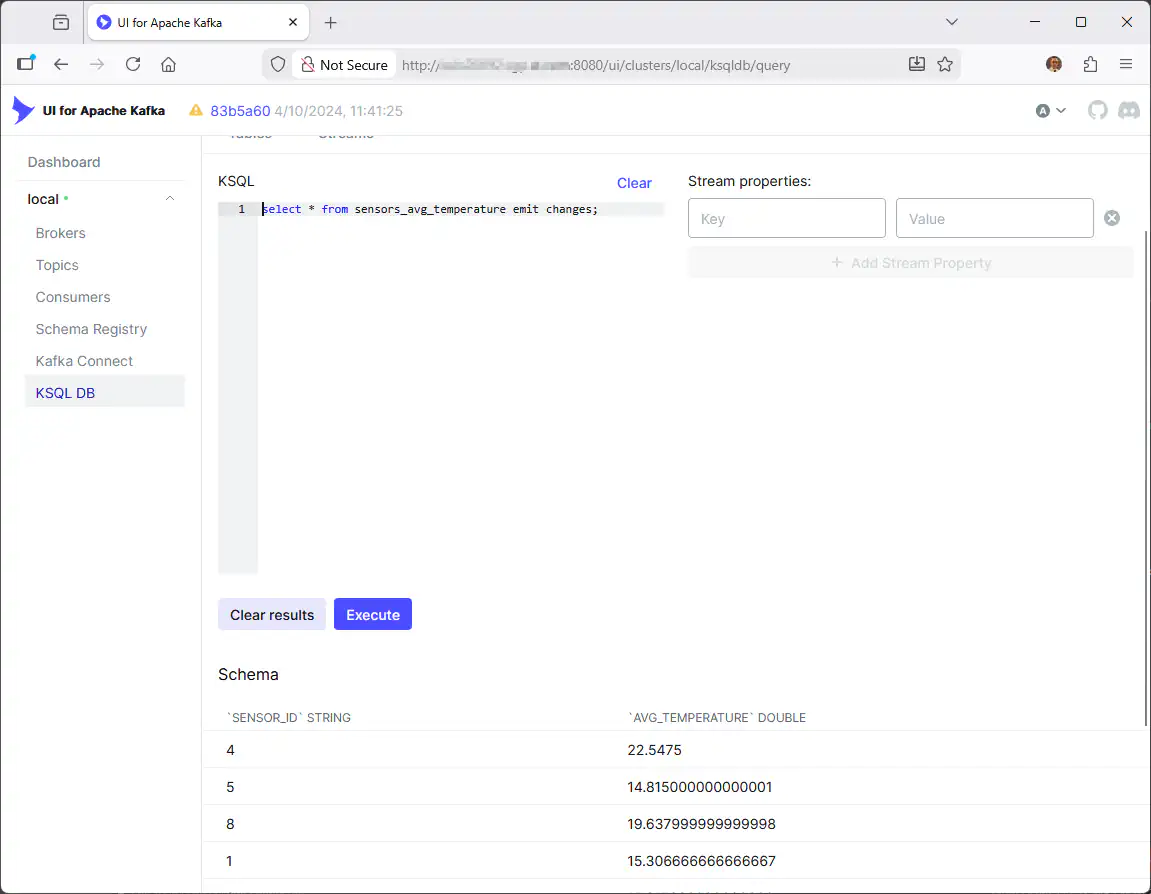
You can also use Kafka graphical interfaces, that we have already seen, like UI for Apache Kafka:
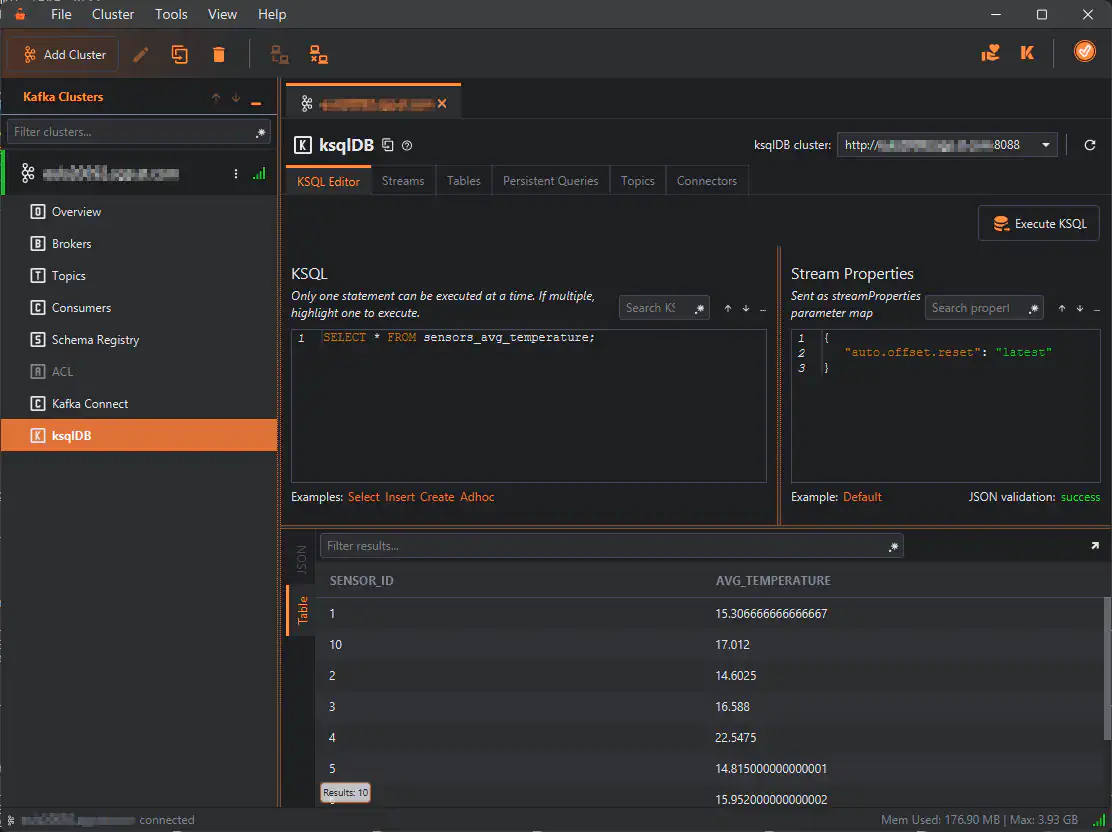
Or KafkIO that, this time, I find more user friendly to use to perform queries and see what you have already created in ksqlDB:
ksqlDB Rest API
For no limit integration you can fetch ksqlDB with REST API calls in http(s). Examples list of streams:
curl -X "POST" "http://server01.domain.com:8088/ksql" \
     -H "Accept: application/vnd.ksql.v1+json" \
     -d $'{
  "ksql": "list streams;",
  "streamsProperties": {}
}'
Or executing queries:
curl --http1.1 \
     -X "POST" "http://server01.domain.com:8088/query" \
     -H "Accept: application/vnd.ksql.v1+json" \
     -d $'{
  "ksql": "select * from sensors_temperature emit changes;",
  "streamsProperties": {
    "ksql.streams.auto.offset.reset": "earliest"
  }
}'
A more complex query:
curl --http1.1 \
     -X "POST" "http://server01.domain.com:8088/query" \
     -H "Accept: application/vnd.ksql.v1+json" \
     -d $'{
  "ksql": "select a.sensor_id as sensor_id, b.location as location, a.avg_temperature as avg_temperature from sensors_avg_temperature a inner join sensors_metadata b on a.sensor_id = b.sensor_id emit changes;",
  "streamsProperties": {
    "ksql.streams.auto.offset.reset": "earliest"
  }
}'
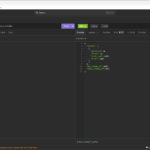
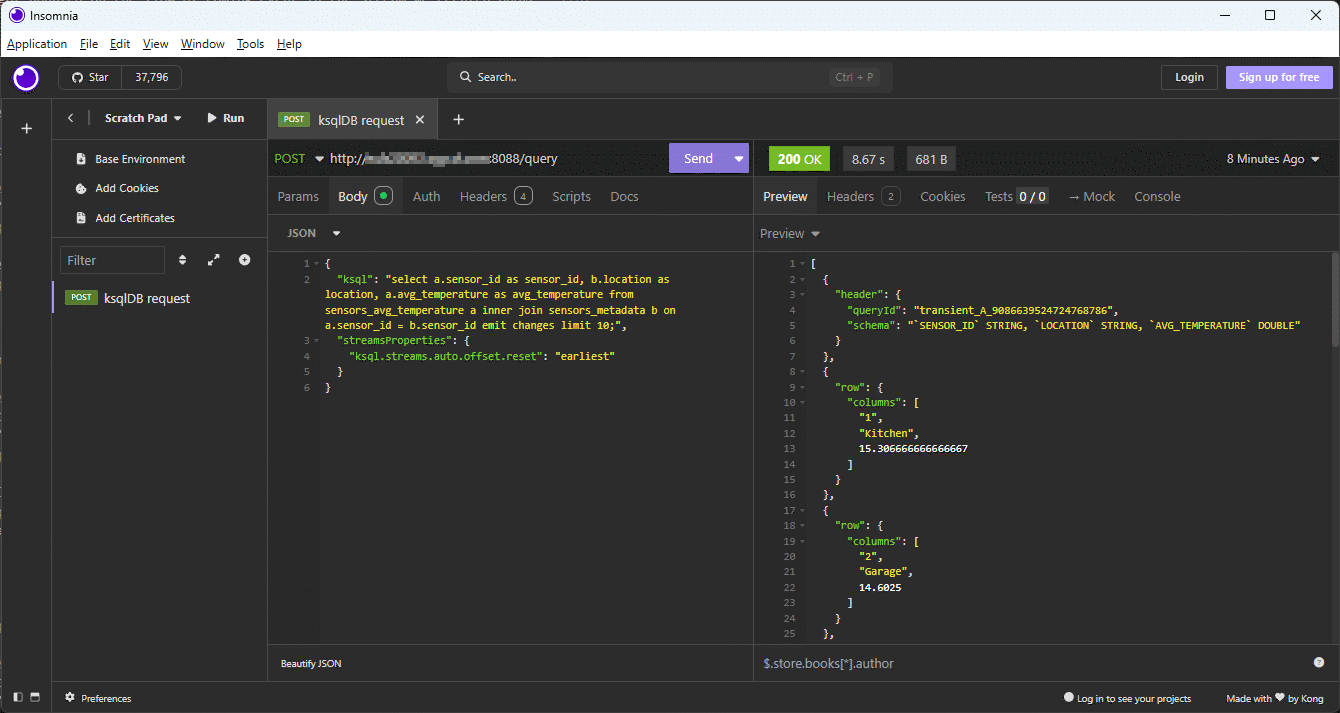
With Insomnia you must add the LIMIT or the software will go in timeout and return nothing:
Issues encountered
Snappy temp folder
My /tmp has the noexec mount option so:
[2025-11-27 17:57:43,961] ERROR Unhandled exception in server startup (io.confluent.ksql.rest.server.KsqlServerMain:164)
java.lang.UnsatisfiedLinkError: /tmp/snappy-1.1.10-d88c8149-d79b-44e8-97b1-820f18440fd8-libsnappyjava.so: /tmp/snappy-1.1.10-d88c8149-d79b-44e8-97b1-820f18440fd8-libsnappyjava.so: failed to map segment from shared object
        at jdk.internal.loader.NativeLibraries.load(Native Method) ~[?:?]
        at jdk.internal.loader.NativeLibraries$NativeLibraryImpl.open(NativeLibraries.java:331) ~[?:?]
        at jdk.internal.loader.NativeLibraries.loadLibrary(NativeLibraries.java:197) ~[?:?]
        at jdk.internal.loader.NativeLibraries.loadLibrary(NativeLibraries.java:139) ~[?:?]
        at java.lang.ClassLoader.loadLibrary(ClassLoader.java:2418) ~[?:?]
        at java.lang.Runtime.load0(Runtime.java:852) ~[?:?]
        at java.lang.System.load(System.java:2025) ~[?:?]
        at org.xerial.snappy.SnappyLoader.loadNativeLibrary(SnappyLoader.java:182) ~[snappy-java-1.1.10.7.jar:1.1.10.7]
        at org.xerial.snappy.SnappyLoader.loadSnappyApi(SnappyLoader.java:157) ~[snappy-java-1.1.10.7.jar:1.1.10.7]
        at org.xerial.snappy.Snappy.init(Snappy.java:70) ~[snappy-java-1.1.10.7.jar:1.1.10.7]
        at org.xerial.snappy.Snappy.clinit(Snappy.java:47) ~[snappy-java-1.1.10.7.jar:1.1.10.7]
        at org.xerial.snappy.SnappyInputStream.hasNextChunk(SnappyInputStream.java:469) ~[snappy-java-1.1.10.7.jar:1.1.10.7]
        at org.xerial.snappy.SnappyInputStream.read(SnappyInputStream.java:185) ~[snappy-java-1.1.10.7.jar:1.1.10.7]
        at org.apache.kafka.common.utils.ChunkedBytesStream.fill(ChunkedBytesStream.java:149) ~[kafka-clients-8.1.0-ce.jar:?]
        at org.apache.kafka.common.utils.ChunkedBytesStream.read(ChunkedBytesStream.java:121) ~[kafka-clients-8.1.0-ce.jar:?]
        at org.apache.kafka.common.utils.ByteUtils.readUnsignedVarint(ByteUtils.java:203) ~[kafka-clients-8.1.0-ce.jar:?]
        at org.apache.kafka.common.utils.ByteUtils.readVarint(ByteUtils.java:256) ~[kafka-clients-8.1.0-ce.jar:?]
        at org.apache.kafka.common.record.DefaultRecord.readFrom(DefaultRecord.java:284) ~[kafka-clients-8.1.0-ce.jar:?]
        at org.apache.kafka.common.record.DefaultRecordBatch$2.doReadRecord(DefaultRecordBatch.java:292) ~[kafka-clients-8.1.0-ce.jar:?]
        at org.apache.kafka.common.record.DefaultRecordBatch$StreamRecordIterator.readNext(DefaultRecordBatch.java:684) ~[kafka-clients-8.1.0-ce.jar:?]
        at org.apache.kafka.common.record.DefaultRecordBatch$RecordIterator.next(DefaultRecordBatch.java:648) ~[kafka-clients-8.1.0-ce.jar:?]
        at org.apache.kafka.common.record.DefaultRecordBatch$RecordIterator.next(DefaultRecordBatch.java:617) ~[kafka-clients-8.1.0-ce.jar:?]
        at org.apache.kafka.clients.consumer.internals.CompletedFetch.nextFetchedRecord(CompletedFetch.java:223) ~[kafka-clients-8.1.0-ce.jar:?]
        at org.apache.kafka.clients.consumer.internals.CompletedFetch.fetchRecords(CompletedFetch.java:272) ~[kafka-clients-8.1.0-ce.jar:?]
        at org.apache.kafka.clients.consumer.internals.FetchCollector.fetchRecords(FetchCollector.java:170) ~[kafka-clients-8.1.0-ce.jar:?]
        at org.apache.kafka.clients.consumer.internals.FetchCollector.collectFetch(FetchCollector.java:133) ~[kafka-clients-8.1.0-ce.jar:?]
        at org.apache.kafka.clients.consumer.internals.Fetcher.collectFetch(Fetcher.java:146) ~[kafka-clients-8.1.0-ce.jar:?]
        at org.apache.kafka.clients.consumer.internals.ClassicKafkaConsumer.pollForFetches(ClassicKafkaConsumer.java:723) ~[kafka-clients-8.1.0-ce.jar:?]
        at org.apache.kafka.clients.consumer.internals.ClassicKafkaConsumer.poll(ClassicKafkaConsumer.java:647) ~[kafka-clients-8.1.0-ce.jar:?]
        at org.apache.kafka.clients.consumer.internals.ClassicKafkaConsumer.poll(ClassicKafkaConsumer.java:626) ~[kafka-clients-8.1.0-ce.jar:?]
        at org.apache.kafka.clients.consumer.KafkaConsumer.poll(KafkaConsumer.java:895) ~[kafka-clients-8.1.0-ce.jar:?]
        at io.confluent.ksql.rest.server.CommandTopic.getAllCommandsInCommandTopic(CommandTopic.java:132) ~[ksqldb-rest-app-8.1.0.jar:?]
        at io.confluent.ksql.rest.server.CommandTopic.getRestoreCommands(CommandTopic.java:109) ~[ksqldb-rest-app-8.1.0.jar:?]
        at io.confluent.ksql.rest.server.computation.CommandStore.getRestoreCommands(CommandStore.java:274) ~[ksqldb-rest-app-8.1.0.jar:?]
        at io.confluent.ksql.rest.server.computation.CommandRunner.processPriorCommands(CommandRunner.java:271) ~[ksqldb-rest-app-8.1.0.jar:?]
        at io.confluent.ksql.rest.server.KsqlRestApplication.initialize(KsqlRestApplication.java:445) ~[ksqldb-rest-app-8.1.0.jar:?]
        at io.confluent.ksql.rest.server.KsqlRestApplication.startKsql(KsqlRestApplication.java:407) ~[ksqldb-rest-app-8.1.0.jar:?]
        at io.confluent.ksql.rest.server.KsqlRestApplication.startAsync(KsqlRestApplication.java:384) ~[ksqldb-rest-app-8.1.0.jar:?]
        at io.confluent.ksql.rest.server.KsqlServerMain.runExecutable(KsqlServerMain.java:160) [ksqldb-rest-app-8.1.0.jar:?]
        at io.confluent.ksql.rest.server.KsqlServerMain.tryStartApp(KsqlServerMain.java:123) [ksqldb-rest-app-8.1.0.jar:?]
        at io.confluent.ksql.rest.server.KsqlServerMain.main(KsqlServerMain.java:102) [ksqldb-rest-app-8.1.0.jar:?]
Sometimes the ksqlDB server might start and you get this error in ksql:
ksql> create stream temperatures
>  (sensor_id int,
>  temperature double,
>  event_ts timestamp)
>with (kafka_topic='oracle-kafka', value_format='json');
Could not write the statement 'create stream temperatures
  (sensor_id int,
  temperature double,
  event_ts timestamp)
with (kafka_topic='oracle-kafka', value_format='json');' into the command topic.
Caused by: Could not write the statement 'CREATE STREAM TEMPERATURES (SENSOR_ID
        INTEGER, TEMPERATURE DOUBLE, EVENT_TS TIMESTAMP) WITH (CLEANUP_POLICY='delete',
        KAFKA_TOPIC='oracle-kafka', KEY_FORMAT='KAFKA', VALUE_FORMAT='JSON');' into the
        command topic.
Caused by: java.lang.NoClassDefFoundError: Could not initialize class
        org.xerial.snappy.Snappy
Caused by: Could not initialize class org.xerial.snappy.Snappy
Caused by: Exception java.lang.UnsatisfiedLinkError:
        /tmp/snappy-1.1.10-ab761a61-a72b-4ede-8d26-aee72279648f-libsnappyjava.so:
        /tmp/snappy-1.1.10-ab761a61-a72b-4ede-8d26-aee72279648f-libsnappyjava.so: failed
        to map segment from shared object [in thread "main"]
This is documented by Confluent, stop/start your ksqlDB server after having set this environment variable (variable name coming from the Confluent script). Create the directory as well:
[kafka@server01 ~]$ export KSQL_OPTS="-Dorg.xerial.snappy.tempdir=$CONFLUENT_HOME/tmp"
But it still fail for an unknown error:
Could not write the statement 'create stream temperatures
  (sensor_id int,
  temperature double,
  event_ts timestamp)
with (kafka_topic='oracle-kafka', value_format='json');' into the command topic.
Caused by: Could not write the statement 'CREATE STREAM TEMPERATURES2 (SENSOR_ID
        INTEGER, TEMPERATURE DOUBLE, EVENT_TS TIMESTAMP) WITH (CLEANUP_POLICY='delete',
        KAFKA_TOPIC='oracle-kafka', KEY_FORMAT='KAFKA', VALUE_FORMAT='JSON');' into the
        command topic.
Caused by: org.apache.kafka.common.errors.UnknownServerException: The server
        experienced an unexpected error when processing the request.
Caused by: The server experienced an unexpected error when processing the
        request.
There is a sibling error in Kafka server log:
[2025-11-27 18:00:34,531] ERROR [ReplicaManager broker=1] Error processing append operation on partition hgCsvhYERD2unLMTt1jHkg:_confluent-ksql-default__command_topic-0 (kafka.server.ReplicaManager)
java.lang.UnsatisfiedLinkError: /tmp/snappy-1.1.10-4f250d31-40e7-4f63-8cc5-ca42b03c990c-libsnappyjava.so: /tmp/snappy-1.1.10-4f250d31-40e7-4f63-8cc5-ca42b03c990c-libsnappyjava.so: failed to map segment from shared object
        at java.base/jdk.internal.loader.NativeLibraries.load(Native Method) ~[?:?]
        at java.base/jdk.internal.loader.NativeLibraries$NativeLibraryImpl.open(NativeLibraries.java:331) ~[?:?]
.
.
.
So you need to sopt/start your Kafka server as well as ksqlDB server after having set this other option (variable name coming from the Confluent script):
[kafka@server01 ~]$ export KAFKA_OPTS=$KSQL_OPTS
Remark:
How to guess the variable to setup ? Look at ksql-server-start shell script in $CONFLUENT_HOME/bin directory…
SQL queries return empty result
Tune auto.offset.reset
Tune the offset of your topics in ksqlDB with:
SET 'auto.offset.reset'='earliest';
Missing KEY keyword
I had another issue where the materialized view returned no rows. It was coming from the missing KEY keyword in the stream definition ! Then an important point is that the column you choose as a key MUST have the same value and data type as the message key (not so easy to achieve in real life) !
Unable to obtain lock as state directory
ksql> drop table sensors_temperature delete topic;
Could not write the statement 'drop table sensors_temperature delete topic;' into the command topic.
Caused by: Timeout while waiting for command topic consumer to process command
        topic

[2025-11-28 12:50:25,087] ERROR Unable to obtain lock as state directory is already locked by another process (org.apache.kafka.streams.processor.internals.StateDirectory:193)
[2025-11-28 12:50:25,087] ERROR Exception encountered running command: Unable to initialize state, this can happen if multiple instances of Kafka Streams are running in the same state directory (current state directory is [/tmp/kafka-streams/_confluent-ksql-default_query_CTAS_SENSORS_TEMPERATURE_17]. Retrying in 5000 ms (io.confluent.ksql.util.RetryUtil:106)
[2025-11-28 12:50:25,087] ERROR Stack trace: org.apache.kafka.streams.errors.StreamsException: Unable to initialize state, this can happen if multiple instances of Kafka Streams are running in the same state directory (current state directory is [/tmp/kafka-streams/_confluent-ksql-default_query_CTAS_SENSORS_TEMPERATURE_17]
        at org.apache.kafka.streams.processor.internals.StateDirectory.initializeProcessId(StateDirectory.java:194)
        at org.apache.kafka.streams.KafkaStreams.init(KafkaStreams.java:953)
        at org.apache.kafka.streams.KafkaStreams.init(KafkaStreams.java:929)
        at org.apache.kafka.streams.KafkaStreams.init(KafkaStreams.java:835)
        at io.confluent.ksql.query.KafkaStreamsBuilderImpl.build(KafkaStreamsBuilderImpl.java:34)
        at io.confluent.ksql.util.QueryMetadataImpl.initialize(QueryMetadataImpl.java:181)
        at io.confluent.ksql.util.PersistentQueryMetadataImpl.initialize(PersistentQueryMetadataImpl.java:152)
        at io.confluent.ksql.query.QueryRegistryImpl.registerPersistentQuery(QueryRegistryImpl.java:470)
        at io.confluent.ksql.query.QueryRegistryImpl.createOrReplacePersistentQuery(QueryRegistryImpl.java:322)
        at io.confluent.ksql.engine.EngineExecutor.executePersistentQuery(EngineExecutor.java:1138)
        at io.confluent.ksql.engine.EngineExecutor.execute(EngineExecutor.java:231)
        at io.confluent.ksql.engine.KsqlEngine.execute(KsqlEngine.java:313)
        at io.confluent.ksql.rest.server.computation.InteractiveStatementExecutor.executePlan(InteractiveStatementExecutor.java:242)
        at io.confluent.ksql.rest.server.computation.InteractiveStatementExecutor.handleStatementWithTerminatedQueries(InteractiveStatementExecutor.java:195)
        at io.confluent.ksql.rest.server.computation.InteractiveStatementExecutor.handleStatement(InteractiveStatementExecutor.java:116)
        at io.confluent.ksql.rest.server.computation.CommandRunner.lambda$executeStatement$5(CommandRunner.java:364)
        at io.confluent.ksql.util.RetryUtil.retryWithBackoff(RetryUtil.java:89)
        at io.confluent.ksql.util.RetryUtil.retryWithBackoff(RetryUtil.java:60)
        at io.confluent.ksql.util.RetryUtil.retryWithBackoff(RetryUtil.java:41)
        at io.confluent.ksql.rest.server.computation.CommandRunner.executeStatement(CommandRunner.java:370)
        at io.confluent.ksql.rest.server.computation.CommandRunner.fetchAndRunCommands(CommandRunner.java:352)
        at io.confluent.ksql.rest.server.computation.CommandRunner$Runner.run(CommandRunner.java:490)
        at java.base/java.util.concurrent.ThreadPoolExecutor.runWorker(ThreadPoolExecutor.java:1144)
        at java.base/java.util.concurrent.ThreadPoolExecutor$Worker.run(ThreadPoolExecutor.java:642)
        at java.base/java.lang.Thread.run(Thread.java:1583)
 (io.confluent.ksql.util.RetryUtil:110)
Erase the mentioned state director, Kafka will rebuild it:
[kafka@server01 ~]$ ll /tmp/kafka-streams
total 0
drwxr-x--- 4 kafka users 79 Nov 28 12:06 _confluent-ksql-default_query_CTAS_SENSORS_TEMPERATURE_17
drwxr-x--- 2 kafka users 57 Nov 28 12:28 _confluent-ksql-default_query_CTAS_SENSORS_TEMPERATURE_19
[kafka@server01 ~]$ rm -rf /tmp/kafka-streams_confluent-ksql-default_query_CTAS_SENSORS_TEMPERATURE_17
[kafka@server01 ~]$ ll /tmp/kafka-streams
total 0
drwxr-x--- 2 kafka users 57 Nov 28 12:28 _confluent-ksql-default_query_CTAS_SENSORS_TEMPERATURE_19
The issue is resolved and the folder is automatically recreated:
[kafka@server01 ~]$ ll /tmp/kafka-streams
total 0
drwxr-x--- 4 kafka users 79 Nov 28 12:51 _confluent-ksql-default_query_CTAS_SENSORS_TEMPERATURE_17
drwxr-x--- 2 kafka users 57 Nov 28 12:28 _confluent-ksql-default_query_CTAS_SENSORS_TEMPERATURE_19
No rows in complex queries
I had no error message but as my /tmp is in noexec I have started to move everything out of /tmp so in ksql-server.properties (parameter taken from ksql-production-server.properties file):
# Set the storage directory for stateful operations like aggregations and
# joins to be at a durable location. By default, they are stored in /tmp.
# Note that the path below needs to be replaced with the actual value
ksql.streams.state.dir=/home/kafka/confluent-8.1.0/tmp/kafka-streams
in server.properties (Kafka Server)
# A comma separated list of directories under which to store log files
log.dirs=/home/kafka/confluent-8.1.0/tmp/kraft-combined-logs
It then generated an error:
ksql> elect
  sensor_id,
  avg(temperature) as avg_temperature
  from sensors_temperature
  group by sensor_id
  emit changes;
+----------------------------------------------------------------------------------------------------------------------------------------------------------+----------------------------------------------------------------------------------------------------------------------------------------------------------+
|ID                                                                                                                                                        |HOME_GOALS                                                                                                                                                |
+----------------------------------------------------------------------------------------------------------------------------------------------------------+----------------------------------------------------------------------------------------------------------------------------------------------------------+
java.lang.UnsatisfiedLinkError: /tmp/librocksdbjni16520378665924561857.so: /tmp/librocksdbjni16520378665924561857.so: failed to map segment from shared object
Query terminated
[2025-12-05 15:09:19,450] ERROR Error in processing query java.lang.UnsatisfiedLinkError: /tmp/librocksdbjni16520378665924561857.so: /tmp/librocksdbjni16520378665924561857.so: failed to map segment from shared object (io.confluent.ksql.api.server.QuerySubscriber:109)
java.lang.UnsatisfiedLinkError: /tmp/librocksdbjni16520378665924561857.so: /tmp/librocksdbjni16520378665924561857.so: failed to map segment from shared object
        at jdk.internal.loader.NativeLibraries.load(Native Method) ~[?:?]
        at jdk.internal.loader.NativeLibraries$NativeLibraryImpl.open(NativeLibraries.java:331) ~[?:?]
        at jdk.internal.loader.NativeLibraries.loadLibrary(NativeLibraries.java:197) ~[?:?]
        at jdk.internal.loader.NativeLibraries.loadLibrary(NativeLibraries.java:139) ~[?:?]
        at java.lang.ClassLoader.loadLibrary(ClassLoader.java:2418) ~[?:?]
        at java.lang.Runtime.load0(Runtime.java:852) ~[?:?]
        at java.lang.System.load(System.java:2025) ~[?:?]
        at org.rocksdb.NativeLibraryLoader.loadLibraryFromJar(NativeLibraryLoader.java:107) ~[rocksdbjni-9.7.3.jar:?]
        at org.rocksdb.NativeLibraryLoader.loadLibrary(NativeLibraryLoader.java:87) ~[rocksdbjni-9.7.3.jar:?]
        at org.rocksdb.RocksDB.loadLibrary(RocksDB.java:73) ~[rocksdbjni-9.7.3.jar:?]
        at org.rocksdb.DBOptions.newDBOptionsInstance(DBOptions.java:1237) ~[rocksdbjni-9.7.3.jar:?]
        at org.rocksdb.DBOptions.init(DBOptions.java:27) ~[rocksdbjni-9.7.3.jar:?]
        at org.apache.kafka.streams.state.internals.RocksDBStore.openDB(RocksDBStore.java:186) ~[kafka-streams-8.1.0-ce.jar:?]
        at org.apache.kafka.streams.state.internals.RocksDBStore.init(RocksDBStore.java:162) ~[kafka-streams-8.1.0-ce.jar:?]
        at org.apache.kafka.streams.state.internals.WrappedStateStore.init(WrappedStateStore.java:63) ~[kafka-streams-8.1.0-ce.jar:?]
        at org.apache.kafka.streams.state.internals.ChangeLoggingKeyValueBytesStore.init(ChangeLoggingKeyValueBytesStore.java:46) ~[kafka-streams-8.1.0-ce.jar:?]
        at org.apache.kafka.streams.state.internals.WrappedStateStore.init(WrappedStateStore.java:63) ~[kafka-streams-8.1.0-ce.jar:?]
        at org.apache.kafka.streams.state.internals.CachingKeyValueStore.init(CachingKeyValueStore.java:106) ~[kafka-streams-8.1.0-ce.jar:?]
        at org.apache.kafka.streams.state.internals.WrappedStateStore.init(WrappedStateStore.java:63) ~[kafka-streams-8.1.0-ce.jar:?]
        at org.apache.kafka.streams.state.internals.MeteredKeyValueStore.lambda$init$0(MeteredKeyValueStore.java:135) ~[kafka-streams-8.1.0-ce.jar:?]
        at org.apache.kafka.streams.processor.internals.metrics.StreamsMetricsImpl.maybeMeasureLatency(StreamsMetricsImpl.java:927) ~[kafka-streams-8.1.0-ce.jar:?]
        at org.apache.kafka.streams.state.internals.MeteredKeyValueStore.init(MeteredKeyValueStore.java:135) ~[kafka-streams-8.1.0-ce.jar:?]
        at org.apache.kafka.streams.processor.internals.ProcessorStateManager.registerStateStores(ProcessorStateManager.java:233) ~[kafka-streams-8.1.0-ce.jar:?]
        at org.apache.kafka.streams.processor.internals.StateManagerUtil.registerStateStores(StateManagerUtil.java:103) ~[kafka-streams-8.1.0-ce.jar:?]
        at org.apache.kafka.streams.processor.internals.StreamTask.initializeIfNeeded(StreamTask.java:267) ~[kafka-streams-8.1.0-ce.jar:?]
        at org.apache.kafka.streams.processor.internals.TaskManager.tryToCompleteRestoration(TaskManager.java:862) ~[kafka-streams-8.1.0-ce.jar:?]
        at org.apache.kafka.streams.processor.internals.StreamThread.initializeAndRestorePhase(StreamThread.java:1409) ~[kafka-streams-8.1.0-ce.jar:?]
        at org.apache.kafka.streams.processor.internals.StreamThread.runOnceWithoutProcessingThreads(StreamThread.java:1211) ~[kafka-streams-8.1.0-ce.jar:?]
        at org.apache.kafka.streams.processor.internals.StreamThread.runLoop(StreamThread.java:926) ~[kafka-streams-8.1.0-ce.jar:?]
        at org.apache.kafka.streams.processor.internals.StreamThread.run(StreamThread.java:886) ~[kafka-streams-8.1.0-ce.jar:?]
Again linked to /tmp in noexec so add export “-Djava.io.tmpdir=/some_other_tmp_directory” to KSQL_OPTS. Now it is (see above):
[kafka@server01 ~]$ export KSQL_OPTS="-Dorg.xerial.snappy.tempdir=$CONFLUENT_HOME/tmp -Djava.io.tmpdir=$CONFLUENT_HOME/tmp"
No suitable driver found for jdbc:mariadb
If you forget to download the MariaDB Connector/J (jar file) and put in in $COFLUENT_HOME/plugins/confluentinc-kafka-connect-jdbc-10.9.2/lib directory (where you unzip the Confluent JDBC Source connectors) you get:
ksql> show connectors;

 Connector Name           | Type   | Class                                         | Status
--------------------------------------------------------------------------------------------
 MARIADB_SENSORS_METADATA | SOURCE | io.confluent.connect.jdbc.JdbcSourceConnector | FAILED
--------------------------------------------------------------------------------------------
ksql> describe connector MARIADB_SENSORS_METADATA;

Name                 : MARIADB_SENSORS_METADATA
Class                : io.confluent.connect.jdbc.JdbcSourceConnector
Type                 : source
State                : FAILED
WorkerId             : 10.75.43.64:8083
Trace                : org.apache.kafka.connect.errors.ConnectException: java.sql.SQLException: No suitable driver found for jdbc:mariadb://server01.domain.com:3316/kafka
        at io.confluent.connect.jdbc.util.CachedConnectionProvider.getConnection(CachedConnectionProvider.java:62)
        at io.confluent.connect.jdbc.JdbcSourceConnector.start(JdbcSourceConnector.java:101)
        at org.apache.kafka.connect.runtime.WorkerConnector.doStart(WorkerConnector.java:219)
        at org.apache.kafka.connect.runtime.WorkerConnector.start(WorkerConnector.java:248)
        at org.apache.kafka.connect.runtime.WorkerConnector.doTransitionTo(WorkerConnector.java:407)
        at org.apache.kafka.connect.runtime.WorkerConnector.doTransitionTo(WorkerConnector.java:388)
        at org.apache.kafka.connect.runtime.WorkerConnector.doRun(WorkerConnector.java:168)
        at org.apache.kafka.connect.runtime.WorkerConnector.run(WorkerConnector.java:128)
        at org.apache.kafka.connect.runtime.isolation.Plugins.lambda$withClassLoader$1(Plugins.java:254)
        at java.base/java.util.concurrent.Executors$RunnableAdapter.call(Executors.java:572)
        at java.base/java.util.concurrent.FutureTask.run(FutureTask.java:317)
        at java.base/java.util.concurrent.ThreadPoolExecutor.runWorker(ThreadPoolExecutor.java:1144)
        at java.base/java.util.concurrent.ThreadPoolExecutor$Worker.run(ThreadPoolExecutor.java:642)
        at java.base/java.lang.Thread.run(Thread.java:1583)
Caused by: java.sql.SQLException: No suitable driver found for jdbc:mariadb://server01.domain.com:3316/kafka
        at java.sql/java.sql.DriverManager.getConnection(DriverManager.java:708)
        at java.sql/java.sql.DriverManager.getConnection(DriverManager.java:191)
        at io.confluent.connect.jdbc.dialect.GenericDatabaseDialect.getConnection(GenericDatabaseDialect.java:278)
        at io.confluent.connect.jdbc.util.CachedConnectionProvider.newConnection(CachedConnectionProvider.java:84)
        at io.confluent.connect.jdbc.util.CachedConnectionProvider.getConnection(CachedConnectionProvider.java:54)
        ... 13 more
Copy the MariaDB Connector/J jar file in $COFLUENT_HOME/plugins/confluentinc-kafka-connect-jdbc-10.9.2/lib and note that many other datbases are already ready to use:
[kafka@server01 lib]$ ll
total 27268
-rw-r--r-- 1 kafka users   214381 Dec 15 09:52 checker-qual-3.5.0.jar
-rw-r--r-- 1 kafka users    17267 Dec 15 09:52 common-utils-7.0.12.jar
-rw-r--r-- 1 kafka users   317816 Dec 15 09:52 jtds-1.3.1.jar
-rw-r--r-- 1 kafka users   339507 Dec 15 09:54 kafka-connect-jdbc-10.9.2.jar
-rw-r----- 1 kafka users   763697 Jan  9 15:29 mariadb-java-client-3.5.7.jar
-rw-r--r-- 1 kafka users  1206695 Dec 15 09:52 mssql-jdbc-12.8.2.jre8.jar
-rw-r--r-- 1 kafka users  4398602 Dec 15 09:52 ojdbc8-19.7.0.0.jar
-rw-r--r-- 1 kafka users   156242 Dec 15 09:52 ons-19.7.0.0.jar
-rw-r--r-- 1 kafka users   311000 Dec 15 09:52 oraclepki-19.7.0.0.jar
-rw-r--r-- 1 kafka users  1663954 Dec 15 09:52 orai18n-19.7.0.0.jar
-rw-r--r-- 1 kafka users   210337 Dec 15 09:52 osdt_cert-19.7.0.0.jar
-rw-r--r-- 1 kafka users   312200 Dec 15 09:52 osdt_core-19.7.0.0.jar
-rw-r--r-- 1 kafka users  1046863 Dec 15 09:52 postgresql-42.4.4.jar
-rw-r--r-- 1 kafka users   113826 Dec 15 09:52 re2j-1.7.jar
-rw-r--r-- 1 kafka users    32168 Dec 15 09:52 simplefan-19.7.0.0.jar
-rw-r--r-- 1 kafka users    41125 Dec 15 09:51 slf4j-api-1.7.36.jar
-rw-r--r-- 1 kafka users 12851127 Dec 15 09:52 sqlite-jdbc-3.41.2.2.jar
-rw-r--r-- 1 kafka users  1684253 Dec 15 09:52 ucp-19.7.0.0.jar
-rw-r--r-- 1 kafka users   265130 Dec 15 09:52 xdb-19.7.0.0.jar
-rw-r--r-- 1 kafka users  1933746 Dec 15 09:52 xmlparserv2-19.7.0.0.jar
Stop and restart Kafka Connect and error should be solved…
References
- KafkIO – ksqlDB features
- RisingWave Blog – The comprehensive guide to ksqlDB
- ActiveWizards – Building real-time applications with Kafka Streams and ksqlDB (step-by-step tutorial)
- RisingWave Blog – Practical examples of ksqlDB in industry applications
- Confluent Blog – Kafka Connect deep dive: JDBC Source Connector
- GitHub – ksql query tutorial (Programming-with-Mati)
- Medium – Using Kafka Streams and ksqlDB for real-time data processing
About Post Author