Configure Kafka authentication to build Kafka client application
Table of contents
- Preamble
- Confluent Community Platform SASL/PLAIN setup for Kafka client application authentication
- Python consumer and producer Kafka client application
- Java consumer and producer Kafka client application
- Connecting to Oracle
-
Issues encountered
- java.util.concurrent.ExecutionException: org.apache.kafka.common.errors.TimeoutException: Timed out waiting for a node assignment.
- KafkaTimeoutError: Failed to update metadata after 4999000.0 secs
- No serviceName defined in either JAAS or Kafka config
- org.apache.kafka.common.errors.SaslAuthenticationException: Failed to configure SaslClientAuthenticator
- Unexpected Kafka request of type METADATA during SASL handshake
- bootstrap.servers ignored and keeps trying to connect to localhost:9092
- Even with 'auto.offset.reset' set to 'earliest' you get no message
- References
Preamble
In a previous blog post we have seen on how to use the Confluent Kafka REST API. In this follow-up blog post I wanted to use the two available Python packages and Java to directly address Kafka server through a Python or Java Kafka client application:
This sounds quite easy to setup but to do so you must fully configure your Kafka server to handle those request coming from different clients and not from the Kafka server itself.
Apache Confluent Kafka platform is ready for multiple authentication mechanisms clearly explained. I have chosen to use SASL/PLAIN. SASL stands for SASL (Simple Authentication Security Layer). SASL/PLAIN, is a simple username/password authentication mechanism, as passwords are sent in clear over the wire, in a production environment you should club SASL/PLAIN with TLS as transport layer.
Even if I plan to make a rapid test with SASL/PLAIN and TLS in a real enterprise environment I believe people would more do LDAP or OAuth/OIDC… Configuring only SASL/PLAIN was already not a piece of cake and Confluent documentation is not very well made for complete example configuration and I had to fight for a while…
I have used Confluent Community Platform 7.9.1. My test server is running Red Hat Enterprise Linux release 8.10 (Ootpa) with 64GB of memory and 12 cores. On my Windows client I have used Insomnia 11.1.0, Python 3.13.3 and Java JDK 21.0.7.
I have used confluent-kafka 2.10.0 and kafka-python 2.2.7 for Python and Apache Kafka client 4.0.0 for Java. I have not created example with oracledb Python package as it would be exactly the same as previous blog post…
Confluent Community Platform SASL/PLAIN setup for Kafka client application authentication
Kafka server
First stop every single component of you Kafka server, I guess you are on a test server first so should not be an issue.
In my previous blog I did not enter too much in the small tuning of the Kafka configuration file, but for SASL/PLAIN configuration you have to tune more precisely. So having this $CONFLUENT_HOME/etc/kafka/kraft/server.properties file:
process.roles=broker,controller
node.id=1
controller.quorum.voters=1@server01.domain.com:9093
listeners=BROKER://:9092,CONTROLLER://:9093
inter.broker.listener.name=BROKER
advertised.listeners=BROKER://server01.domain.com:9092,CONTROLLER://server01.domain.com:9093
controller.listener.names=CONTROLLER
listener.security.protocol.map=BROKER:SASL_PLAINTEXT,CONTROLLER:SASL_PLAINTEXT
sasl.enabled.mechanisms=PLAIN
sasl.mechanism.inter.broker.protocol=PLAIN
sasl.mechanism.controller.protocol=PLAIN
security.protocol=SASL_PLAINTEXT
I have created this JAAS (Java Authentication and Authorization Service) configuration file (kafka_server_jaas.conf):
KafkaServer {
  org.apache.kafka.common.security.plain.PlainLoginModule required
  serviceName="KafkaServer"
  username="admin"
  password="admin-secret"
  user_admin="admin-secret"
  user_schemaregistry="schemaregistry-secret"
  user_yjaquier="secure_password";
};
To take it into account you have to export KAFKA_OPTS variable:
export KAFKA_OPTS=”-Djava.security.auth.login.config=$CONFLUENT_HOME/etc/kafka/kraft/kafka_server_jaas.conf”
But the Confluent recommended method is to use listener.name.{listenerName}.{saslMechanism}.sasl.jaas.config server property to specify your configuration, so I have added to my server.properties file (listener names must be in lowercase or you get a stupid error). The protocol is PLAIN and NOT SASL_PLAINTEXT:
listener.name.broker.plain.sasl.jaas.config = org.apache.kafka.common.security.plain.PlainLoginModule required \
  username="admin" \
  password="admin-secret" \
  user_admin="admin-secret" \
  user_schemaregistry="schemaregistry-secret" \
  user_yjaquier="secure_password";
listener.name.controller.plain.sasl.jaas.config = org.apache.kafka.common.security.plain.PlainLoginModule required \
  username="admin" \
  password="admin-secret" \
  user_admin="admin-secret" \
  user_schemaregistry="schemaregistry-secret" \
  user_yjaquier="secure_password";
Then simply starting it with:
[kafka@server01 ~]$ nohup kafka-server-start $CONFLUENT_HOME/etc/kafka/kraft/server.properties > ~/kafka-server-start.log 2>&1 &
Schema Registry
I modified $CONFLUENT_HOME/etc/schema-registry/schema-registry.properties file to match the new SASL_PLAINTEXT configuration:
kafkastore.bootstrap.servers=SASL_PLAINTEXT://localhost:9092

kafkastore.security.protocol=SASL_PLAINTEXT
kafkastore.sasl.mechanism=PLAIN
kafkastore.sasl.jaas.config=org.apache.kafka.common.security.plain.PlainLoginModule required \
  username="schemaregistry" \
  password="schemaregistry-secret";
Then simply starting it with:
[kafka@server01 ~]$ nohup schema-registry-start $CONFLUENT_HOME/etc/schema-registry/schema-registry.properties > ~/schema-registry-start.log 2>&1 &
Then after to issue all commands we have seen you need to be authenticated. I have created two file to authenticate with my yjaquier account and another one to authenticate with admin account:
[kafka@server01 ~]$ cat client.conf
security.protocol=SASL_PLAINTEXT
sasl.mechanism=PLAIN
sasl.jaas.config=org.apache.kafka.common.security.plain.PlainLoginModule required \
    username="yjaquier" \
    password="secure_password";
[kafka@server01 ~]$ cat adminclient.conf
security.protocol=SASL_PLAINTEXT
sasl.mechanism=PLAIN
sasl.jaas.config=org.apache.kafka.common.security.plain.PlainLoginModule required \
    username="admin" \
    password="admin-secret";
Then specify one of those client configuration files with different option versus the used tool. Examples:
[kafka@server01 ~]$ kafka-topics --bootstrap-server localhost:9092 --command-config client.conf --list
__consumer_offsets
_dek_registry_keys
_schema_encoders
_schemas
jsontest
oracle-kafka

[kafka@server01 ~]$ kafka-console-producer --topic oracle-kafka --bootstrap-server localhost:9092 --producer.config adminclient.conf

[kafka@server01 ~]$ kafka-console-consumer --topic oracle-kafka --bootstrap-server localhost:9092 --consumer.config client.conf --from-beginning
Python consumer and producer Kafka client application
Kafka Python
My script is:
from kafka import KafkaProducer, KafkaConsumer
from kafka.errors import KafkaTimeoutError, KafkaError
import json
import logging
import random
import argparse

def producer(topic_name: str) -> None:
  try:
    producer = KafkaProducer(bootstrap_servers="server01.domain.com:9092",
                            security_protocol='SASL_PLAINTEXT',
                            sasl_mechanism='PLAIN',
                            sasl_plain_username="yjaquier",
                            sasl_plain_password="secure_password",
                            value_serializer=lambda m: json.dumps(m).encode('utf-8'), max_block_ms=5000)
  except Exception as e:
    print(f"Error creating Kafka producer: {e}")
    exit(1)
  else:
    print("Successfully created Kafka producer")

  try:
    producer.send(topic_name,  { "key": "Random value " + str(random.randint(0, 9999)) })
    # Wait for all messages to be sent
    producer.flush()
  except Exception as e:
    print(f"Error sending message to producer: {e}")
    exit(1)
  finally:
    # Close the producer
    producer.close()

  print("Message sent successfully.")

def consumer(topic_name: str) -> None:
  try:
    consumer = KafkaConsumer(bootstrap_servers="server01.domain.com:9092",
                            security_protocol='SASL_PLAINTEXT',
                            sasl_mechanism='PLAIN',
                            sasl_plain_username="yjaquier",
                            sasl_plain_password="secure_password",
                            group_id="mygroup" + str(random.randint(1000, 9999)),
                            auto_offset_reset="latest")
  except Exception as e:
    print(f"Error creating Kafka consumer: {e}")
    exit(1)
  else:
    print("Successfully created Kafka consumer")

  # Topics list
  metadata = consumer.topics()
  print(f'Topics: {list(metadata)}')

  try:
    consumer.subscribe(topics=[topic_name])
  except Exception as e:
    print(f"Error subscribing to topic: {e}")
    exit(1)
  else:
    print(f"Successfully subscribed to topic {topic_name}")

  print(f"Polling messages from topic {topic_name} using kafka-python...")
  # print(consumer.partitions_for_topic(TOPIC_NAME))

  # Poll for messages
  try:
    while True:
      msg = consumer.poll(timeout_ms=1000)
      if not msg:
        # If no messages are returned, print "waiting"
        print("Waiting...")
      else:
        for topic_partition, messages in msg.items():
          for message in messages:
            print(f"Received message: {message.value.decode('utf-8')} from {message.topic} [{message.partition}]")
  except KeyboardInterrupt:
    pass
  finally:
    # Leave group and commit final offsets
    consumer.close()

def main():
  # Enable logging
  # logging.basicConfig(level=logging.DEBUG)
  logging.basicConfig(level=logging.ERROR)
  logger = logging.getLogger(__name__)

  TOPIC_NAME="oracle-kafka"
  # Create the parser
  parser = argparse.ArgumentParser(description="A simple example of using argparse.")

  # Add arguments
  parser.add_argument('-t', '--type', type=str, help='Producer or consumer ?', required=True)

  # Parse the arguments
  args = parser.parse_args()

  # Use the arguments
  if args.type == "producer":
    producer(TOPIC_NAME)
  elif args.type == "consumer":
    consumer(TOPIC_NAME)
  else:
    print("Invalid type. Use 'producer' or 'consumer'.")
    exit(1)

if __name__ == "__main__":
  main()
Execute first the consumer in one terminal:
$ python kafka_apache.py --type consumer
Successfully created Kafka consumer
Topics: ['_schemas', 'jsontest', 'my-topic', '_schema_encoders', 'oracle-kafka', '_dek_registry_keys']
Successfully subscribed to topic oracle-kafka
Polling messages from topic oracle-kafka using kafka-python...
Waiting...
Waiting...
Waiting...
Waiting...
Waiting...
Waiting...
Waiting...
Received message: {"key": "Random value 6900"} from oracle-kafka [0]
Waiting...
Waiting...
Waiting...
Waiting...
An the producer in another terminal:
$ python kafka_apache.py --type producer
Successfully created Kafka producer
Message sent successfully.
Confluent Kafka
Execution is exactly the same and script is:
from confluent_kafka import Producer, Consumer, KafkaException, TopicPartition
import json
import logging
import socket
import random
import argparse


def producer(topic_name: str) -> None:
  config_producer = {
    'bootstrap.servers': 'server01.domain.com:9092',
    'security.protocol': 'SASL_PLAINTEXT',
    'sasl.mechanism':   'PLAIN',
    'sasl.username':     'yjaquier',
    'sasl.password':     'secure_password'
  }
  try:
    producer = Producer(**config_producer)
  except Exception as e:
    print(f"Error creating Kafka producer: {e}")
    exit(1)
  else:
    print("Successfully created Kafka producer")

  # Delivery report callback
  def delivery_report(err, msg):
    if err is not None:
      print(f"Delivery failed for message {msg.key()}: {err}")
    else:
      print(f"Message {msg.key()} successfully delivered to {msg.topic()} [{msg.partition()}]")

  # Produce a message
  producer.produce(topic_name, key='key', value='{ "key": "Random value ' + str(random.randint(0, 9999)) + '" }', callback=delivery_report)

  # Wait for any outstanding messages to be delivered
  producer.flush()

def consumer(topic_name: str) -> None:
  config_consumer = {
    'bootstrap.servers': 'server01.domain.com:9092',
    'sasl.username':     'yjaquier',
    'sasl.password':     'secure_password',
    'security.protocol': 'SASL_PLAINTEXT',
    'sasl.mechanism':   'PLAIN',
    'group.id': 'mygroup' + str(random.randint(1000, 9999)),
    'auto.offset.reset': 'latest',
    'enable.auto.offset.store': False
  }

  try:
    consumer = Consumer(**config_consumer)
  except Exception as e:
    print(f"Error creating Kafka consumer: {e}")
    exit(1)
  else:
    print("Successfully created Kafka consumer")

  # Topics list
  metadata = consumer.list_topics().topics
  print(f'Topics: {list(metadata)}')

  def on_assign_callback(consumer, topic_partitions):
    for topic_partition in topic_partitions:
      print("Topic={}. partition={}. offset={}. error={}".format(topic_partition.topic, topic_partition.partition, topic_partition.offset, topic_partition.error))

  try:
    consumer.subscribe(topics=[topic_name], on_assign=on_assign_callback)
  except Exception as e:
    print(f"Error subscribing to topic: {e}")
    exit(1)
  else:
    print(f"Successfully subscribed to topic {topic_name}")

  # Poll for messages
  try:
    while True:
      msg = consumer.poll(1.0)
      if msg is None:
        print("Waiting...")
        # continue
      elif msg.error():
        print(f"Consumer error: {msg.error()}")
        raise KafkaException(msg.error())
        # continue
      else:
        print(f"Received message: {msg.value().decode('utf-8')} from {msg.topic()} [{msg.partition()}]")
        # print("Consumed event from topic {topic}: key = {key:12} value = {value:12}".format(topic=msg.topic(), key=msg.key().decode('utf-8'), value=msg.value().decode('utf-8')))
  except KeyboardInterrupt:
    pass
  finally:
    # Leave group and commit final offsets
    consumer.close()

def main():
  # Enable logging
  # logging.basicConfig(level=logging.DEBUG)
  logging.basicConfig(level=logging.ERROR)
  logger = logging.getLogger(__name__)

  TOPIC_NAME="oracle-kafka"
  # Create the parser
  parser = argparse.ArgumentParser(description="A simple example of using argparse.")

  # Add arguments
  parser.add_argument('-t', '--type', type=str, help='Producer or consumer ?', required=True)

  # Parse the arguments
  args = parser.parse_args()

  # Use the arguments
  if args.type == "producer":
    producer(TOPIC_NAME)
  elif args.type == "consumer":
    consumer(TOPIC_NAME)
  else:
    print("Invalid type. Use 'producer' or 'consumer'.")
    exit(1)

if __name__ == "__main__":
  main()
Java consumer and producer Kafka client application
Same as for Python I have created an unique package that will handle, through a parameter, the producer and consumer role. I have this project structure in IntelliJ:
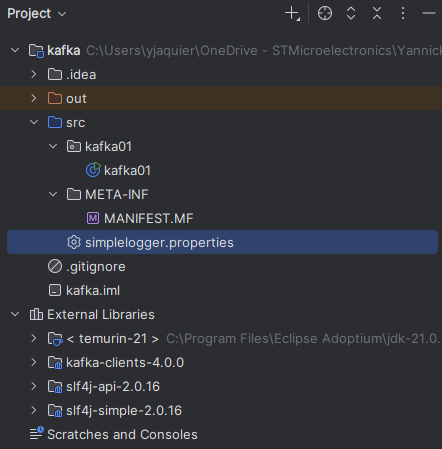
My logger configuration is (simplelogger.properties):
org.slf4j.simpleLogger.defaultLogLevel=warn
The Java code:
package kafka01;

import org.apache.kafka.clients.consumer.KafkaConsumer;
import org.apache.kafka.clients.consumer.ConsumerConfig;
import org.apache.kafka.clients.producer.KafkaProducer;
import org.apache.kafka.clients.producer.ProducerConfig;
import org.apache.kafka.clients.producer.ProducerRecord;
import org.apache.kafka.clients.producer.RecordMetadata;
import org.apache.kafka.clients.consumer.ConsumerRecord;
import org.apache.kafka.clients.consumer.ConsumerRecords;
import org.apache.kafka.common.serialization.StringDeserializer;
import org.apache.kafka.common.serialization.StringSerializer;

import java.util.Properties;
import java.util.Random;
import java.util.Collections;
import java.time.Duration;
import java.util.concurrent.ExecutionException;

import org.slf4j.Logger;
import org.slf4j.LoggerFactory;

public class kafka01 {
  private static final String TOPIC_NAME = "oracle-kafka";
  private static final Logger logger = LoggerFactory.getLogger(kafka01.class);

  private static void producer() {
    Properties props = new Properties();
    Random random01 = new Random();
    props.put(ProducerConfig.BOOTSTRAP_SERVERS_CONFIG, "server01.domain.com:9092");
    props.put(ProducerConfig.KEY_SERIALIZER_CLASS_CONFIG, StringSerializer.class.getName());
    props.put(ProducerConfig.VALUE_SERIALIZER_CLASS_CONFIG, StringSerializer.class.getName());
    props.put("security.protocol", "SASL_PLAINTEXT");
    props.put("sasl.mechanism", "PLAIN");
    props.put("sasl.jaas.config", "org.apache.kafka.common.security.plain.PlainLoginModule required username=\"yjaquier\" password=\"secure_password\";");
    // Create the producer
    KafkaProducer<String, String> producer = new KafkaProducer<>(props);

    // Create a JSON object
    String jsonobject01 = "{ \"key\": \"Random value " + random01.nextInt(10000) + "\" }";
    // Create a producer record
    ProducerRecord<String, String> record = new ProducerRecord<>(TOPIC_NAME, "key"+random01.nextInt(100), jsonobject01);

    try {
      // Send the record and get metadata
      RecordMetadata metadata = producer.send(record).get();
      System.out.printf("Sent message to topic %s partition %d with offset %d%n",
              metadata.topic(), metadata.partition(), metadata.offset());
    } catch (InterruptedException | ExecutionException e) {
      logger.error("", e);
    } finally {
      // Close the producer
      producer.close();
    }

  }
  private static void consumer() {
    Random random01 = new Random();
    Properties props = new Properties();
    props.put(ConsumerConfig.BOOTSTRAP_SERVERS_CONFIG, "server01.domain.com:9092");
    props.put(ConsumerConfig.GROUP_ID_CONFIG, "mygroup" + random01.nextInt(1000, 9999));
    props.put(ConsumerConfig.KEY_DESERIALIZER_CLASS_CONFIG,   StringDeserializer.class.getCanonicalName());
    props.put(ConsumerConfig.VALUE_DESERIALIZER_CLASS_CONFIG, StringDeserializer.class.getCanonicalName());
    props.put(ConsumerConfig.AUTO_OFFSET_RESET_CONFIG, "latest");
    props.put("security.protocol", "SASL_PLAINTEXT");
    props.put("sasl.mechanism", "PLAIN");
    props.put("sasl.jaas.config", "org.apache.kafka.common.security.plain.PlainLoginModule required username=\"yjaquier\" password=\"secure_password\";");
    // Create the consumer
    KafkaConsumer<String, String> consumer = new KafkaConsumer<>(props);

    // Subscribe to the topic
    consumer.subscribe(Collections.singletonList(TOPIC_NAME));

    // Poll for new messages
    try {
      while (true) {
        ConsumerRecords<String, String> records = consumer.poll(Duration.ofMillis(1000));
        if (records.isEmpty()) {
          // If no messages are returned, print "waiting..."
          System.out.println("waiting...");
        } else {
          // Process each message in the batch
          for (ConsumerRecord<String, String> record : records) {
            System.out.printf("Received message: %s from topic %s partition %d offset %d%n", record.value(), record.topic(), record.partition(), record.offset());
          }
        }
      }
    } finally {
      // Close the consumer
      consumer.close();
    }
  }

  public static void main(String[] args) {
    if (args.length < 1) {
      System.out.println("Please specify 'producer' or 'consumer' as the first argument.");
      return;
    }

    String mode = args[0];

    if ("producer".equalsIgnoreCase(mode)) {
      System.out.println("Producer chosen");
      producer();
    } else if ("consumer".equalsIgnoreCase(mode)) {
      System.out.println("Consumer chosen");
      consumer();
    } else {
      System.out.println("Invalid argument " + mode + ". Please specify 'producer' or 'consumer'.");
    }
  }
}
Create a JAR file for this project (using Build Artifacts) and execute, first, the consumer with:
PS D:\> java -cp d:\temp\kafka.jar kafka01.kafka01 consumer
Consumer chosen
waiting...
waiting...
waiting...
waiting...
Received message: { "key": "Random value 5063" } from topic oracle-kafka partition 0 offset 94
waiting...
waiting...
waiting...
Genearate a message with (that appear as displayed just above):
PS D:\> java -cp d:\temp\kafka.jar kafka01.kafka01 producer
Producer chosen
Sent message to topic oracle-kafka partition 0 with offset 94
Connecting to Oracle
To connect to an Oracle database I have added Oracle JDBC JAR file to my project (ojdbc17.jar) and with a code like:
String jdbcUrl = "jdbc:oracle:thin:@//sever01.domain.com:1531/pdb1"; // Update with your Oracle DB details
String username = "yjaquier";
String password = "secure_password";
String result;

try (Connection connection = DriverManager.getConnection(jdbcUrl, username, password);
      Statement statement = connection.createStatement()) {

  // Execute a query
  String query = "select json_object('customer_name' is customer_name, 'total_sales' is total_sales) as json " +
                  "from (select c.name as customer_name, " +
                  "     sum(o.quantity * p.price) as total_sales " +
                  "from customer c join orders o on c.id = o.customer__id " +
                  "join product p on o.product__id = p.id " +
                  "group by c.name)";
  ResultSet resultSet = statement.executeQuery(query);
  Properties props = new Properties();
  Random random01 = new Random();
  props.put(ProducerConfig.BOOTSTRAP_SERVERS_CONFIG, "sever01.domain.com:9092");
  props.put(ProducerConfig.KEY_SERIALIZER_CLASS_CONFIG, StringSerializer.class.getName());
  props.put(ProducerConfig.VALUE_SERIALIZER_CLASS_CONFIG, StringSerializer.class.getName());
  props.put("security.protocol", "SASL_PLAINTEXT");
  props.put("sasl.mechanism", "PLAIN");
  props.put("sasl.jaas.config", "org.apache.kafka.common.security.plain.PlainLoginModule required username=\"yjaquier\" password=\"secure_password\";");
  // Create the producer
  KafkaProducer<String, String> producer = new KafkaProducer<>(props);

  while (resultSet.next()) {
    //result="{ \"customer_name\": \""+ resultSet.getString("customer_name") + "\", \"total_sales\": " + resultSet.getFloat("total_sales") + " }";
    result=resultSet.getString("json");
    //System.out.println(result);
    ProducerRecord<String, String> record = new ProducerRecord<>(TOPIC_NAME, "key", result);
    try {
      // Send the record and get metadata
      RecordMetadata metadata = producer.send(record).get();
      System.out.printf("Sent message to topic %s partition %d with offset %d%n",
              metadata.topic(), metadata.partition(), metadata.offset());
    } catch (InterruptedException | ExecutionException e) {
      logger.error("", e);
    }
  }
  producer.close();
} catch (Exception e) {
    logger.error("", e);
}
Of course it is also possible not to use the JSON feature of the database and build your own JSON object with one of the multiple Java JSON libraries (org.json, JSON.simple, Jackson, …).
Issues encountered
java.util.concurrent.ExecutionException: org.apache.kafka.common.errors.TimeoutException: Timed out waiting for a node assignment.
KafkaTimeoutError: Failed to update metadata after 4999000.0 secs
Working from my Windows laptop and accessing to my Confluent Kafka Community server with this simple code:
import oracledb
from kafka import KafkaProducer
from kafka.errors import KafkaTimeoutError
import json

producer = KafkaProducer(bootstrap_servers=['server01.domain.com:9092'], value_serializer=lambda m: json.dumps(m).encode('utf-8'), max_block_ms=5000)

try:
  future = producer.send("oracle-kafka", b'some_message')
  result = future.get(timeout=60)  # setting the timeout to 60 seconds
except KafkaTimeoutError as e:
  print(e)
  print("Failed to send message due to timeout error")
I got ths error:
KafkaTimeoutError: Failed to update metadata after %s secs.
Failed to send message due to timeout error
But the code is working well when I execute it directly from the Kafka server… So there is a story of access rights… So the SASL_PLAINTEXT confguration of this blog post…
No serviceName defined in either JAAS or Kafka config
Required to set this parameter, undocumented on Confluent documentation web site, in JASS confiuration file if you use it (not directly if using only server.properties file). The name of the service is apparently not important but it must be specified:
serviceName="KafkaServer"
org.apache.kafka.common.errors.SaslAuthenticationException: Failed to configure SaslClientAuthenticator
[2025-05-23 12:17:31,548] WARN [NodeToControllerChannelManager id=1 name=heartbeat] Error connecting to node localhost:9093 (id: 1 rack: null) (org.apache.kafka.clients.NetworkClient)
java.io.IOException: Channel could not be created for socket java.nio.channels.SocketChannel[closed]
        at org.apache.kafka.common.network.Selector.buildAndAttachKafkaChannel(Selector.java:368)
        at org.apache.kafka.common.network.Selector.registerChannel(Selector.java:345)
        at org.apache.kafka.common.network.Selector.connect(Selector.java:272)
        at org.apache.kafka.clients.NetworkClient.initiateConnect(NetworkClient.java:1077)
        at org.apache.kafka.clients.NetworkClient.ready(NetworkClient.java:321)
        at org.apache.kafka.server.util.InterBrokerSendThread.sendRequests(InterBrokerSendThread.java:146)
        at org.apache.kafka.server.util.InterBrokerSendThread.pollOnce(InterBrokerSendThread.java:109)
        at kafka.server.NodeToControllerRequestThread.doWork(NodeToControllerChannelManager.scala:377)
        at org.apache.kafka.server.util.ShutdownableThread.run(ShutdownableThread.java:136)
Caused by: org.apache.kafka.common.KafkaException: org.apache.kafka.common.errors.SaslAuthenticationException: Failed to configure SaslClientAuthenticator
        at org.apache.kafka.common.network.SaslChannelBuilder.buildChannel(SaslChannelBuilder.java:251)
        at org.apache.kafka.common.network.Selector.buildAndAttachKafkaChannel(Selector.java:356)
        ... 8 more
Caused by: org.apache.kafka.common.errors.SaslAuthenticationException: Failed to configure SaslClientAuthenticator
Caused by: org.apache.kafka.common.KafkaException: Principal could not be determined from Subject, this may be a transient failure due to Kerberos re-login
        at org.apache.kafka.common.security.authenticator.SaslClientAuthenticator.firstPrincipal(SaslClientAuthenticator.java:634)
        at org.apache.kafka.common.security.authenticator.SaslClientAuthenticator.(SaslClientAuthenticator.java:205)
        at org.apache.kafka.common.network.SaslChannelBuilder.buildClientAuthenticator(SaslChannelBuilder.java:297)
        at org.apache.kafka.common.network.SaslChannelBuilder.lambda$buildChannel$1(SaslChannelBuilder.java:237)
        at org.apache.kafka.common.network.KafkaChannel.(KafkaChannel.java:143)
        at org.apache.kafka.common.network.SaslChannelBuilder.buildChannel(SaslChannelBuilder.java:245)
        at org.apache.kafka.common.network.Selector.buildAndAttachKafkaChannel(Selector.java:356)
        at org.apache.kafka.common.network.Selector.registerChannel(Selector.java:345)
        at org.apache.kafka.common.network.Selector.connect(Selector.java:272)
        at org.apache.kafka.clients.NetworkClient.initiateConnect(NetworkClient.java:1077)
        at org.apache.kafka.clients.NetworkClient.ready(NetworkClient.java:321)
        at org.apache.kafka.server.util.InterBrokerSendThread.sendRequests(InterBrokerSendThread.java:146)
        at org.apache.kafka.server.util.InterBrokerSendThread.pollOnce(InterBrokerSendThread.java:109)
        at kafka.server.NodeToControllerRequestThread.doWork(NodeToControllerChannelManager.scala:377)
        at org.apache.kafka.server.util.ShutdownableThread.run(ShutdownableThread.java:136)
To solve this issue you have to add the following line in your server.properties file:
sasl.mechanism.controller.protocol=PLAIN
Unexpected Kafka request of type METADATA during SASL handshake
[2025-05-23 12:18:04,479] INFO [SocketServer listenerType=BROKER, nodeId=1] Failed authentication with /127.0.0.1 (channelId=127.0.0.1:9092-127.0.0.1:45820-0) (Unexpected Kafka request of type METADATA during SASL handshake.) (org.apache.kafka.common.network.Selector)
The general recommandation is to check if you have a running process, like a producer, a consumer, trying to connect in an unsecure way to your Kafka server. For me it was simply the Schema Registry process that was runing in the background that was trying to connect non-securely to my Kafka server.
bootstrap.servers ignored and keeps trying to connect to localhost:9092
Even if I specify correctly in my consumer configuration:
config_consumer = {
  'bootstrap.servers': 'server01.domain.com:9092',
  'sasl.username':     'yjaquier',
  'sasl.password':     'secure_password',
  'security.protocol': 'SASL_PLAINTEXT',
  'sasl.mechanism':   'PLAIN',
  'group.id': 'mygroup',
  'auto.offset.reset': 'earliest'
}
I was able to correctly connect to get the topics list but then when trying to consume event my Python script kept trying to connect to localhost and not my specified servername:
Successfully created Kafka consumer
Topics: ['_dek_registry_keys', '_schema_encoders', '_schemas', 'jsontest', '__consumer_offsets', 'oracle-kafka']
Successfully subscribed to topic 'oracle-kafka'
%3|1748249010.649|FAIL|rdkafka#consumer-1| [thrd:GroupCoordinator]: GroupCoordinator: localhost:9092: Connect to ipv4#127.0.0.1:9092 failed: Unknown error (after 2032ms in state CONNECT)
%3|1748249010.665|FAIL|rdkafka#consumer-1| [thrd:sasl_plaintext://localhost:9092/1]: sasl_plaintext://localhost:9092/1: Connect to ipv4#127.0.0.1:9092 failed: Unknown error (after 2043ms in state CONNECT)
%3|1748249012.847|FAIL|rdkafka#consumer-1| [thrd:GroupCoordinator]: GroupCoordinator: localhost:9092: Connect to ipv4#127.0.0.1:9092 failed: Unknown error (after 2041ms in state CONNECT, 1 identical error(s) suppressed)
%3|1748249014.652|FAIL|rdkafka#consumer-1| [thrd:sasl_plaintext://localhost:9092/1]: sasl_plaintext://localhost:9092/1: Connect to ipv4#127.0.0.1:9092 failed: Unknown error (after 2039ms in state CONNECT, 1 identical error(s) suppressed)
%3|1748249019.701|FAIL|rdkafka#consumer-1| [thrd:GroupCoordinator]: GroupCoordinator: localhost:9092: Connect to ipv4#127.0.0.1:9092 failed: Unknown error (after 2018ms in state CONNECT)
%3|1748249031.821|FAIL|rdkafka#consumer-1| [thrd:GroupCoordinator]: GroupCoordinator: localhost:9092: Connect to ipv4#127.0.0.1:9092 failed: Unknown error (after 2046ms in state CONNECT)
%3|1748249041.816|FAIL|rdkafka#consumer-1| [thrd:GroupCoordinator]: GroupCoordinator: localhost:9092: Connect to ipv4#127.0.0.1:9092 failed: Unknown error (after 2023ms in state CONNECT)
%3|1748249045.664|FAIL|rdkafka#consumer-1| [thrd:GroupCoordinator]: GroupCoordinator: localhost:9092: Connect to ipv4#127.0.0.1:9092 failed: Unknown error (after 2050ms in state CONNECT)
Remark:
Thanks to this Python code to put my script in debug mode:
import logging
logging.basicConfig(level=logging.DEBUG)
logger = logging.getLogger(__name__)
I found this stackoverlow question and changing:
advertised.listeners=BROKER://server01.domain.com:9092,CONTROLLER://server01.domain.com:9093
Even with ‘auto.offset.reset’ set to ‘earliest’ you get no message
The reason is:
- Kafka tracks the offset of messages for each consumer group. When a consumer reads a message, Kafka records the offset of the last message read.
- If you run the consumer again with the same group ID, it will start reading from the last committed offset, which means it won’t re-read old messages.
So change the name of the consumer group id to get again all messages from the beginning…
References
- Apache Kafka Python Sample: Consuming and Writing Data into SAP HANA Cloud, data lake Files
- Building an API Endpoint for Apache Kafka: A Step-by-Step Guide
- Apache Kafka: How to create a Kafka Consumer and Producer using Python
- Confluent’s Python client for Kafka
- Kafka SASL Authentication: Usage & Best Practices
- Python Client for Apache Kafka
- Java Client for Apache Kafka
About Post Author