DuckDB to query Excel file in SQL
Table of contents
Preamble
I was looking for a very simple solution to load an Excel file and be able to perform SQL queries on it and DuckDB is exactly answering this question ! The product is free and open source and has more than 35K GitHub stars…
There is a bit of configuration but when you have done it it goes frictionless !
First thing first, why would you need to perform SQL on an Excel file ? My use case was a complex Excel report extracted from Qualys Policy Scan module where some cells contain a complete different multiline answer where I had to extract the evidences for further analysis and better tune the list of accepted exceptions.
Example for a Qualys control checking the ‘GRANT ANY ROLE’ Oracle privilege:
The following List String value(s) X shows the unauthorized users that have access to the GRANT ANY ROLE privilege.

======Expected Value(s)======
Grantee not found
------------ OR ------------
Table not found
------------ OR ------------
matches regular expression list
.*

======Current Value(s) - Last updated: 12/16/2025 at 22:39:51 (GMT-1100)======
EM_EXPRESS_ALL
GSMADMIN_INTERNAL


======Extended Evidence======:
Row 1:GRANTEE,PRIVILEGE
Row 2:EM_EXPRESS_ALL,GRANT ANY ROLE
Row 3:GSMADMIN_INTERNAL,GRANT ANY ROLE
I want to build a list of all the possible account across all my databases, to understand the ones we would accept and the ones where it was not justified to have this high privilege…
This article has been written using DuckDB 1.4.3 running on my Windows 11 desktop.
DuckDB installation and configuration
I have download the Windows 64 bits zip file and simply extract the only file of it called duckdb.exe in a directory of my choice on my desktop and that’s it, DuckDB is installed ! You can also use any Linux server you have available…
To execute it I use PowerShell 7 and you have the choice to work in memory (no filename specified) or create a persistent database with the FILENAME command line option. This will launch the DuckDB CLI as well as running DuckDB in the background:
./duckdb.exe qualys.duckdb
The command to install an extension might fail if, like me, you are behind a corporate proxy:
D install excel;
IO Error:
Failed to download extension "excel" at URL "http://extensions.duckdb.org/v1.4.3/windows_amd64/excel.duckdb_extension.gz"
Extension "excel" is an existing extension.

For more info, visit https://duckdb.org/docs/stable/extensions/troubleshooting?version=v1.4.3&platform=windows_amd64&extension=excel (ERROR Could not establish connection)
So either you download the extension manually using the displayed url and load it with:
install 'path_to_downloaded_extension\excel.duckdb_extension';
The extension will be copied to C:\Users\Windows_account\.duckdb\extensions\v1.4.3\windows_amd64…
Or you set the three following DuckDB parameters:
set http_proxy='http://proxy_server:proxy_port';
set http_proxy_username='proxy_account';
set http_proxy_password='proxy_password';
You can check in DuckDB CLI it has been done with:
D select * from duckdb_settings() where name like 'http%';
┌─────────────────────┬────────────────────────────────┬───────────────────────────────────────────────────────────────────────────────────────────────────────┬────────────┬─────────┬───────────┐
│        name         │            value               │                                              description                                              │ input_type │  scope  │  aliases  │
│       varchar       │           varchar              │                                                varchar                                                │  varchar   │ varchar │ varchar[] │
├─────────────────────┼────────────────────────────────┼───────────────────────────────────────────────────────────────────────────────────────────────────────┼────────────┼─────────┼───────────┤
│ http_logging_output │                                │ (deprecated) The file to which HTTP logging output should be saved, or empty to print to the terminal │ VARCHAR    │ LOCAL   │ []        │
│ http_proxy          │ http://proxy_server:proxy_port │ HTTP proxy host                                                                                       │ VARCHAR    │ GLOBAL  │ []        │
│ http_proxy_password │ proxy_password                 │ Password for HTTP proxy                                                                               │ VARCHAR    │ GLOBAL  │ []        │
│ http_proxy_username │ proxy_account                  │ Username for HTTP proxy                                                                               │ VARCHAR    │ GLOBAL  │ []        │
└─────────────────────┴────────────────────────────────┴───────────────────────────────────────────────────────────────────────────────────────────────────────┴────────────┴─────────┴───────────┘
Finally run the extension with ():
load excel;
Remark:
Install is a one time task while you must load the extensions each time you start DuckDB…
To install, load and launch the DuckDB graphical interface (strongly recommended) do:
install ui;
load ui;
call start_ui();
It will open your default browser on page http://localhost:4213. This interface provide quite a lot of information on your objects as well as a Jupyter like interface to execute SQL in cells…
There is also the nice option to create a .duckdbrc file in c:\user\Windows_account. What I have put in mine:
set http_proxy='http://proxy_server:proxy_port';
set http_proxy_username='proxy_account';
set http_proxy_password='proxy_password';
load ui;
load excel;
call start_ui();
Ensure all is correclty loaded with:
D select * from duckdb_extensions() where loaded;
┌────────────────┬─────────┬───────────┬──────────────────────────────────────────────────────────────────────────────────┬──────────────────────────────────────────────────────────────────┬───────────┬───────────────────┬───────────────────┬────────────────┐
│ extension_name │ loaded  │ installed │                                   install_path                                   │                           description                            │  aliases  │ extension_version │   install_mode    │ installed_from │
│    varchar     │ boolean │  boolean  │                                     varchar                                      │                             varchar                              │ varchar[] │      varchar      │      varchar      │    varchar     │
├────────────────┼─────────┼───────────┼──────────────────────────────────────────────────────────────────────────────────┼──────────────────────────────────────────────────────────────────┼───────────┼───────────────────┼───────────────────┼────────────────┤
│ autocomplete   │ true    │ true      │ (BUILT-IN)                                                                       │ Adds support for autocomplete in the shell                       │ []        │ v1.4.3            │ STATICALLY_LINKED │                │
│ core_functions │ true    │ true      │ (BUILT-IN)                                                                       │ Core function library                                            │ []        │ v1.4.3            │ STATICALLY_LINKED │                │
│ excel          │ true    │ true      │ C:\Users\account\.duckdb\extensions\v1.4.3\windows_amd64\excel.duckdb_extension  │ Adds support for Excel-like format strings                       │ []        │ 8504be9           │ REPOSITORY        │ core           │
│ icu            │ true    │ true      │ (BUILT-IN)                                                                       │ Adds support for time zones and collations using the ICU library │ []        │ v1.4.3            │ STATICALLY_LINKED │                │
│ json           │ true    │ true      │ (BUILT-IN)                                                                       │ Adds support for JSON operations                                 │ []        │ v1.4.3            │ STATICALLY_LINKED │                │
│ parquet        │ true    │ true      │ (BUILT-IN)                                                                       │ Adds support for reading and writing parquet files               │ []        │ v1.4.3            │ STATICALLY_LINKED │                │
│ shell          │ true    │ true      │ (BUILT-IN)                                                                       │                                                                  │ []        │ v1.4.3            │ STATICALLY_LINKED │                │
│ ui             │ true    │ true      │ C:\Users\account\.duckdb\extensions\v1.4.3\windows_amd64\ui.duckdb_extension     │ Adds local UI for DuckDB                                         │ []        │ 7fcd176           │ REPOSITORY        │ core           │
└────────────────┴─────────┴───────────┴──────────────────────────────────────────────────────────────────────────────────┴──────────────────────────────────────────────────────────────────┴───────────┴───────────────────┴───────────────────┴────────────────┘
Looking in browser console I noticed these errors:
- Failed to install or load icu extension: HTTP Error: Failed to download extension "icu" at URL "http://extensions.duckdb.org/v1.4.3/windows_amd64/icu.duckdb_extension.gz" (HTTP 407)
Extension "icu" is an existing extension.
For more info, visit https://duckdb.org/docs/stable/extensions/troubleshooting?version=v1.4.3&platform=windows_amd64&extension=icu undefined
- Failed to install or load json extension: HTTP Error: Failed to download extension "json" at URL "http://extensions.duckdb.org/v1.4.3/windows_amd64/json.duckdb_extension.gz" (HTTP 407)
Extension "json" is an existing extension.
For more info, visit https://duckdb.org/docs/stable/extensions/troubleshooting?version=v1.4.3&platform=windows_amd64&extension=json undefined
So I did, to prepare everything correctly:
install icu;
install json;
DuckDB test case
To query Excel file you can simply do SQL on them but I prefer to create a DuckDB table with read_xlsx command (and also to benefit from DuckDB internal storage and no read from the Excel file):
D create table qualys as select * from read_xlsx('qualys.xlsx', sheet='Compliance_report', header=true);
Invalid Input Error:
read_xlsx: Failed to parse cell 'D1978': Could not convert string 'CRONT165' to DOUBLE
I have one colum that starts with blank value and later some text values, DuckDB thinks this would be a DOUBLE so the error so using empty_as_varchar=true helps:
D create table qualys as select * from read_xlsx('qualys.xlsx', sheet='Compliance_report', header=true, empty_as_varchar=true);
D show tables;
┌─────────┐
│  name   │
│ varchar │
├─────────┤
│ qualys  │
└─────────┘
D describe qualys;
┌────────────────────────────┬─────────────┬─────────┬─────────┬─────────┬─────────┐
│        column_name         │ column_type │  null   │   key   │ default │  extra  │
│          varchar           │   varchar   │ varchar │ varchar │ varchar │ varchar │
├────────────────────────────┼─────────────┼─────────┼─────────┼─────────┼─────────┤
│ Host IP                    │ VARCHAR     │ YES     │ NULL    │ NULL    │ NULL    │
│ DNS Hostname               │ VARCHAR     │ YES     │ NULL    │ NULL    │ NULL    │
│ Site                       │ VARCHAR     │ YES     │ NULL    │ NULL    │ NULL    │
│ NetBIOS Hostname           │ VARCHAR     │ YES     │ NULL    │ NULL    │ NULL    │
│ Tracking Method            │ VARCHAR     │ YES     │ NULL    │ NULL    │ NULL    │
│ Operating System           │ VARCHAR     │ YES     │ NULL    │ NULL    │ NULL    │
│ OS CPE                     │ VARCHAR     │ YES     │ NULL    │ NULL    │ NULL    │
│ Last Scan Date             │ VARCHAR     │ YES     │ NULL    │ NULL    │ NULL    │
│ Evaluation Date            │ VARCHAR     │ YES     │ NULL    │ NULL    │ NULL    │
│ Control ID                 │ DOUBLE      │ YES     │ NULL    │ NULL    │ NULL    │
│ Control References         │ VARCHAR     │ YES     │ NULL    │ NULL    │ NULL    │
│ Technology                 │ VARCHAR     │ YES     │ NULL    │ NULL    │ NULL    │
│ Control                    │ VARCHAR     │ YES     │ NULL    │ NULL    │ NULL    │
│ Criticality Label          │ VARCHAR     │ YES     │ NULL    │ NULL    │ NULL    │
│ Criticality Value          │ DOUBLE      │ YES     │ NULL    │ NULL    │ NULL    │
│ Instance                   │ VARCHAR     │ YES     │ NULL    │ NULL    │ NULL    │
│ Rationale                  │ VARCHAR     │ YES     │ NULL    │ NULL    │ NULL    │
│ Status                     │ VARCHAR     │ YES     │ NULL    │ NULL    │ NULL    │
│ Remediation                │ VARCHAR     │ YES     │ NULL    │ NULL    │ NULL    │
│ Deprecated                 │ DOUBLE      │ YES     │ NULL    │ NULL    │ NULL    │
│ Evidence                   │ VARCHAR     │ YES     │ NULL    │ NULL    │ NULL    │
│ Exception Assignee         │ VARCHAR     │ YES     │ NULL    │ NULL    │ NULL    │
│ Exception Status           │ VARCHAR     │ YES     │ NULL    │ NULL    │ NULL    │
│ Exception End Date         │ VARCHAR     │ YES     │ NULL    │ NULL    │ NULL    │
│ Exception Creator          │ VARCHAR     │ YES     │ NULL    │ NULL    │ NULL    │
│ Exception Created Date     │ VARCHAR     │ YES     │ NULL    │ NULL    │ NULL    │
│ Exception Modifier         │ VARCHAR     │ YES     │ NULL    │ NULL    │ NULL    │
│ Exception Modified Date    │ VARCHAR     │ YES     │ NULL    │ NULL    │ NULL    │
│ Exception Comments History │ VARCHAR     │ YES     │ NULL    │ NULL    │ NULL    │
│ Qualys Host ID             │ VARCHAR     │ YES     │ NULL    │ NULL    │ NULL    │
├────────────────────────────┴─────────────┴─────────┴─────────┴─────────┴─────────┤
│ 30 rows                                                                6 columns │
└──────────────────────────────────────────────────────────────────────────────────┘
You can use DuckDB CLI or use DuckDB UI:
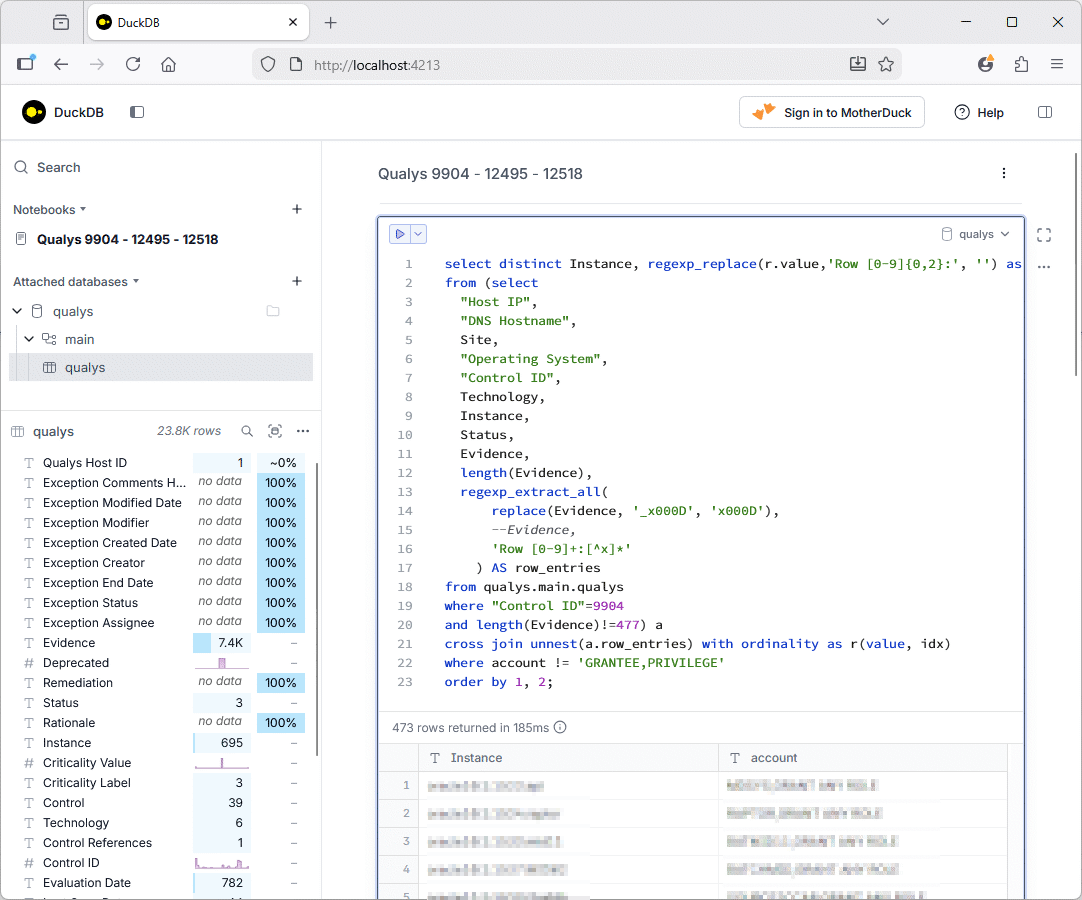
You can also use DBeaver to open and query any DuckDB database (DBeaver will directly open the DuckDB database file) !
Overall the experience is super smooth and even with a 10MB Excel file, once I created the database in DuckDB all queries where almost instantaneous. The list of available default functions is also quite impressive (my test query witness it) !
About Post Author