Spark to handle time series data though Spark Connect
Table of contents
Preamble
Why not managing time series data directly with Apache Spark ? We have started to internally build some expertise around Spark with Databricks so it could be an a solution. From the different article I have seen on internet nothing, as such, forbid the usage of Spark to handle time series data.
There are even few open source initiative to better handle time series in Spark but many of them have been deprecated or abandoned like Flint (Two Sigma), Koalas (Databricks) due to the rise of Pandas API on Spark and its dedicated time series functions on top of all the Pandas cool features…
I plan to use the open source version of Spark and start a cluster on my Linux test machine. To then connect directly from my Windows laptop and benefit from my graphical IDE (VS Code) I plan to use promising Spark Connect feature. Spark Connect allow you tu run locally developed Spark code on a remote Spark cluster and so benefiting from all the debugging and testing feature of your local development environment.
Databricks has also taken Spark Connect into consideration and created on top of it Databricks Connect.
My trial dataset will be the same as my previous time series testing i.e. the NYC Yellow cab information. I am not planning to make prediction with Prophet library that is used in quite a few blog posts.
My test server is running Red Hat Enterprise Linux release 8.10 (Ootpa) and has 12 cores and 64GB of memory. In below I will use Spark 3.5.5 and Scala 2.12. Of course this is far from a real cluster has the same box will run the master and all the executors.
Spark cluster setup
I have created a spark Linux account and a dedicated VxFS mount point under /spark. I have downloaded spark-3.5.5-bin-hadoop3.tgz and unzip it in /spark/spark-3.5.5-bin-hadoop3. I have also installed OpenJDK 17:
[spark@server01 ~]$ java -version
openjdk version "17.0.14" 2025-01-21 LTS
OpenJDK Runtime Environment (Red_Hat-17.0.14.0.7-1) (build 17.0.14+7-LTS)
OpenJDK 64-Bit Server VM (Red_Hat-17.0.14.0.7-1) (build 17.0.14+7-LTS, mixed mode, sharing)
To ease launching scripts I have also added this in the profile of my spark account:
export SPARK_HOME=/spark/spark-3.5.5-bin-hadoop3
export PATH=$PATH:$SPARK_HOME/bin:$SPARK_HOME/sbin
As described in the documentation there are multiple way of deploying a Spark cluster and I’m going to follow the standalone deploy mode which is the simple to deploy…
Start the master with:
[spark@server01 ~]$ start-master.sh
starting org.apache.spark.deploy.master.Master, logging to /spark/spark-3.5.5-bin-hadoop3/logs/spark-spark-org.apache.spark.deploy.master.Master-1-server01.out
I have decided to start two executors of 4 cores and 16GB of memory with:
[spark@server01 ~]$ export SPARK_IDENT_STRING=worker1
[spark@server01 ~]$ start-worker.sh spark://server01.domain.com:7077 --cores 4 --memory 16G --webui-port 8081
starting org.apache.spark.deploy.worker.Worker, logging to /spark/spark-3.5.5-bin-hadoop3/logs/spark-worker1-org.apache.spark.deploy.worker.Worker-1-server01.out
[spark@server01 ~]$ export SPARK_IDENT_STRING=worker2
[spark@server01 ~]$ start-worker.sh spark://server01.domain.com:7077 --cores 4 --memory 16G --webui-port 8082
starting org.apache.spark.deploy.worker.Worker, logging to /spark/spark-3.5.5-bin-hadoop3/logs/spark-worker2-org.apache.spark.deploy.worker.Worker-1-server01.out
Remark:
The (undocumented) SPARK_IDENT_STRING variable is to be able to launch multiple executors on the same server or you get this message when you try to start a second one:
org.apache.spark.deploy.worker.Worker running as process 1725478. Stop it first.
To start Spark Connect you need first to download the Spark Connect jar file from Maven Central Repository that I have put in /spark. The version must match your Scala version as well as your Spark version. Finally start Spark Connect with:
[spark@server01 ~]$ start-connect-server.sh --master spark://server01.domain.com:7077 --jars /spark/spark-connect_2.12-3.5.5.jar
starting org.apache.spark.sql.connect.service.SparkConnectServer, logging to /spark/spark-3.5.5-bin-hadoop3/logs/spark-worker2-org.apache.spark.sql.connect.service.SparkConnectServer-1-server01.out
failed to launch: nice -n 0 bash /spark/spark-3.5.5-bin-hadoop3/bin/spark-submit --class org.apache.spark.sql.connect.service.SparkConnectServer --name Spark Connect server --master spark://server01.domain.com:7077 --jars /spark/spark-connect_2.12-3.5.5.jar
full log in /spark/spark-3.5.5-bin-hadoop3/logs/spark-worker2-org.apache.spark.sql.connect.service.SparkConnectServer-1-server01.out
I have an error with the nice command but at the end Spark Connect application is running. Go with a web browser to the IP address or server name on port 8080:

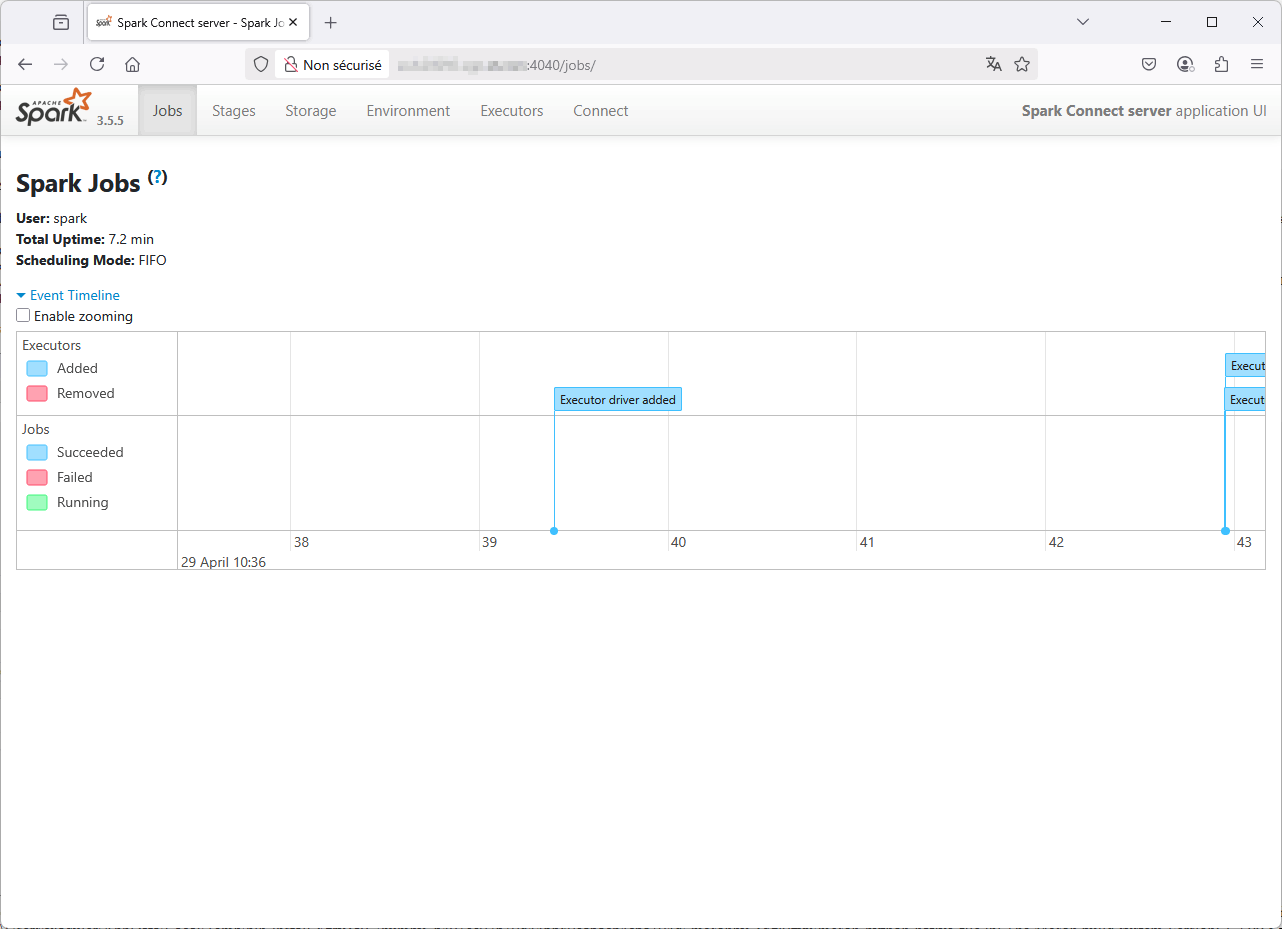
If you go on port 4040 you have also information of all the session run through Spark Connect:
Spark Connect client setup
I use Miniconda on my Windows client to create virtual Python environment (using only conda forge repository for licensing reasons). To create a new spark Conda environment create this YAML environment.yml file:
name: spark
dependencies:
  - python=3.13
Create the Conda environment with:
conda env create --file='C:\Users\yjaquier\environment.yml'
Activate the spark Conda environment (conda activate spark) and as described in official documentation install specific version of Spark Connect with:
pip install pyspark[connect]==3.5.5
using Python 3.13 I had an error doing it:
Preparing metadata (pyproject.toml) ... error
error: subprocess-exited-with-error

× Preparing metadata (pyproject.toml) did not run successfully.
│ exit code: 1
╰─> [21 lines of output]
    + C:\Users\yjaquier\.conda\envs\spark\python.exe C:\Users\yjaquier\AppData\Local\Temp\pip-install-8grv5a9_\numpy_b493ec07b30d446b80ca6acb4c6a304d\vendored-meson\meson\meson.py setup C:\Users\yjaquier\AppData\Local\Temp\pip-install-8grv5a9_\numpy_b493ec07b30d446b80ca6acb4c6a304d C:\Users\yjaquier\AppData\Local\Temp\pip-install-8grv5a9_\numpy_b493ec07b30d446b80ca6acb4c6a304d\.mesonpy-5qgl0zyu -Dbuildtype=release -Db_ndebug=if-release -Db_vscrt=md --native-file=C:\Users\yjaquier\AppData\Local\Temp\pip-install-8grv5a9_\numpy_b493ec07b30d446b80ca6acb4c6a304d\.mesonpy-5qgl0zyu\meson-python-native-file.ini
    The Meson build system
    Version: 1.2.99
    Source dir: C:\Users\yjaquier\AppData\Local\Temp\pip-install-8grv5a9_\numpy_b493ec07b30d446b80ca6acb4c6a304d
    Build dir: C:\Users\yjaquier\AppData\Local\Temp\pip-install-8grv5a9_\numpy_b493ec07b30d446b80ca6acb4c6a304d\.mesonpy-5qgl0zyu
    Build type: native build
    Project name: NumPy
    Project version: 1.26.4
    WARNING: Failed to activate VS environment: Could not find C:\Program Files (x86)\Microsoft Visual Studio\Installer\vswhere.exe

    ..\meson.build:1:0: ERROR: Unknown compiler(s): [['icl'], ['cl'], ['cc'], ['gcc'], ['clang'], ['clang-cl'], ['pgcc']]
    The following exception(s) were encountered:
    Running `icl ""` gave "[WinError 2] The system cannot find the file specified"
    Running `cl /?` gave "[WinError 2] The system cannot find the file specified"
    Running `cc --version` gave "[WinError 2] The system cannot find the file specified"
    Running `gcc --version` gave "[WinError 2] The system cannot find the file specified"
    Running `clang --version` gave "[WinError 2] The system cannot find the file specified"
    Running `clang-cl /?` gave "[WinError 2] The system cannot find the file specified"
    Running `pgcc --version` gave "[WinError 2] The system cannot find the file specified"

    A full log can be found at C:\Users\yjaquier\AppData\Local\Temp\pip-install-8grv5a9_\numpy_b493ec07b30d446b80ca6acb4c6a304d\.mesonpy-5qgl0zyu\meson-logs\meson-log.txt
    [end of output]

note: This error originates from a subprocess, and is likely not a problem with pip.
error: metadata-generation-failed

× Encountered error while generating package metadata.
╰─> See above for output.

note: This is an issue with the package mentioned above, not pip.
hint: See above for details.
So I was looking for a compatibility matrix between PySpark and Python and found it on Spark | PySpark Versions Supportability Matrix where I saw that only Python 3.8 and 3.9 are support with Spark 3.5.x. So recreated the Conda spark environment with Python 3.9 and so this environment.yml file !
name: spark
dependencies:
  - python=3.9
And this time everything went well:
$ pip install pyspark[connect]==3.5.5
Collecting pyspark==3.5.5 (from pyspark[connect]==3.5.5)
  Using cached pyspark-3.5.5.tar.gz (317.2 MB)
  Preparing metadata (setup.py) ... done
Collecting py4j==0.10.9.7 (from pyspark==3.5.5->pyspark[connect]==3.5.5)
  Using cached py4j-0.10.9.7-py2.py3-none-any.whl.metadata (1.5 kB)
Collecting pandas>=1.0.5 (from pyspark[connect]==3.5.5)
  Downloading pandas-2.2.3-cp39-cp39-win_amd64.whl.metadata (19 kB)
Collecting pyarrow>=4.0.0 (from pyspark[connect]==3.5.5)
  Downloading pyarrow-19.0.1-cp39-cp39-win_amd64.whl.metadata (3.4 kB)
Collecting grpcio>=1.56.0 (from pyspark[connect]==3.5.5)
  Downloading grpcio-1.71.0-cp39-cp39-win_amd64.whl.metadata (4.0 kB)
Collecting grpcio-status>=1.56.0 (from pyspark[connect]==3.5.5)
  Using cached grpcio_status-1.71.0-py3-none-any.whl.metadata (1.1 kB)
Collecting googleapis-common-protos>=1.56.4 (from pyspark[connect]==3.5.5)
  Using cached googleapis_common_protos-1.70.0-py3-none-any.whl.metadata (9.3 kB)
Collecting numpy<2,>=1.15 (from pyspark[connect]==3.5.5)
  Downloading numpy-1.26.4-cp39-cp39-win_amd64.whl.metadata (61 kB)
Collecting protobuf!=4.21.1,!=4.21.2,!=4.21.3,!=4.21.4,!=4.21.5,<7.0.0,>=3.20.2 (from googleapis-common-protos>=1.56.4->pyspark[connect]==3.5.5)
  Downloading protobuf-6.30.2-cp39-cp39-win_amd64.whl.metadata (593 bytes)
  Downloading protobuf-5.29.4-cp39-cp39-win_amd64.whl.metadata (592 bytes)
Collecting python-dateutil>=2.8.2 (from pandas>=1.0.5->pyspark[connect]==3.5.5)
  Using cached python_dateutil-2.9.0.post0-py2.py3-none-any.whl.metadata (8.4 kB)
Collecting pytz>=2020.1 (from pandas>=1.0.5->pyspark[connect]==3.5.5)
  Using cached pytz-2025.2-py2.py3-none-any.whl.metadata (22 kB)
Collecting tzdata>=2022.7 (from pandas>=1.0.5->pyspark[connect]==3.5.5)
  Using cached tzdata-2025.2-py2.py3-none-any.whl.metadata (1.4 kB)
Collecting six>=1.5 (from python-dateutil>=2.8.2->pandas>=1.0.5->pyspark[connect]==3.5.5)
  Using cached six-1.17.0-py2.py3-none-any.whl.metadata (1.7 kB)
Using cached py4j-0.10.9.7-py2.py3-none-any.whl (200 kB)
Downloading googleapis_common_protos-1.70.0-py3-none-any.whl (294 kB)
Downloading grpcio-1.71.0-cp39-cp39-win_amd64.whl (4.3 MB)
   ━━━━━━━━━━━━━━━━━━━━━━━━━━━━━━━━━━━━━━━━ 4.3/4.3 MB 8.3 MB/s eta 0:00:00
Downloading grpcio_status-1.71.0-py3-none-any.whl (14 kB)
Downloading numpy-1.26.4-cp39-cp39-win_amd64.whl (15.8 MB)
   ━━━━━━━━━━━━━━━━━━━━━━━━━━━━━━━━━━━━━━━━ 15.8/15.8 MB 4.7 MB/s eta 0:00:00
Downloading pandas-2.2.3-cp39-cp39-win_amd64.whl (11.6 MB)
   ━━━━━━━━━━━━━━━━━━━━━━━━━━━━━━━━━━━━━━━━ 11.6/11.6 MB 5.9 MB/s eta 0:00:00
Downloading pyarrow-19.0.1-cp39-cp39-win_amd64.whl (25.5 MB)
   ━━━━━━━━━━━━━━━━━━━━━━━━━━━━━━━━━━━━━━━━ 25.5/25.5 MB 4.0 MB/s eta 0:00:00
Downloading protobuf-5.29.4-cp39-cp39-win_amd64.whl (434 kB)
Using cached python_dateutil-2.9.0.post0-py2.py3-none-any.whl (229 kB)
Using cached pytz-2025.2-py2.py3-none-any.whl (509 kB)
Using cached tzdata-2025.2-py2.py3-none-any.whl (347 kB)
Using cached six-1.17.0-py2.py3-none-any.whl (11 kB)
Building wheels for collected packages: pyspark
  Building wheel for pyspark (setup.py) ... done
  Created wheel for pyspark: filename=pyspark-3.5.5-py2.py3-none-any.whl size=317747967 sha256=b356e5912f6955c8030286239e5cea9c807d07c8b6547171820bec3febd1a4bf
  Stored in directory: c:\users\yjaquier\appdata\local\pip\cache\wheels\af\de\65\358d44d6c11fd5795dcbda700ff8b7ab3cbcdfde7f4fb1d9fb
Successfully built pyspark
Installing collected packages: pytz, py4j, tzdata, six, pyspark, pyarrow, protobuf, numpy, grpcio, python-dateutil, googleapis-common-protos, pandas, grpcio-status
Successfully installed googleapis-common-protos-1.70.0 grpcio-1.71.0 grpcio-status-1.71.0 numpy-1.26.4 pandas-2.2.3 protobuf-5.29.4 py4j-0.10.9.7 pyarrow-19.0.1 pyspark-3.5.5 python-dateutil-2.9.0.post0 pytz-2025.2 six-1.17.0 tzdata-2025.2
Spark Connect testing
To connect from your client to your Spark cluster the trick is using remote when building the Spark Session. When doing so the driver will be your client and no extra memory are used on the Spark cluster. Then files and directories are the one of the remote server. Ideally this should be HDFS to see the same things from all the physical servers of your Spark cluster. To test it I have done interactively:
>>> from pyspark.sql import SparkSession
>>> spark = SparkSession.builder.remote("sc://server01.domain.com:15002").appName("TimeSeries").getOrCreate()
>>> directory = '/u01/nyc/'
>>> filename = 'yellow_tripdata_2023-01.parquet'
>>> df01 = spark.read.parquet(directory + filename)
>>> df01 = df01[["tpep_pickup_datetime", "tpep_dropoff_datetime", "passenger_count", "trip_distance", "tip_amount", "total_amount"]]
>>> df01 = df01.withColumnsRenamed({'tpep_pickup_datetime': 'started_at', 'tpep_dropoff_datetime': 'ended_at', 'trip_distance': 'distance'})
>>> df01.show(20)
+-------------------+-------------------+---------------+--------+----------+------------+
|         started_at|           ended_at|passenger_count|distance|tip_amount|total_amount|
+-------------------+-------------------+---------------+--------+----------+------------+
|2023-01-01 00:32:10|2023-01-01 00:40:36|            1.0|    0.97|       0.0|        14.3|
|2023-01-01 00:55:08|2023-01-01 01:01:27|            1.0|     1.1|       4.0|        16.9|
|2023-01-01 00:25:04|2023-01-01 00:37:49|            1.0|    2.51|      15.0|        34.9|
|2023-01-01 00:03:48|2023-01-01 00:13:25|            0.0|     1.9|       0.0|       20.85|
|2023-01-01 00:10:29|2023-01-01 00:21:19|            1.0|    1.43|      3.28|       19.68|
|2023-01-01 00:50:34|2023-01-01 01:02:52|            1.0|    1.84|      10.0|        27.8|
|2023-01-01 00:09:22|2023-01-01 00:19:49|            1.0|    1.66|      3.42|       20.52|
|2023-01-01 00:27:12|2023-01-01 00:49:56|            1.0|    11.7|     10.74|       64.44|
|2023-01-01 00:21:44|2023-01-01 00:36:40|            1.0|    2.95|      5.68|       28.38|
|2023-01-01 00:39:42|2023-01-01 00:50:36|            1.0|    3.01|       0.0|        19.9|
|2023-01-01 00:53:01|2023-01-01 01:01:45|            1.0|     1.8|      3.28|       19.68|
|2023-01-01 00:43:37|2023-01-01 01:17:18|            4.0|     7.3|      7.75|       46.55|
|2023-01-01 00:34:44|2023-01-01 01:04:25|            1.0|    3.23|      6.22|       37.32|
|2023-01-01 00:09:29|2023-01-01 00:29:23|            2.0|   11.43|     13.26|       66.31|
|2023-01-01 00:33:53|2023-01-01 00:49:15|            1.0|    2.95|      4.04|       24.24|
|2023-01-01 00:13:04|2023-01-01 00:22:10|            1.0|    1.52|      1.25|       16.25|
|2023-01-01 00:45:11|2023-01-01 01:07:39|            1.0|    2.23|      4.96|       29.76|
|2023-01-01 00:04:33|2023-01-01 00:19:22|            1.0|     4.5|       4.0|        29.5|
|2023-01-01 00:03:36|2023-01-01 00:09:36|            3.0|     1.2|       0.0|        13.6|
|2023-01-01 00:15:23|2023-01-01 00:29:41|            2.0|     2.5|       0.0|        20.6|
+-------------------+-------------------+---------------+--------+----------+------------+
only showing top 20 rows
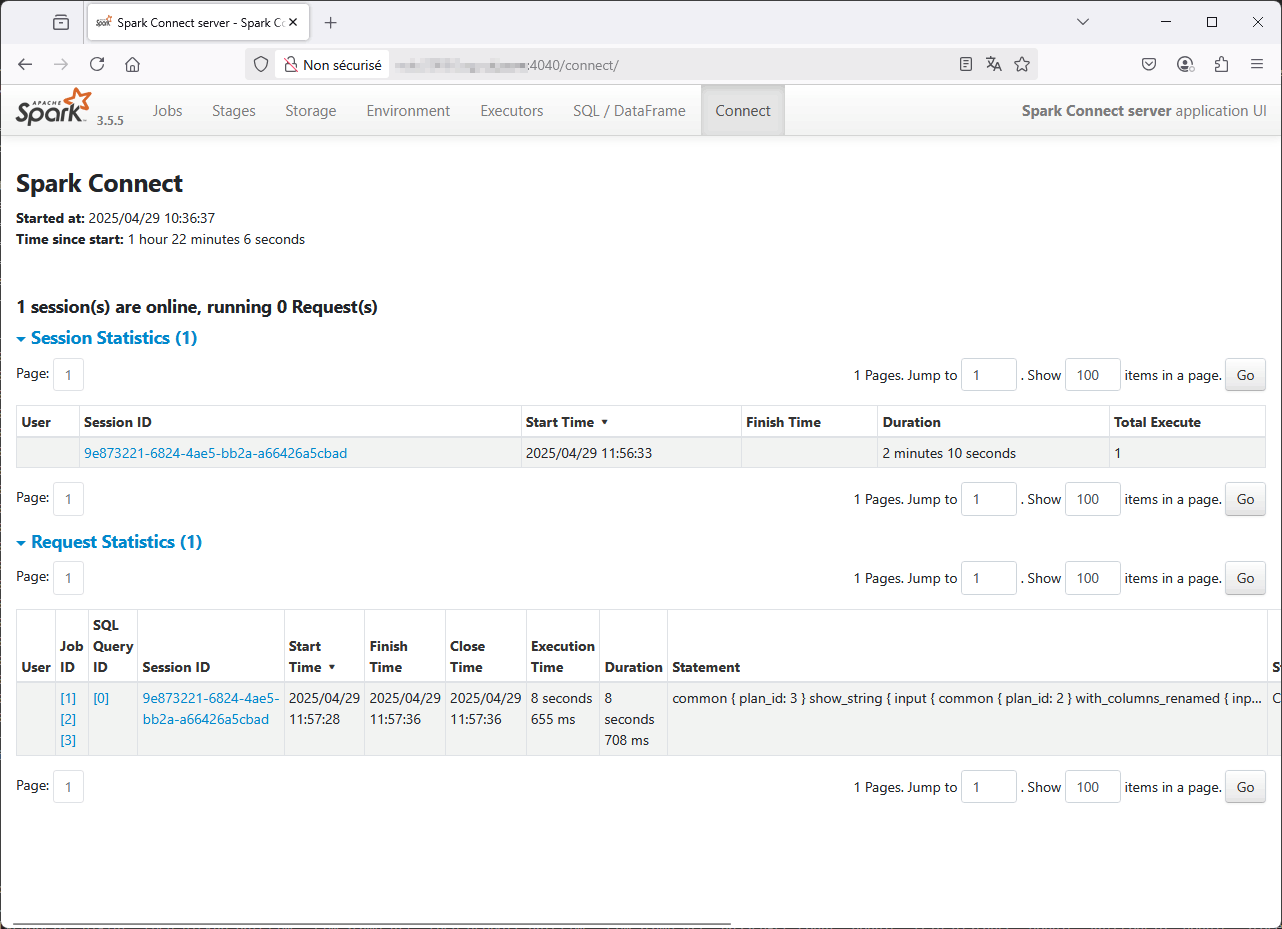
On the Spark Connect graphical interface (port 4040) you can see plenty of interesting information like execution time, Spark execution plan and so on:
But all is not perfect as some basic commands (count, collect) are failing and bug are not yet resolved at the time of writing this blog post:
>>> df01.count()
Traceback (most recent call last):
  File "", line 1, in
  File "C:\Users\yjaquier\.conda\envs\spark\lib\site-packages\pyspark\sql\connect\dataframe.py", line 248, in count
    pdd = self.agg(_invoke_function("count", lit(1))).toPandas()
  File "C:\Users\yjaquier\.conda\envs\spark\lib\site-packages\pyspark\sql\connect\dataframe.py", line 1663, in toPandas
    return self._session.client.to_pandas(query)
  File "C:\Users\yjaquier\.conda\envs\spark\lib\site-packages\pyspark\sql\connect\client\core.py", line 873, in to_pandas
    table, schema, metrics, observed_metrics, _ = self._execute_and_fetch(
  File "C:\Users\yjaquier\.conda\envs\spark\lib\site-packages\pyspark\sql\connect\client\core.py", line 1283, in _execute_and_fetch
    for response in self._execute_and_fetch_as_iterator(req):
  File "C:\Users\yjaquier\.conda\envs\spark\lib\site-packages\pyspark\sql\connect\client\core.py", line 1264, in _execute_and_fetch_as_iterator
    self._handle_error(error)
  File "C:\Users\yjaquier\.conda\envs\spark\lib\site-packages\pyspark\sql\connect\client\core.py", line 1503, in _handle_error
    self._handle_rpc_error(error)
  File "C:\Users\yjaquier\.conda\envs\spark\lib\site-packages\pyspark\sql\connect\client\core.py", line 1539, in _handle_rpc_error
    raise convert_exception(info, status.message) from None
pyspark.errors.exceptions.connect.SparkConnectGrpcException: (org.apache.spark.SparkException) Job aborted due to stage failure: Task 0 in stage 7.0 failed 4 times, most recent failure: Lost task 0.3 in stage 7.0 (TID 19) (10.75.43.64 executor 1): java.lang.ClassCastException: cannot assign instance of java.lang.invoke.SerializedLambda to field org.apache.spark.rdd.MapPartitionsRDD.f of type scala.Function3 in instance of org.apache.spark.rdd.MapPartitionsRDD
        at java.base/java.io.ObjectStreamClass$FieldReflector.setObjFieldValues(ObjectStreamClass.java:2096)
        at java.base/java.io.ObjectStreamClass$FieldReflector.checkObjectFieldValueTypes(ObjectStreamClass.java:2060)
        at java.base/java.io.ObjectStreamClass.checkObjFieldValueTypes(ObjectStreamClass.java:1347)
        at java.base/java.io.ObjectInputStream$FieldValues.defaultCheckFieldValues(ObjectInputStream.java:2679)
        at java.base/java.io.ObjectInputStream.readSerialData(ObjectInputStream.java:2486)
        at java.base/java.io.ObjectInputStream.readOrdinaryObject(ObjectInputStream.java:2257)
        at java.base/java.io.ObjectInputStream.readObject0(ObjectInputStream.java:1733)
        at java.base/java.io.ObjectInputStream$FieldValues.(ObjectInputStream.java:2606)
        at java.base/java.io.ObjectInputStream.readSerialData(ObjectInputStream.java:2457)
        at java.base/java.io.ObjectInputStream.readOrdinaryObject(ObjectInputStream.java:2257)
        at java.base/java.io.ObjectInputStream.readObject0(ObjectInputStream.java:1733)
        at java.base/java.io.ObjectInputStream.readObject(ObjectInputStream.java:509)
        at java.base/java.io.ObjectInputStream.readObject(ObjectInputStream.java:467)
        at org.apache.spark.serializer.JavaDeserializationStream.readObject(JavaSerializer.scala:87)
        at org.apache.spark.serializer.JavaSerializerInstance.deserialize(JavaSerializer.scala:129)
        at org.apache.spark.scheduler.ResultTask.runTask(ResultTask.scala:86)
        at org.apache.spark.TaskContext.runTaskWithListeners(TaskContext.scala:166)
        at org.apache.spark.scheduler.Task.run(Task.scala:141)
        at org.apache.spark.executor.Executor$TaskRunner.$anonfun$run$4(Executor.scala:620)
        at org.apache.spark.util.SparkErrorU...
What is really difficult to overcome of rme is the missing SparkContext:
PySpark: Since Spark 3.4, Spark Connect supports most PySpark APIs, including DataFrame, Functions, and Column. However, some APIs such as SparkContext and RDD are not supported. You can check which APIs are currently supported in the API reference documentation. Supported APIs are labeled “Supports Spark Connect” so you can check whether the APIs you are using are available before migrating existing code to Spark Connect.
Because the Python os package is listing local client files and SparkContext is not available so my crappy file to load all the Parquet files I have…
You can also go for Spark SQL:
>>> df01.createOrReplaceTempView("df01")
>>> spark.sql("select * from df01 limit 10").show()
+-------------------+-------------------+---------------+--------+----------+------------+
|         started_at|           ended_at|passenger_count|distance|tip_amount|total_amount|
+-------------------+-------------------+---------------+--------+----------+------------+
|2023-01-01 00:32:10|2023-01-01 00:40:36|            1.0|    0.97|       0.0|        14.3|
|2023-01-01 00:55:08|2023-01-01 01:01:27|            1.0|     1.1|       4.0|        16.9|
|2023-01-01 00:25:04|2023-01-01 00:37:49|            1.0|    2.51|      15.0|        34.9|
|2023-01-01 00:03:48|2023-01-01 00:13:25|            0.0|     1.9|       0.0|       20.85|
|2023-01-01 00:10:29|2023-01-01 00:21:19|            1.0|    1.43|      3.28|       19.68|
|2023-01-01 00:50:34|2023-01-01 01:02:52|            1.0|    1.84|      10.0|        27.8|
|2023-01-01 00:09:22|2023-01-01 00:19:49|            1.0|    1.66|      3.42|       20.52|
|2023-01-01 00:27:12|2023-01-01 00:49:56|            1.0|    11.7|     10.74|       64.44|
|2023-01-01 00:21:44|2023-01-01 00:36:40|            1.0|    2.95|      5.68|       28.38|
|2023-01-01 00:39:42|2023-01-01 00:50:36|            1.0|    3.01|       0.0|        19.9|
+-------------------+-------------------+---------------+--------+----------+------------+
So at the end my Python script:
from pyspark.sql.window import Window
import pyspark.sql.functions as F
from pyspark.sql import SparkSession
from datetime import datetime

#Create SparkSession
spark = SparkSession.builder.remote("sc://server01.domain.com:15002").appName("TimeSeries").getOrCreate()

directory = '/u01/nyc/'

first = True
for i in range(1, 13):
  filename = f'yellow_tripdata_2023-{i:02}.parquet'
  print("Loading " + filename)
  # df01 = spark.read.parquet(directory + filename)
  df01 = spark.read.parquet(directory + filename)
  df01 = df01[["tpep_pickup_datetime", "tpep_dropoff_datetime", "passenger_count", "trip_distance", "tip_amount", "total_amount"]]
  df01 = df01.withColumnsRenamed({'tpep_pickup_datetime': 'started_at', 'tpep_dropoff_datetime': 'ended_at', 'trip_distance': 'distance'})
  if (first == True):
    trips = df01
    first = False
  else:
    trips = trips.union(df01)
    # print(f"Error loading {filename}: {e}")
  print("Loaded " + filename)

def query01():
  time1=datetime.now()
  trips.select(F.date_part(F.lit('month'), 'started_at').alias('month'), F.extract(F.lit('year'), 'started_at').alias('year'), F.col("total_amount")) \
  .filter('year = 2023') \
  .groupBy("month").agg(F.avg("total_amount").alias("avg"), F.max("total_amount").alias("max"), F.min("total_amount").alias("min")) \
  .orderBy("month") \
  .show()
  time2=datetime.now()
  print(f"Query executed in: {time2-time1}")
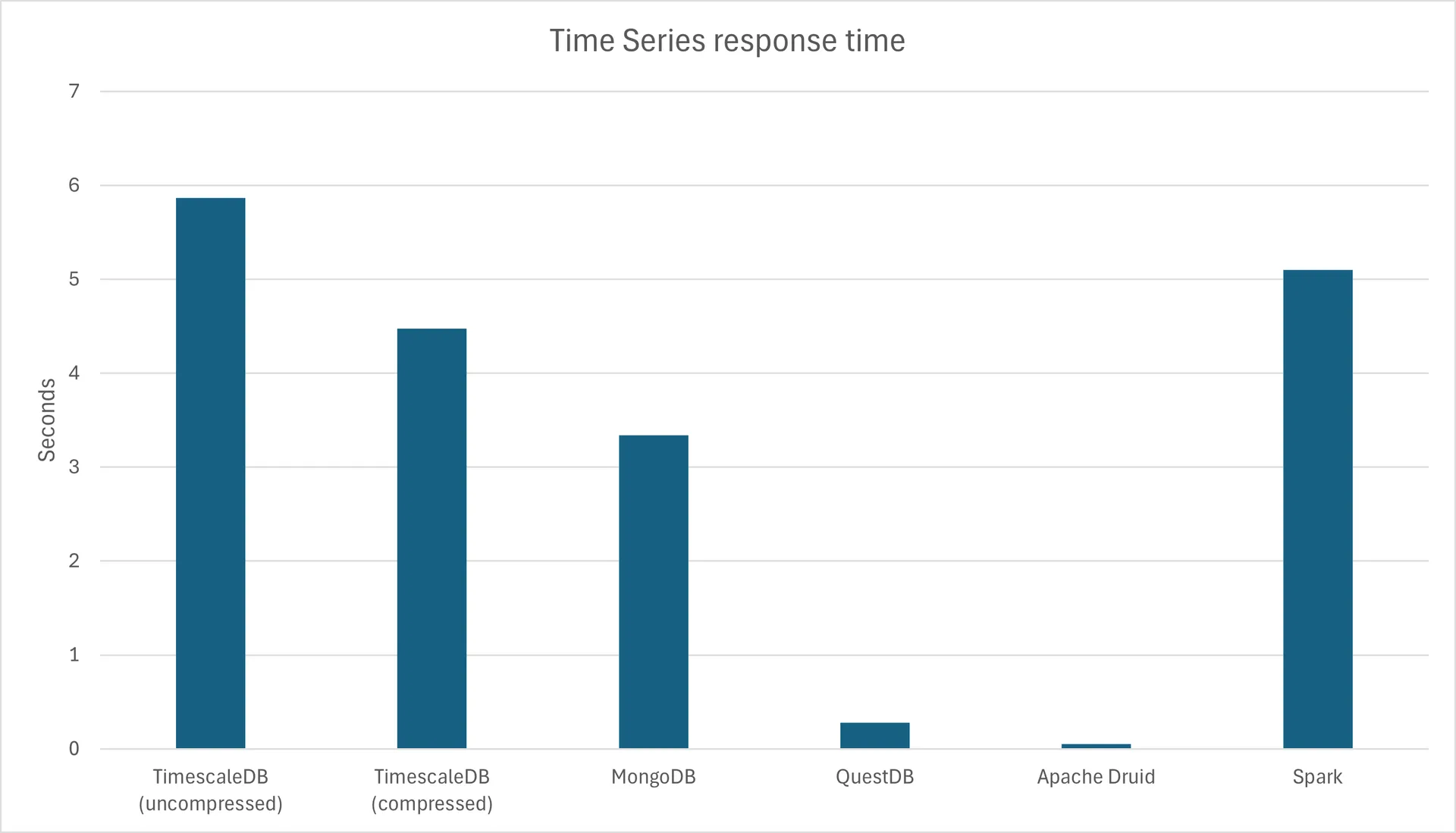
Over 10 runs I had an average of 5.1 seconds to execute my typical query, not bad but not excellent:
To go further with Spark Connect and a Jupyter notebook
I have discovered (better late than never) that by creating a file with ipynb extension it is possible to have a Jupyter environment directly in VS Code. When you open the file in VS Code then a bunch of Jupyter extensions will be installed and you can start writing Python cells like you would do in a Databricks notebook.
When you try to execute a cell in the Conda environment you will get a popup in VS Code asking for ipykernel so in my spark Conda environment I did:
pip install ipykernel
To test the graphical capability of those notebook I have also installed Matplotlib with:
pip install matplotlib
I have found another bug in Spark Connect when converting my Spark DataFram to Pandas DataFrame with toPandas() function, so I have not been able to do the test 100%:
>>> summary_pd = summary.toPandas()
Traceback (most recent call last):
  File "", line 1, in
  File "C:\Users\yjaquier\.conda\envs\spark\lib\site-packages\pyspark\sql\connect\dataframe.py", line 1663, in toPandas
    return self._session.client.to_pandas(query)
  File "C:\Users\yjaquier\.conda\envs\spark\lib\site-packages\pyspark\sql\connect\client\core.py", line 873, in to_pandas
    table, schema, metrics, observed_metrics, _ = self._execute_and_fetch(
  File "C:\Users\yjaquier\.conda\envs\spark\lib\site-packages\pyspark\sql\connect\client\core.py", line 1283, in _execute_and_fetch
    for response in self._execute_and_fetch_as_iterator(req):
  File "C:\Users\yjaquier\.conda\envs\spark\lib\site-packages\pyspark\sql\connect\client\core.py", line 1264, in _execute_and_fetch_as_iterator
    self._handle_error(error)
  File "C:\Users\yjaquier\.conda\envs\spark\lib\site-packages\pyspark\sql\connect\client\core.py", line 1503, in _handle_error
    self._handle_rpc_error(error)
  File "C:\Users\yjaquier\.conda\envs\spark\lib\site-packages\pyspark\sql\connect\client\core.py", line 1539, in _handle_rpc_error
    raise convert_exception(info, status.message) from None
pyspark.errors.exceptions.connect.SparkConnectGrpcException: (org.apache.spark.SparkException) Job aborted due to stage failure: Task 0 in stage 627.0 failed 4 times, most recent failure: Lost task 0.3 in stage 627.0 (TID 2534) (10.75.43.64 executor 0): java.lang.ClassCastException: cannot assign instance of java.lang.invoke.SerializedLambda to field org.apache.spark.rdd.MapPartitionsRDD.f of type scala.Function3 in instance of org.apache.spark.rdd.MapPartitionsRDD
        at java.base/java.io.ObjectStreamClass$FieldReflector.setObjFieldValues(ObjectStreamClass.java:2096)
        at java.base/java.io.ObjectStreamClass$FieldReflector.checkObjectFieldValueTypes(ObjectStreamClass.java:2060)
        at java.base/java.io.ObjectStreamClass.checkObjFieldValueTypes(ObjectStreamClass.java:1347)
        at java.base/java.io.ObjectInputStream$FieldValues.defaultCheckFieldValues(ObjectInputStream.java:2679)
        at java.base/java.io.ObjectInputStream.readSerialData(ObjectInputStream.java:2486)
        at java.base/java.io.ObjectInputStream.readOrdinaryObject(ObjectInputStream.java:2257)
        at java.base/java.io.ObjectInputStream.readObject0(ObjectInputStream.java:1733)
        at java.base/java.io.ObjectInputStream$FieldValues.(ObjectInputStream.java:2606)
        at java.base/java.io.ObjectInputStream.readSerialData(ObjectInputStream.java:2457)
        at java.base/java.io.ObjectInputStream.readOrdinaryObject(ObjectInputStream.java:2257)
        at java.base/java.io.ObjectInputStream.readObject0(ObjectInputStream.java:1733)
        at java.base/java.io.ObjectInputStream.readObject(ObjectInputStream.java:509)
        at java.base/java.io.ObjectInputStream.readObject(ObjectInputStream.java:467)
        at org.apache.spark.serializer.JavaDeserializationStream.readObject(JavaSerializer.scala:87)
        at org.apache.spark.serializer.JavaSerializerInstance.deserialize(JavaSerializer.scala:129)
        at org.apache.spark.scheduler.ResultTask.runTask(ResultTask.scala:86)
        at org.apache.spark.TaskContext.runTaskWithListeners(TaskContext.scala:166)
        at org.apache.spark.scheduler.Task.run(Task.scala:141)
        at org.apache.spark.executor.Executor$TaskRunner.$anonfun$run$4(Executor.scala:620)
        at org.apache.spark.util.Spark...
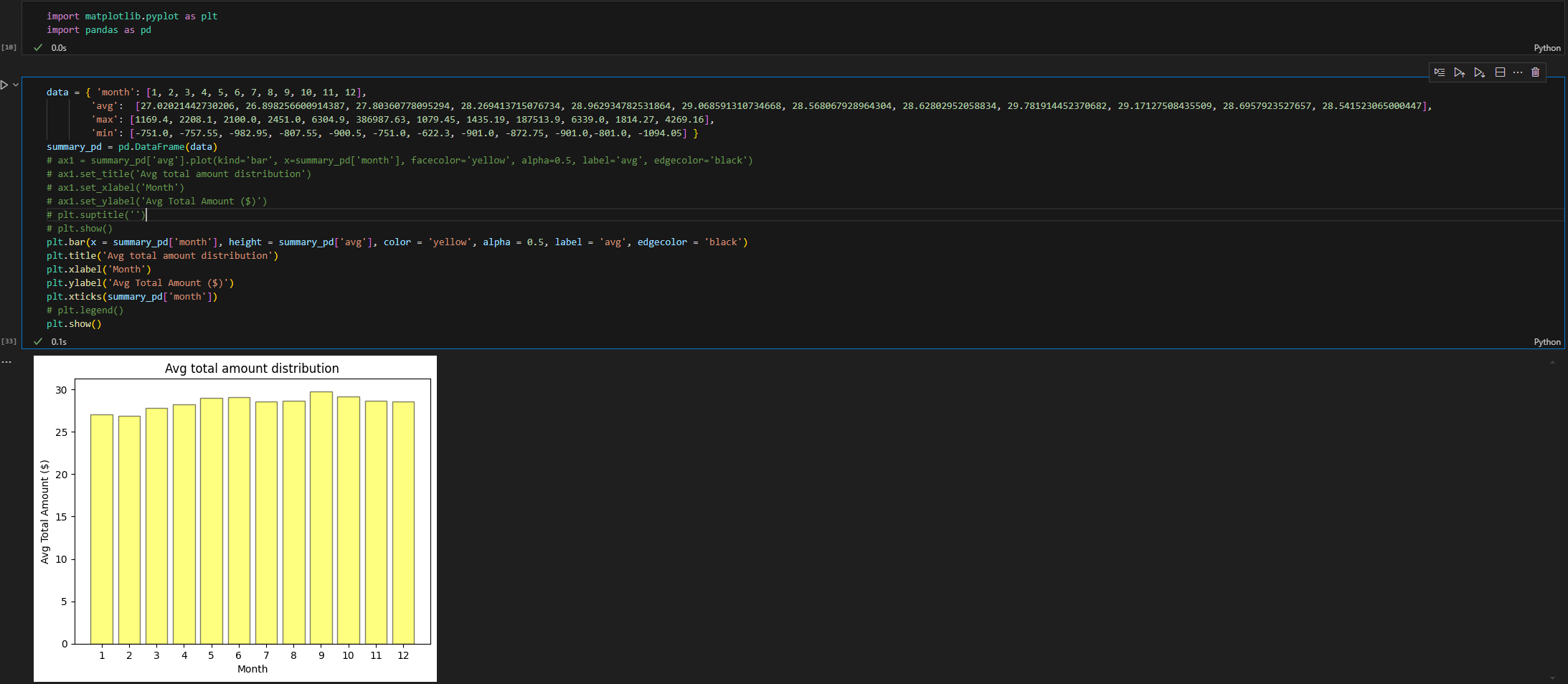
To really see if I was able to display a figure I have copied the data in a simple DataFrame with:
data = { 'month': [1, 2, 3, 4, 5, 6, 7, 8, 9, 10, 11, 12],
        'avg':  [27.02021442730206, 26.898256600914387, 27.80360778095294, 28.269413715076734, 28.962934782531864, 29.068591310734668, 28.568067928964304, 28.62802952058834, 29.781914452370682, 29.17127508435509, 28.6957923527657, 28.541523065000447],
        'max': [1169.4, 2208.1, 2100.0, 2451.0, 6304.9, 386987.63, 1079.45, 1435.19, 187513.9, 6339.0, 1814.27, 4269.16],
        'min': [-751.0, -757.55, -982.95, -807.55, -900.5, -751.0, -622.3, -901.0, -872.75, -901.0,-801.0, -1094.05] }
summary_pd = pd.DataFrame(data)
And it worked pretty well (you can use Pandas plot or directly the one of Matplotlib):
References
- Spark — Leveraging Window functions for time-series analysis in PySpark
- Feature Engineering for Time-Series Using PySpark on Databricks
- Train and evaluate a time series forecasting model
- Scalable Time-Series Forecasting with Spark and Prophet
- Analyze data with Apache Spark and Python
About Post Author