OpenStack release 2 for Oracle Linux installation – part 2
Table of contents
Preamble
I have to say that many of the issue I faced where linked to the VirtualBox installation I have performed. If you install Oracle OpenStack on a real physical server (or in non-free VMWare player product) you might not face any issue.
I say this because VirtualBox in contrary of VMWare player is not supporting nested Virtualization Technology (Intel VMX or AMD-V) and it will apparently not be implemented soon…
As the post would be really two long I have decided to split is in two parts, check out part1.
Oracle OpenStack preparation steps
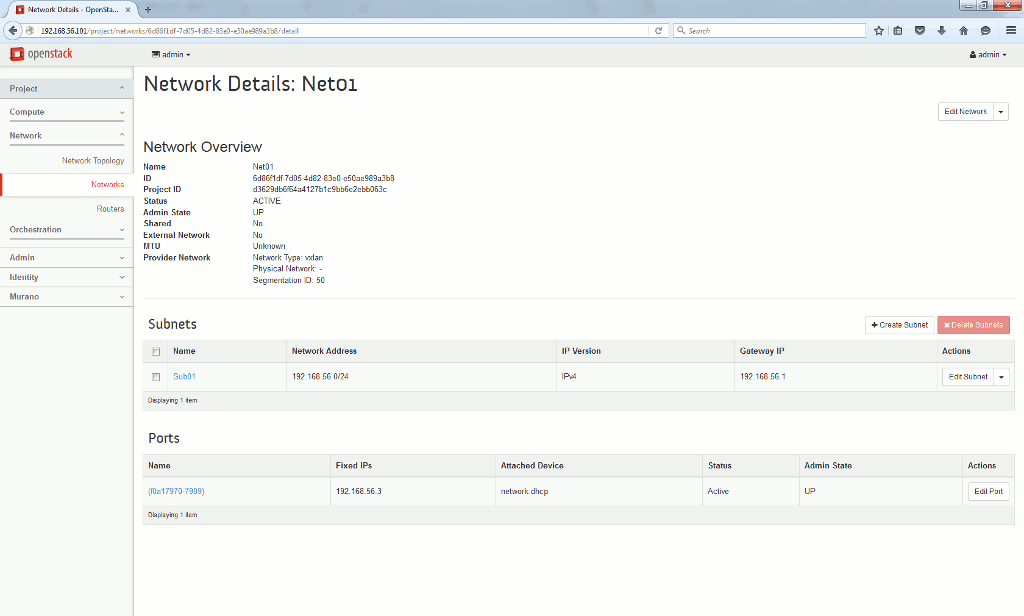
First thing I have done is to configure the mandatory network for my instances. I have chosen the same range as my virtual machine (192.168.56.0/24) and a DHCP allocation around the beginning of the possible IP addresses:
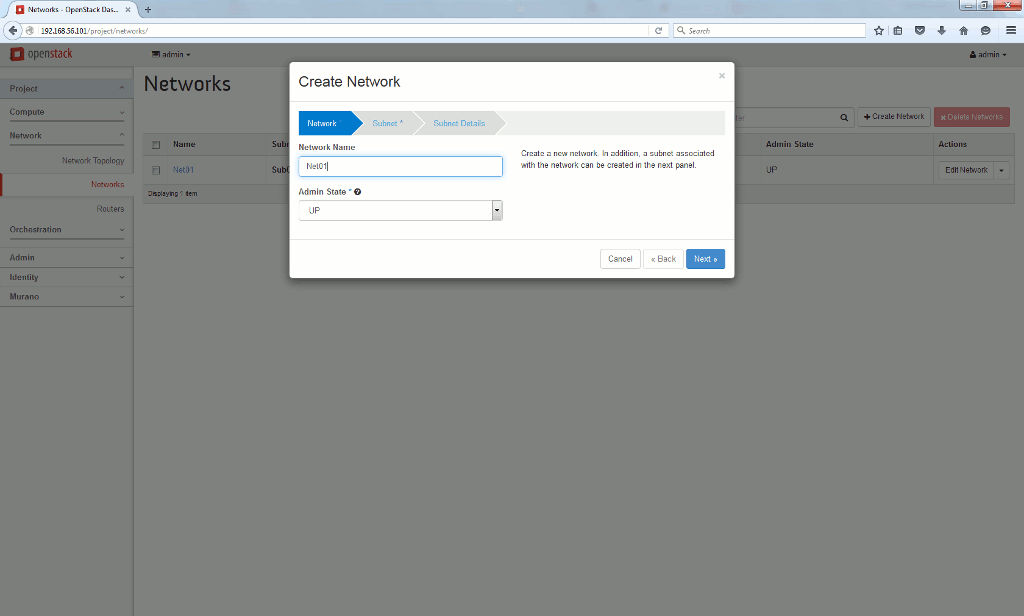
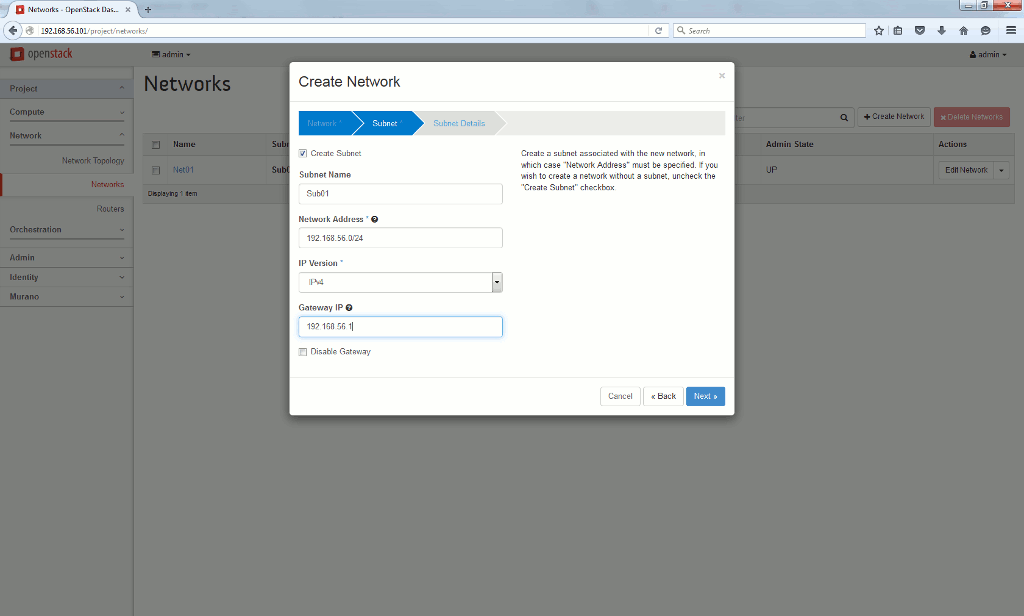
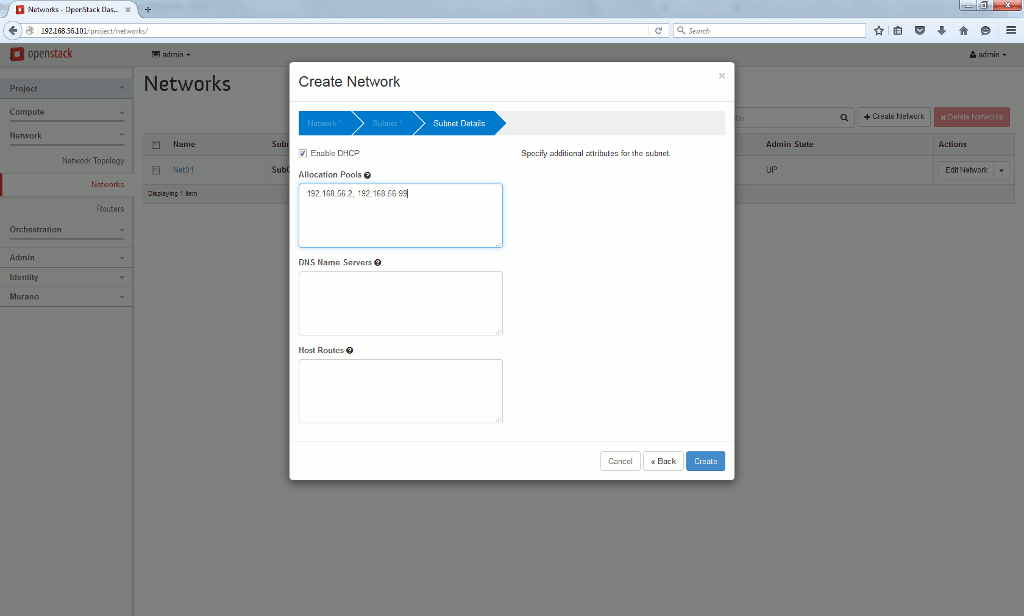
To finally get below network configuration:
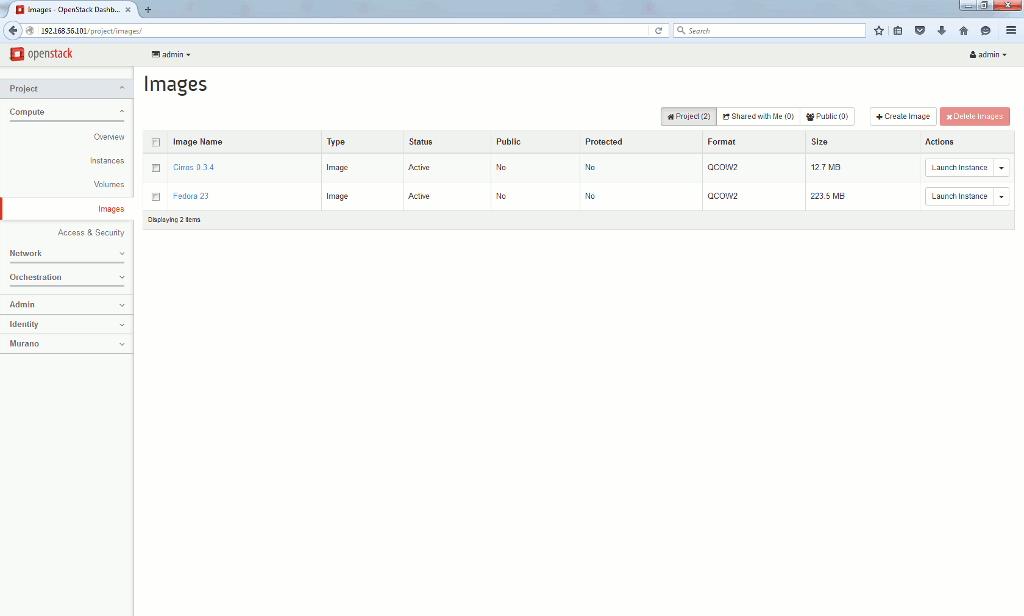
Second step is to download OpenStack images from http://docs.openstack.org/image-guide/obtain-images.html.
I have downloaded and uploaded to my OpenStack server via web interface the one of Cirros for rapid testing and the one of Fedora 23 that I know well:
Launch instances
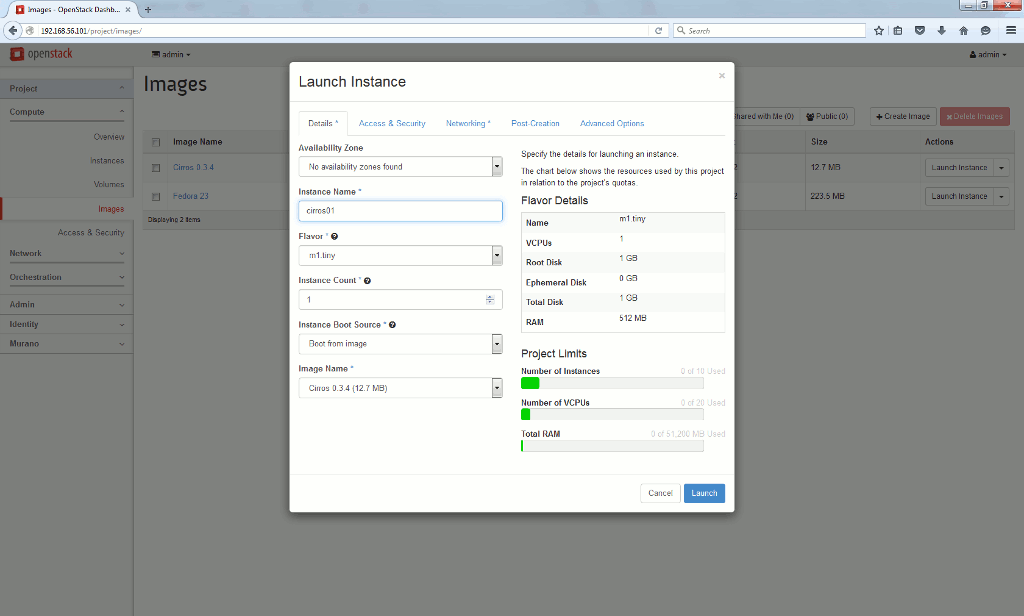
When you have loaded an image you can create an instance of it directly on the image page. I have tested it on Cirros image that is, by definition, a light testing Linux flavor. Choose a name for your image and associate a flavor. A flavor is system allocation to your images (root disk space, cores and memory), you can obviosuly create as many as you like. I choose the tiny one that suit perfectly Cirros:
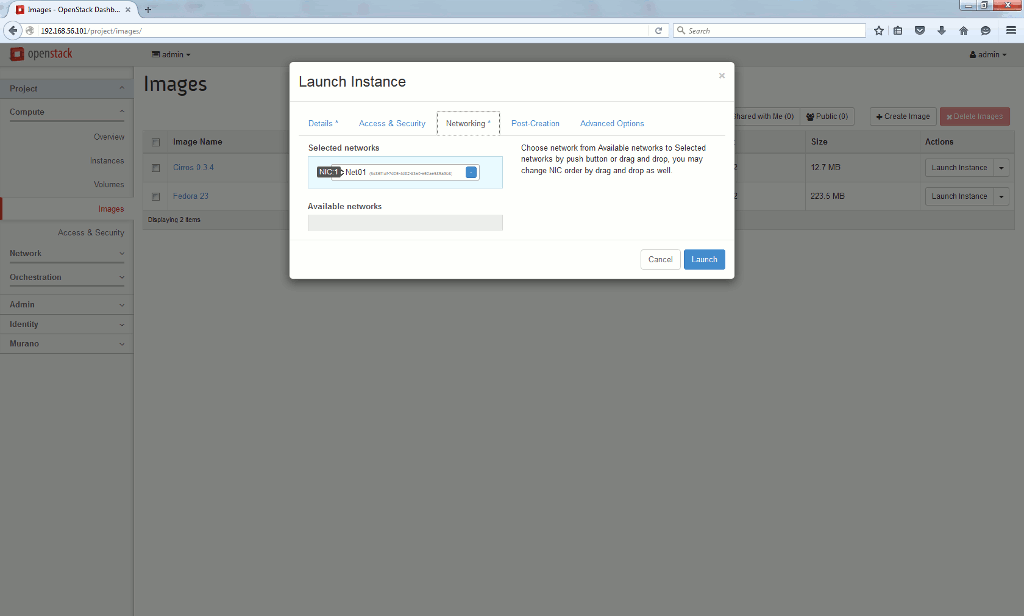
All rest by default except the network, or your instance cannot be created:
But unfortunately it has not gone well:
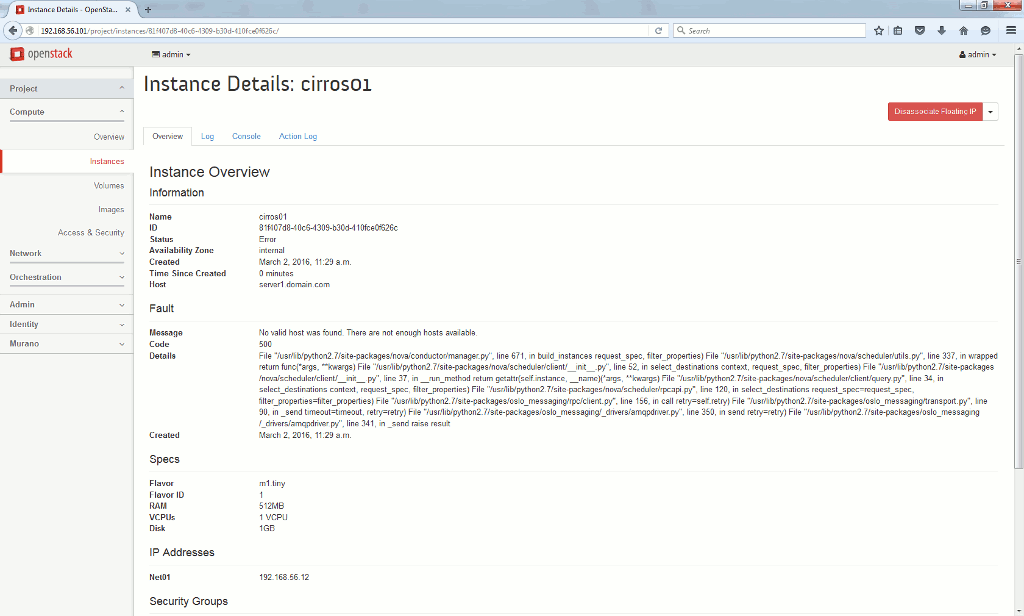
In clear text I got below error message:
Fault

Message
No valid host was found. There are not enough hosts available.
Code
500
Details
File "/usr/lib/python2.7/site-packages/nova/conductor/manager.py", line 671, in build_instances request_spec, filter_properties) File "/usr/lib/python2.7/site-packages/nova/scheduler/utils.py", line 337, in wrapped return func(*args, **kwargs) File "/usr/lib/python2.7/site-packages/nova/scheduler/client/__init__.py", line 52, in select_destinations context, request_spec, filter_properties) File "/usr/lib/python2.7/site-packages/nova/scheduler/client/__init__.py", line 37, in __run_method return getattr(self.instance, __name)(*args, **kwargs) File "/usr/lib/python2.7/site-packages/nova/scheduler/client/query.py", line 34, in select_destinations context, request_spec, filter_properties) File "/usr/lib/python2.7/site-packages/nova/scheduler/rpcapi.py", line 120, in select_destinations request_spec=request_spec, filter_properties=filter_properties) File "/usr/lib/python2.7/site-packages/oslo_messaging/rpc/client.py", line 156, in call retry=self.retry) File "/usr/lib/python2.7/site-packages/oslo_messaging/transport.py", line 90, in _send timeout=timeout, retry=retry) File "/usr/lib/python2.7/site-packages/oslo_messaging/_drivers/amqpdriver.py", line 350, in send retry=retry) File "/usr/lib/python2.7/site-packages/oslo_messaging/_drivers/amqpdriver.py", line 341, in _send raise result
At that step you have to dig a bit inside Docker and reading the official Docker documentation could be useful. My Docker container list is the following, and container to debug for failed instance is nova_compute:
[root@server1 ~]# docker ps
CONTAINER ID        IMAGE                                                                         COMMAND                  CREATED             STATUS              PORTS                    NAMES
2c73c27aefcc        server1.domain.com:5443/oracle/ol-openstack-nova-compute:2.0.2                "/start.sh"              2 days ago          Up 47 hours                                  nova_compute
bcc4123352f9        server1.domain.com:5443/oracle/ol-openstack-mysqlcluster-api:2.0.2            "/start.sh"              2 days ago          Up 2 days                                    mysqlcluster_api
eab9c687c27a        server1.domain.com:5443/oracle/ol-openstack-murano-api:2.0.2                  "/start.sh"              8 days ago          Up 2 days                                    murano_api
f5e4210493ec        server1.domain.com:5443/oracle/ol-openstack-murano-engine:2.0.2               "/start.sh"              8 days ago          Up 2 days                                    murano_engine
240d3e54c1ae        server1.domain.com:5443/oracle/ol-openstack-horizon:2.0.2                     "/start.sh"              8 days ago          Up 2 days                                    horizon
76c359cdb204        server1.domain.com:5443/oracle/ol-openstack-heat-engine:2.0.2                 "/start.sh"              8 days ago          Up 2 days                                    heat_engine
bcd0493c4cff        server1.domain.com:5443/oracle/ol-openstack-heat-api-cfn:2.0.2                "/start.sh"              8 days ago          Up 2 days                                    heat_api_cfn
b51c03e8317f        server1.domain.com:5443/oracle/ol-openstack-heat-api:2.0.2                    "/start.sh"              8 days ago          Up 2 days                                    heat_api
fde6baa590a9        server1.domain.com:5443/oracle/ol-openstack-cinder-volume:2.0.2               "/start.sh"              8 days ago          Up 2 days                                    cinder_volume
23b64b04f2c0        server1.domain.com:5443/oracle/ol-openstack-cinder-scheduler:2.0.2            "/start.sh"              8 days ago          Up 2 days                                    cinder_scheduler
6a002a027c79        server1.domain.com:5443/oracle/ol-openstack-cinder-backup:2.0.2               "/start.sh"              8 days ago          Up 2 days                                    cinder_backup
c0b5b6dafa42        server1.domain.com:5443/oracle/ol-openstack-cinder-api:2.0.2                  "/start.sh"              8 days ago          Up 2 days                                    cinder_api
.
.
I have attached to nova_compute to try to debug a bit:
[root@server1 ~]# docker attach nova_compute
.
.
.
2016-02-29 16:04:24.609 1 ERROR nova.virt.libvirt.driver [req-6ebd375d-c462-48e1-90aa-caf0540c1034 19b412645f174ae3a0318995906541d5 d3629db6f64a4127b1c9bb6e2ebb063c - - -] Error defining a domain with XML: <domain type="kvm">
  <uuid>5e0a6963-d585-4a77-8ca8-3cf8ee5088a9</uuid>
  <name>instance-0000000d</name>
  <memory>524288</memory>
  <vcpu>1</vcpu>
  <metadata>
    <nova:instance xmlns:nova="http://openstack.org/xmlns/libvirt/nova/1.0">
      <nova:package version="2015.1.3">
      <nova:name>cirros01</nova:name>
      <nova:creationtime>2016-02-29 16:04:22</nova:creationtime>
      <nova:flavor name="m1.tiny">
        <nova:memory>512</nova:memory>
        <nova:disk>1</nova:disk>
        <nova:swap>0</nova:swap>
        <nova:ephemeral>0</nova:ephemeral>
        <nova:vcpus>1</nova:vcpus>
      </nova:flavor>
      <nova:owner>
        <nova:user uuid="19b412645f174ae3a0318995906541d5">admin</nova:user>
        <nova:project uuid="d3629db6f64a4127b1c9bb6e2ebb063c">admin</nova:project>
      </nova:owner>
      <nova:root type="image" uuid="06953a9c-54f4-4b89-809c-5220e9d33e35">
    </nova:root></nova:package></nova:instance>
  </metadata>
  <sysinfo type="smbios">
    <system>
      <entry name="manufacturer">OpenStack Foundation</entry>
      <entry name="product">OpenStack Nova</entry>
      <entry name="version">2015.1.3</entry>
      <entry name="serial">7ab3c2a9-7e82-451d-9866-6d5695d252be</entry>
      <entry name="uuid">5e0a6963-d585-4a77-8ca8-3cf8ee5088a9</entry>
    </system>
  </sysinfo>
  <os>
    <type>hvm</type>
    <boot dev="hd">
    <smbios mode="sysinfo">
  </smbios></boot></os>
  <features>
    <acpi>
    <apic>
  </apic></acpi></features>
  <cputune>
    <shares>1024</shares>
  </cputune>
  <clock offset="utc">
    <timer name="pit" tickpolicy="delay">
    <timer name="rtc" tickpolicy="catchup">
    <timer name="hpet" present="no">
  </timer></timer></timer></clock>
  <cpu mode="host-model" match="exact">
    <topology sockets="1" cores="1" threads="1">
  </topology></cpu>
  <devices>
    <disk type="file" device="disk">
      <driver name="qemu" type="qcow2" cache="none">
      <source file="/var/lib/nova/instances/5e0a6963-d585-4a77-8ca8-3cf8ee5088a9/disk">
      <target bus="virtio" dev="vda">
    </target></driver></disk>
    <interface type="bridge">
      <mac address="fa:16:3e:36:7d:b8">
      <model type="virtio">
      <source bridge="qbr57f672a8-e9">
      <target dev="tap57f672a8-e9">
    </target></model></mac></interface>
    <serial type="file">
      <source path="/var/lib/nova/instances/5e0a6963-d585-4a77-8ca8-3cf8ee5088a9/console.log">
    </serial>
    <serial type="pty">
    <input type="tablet" bus="usb">
    <graphics type="vnc" autoport="yes" keymap="en-us" listen="192.168.56.101">
    <video>
      <model type="cirrus">
    </model></video>
    <memballoon model="virtio">
      <stats period="10">
    </stats></memballoon>
  </graphics></serial></devices>
</domain>
2016-02-29 16:04:24.610 1 ERROR nova.compute.manager [req-6ebd375d-c462-48e1-90aa-caf0540c1034 19b412645f174ae3a0318995906541d5 d3629db6f64a4127b1c9bb6e2ebb063c - - -] [instance: 5e0a6963-d585-4a77-8ca8-3cf8ee5088a9] Instance failed to spawn
.
.
.
Looks like it is an error I already have where KVM is not supported on virtual machine where nested virtualization technology is not supported (Intel VMX in my case)…
Investigated a bit in nova.conf file of my nova_compute container:
[root@server1 ~]# docker exec -ti nova_compute tail /etc/nova/nova.conf
auth_plugin = password
project_domain_id = default
user_domain_id = default
project_name = service
username = nova
password = password

[libvirt]
virt_type = kvm
My idea is to change last line and replace virt_type=kvm by virt_type=qemu. Why QEMU ? Mainly because this hypervisor does not need virtualization technology, with a drawback of performance obviously.
After few tests I have exported the running environment of the nova_compute container created by Oracle:
[root@server1 ~]# docker inspect nova_compute > /tmp/nova_compute.txt
[root@server1 ~]# head /tmp/nova_compute.txt
[
{
    "Id": "2c73c27aefcc3538613418427d82f6204a71440d1ef045436ff409179783524b",
    "Created": "2016-03-02T11:22:51.438767627Z",
    "Path": "/start.sh",
    "Args": [],
    "State": {
        "Status": "running",
        "Running": true,
        "Paused": false,
Or:
[root@server1 ~]# docker inspect -f "{{ .Config.Env }}" nova_compute
[KOLLA_CONFIG_STRATEGY=COPY_ALWAYS PATH=/usr/local/sbin:/usr/local/bin:/usr/sbin:/usr/bin:/sbin:/bin HTTPS_PROXY= https_proxy= HTTP_PROXY= http_proxy= PIP_TRUSTED_HOST= PIP_INDEX_URL= KOLLA_BASE_DISTRO=oraclelinux KOLLA_INSTALL_TYPE=source]
I connect to container by running bash:
[root@server1 ~]$ docker exec -ti nova_compute bash
Then edit /etc/nova/nova.cnf file with vi. You can control it has been done after exited from container with:
[root@server1 ~]# docker exec -ti nova_compute tail /etc/nova/nova.conf
project_domain_id = default
user_domain_id = default
project_name = service
username = nova
password = password

[libvirt]
#virt_type = kvm
virt_type = qemu
Once the modification is effective I commit the change and create a new image inside my local registry with (tag is 2.0.2.1, same name):
[root@server1 ~]# docker commit nova_compute server1.domain.com:5443/oracle/ol-openstack-nova-compute:2.0.2.1
0b2d98b31ec9a715362e00d2edc056ac66444f81712f363f0c73f18a4e8917a9
[root@server1 ~]# docker images |grep compute
server1.domain.com:5443/oracle/ol-openstack-nova-compute                 2.0.2.1             0b2d98b31ec9        3 seconds ago       1.678 GB
server1.domain.com:5443/oracle/ol-openstack-nova-compute                 2.0.2               d7df5396a5a7        11 weeks ago        1.678 GB
oracle/ol-openstack-nova-compute                                         2.0.2               d7df5396a5a7        11 weeks ago        1.678 GB
Then the idea is to start a nova_compute like container using the newly created image (notice the start.sh command to be executed at startup). After many unsuccessful test I discovered I had to bind filesystems between main OS and containers. This is not transferred by docker commit command for the newly created image:
[root@server1 ~]# docker run --detach  --volume="/dev:/dev:rw" --volume="/run:/run:rw" --volume="/etc/kolla/nova-compute/:/opt/kolla/nova-compute/:ro" \
--volume="/lib/modules:/lib/modules:ro" --hostname="server1.domain.com" --name nova_compute_new oracle/ol-openstack-nova-compute:2.0.2.1 "/start.sh"
6173d12a9b32935f4270ad1514a4a91061dc94f3b0f5100f7aefe31928f95f50
But still when displaying /etc/nova/nova.conf the chosen hypervisor was still kvm and not qemu, so my modification has not been taken into account…
I investigated in /start.sh command run at container execution (so inside nove_compute container):
[root@server1 ~]# docker exec -ti nova_compute bash
[root@server1 /]# cat /start.sh
#!/bin/bash
set -o errexit

CMD="/usr/bin/nova-compute"
ARGS=""

# Loading common functions.
source /opt/kolla/kolla-common.sh

# Execute config strategy
set_configs

# Load NDB explicitly
modprobe nbd

exec $CMD $ARGS
[root@server1 /]# cat /opt/kolla/kolla-common.sh
#!/bin/bash

set_configs() {
    case $KOLLA_CONFIG_STRATEGY in
        COPY_ALWAYS)
            source /opt/kolla/config-external.sh
            ;;
        COPY_ONCE)
            if [[ -f /configured ]]; then
                echo 'INFO - This container has already been configured; Refusing to copy new configs'
            else
                source /opt/kolla/config-external.sh
                touch /configured
            fi
            ;;

        *)
            echo '$KOLLA_CONFIG_STRATEGY is not set properly'
            exit 1
            ;;
    esac
}
COPY_ALWAYS is the option that is chosen to run nova_compute container (see docker inspect command above) so /opt/kolla/config-external.sh is source as well:
[root@server1 /]# cat /opt/kolla/config-external.sh
#!/bin/bash
SOURCE="/opt/kolla/nova-compute/nova.conf"
TARGET="/etc/nova/nova.conf"
OWNER="nova"

if [[ -f "$SOURCE" ]]; then
    cp $SOURCE $TARGET
    chown ${OWNER}: $TARGET
    chmod 0644 $TARGET
fi
Here is the trick, the file is overwritten at each restart by /opt/kolla/nova-compute/nova.conf that is in fact on my main host due to binds in mount points used to run nova_compute container !!! So the file to modify was simply /etc/kolla/nova-compute/nova.conf on my main host running Docker, then restart nova_compute container and confirm the /ec/nova/nova.conf file has been updated as well (you can also delete the newly created images as not needed anymore):
[root@server1 ~]# tail /etc/kolla/nova-compute/nova.conf
auth_plugin = password
project_domain_id = default
user_domain_id = default
project_name = service
username = nova
password = password

[libvirt]
#virt_type = kvm
virt_type = qemu
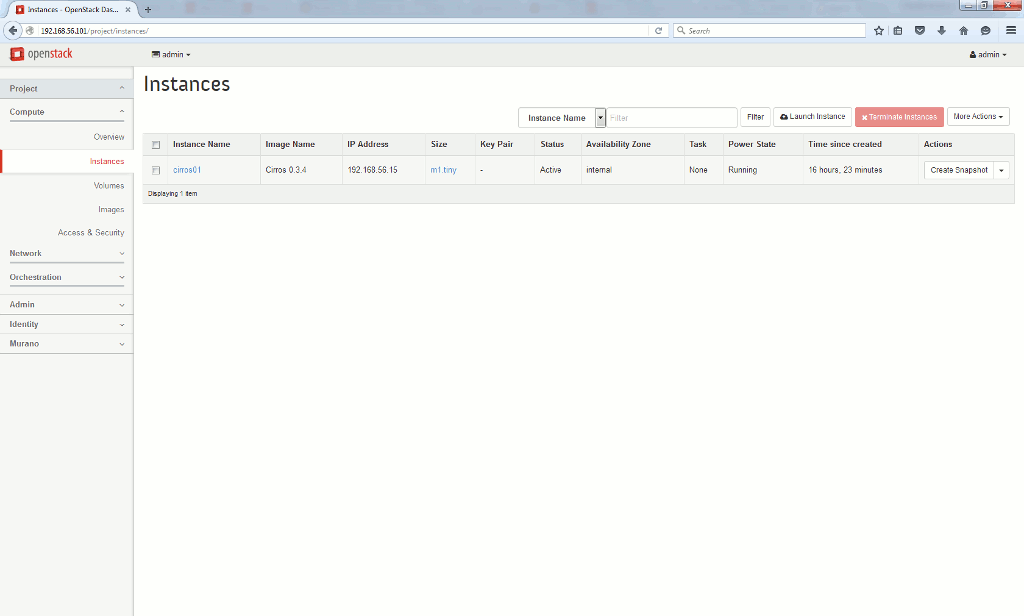
Then my Cirros instance has started successfully this time:
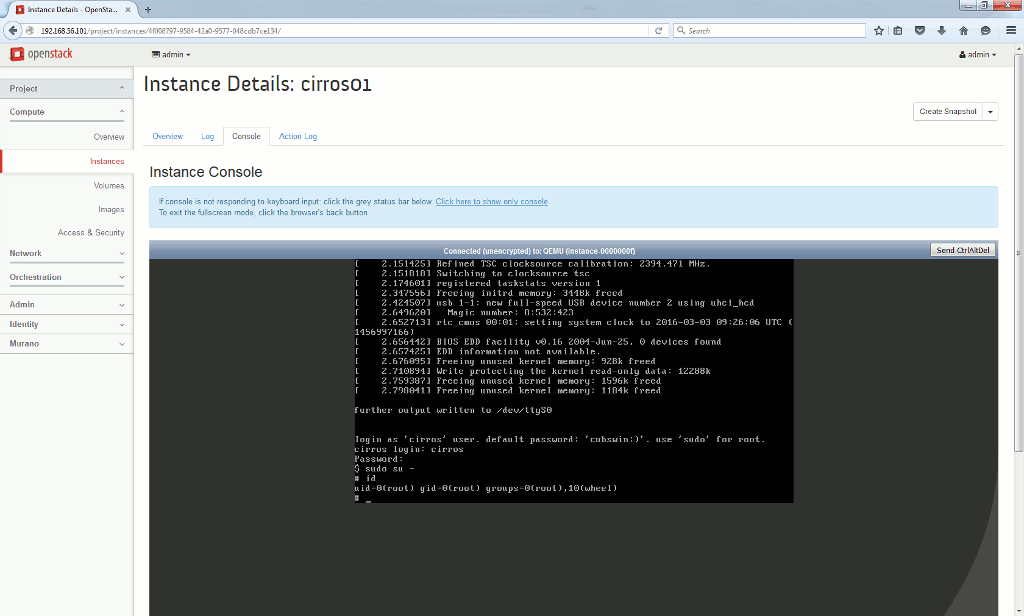
As it is written in a CirrOS image, the login account is cirros. The password is cubswin:). Which was a challenge with the default keyboard layout and my French keyboard. So I have used Alt key and number found in ASCII table to type : and ) character, first action was to change password and confirm root sudo was working:
References
- Use the Docker command line
- Open Stack, attempting to launch instance: libvirtError: unsupported configuration: CPU specification not supported by hypervisor
About Post Author