This blog post is a follow-up of the one on Maxscale NOSQL protocol (http). This is part of the Oracle marketing slides that Oracle database is now a converged architecture where you can store:
Relational
NoSQL / JSON
Graph
Spatial
Media
AI Vector
The part of interest here is the NoSQL / JSON option with the feature called the Oracle Database API for MongoDB. This feature is based on ORDS (Oracle REST Data Services) that I have already tested a long time back. Worth to mention but ORDS is free !
Oracle Database API for MongoDB covers apparently more features than Maxscale NoSQL Protocol. The percentage is more around 80% features covered for application workloads, infrastructure feature, sharding is another story…
The only drawback is the release support by Oracle Database API for MongoDB:
The MongoDB API supports Oracle Database version 21c or later and the Autonomous Oracle Database 19c or later (serverless, dedicated, and cloud@customer). In general, Oracle API for MongoDB supports MongoDB tools and drivers that support the loadBalanced connection option.
21c is an innovation release with premium support ending in July 2027. Most probably you have not even tried it and you surely not have it in any of your databases. The next Long Term Support release 26ai is still not available at the time of writing this blog post. so no real solution as testing using either a 21c (this blog post) or using the container or Virtualbox image of 26ai (see reference section). If you do your testing with 26ai you will be able to also test a cool feature called JSON Relational Duality (https://www.oracle.com/database/json-relational-duality/).
My test server is running Red Hat 8.10 with Oracle 21c (21.20) and with ORDS 25.3.1. They are both running on same server that has 12 cores and 64GB of memory. I have also added a remote 19.25 database in my ORDS central installation testing scenario.
[root@server01 ~]# alternatives --config java

There are 3 programs which provide 'java'.

  Selection    Command
-----------------------------------------------
*  1           java-1.8.0-openjdk.x86_64 (/usr/lib/jvm/java-1.8.0-openjdk-1.8.0.432.b06-2.el8.x86_64/jre/bin/java)
 + 2           java-17-openjdk.x86_64 (/usr/lib/jvm/java-17-openjdk-17.0.15.0.6-2.el8.x86_64/bin/java)
   3           java-21-openjdk.x86_64 (/usr/lib/jvm/java-21-openjdk-21.0.9.0.10-1.el8.x86_64/bin/java)

Enter to keep the current selection[+], or type selection number: 3
[root@server01 ~]# java -version
openjdk version "21.0.9" 2025-10-21 LTS
OpenJDK Runtime Environment (Red_Hat-21.0.9.0.10-1) (build 21.0.9+10-LTS)
OpenJDK 64-Bit Server VM (Red_Hat-21.0.9.0.10-1) (build 21.0.9+10-LTS, mixed mode, sharing)
Download ORDS and unzip it in a folder (the one I have chosen is only for testing):
[oracle@server01 ~]$ unzip -q ords-25.3.1.289.1312.zip -d ords
[oracle@server01 ~]$ cd ords/bin
[oracle@server01 bin]$ ./ords --version
2025-11-20T16:32:21.744Z WARNING     Your configuration folder /home/oracle/ords/bin is located in ORDS product folder.  Oracle recommends to use a different configuration folder.
Refer to Oracle REST Data Services Documentation on how to setup your configuration folder.

ORDS: Release 25.3 Production on Thu Nov 20 16:32:21 2025

Copyright (c) 2010, 2025, Oracle.

Configuration:
  /home/oracle/ords/bin

Oracle REST Data Services 25.3.1.r2891312
I add this path to my .bash_profile:
export PATH=$PATH:~oracle/ords/bin
I have chosen to set my configuration directory in ORDS home even if it is not recommended by Oracle (do not do this in production):
[oracle@server01 ~]$ mkdir ords/conf
Then launch ORDS installation with:
[oracle@server01 ~]$ ords --config /home/oracle/ords/conf --java-options -Djava.io.tmpdir=/home/oracle/tmp install

NOTE: Picked up --java-options : -Djava.io.tmpdir=/home/oracle/tmp
2025-11-21T09:25:46.218Z WARNING     Your configuration folder /home/oracle/ords/conf is located in ORDS product folder.  Oracle recommends to use a different configuration folder.
Refer to Oracle REST Data Services Documentation on how to setup your configuration folder.

ORDS: Release 25.3 Production on Fri Nov 21 09:25:46 2025

Copyright (c) 2010, 2025, Oracle.

Configuration:
  /home/oracle/ords/conf

The configuration folder /home/oracle/ords/conf does not contain any configuration files.

Oracle REST Data Services - Interactive Install

  Enter a number to select the database connection type to use
    [1] Basic (host name, port, service name)
    [2] TNS (TNS alias, TNS directory)
    [3] Custom database URL
  Choose [1]:
  Enter the database host name [localhost]: server01.domain.com
  Enter the database listen port [1521]: 1531
  Enter the database service name [orcl1]: pdb1
  Provide database user name with administrator privileges.
    Enter the administrator username: sys
  Enter the database password for SYS AS SYSDBA:

Retrieving information.
ORDS is not installed in the database. ORDS installation is required.

  Enter a number to update the value or select option A to Accept and Continue
    [1] Connection Type: Basic
    [2] Basic Connection: HOST=server01.domain.com PORT=1531 SERVICE_NAME=pdb1
           Administrator User: SYS AS SYSDBA
    [3] Database password for ORDS runtime user (ORDS_PUBLIC_USER): generate
    [4] ORDS runtime user and schema tablespaces:  Default: SYSAUX Temporary TEMP
    [5] Additional Feature: Database Actions
    [6] Configure and start ORDS in Standalone Mode: Yes
    [7]    Protocol: HTTP
    [8]       HTTP Port: 8080
    [A] Accept and Continue - Create configuration and Install ORDS in the database
    [Q] Quit - Do not proceed. No changes
  Choose [A]: A
The setting named: db.connectionType was set to: basic in configuration: default
The setting named: db.hostname was set to: server01.domain.com in configuration: default
The setting named: db.port was set to: 1531 in configuration: default
The setting named: db.servicename was set to: pdb1 in configuration: default
The setting named: db.username was set to: ORDS_PUBLIC_USER in configuration: default
The setting named: db.password was set to: ****** in configuration: default
The setting named: feature.sdw was set to: true in configuration: default
The global setting named: database.api.enabled was set to: true
The setting named: restEnabledSql.active was set to: true in configuration: default
The global setting named: standalone.http.port was set to: 8080
The global setting named: standalone.doc.root was set to: /home/oracle/ords/conf/global/doc_root
The setting named: security.requestValidationFunction was set to: ords_util.authorize_plsql_gateway in configuration: default
2025-11-21T09:26:07.106Z INFO        Created folder /home/oracle/logs
2025-11-21T09:26:07.106Z INFO        The log file is defaulted to the current working directory located at /home/oracle/logs
2025-11-21T09:26:07.261Z INFO        Installing Oracle REST Data Services version 25.3.1.r2891312 in PDB1
2025-11-21T09:26:09.730Z INFO        ... Verified database prerequisites
2025-11-21T09:26:11.438Z INFO        ... Created Oracle REST Data Services proxy user
2025-11-21T09:26:12.173Z INFO        ... Created Oracle REST Data Services schema
2025-11-21T09:26:14.397Z INFO        ... Granted privileges to Oracle REST Data Services
2025-11-21T09:26:22.072Z INFO        ... Created Oracle REST Data Services database objects
2025-11-21T09:26:50.322Z INFO        Completed installation for Oracle REST Data Services version 25.3.1.r2891312. Elapsed time: 00:00:42.983

2025-11-21T09:26:50.338Z INFO        Log file written to /home/oracle/logs/ords_install_2025-11-21_092607_10689.log
2025-11-21T09:26:50.758Z INFO        HTTP and HTTP/2 cleartext listening on host: 0.0.0.0 port: 8080
2025-11-21T09:26:50.804Z INFO        Disabling document root because the specified folder does not exist: /home/oracle/ords/conf/global/doc_root
2025-11-21T09:26:50.804Z INFO        Default forwarding from / to contextRoot configured.
2025-11-21T09:26:54.545Z INFO        Configuration properties for: |default|lo|
db.connectionType=basic
db.hostname=server01.domain.com
db.port=1531
db.servicename=pdb1
db.username=ORDS_PUBLIC_USER
feature.sdw=true
restEnabledSql.active=true
security.requestValidationFunction=ords_util.authorize_plsql_gateway
database.api.enabled=true
standalone.doc.root=/home/oracle/ords/conf/global/doc_root
standalone.http.port=8080
config.required=true
resource.templates.enabled=false
db.password=******
conf.use.wallet=true

2025-11-21T09:26:54.548Z WARNING     *** jdbc.MaxLimit in configuration |default|lo| is using a value of 10, this setting may not be sized adequately for a production environment ***
2025-11-21T09:26:55.216Z INFO        Created Pool: |default|lo|-2025-11-21T09-26-54.372667239Z at: 2025-11-21T09:26:54.372667239Z
2025-11-21T09:26:55.471Z INFO

Mapped local pools from /home/oracle/ords/conf/databases:
  /ords/                              => default                        => VALID


2025-11-21T09:26:55.483Z INFO        Oracle REST Data Services initialized
Oracle REST Data Services version : 25.3.1.r2891312
Oracle REST Data Services server info: jetty/12.0.25
Oracle REST Data Services java info: OpenJDK 64-Bit Server VM (Red_Hat-21.0.9.0.10-1) (build 21.0.9+10-LTS mixed mode, sharing)
Remark:
Strangely the installation process did not exit but ORDS was working so I pressed CTRL + C and relaunch ORDS with:
You can then access to the graphical interface with a web browser (connection to SQL Developer Web not yet possible):
oracle_database_api_for_mongodb01
Oracle Database API for MongoDB setup
Create an account for testing:
create user mongodb identified by "secure_password" default tablespace users temporary tablespace temp;
grant connect, resource to mongodb;
alter user mongodb quota unlimited on users;
Activate ORDS for this account with (I also activated it for my DBA personal account):
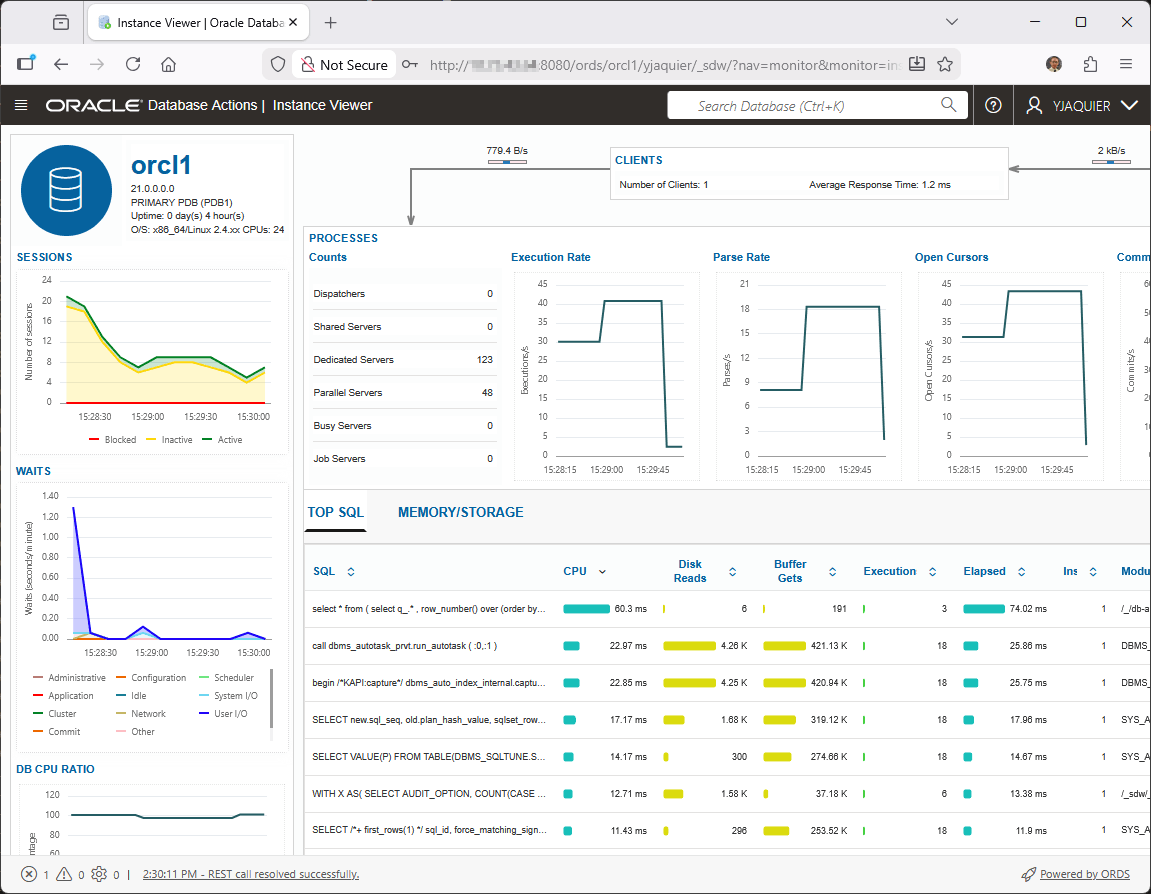
Then you can connect to SQL Developer Web on ORDS landing page as your account has been activated to be able to connect with SQL Developer Web (on 21c the Performance Hub is cool even if my test database has no activity):
oracle_database_api_for_mongodb02
Enable MongoDB API with, as well as setting few parameters (https://docs.oracle.com/en/database/oracle/oracle-rest-data-services/25.3/ordig/enabling-and-configuring-oracle-database-api-mongodb.html#GUID-9EF30803-F486-48E8-955D-1F4E04837BFE) if required:
[oracle@server01 ~]$ ords --config /home/oracle/ords/conf config set mongo.enabled true
2025-11-21T11:33:08.717Z WARNING     Your configuration folder /home/oracle/ords/conf is located in ORDS product folder.  Oracle recommends to use a different configuration folder.
Refer to Oracle REST Data Services Documentation on how to setup your configuration folder.

ORDS: Release 25.3 Production on Fri Nov 21 11:33:08 2025

Copyright (c) 2010, 2025, Oracle.

Configuration:
  /home/oracle/ords/conf

The global setting named: mongo.enabled was set to: true
[oracle@server01 ~]$ ords --config /home/oracle/ords/conf config set mongo.port 27017
2025-11-21T11:33:48.572Z WARNING     Your configuration folder /home/oracle/ords/conf is located in ORDS product folder.  Oracle recommends to use a different configuration folder.
Refer to Oracle REST Data Services Documentation on how to setup your configuration folder.

ORDS: Release 25.3 Production on Fri Nov 21 11:33:48 2025

Copyright (c) 2010, 2025, Oracle.

Configuration:
  /home/oracle/ords/conf

The global setting named: mongo.port was set to: 27017
Unlike Maxscale NoSQL protocol I’m, this time, trying with latest MongoDS Shell tool (2.5.9). As mentionned in official documentation I have used –tlsAllowInvalidCertificates to avoid the problem with self signed certificate:
PS D:\Download\mongosh-2.5.9-win32-x64\bin> .\mongosh.exe --tlsAllowInvalidCertificates "mongodb://server01.domain.com:27017/mongodb?authMechanism=PLAIN&authSource=\$external&ssl=true&retryWrites=false&loadBalanced=true" --username mongodb --password secure_password
Current Mongosh Log ID: 69206e37f792c95eba63b111
Connecting to:          mongodb://credentials@server01.domain.com:27017/mongodb?authMechanism=PLAIN&authSource=%5C&ssl=true&retryWrites=false&loadBalanced=true&tlsAllowInvalidCertificates=true&appName=mongosh+2.5.9
Using MongoDB:          7.0.22
Using Mongosh:          2.5.9

For mongosh info see: https://www.mongodb.com/docs/mongodb-shell/

mongodb>
Oracle Database API for MongoDB testing
Connected with MongoDB shell 2.5.9 I do the same exact dummy testing I have done with Maxscale NoSQL protocol:
SQL> desc employee_collection;

Name             Null?       Type
________________ ___________ ________________
ID               NOT NULL    VARCHAR2(255)
CREATED_ON       NOT NULL    TIMESTAMP(6)
LAST_MODIFIED    NOT NULL    TIMESTAMP(6)
VERSION          NOT NULL    VARCHAR2(255)
DATA                         JSON
SQL> select json_value(data, '$.id') as id, json_value(data, '$.name') as name from mongodb.employee_collection;

ID    NAME
_____ ________________________
1     Yannick Jaquier
2     Keanu Reeves
3     Arnold Schwarzenegger
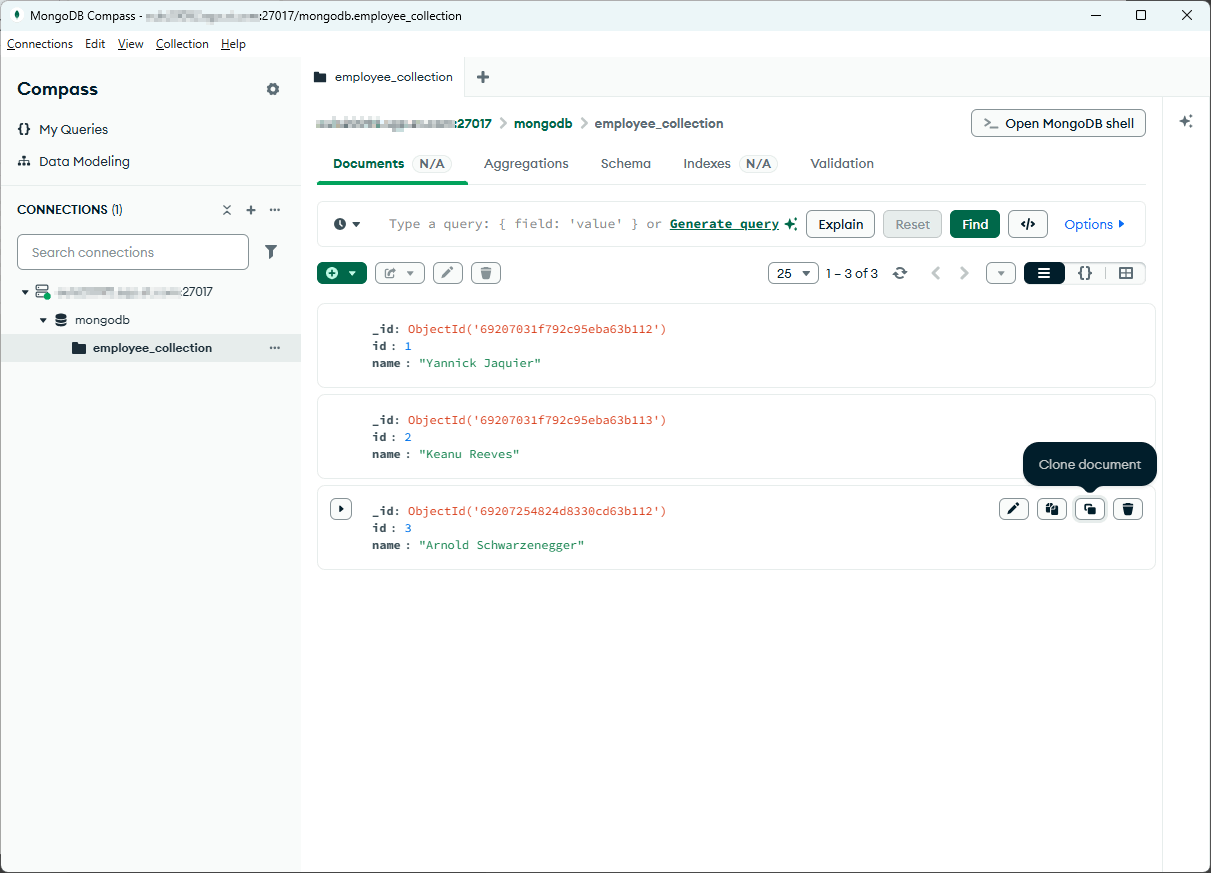
Unlike Maxscale NoSQL protocol, with ORDS you can use MongoDB Compass to connect to Oracle Database API for MongoDB. I had to manually edit the connection string to add loadBalanced=true and authMechanism=PLAIN. Options tlsAllowInvalidCertificates=true and tls=true can be selected through the graphical interface:
oracle_database_api_for_mongodb03
ORDS central installation
There is an option to install ORDS in a central server (why not the one running Oracle Cloud Control / Oracle Enterprise Manager) and access to as many databases as you like from a central server ?
As I have remote_login_passwordfile = exclusive for the database I plan to add. I had to create a password file for SYS to be able to connect from remote. There is a script (ords_installer_privileges.sql) to install ORDS with non-SYS accounts but I rate it equally complex:
[orare@server02 dbs]$ orapwd file=orapwpdb2 sys=password

Enter password for SYS:
[orare@server02 dbs]$ ll orapwpdb2
-rw-r----- 1 orare dba 6144 Nov 25 12:58 orapwpdb2
I launch again the install process (ORDS still running):
[oracle@server01 ~]$ ords --config /home/oracle/ords/conf --java-options -Djava.io.tmpdir=/home/oracle/tmp install

NOTE: Picked up --java-options : -Djava.io.tmpdir=/home/oracle/tmp
2025-11-25T11:01:59.863Z WARNING     Your configuration folder /home/oracle/ords/conf is located in ORDS product folder.  Oracle recommends to use a different configuration folder.
Refer to Oracle REST Data Services Documentation on how to setup your configuration folder.

ORDS: Release 25.3 Production on Tue Nov 25 11:01:59 2025

Copyright (c) 2010, 2025, Oracle.

Configuration:
  /home/oracle/ords/conf

Oracle REST Data Services - Interactive Install

  Enter a number to select the database pool to upgrade ORDS or create an additional database pool
    [1] default      jdbc:oracle:thin:@//server01.domain.com:1531/pdb1
    [C] Create an additional database pool
  Choose [1]: C
  Enter the database pool name: pdb2
  Enter a number to select the database connection type to use
    [1] Basic (host name, port, service name)
    [2] TNS (TNS alias, TNS directory)
    [3] Custom database URL
  Choose [1]:
  Enter the database host name [localhost]: server02.domain.com
  Enter the database listen port [1521]: 1556
  Enter the database service name [orcl1]: pdb2
  Provide database user name with administrator privileges.
    Enter the administrator username: system
  Enter the database password for system:

Retrieving information.
ORDS is not installed in the database. ORDS installation is required.

  Enter a number to update the value or select option A to Accept and Continue
    [1] Connection Type: Basic
    [2] Basic Connection: HOST=server02.domain.com PORT=1556 SERVICE_NAME=pdb2
           Administrator User: system
    [3] Database password for ORDS runtime user (ORDS_PUBLIC_USER): generate
    [4] ORDS runtime user and schema tablespaces:  Default: SYSAUX Temporary TEMP
    [5] Additional Feature: Database Actions
    [6] Configure and start ORDS in Standalone Mode: Yes
    [7]    Protocol: HTTP
    [8]       HTTP Port: 8080
    [A] Accept and Continue - Create configuration and Install ORDS in the database
    [Q] Quit - Do not proceed. No changes
  Choose [A]:
The setting named: db.connectionType was set to: basic in configuration: pdb2
The setting named: db.hostname was set to: server02.domain.com in configuration: pdb2
The setting named: db.port was set to: 1556 in configuration: pdb2
The setting named: db.servicename was set to: pdb2 in configuration: pdb2
The setting named: db.username was set to: ORDS_PUBLIC_USER in configuration: pdb2
The setting named: db.password was set to: ****** in configuration: pdb2
The setting named: feature.sdw was set to: true in configuration: pdb2
The setting named: restEnabledSql.active was set to: true in configuration: pdb2
The setting named: security.requestValidationFunction was set to: ords_util.authorize_plsql_gateway in configuration: pdb2
2025-11-25T11:02:28.764Z INFO        The log file is defaulted to the current working directory located at /home/oracle/logs/
2025-11-25T13:28:30.218Z INFO        Installing Oracle REST Data Services version 25.3.1.r2891312 in NON_CDB
2025-11-25T13:28:32.346Z INFO        ... Verified database prerequisites
2025-11-25T13:28:32.861Z INFO        ... Created Oracle REST Data Services proxy user
2025-11-25T13:28:33.646Z INFO        ... Created Oracle REST Data Services schema
2025-11-25T13:28:34.335Z INFO        ... Granted privileges to Oracle REST Data Services
2025-11-25T13:28:36.823Z INFO        ... Created Oracle REST Data Services database objects
2025-11-25T13:28:48.071Z INFO        Completed installation for Oracle REST Data Services version 25.3.1.r2891312. Elapsed time: 00:00:17.783

2025-11-25T13:28:48.084Z INFO        Log file written to /home/oracle/logs/ords_install_2025-11-25_132830_13336.log
Then in /home/oracle/ords/conf/databases I moved default initial installation to pdb1:
[oracle@server01 databases]$ ll
total 0
drwxr-x--- 3 oracle dba 36 Nov 21 10:26 default
drwxr-x--- 3 oracle dba 49 Nov 25 14:40 pdb2
[oracle@server01 databases]$ mv default pdb1
In each database configuration folder I create a paths file, as explained in official documentation (https://docs.oracle.com/en/database/oracle/oracle-rest-data-services/25.3/ordig/configuring-additional-databases.html), in each of the paths file I have added the database name (i.e. paths text file in pdb1 directory contains pdb1 and so on):
Then you can go to different urls like http://ords_central_sever.domain.com:8080/ords/pdb1 or http://ords_central_sever.domain.com:8080/ords/pdb2 and so on for each new database configuration you add !
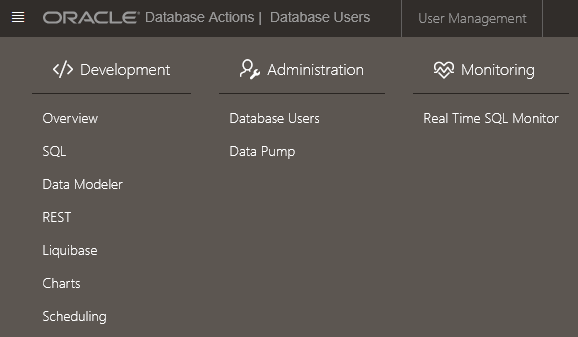
Even if the second database I added is in 19.25 the monitoring section is really poor. This is explained in documentation (https://docs.oracle.com/en/database/oracle/sql-developer-web/index.html), it is always available in 21c even if not specified in clear:
oracle_database_api_for_mongodb04
Errors encountered
Jansi native library loading issue
While installing ORDS I got:
Failed to load native library:jansi-2.4.1-e59969c065e73dd-libjansi.so. The native library file at /tmp/jansi-2.4.1-e59969c065e73dd-libjansi.so is not executable,
make sure that the directory is mounted on a partition without the noexec flag, or set the jansi.tmpdir system property to point to a proper location.
This is due to my /tmp mount options that, if I’m not wrong, have been set for security reasons:
[oracle@server01 ~]$ mount | grep /tmp
/dev/mapper/vg00-lvol6 on /tmp type xfs (rw,nosuid,nodev,noexec,relatime,attr2,inode64,logbufs=8,logbsize=256k,sunit=512,swidth=512,noquota)
Either change the noexec option for /tmp (not suggested) or set this java options when installing ORDS: (setting TMPDIR environment variable to a directory without the noexec flag does not work):
--java-options -Djava.io.tmpdir=/home/oracle/tmp
Inspired from MOPS note SQLcl Fails With Exception in thread main java.lang.UnsatisfiedLinkError Could not load library (Doc ID 2778399.1).
ORDS installation with non-SYS account
Complete error message:
Error, the administrator user: system does not have the privileges to install ORDS.
You will need to do the following to provide privileges and reinstall ORDS in the database:
- Ensure that the administrator user: system has the appropriate privileges to install ORDS.
- To reinstall ORDS in the database, you will need to uninstall ORDS and then install ORDS in the database.
See Oracle REST Data Services documentation on how to 1) provide privileges to a non-SYS user to install ORDS, and 2) uninstall ORDS from the database and install ORDS again.
It is preferrable to install ORDS with SYS account. Connecting with SYS from remote might violate your security policy, you can grant to another account the rights to install ORDS but you execute an Oracel provided script before.