One of our suppliers is now having MongoDB in one of their component. Problem is that we have no expertise and it would be another database (NoSQL) on top of our already long list of RDBMS that we manage internally. It’s not at all that we are against MongoDB, but another constraint of this infrastructure is to be on-premise to continue to run in case of network issue, which forbid MongoDB Atlas (PaaS)…
Maxscale NoSQL Protocol is one option and I wanted to see if it could avoid adding a new, NoSQL, database in our standard. Indeed we have good MariaDB internal knowledge but, so far, Maxscale is not used and new to us…
Maxscale is not a free product and you must have a MariaDB subscription to use it ! There is anyways a 14-days trial located at this link.
As we have a MariaDB subscription I have taken the official package to see if the tool could help us to avoid to build an infrastructure to avoid installing MongoDB. Spoiler alert this would not be a complete drop in of MongoDB as the advanced feature are not there. MariaDB is claiming to cover 30% of the MongoDB feature. So it would work for basic feature, which is exactly what I will test…
My test server is running Red Hat 8.10 with Maxscale 25.10 and MariaDB 11.8.4. They are both running on same server that has 12 cores and 64GB of memory.
Maxscale installation
Each time I try to choose the bintar installation that allow me to install the product in the directory of my choice and not pollute the default /var, /etc and so on directories of my server. Finding the bintar for Red Hat 8 was not a piece of cake as in bintar directory there is only Red Hat 9 and 10 and for release 9 only the Power 64 architecture ! I had to go in rocky directory of bintar to find the x86_64 architecture for Red Hat 8…
I have created a dedicated maxscale Linux account in users group:
[root@server01 ~]# useradd -m -g users maxscale
And untar in home directory (do not do this in production) the tar file with:
drop user if exists 'maxscale_monitor'@'maxscalehost';
create user if not exists 'maxscale_monitor'@'maxscalehost' identified by 'secure_password';
grant replication client on *.* to 'maxscale_monitor'@'maxscalehost';
grant replica monitor on *.* to 'maxscale_monitor'@'maxscalehost';
grant file on *.* to 'maxscale_monitor'@'maxscalehost';
grant connection admin on *.* to 'maxscale_monitor'@'maxscalehost';
Remark: As Maxscale is running on same server as my MariaDB instance I should have used localhost instead of maxscalehost. But Maxscale is connecting remotely and if like me you have skip_name_resolve in your my.cnf file then chose wisely (spoiler: I used directly the IP Address).
This service account requires pretty high privileges because it will act as a proxy for the account you will really use. In other words you will NOT communicate this account to your end users and they will continue to use their own accounts:
drop user if exists 'maxscale'@'%';
create user if not exists 'maxscale'@'%' identified by 'secure_password';
grant select on mysql.user to 'maxscale'@'%';
grant select on mysql.db to 'maxscale'@'%';
grant select on mysql.tables_priv to 'maxscale'@'%';
grant select on mysql.columns_priv to 'maxscale'@'%';
grant select on mysql.procs_priv to 'maxscale'@'%';
grant select on mysql.proxies_priv to 'maxscale'@'%';
grant select on mysql.global_priv to 'maxscale'@'%';
grant select on mysql.roles_mapping to 'maxscale'@'%';
grant show databases on *.* to 'maxscale'@'%';
grant set user on *.* to 'maxscale'@'%';
To create object and test the connections with MariaDB protocol and MongoDB protocol (Maxscale NoSQL protocol) I create a test user. I create account mongodb with all privileges on my test database. To forbid your users to connect directly on your database and force them to use Maxscale you can create them with @’maxscalehost’ or simply @’%’ to ease my testing:
MariaDB [(none)]> create database test character set utf8mb4 collate utf8mb4_general_ci comment 'My test database';
Query OK, 1 row affected (0.001 sec)

MariaDB [(none)]> drop user if exists 'mongodb'@'%';
Query OK, 0 rows affected, 1 warning (0.002 sec)

MariaDB [(none)]> create user if not exists 'mongodb'@'%' identified by 'secure_password';
Query OK, 0 rows affected (0.002 sec)

MariaDB [(none)]> grant all privileges on test.* to 'mongodb'@'%';
Query OK, 0 rows affected (0.001 sec)
Maxscale NoSQL protocol configuration
Maxscale configuration file
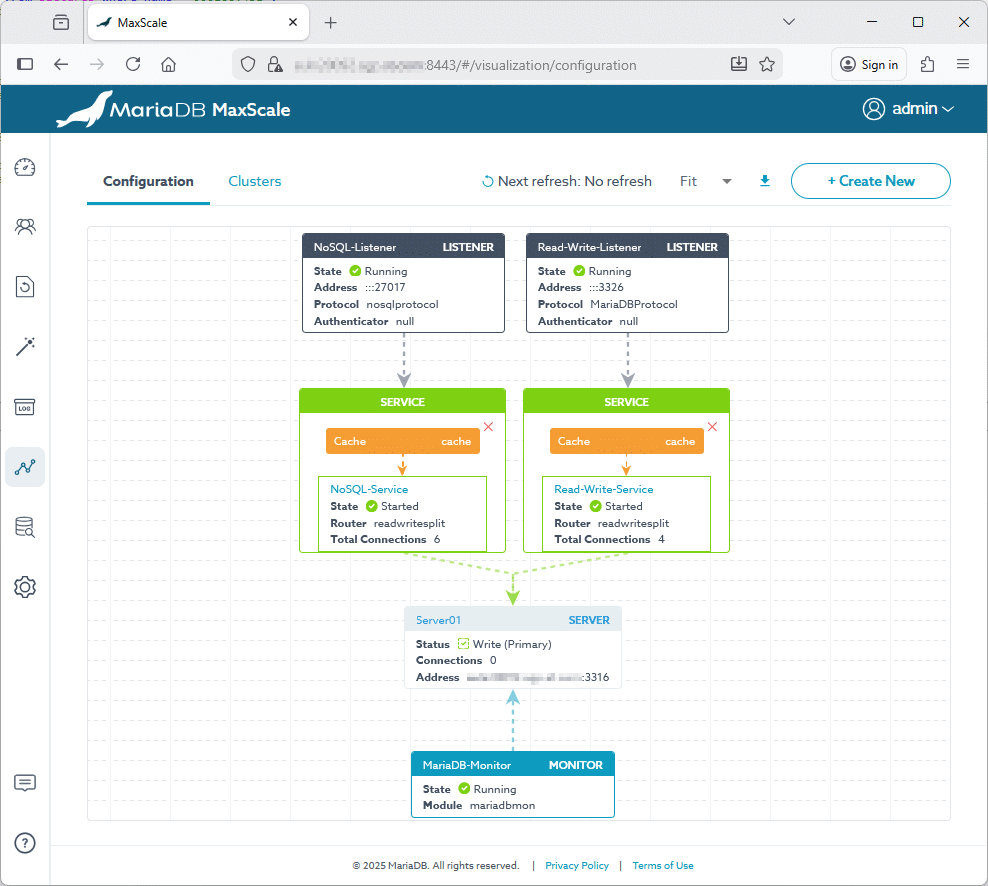
I have written this maxscale.conf file in $MAXSCALE_HOME/etc starting from maxscale.cnf.template. List of available parameters is quite big. I have generic configuration [maxscale], caching, monitor, a MariaDB protocol listener and a NoSQL protocol listener:
[maxscale]
threads = auto
libdir = /home/maxscale/maxscale-25.10.0.rhel.8/lib64/maxscale
logdir = /home/maxscale/maxscale-25.10.0.rhel.8/log
datadir = /home/maxscale/maxscale-25.10.0.rhel.8/data
secretsdir = /home/maxscale/maxscale-25.10.0.rhel.8/secrets
piddir = /home/maxscale/maxscale-25.10.0.rhel.8/run
persistdir = /home/maxscale/maxscale-25.10.0.rhel.8/persist
module_configdir = /home/maxscale/maxscale-25.10.0.rhel.8/etc/maxscale.modules.d
# For Maxscale GUI, must be specified if you choose all your directories by yourself
sharedir = /home/maxscale/maxscale-25.10.0.rhel.8/share/maxscale
admin_host = 0.0.0.0
admin_port = 8443
admin_ssl_key = /home/maxscale/maxscale-25.10.0.rhel.8/certs/server-key.pem
admin_ssl_cert = /home/maxscale/maxscale-25.10.0.rhel.8/certs/server-cert.pem
admin_ssl_ca = /home/maxscale/maxscale-25.10.0.rhel.8/certs/ca-cert.pem

# The first MariaDB database server (community)
# You can have multiple and specify them in servers parameter of monitor and services
[Server01]
type = server
address = server01.domain.com
port = 3316

[Cache]
type = filter
module = cache
cached_data = shared
max_size = 100M
soft_ttl = 300s
hard_ttl = 310s
invalidate = current

[MariaDB-Monitor]
type = monitor
module = mariadbmon
servers = Server01
user = maxscale_monitor
password = F04AB7A358EC68F53BE52B50597E2B56AC0BB70A27E4C26172D9D150C578866A
monitor_interval = 10s

[Read-Write-Listener]
type = listener
service = Read-Write-Service
port = 3326
ssl = true
ssl_key = /home/maxscale/maxscale-25.10.0.rhel.8/certs/server-key.pem
ssl_cert = /home/maxscale/maxscale-25.10.0.rhel.8/certs/server-cert.pem
ssl_ca = /home/maxscale/maxscale-25.10.0.rhel.8/certs/ca-cert.pem

[Read-Write-Service]
type = service
router = readwritesplit
servers = Server01
user = maxscale
password = F04AB7A358EC68F53BE52B50597E2B56AC0BB70A27E4C26172D9D150C578866A
filters = Cache

[NoSQL-Service]
type = service
router = readwritesplit
servers = Server01
user = maxscale
password = F04AB7A358EC68F53BE52B50597E2B56AC0BB70A27E4C26172D9D150C578866A
filters = Cache

[NoSQL-Listener]
type=listener
service = NoSQL-Service
protocol = nosqlprotocol
nosqlprotocol.authentication_required = true
nosqlprotocol.authorization_enabled = true
nosqlprotocol.user = maxscale
nosqlprotocol.password = F04AB7A358EC68F53BE52B50597E2B56AC0BB70A27E4C26172D9D150C578866A
nosqlprotocol.internal_cache = cache
nosqlprotocol.cache.cached_data = shared
nosqlprotocol.cache.max_size = 100M
nosqlprotocol.cache.soft_ttl = 300s
nosqlprotocol.cache.hard_ttl = 310s
nosqlprotocol.cache.invalidate = current
port = 27017
I have activated caching for MariaDB and NoSQL protocol but this is clearly not required…
If ‘–basedir’ is provided then all other paths, including the default configuration file path, are defined relative to that. As an example, if ‘–basedir /path/maxscale’ is specified, then, for instance, the log dir will be ‘/path/maxscale/var/log/maxscale’, the config dir will be ‘/path/maxscale/etc’ and the default config file will be ‘/path/maxscale/etc/maxscale.cnf’.
Means that you will NOT be able, for example, to change the log directory. So it looks better to not use it but then you have to specify all possible directories of Maxscale one by one… And then test you config with something like:
By a bad luck the default Maxscale admin port (8989) was already used by Veritas Volume Replicator (VVR), a component of Veritas Volume Manager (VxVM) by Veritas (now part of Broadcom):
As you have seen above the password appear in clear text which is not really secure. Good news is that there is a way to encrypt them with maxkeys and maxpasswd:
[maxscale@server01 ~]$ mkdir $MAXSCALE_HOME/secrets
[maxscale@server01 ~]$ maxkeys $MAXSCALE_HOME/secrets
Permissions of '/home/maxscale/maxscale-25.10.0.rhel.8/secrets/.secrets' set to owner:read.
Ownership of '/home/maxscale/maxscale-25.10.0.rhel.8/secrets/.secrets' given to maxscale.
[maxscale@server01 ~]$ ll -a $MAXSCALE_HOME/secrets
total 4
drwxr-x---  2 maxscale users  22 Nov 12 12:56 .
drwxr-x--- 10 maxscale users 101 Nov 12 12:56 ..
-r--------  1 maxscale users 228 Nov 12 12:56 .secrets
[maxscale@server01 ~]$ cat $MAXSCALE_HOME/secrets/.secrets
{
    "description": "MaxScale encryption/decryption key",
    "maxscale_version": "25.10.0",
    "encryption_cipher": "EVP_aes_256_cbc",
    "encryption_key": "2A049CC5EEF15B14F89DE0BC1FAF54DD68C9DCC32375479E3C5B17DCC06F51ED"
}
The output value is what you will put in your maxscale.cnf file to hide password in clear text… Also change the configuration to set secretsdir to your chosen directory…
MaxGUI requires TLS, so you must enable TLS for MaxScale’s REST API Several global parameters must be configured in maxscale.cnf.
admin_ssl_key : This parameter defines the private key used by the REST API.
admin_ssl_cert : This parameter defines the certificate used by the REST API.
admin_ssl_ca : This parameter defines the CA certificate that signed the REST API’s certificate.
Here we go a new certificate and signing certifcate generation with openSSL. In my $MAXSCALE_HOME directory I create a certs subdirectory and then I create a Certificate Authority (CA) with:
# Generate private key for CA
openssl genrsa -out ca-key.pem 4096

# Generate self-signed CA certificate
openssl req -x509 -new -nodes -key ca-key.pem -sha256 -days 3650 -out ca-cert.pem -subj "/C=CH/ST=Geneva/L=Geneva/O=MyCompany/OU=IT/CN=server01.domain.com"
Create a Server Key and Certificate Signing Request (CSR)
# Generate private key for server
openssl genrsa -out server-key.pem 4096

# Generate CSR for server certificate
openssl req -new -key server-key.pem -out server.csr -subj "/C=CH/ST=Geneva/L=Geneva/O=MyCompany/OU=IT/CN=server01.domain.com"
Then going to https://server01.domain.com:8443 you should see the Maxscale GUI appearing (as it is a self-signed certificate you will have to accept a security warning to proceed). You can use default account admin/mariadb (change the password):
maxscale01
Create an account for yourself with maxctrl and the Rest API (account creation can be done with maxctrl or with graphical interface)
[maxscale@server01 ~]$ maxctrl --secure --tls-verify-server-cert=false --user=admin --password=mariadb --hosts=127.0.0.1:8443 create user "yjaquier" "secure_password" --type=admin
OK
The connection to MariaDB are straightforward and you just have to change the port (and servername if Maxscale is running on another server) and do with same user/password as directly connecting to MariaDB:
[mariadb@server01 ~]$ mariadb --host=server01.domain.com --port=3326 --user=mongodb --password=secure_password --database=test
Reading table information for completion of table and column names
You can turn off this feature to get a quicker startup with -A

Welcome to the MariaDB monitor.  Commands end with ; or \g.
Your MariaDB connection id is 136
Server version: 11.8.4-MariaDB-log MariaDB Server

Copyright (c) 2000, 2018, Oracle, MariaDB Corporation Ab and others.

Type 'help;' or '\h' for help. Type '\c' to clear the current input statement.

MariaDB [test]>
You can use any graphical tool, like HeidiSQL, to connect through Maxscale to MariaDB…
MongoDB
Without further configuration Maxscale NoSQL Protocol connection are un-authorized and un-authenticated. I initially tried:
2025-11-12 15:29:16   warning: (60) [nosqlprotocol] User 'mongodb' does not exist.
2025-11-12 15:29:16   warning: (60) [nosqlprotocol] nosql exception occurred when executing NoSQL command: Authentication failed
So at first sight simply do:
PS C:\Download\mongosh-1.10.6-win32-x64\bin> .\mongosh.exe "mongodb://server01.domain.com:27017/test"
Current Mongosh Log ID: 6914a6c4ebbb2a1eeccb826a
Connecting to:          mongodb://server01.domain.com:27017/test?directConnection=true&appName=mongosh+1.10.6
Using MongoDB:          4.4.1
Using Mongosh:          1.10.6
mongosh 2.5.9 is available for download: https://www.mongodb.com/try/download/shell

For mongosh info see: https://docs.mongodb.com/mongodb-shell/

test>
Now we need to create users and assign roles to them. I have started by creating an admin super account, for myself, to manage all the other users in different databases (without this account you might have to stop/start Maxscale to achieve your goal):
test> use admin
switched to db admin
admin> db.runCommand({createUser: "yjaquier", pwd: "secure_password", roles: ["userAdmin"]});
MongoServerError: not authorized on admin to execute command { "createUser" : "yjaquier", "pwd" : "secure_password", "roles" : [ "userAdmin" ], "lsid" : { "id" : { "$binary" : "/ZNYOL0XQ2W3bpUgo5zB/A==", "$type" : "04" } }, "$db" : "admin" }
You find the explanation in the documentation: If you want to create a user, then you first need to configure nosqlprotocol with credentials that are sufficient for creating a user:
MariaDB [(none)]> grant create user on *.* to maxscale@'%' with grant option;
Query OK, 0 rows affected (0.001 sec)
I also had a bunch of errors (maxscle.log file):
Could create user 'admin.yjaquier'@'%', but granting access with the statement "GRANT CREATE USER ON *.* TO 'admin.yjaquier'@'%'" failed with: (1045) "Access denied for user 'maxscale'@'%' (using password: YES)". Will now attempt to DROP the user.

Could create user 'admin.yjaquier'@'%', but granting access with the statement "GRANT ALTER,CREATE,DELETE,DROP,GRANT OPTION,INDEX,INSERT,SELECT,SHOW DATABASES,UPDATE ON *.* TO 'admin.yjaquier'@'%'" failed with: (1045) "Access denied for user 'maxscale'@'%' (using password: YES)". Will now attempt to DROP the user.
So I end up with:
MariaDB [(none)]> grant alter, create, delete, drop, grant option, index, insert, select, show databases, update on *.* to maxscale@'%' with grant option;
Query OK, 0 rows affected (0.001 sec)
I also create an applicative account called mongodb. Here you have two options:
You use the dbname.account naming convention and have an account per database, like test.mongodb in my case
You use the special mariadb database and the database name will not be prepended to your MongoDB account and will match the one of MariaDB
For option 1:
admin> use test
switched to db test
test> db.runCommand({createUser: "mongodb", pwd: "secure_password", roles: ["dbOwner"]});
{ ok: 1 }
test> db.runCommand({usersInfo: 1});
{
  users: [
    {
      _id: 'test.mongodb',
      userId: new UUID("d8a8510b-f418-4fc7-bf1a-b7737ba8ae6e"),
      user: 'mongodb',
      db: 'test',
      roles: [ { db: 'test', role: 'dbOwner' } ],
      mechanisms: [ 'SCRAM-SHA-1', 'SCRAM-SHA-256' ]
    }
  ],
  ok: 1
}

MariaDB [(none)]> select host, user from mysql.user where user like '%\.%';
+-----------+----------------+
| Host      | User           |
+-----------+----------------+
| %         | admin.yjaquier |
| %         | test.mongodb   |
| localhost | mariadb.sys    |
+-----------+----------------+
3 rows in set (0.002 sec)
For option 2, I already have a mongodb user in my MariaDB database so the createUser command is failing. What you need to use is mxsAddUser to modify only the Maxscale NoSQL protocol local database user (sqlite). You also need to specify the target database which I did not do in first step so the mxsUpdateUser command:
Remark: Use a connection string like “mongodb://server01.domain.com:27017/mariadb” and change to test database for this option: the account has not been created in test database !
Now I can change my Maxscale configuration file and add:
After Maxscale has been restarted it is still possible to connect with NoSQL protocol without specifying a password but you have access to a limited set of rights, insert forbidden, while read is still possible !!
Those local Maxscale accounts are stored in a sqlite database in datadir (/home/maxscale/maxscale-25.10.0.rhel.8/data). You can access and query it for double control:
To do cleaning you can use dropUser or mxsRemoveUser… This small sqlite database can also be deleted (make cleaning in MariaDB manually) and Maxscale will recreate it at startup.
Maxscale NoSQL protocol testing
MongoDB collection creation and insert few rows inside:
Remark: It could be a good idea to have a non-cache NoSQL protocol listener to avoid this edge case…
At MariaDB level:
The table is created like this (I expected a JSON datatype):
MariaDB [test]> desc employee_collection;
+-------+-------------+------+-----+---------+-------------------+
| Field | Type        | Null | Key | Default | Extra             |
+-------+-------------+------+-----+---------+-------------------+
| id    | varchar(35) | YES  | UNI | NULL    | VIRTUAL GENERATED |
| doc   | longtext    | YES  |     | NULL    |                   |
+-------+-------------+------+-----+---------+-------------------+
2 rows in set (0.020 sec)
This table behaves exactly same as any other tables:
MariaDB [test]> select * from employee_collection;
+-------------------------------------+-------------------------------------------------------------------------------------------------+
| id                                  | doc                                                                                             |
+-------------------------------------+-------------------------------------------------------------------------------------------------+
| {"$oid":"6915fc3fdbf1be7b7d3a0dac"} | { "id" : 1, "name" : "Yannick Jaquier", "_id" : { "$oid" : "6915fc3fdbf1be7b7d3a0dac" } }       |
| {"$oid":"6915fc3fdbf1be7b7d3a0dad"} | { "id" : 2, "name" : "Keanu Reeves", "_id" : { "$oid" : "6915fc3fdbf1be7b7d3a0dad" } }          |
| {"$oid":"691715d60474b661b4146757"} | { "id" : 3, "name" : "Arnold Schwarzenegger", "_id" : { "$oid" : "691715d60474b661b4146757" } } |
+-------------------------------------+-------------------------------------------------------------------------------------------------+
3 rows in set (0.001 sec)

MariaDB [test]> select json_value(doc, "$.id") as id, json_value(doc, "$.name") as name from employee_collection order by 1;
+------+-----------------------+
| id   | name                  |
+------+-----------------------+
| 1    | Yannick Jaquier       |
| 2    | Keanu Reeves          |
| 3    | Arnold Schwarzenegger |
+------+-----------------------+
3 rows in set (0.001 sec)
Issues encountered
Node.js required for Maxscale GUI
[maxscale@server01 bin]$ maxctrl
Node.js is not installed!
[root@server01 ~]# dnf install nodejs.x86_64
Using a self signed certificate for Maxscale GUI
When using a self signed certificate for Maxscale GUI, you might encounter errors related to the certificate trust. Here’s how to handle it:
[maxscale@server01 ~]$ maxctrl --hosts 127.0.0.1:8443 list servers
Error: socket hang up. If MaxScale is configured to use HTTPS, use the --secure option.
[maxscale@server01 ~]$ maxctrl --secure --hosts 127.0.0.1:8443 list servers
Error: self signed certificate
[maxscale@server01 ~]$ maxctrl --secure --tls-verify-server-cert=false --hosts 127.0.0.1:8443 list servers
┌──────────┬──────────────────────┬──────┬─────────────┬────────┬─────────────┬──────────────┬─────────────────┐
│ Server   │ Address              │ Port │ Connections │ Status │ Status Info │ GTID         │ Monitor         │
├──────────┼──────────────────────┼──────┼─────────────┼────────┼─────────────┼──────────────┼─────────────────┤
│ Server01 │ server01.domain.com  │ 3316 │ 1           │ Write  │ Primary     │ 0-1-36095837 │ MariaDB-Monitor │
└──────────┴──────────────────────┴──────┴─────────────┴────────┴─────────────┴──────────────┴─────────────────┘
TLS/SSL error: SSL is required
Connection to Maxscale MariaDB protocol with a Linux MariaDB client is failing for:
[mariadb@server01 ~]$ /mariadb/software/mariadb01/bin/mariadb --host=server01.domain.com --port=3326 --user=yjaquier --password=secure_password
ERROR 2026 (HY000): TLS/SSL error: SSL is required, but the server does not support it
Can be solved doing insecure connection with –skip-ssl:
[mariadb@server01 ~]$ /mariadb/software/mariadb01/bin/mariadb --host=server01.domain.com --port=3326 --skip-ssl --user=yjaquier --password=secure_password
Welcome to the MariaDB monitor.  Commands end with ; or \g.
Your MariaDB connection id is 1
Server version: 11.8.4-MariaDB-log MariaDB Server

Copyright (c) 2000, 2018, Oracle, MariaDB Corporation Ab and others.

Type 'help;' or '\h' for help. Type '\c' to clear the current input statement.

MariaDB [(none)]>
Or much better use the same certificates as the ones for Maxscale GUI::
[Read-Write-Listener]
type = listener
service = Read-Write-Service
port = 3326
ssl = true
ssl_key = /home/maxscale/maxscale-25.10.0.rhel.8/certs/server-key.pem
ssl_cert = /home/maxscale/maxscale-25.10.0.rhel.8/certs/server-cert.pem
ssl_ca = /home/maxscale/maxscale-25.10.0.rhel.8/certs/ca-cert.pem
Wire protocol version mismatch
Latest MongoDB Shell (2.5.9) is not compatible with Maxscale NoSQL Protocol:
PS C:\Download\mongosh-2.5.9-win32-x64\bin> .\mongosh.exe "mongodb://server01.domain.com:27017/test"
Current Mongosh Log ID: 6914a5e50f2dac9dce63b111
Connecting to:          mongodb://server01.domain.com:27017/test?directConnection=true&appName=mongosh+2.5.9
MongoServerSelectionError: Server at server01.domain.com:27017 reports maximum wire version 6, but this version of the Node.js Driver requires at least 8 (MongoDB 4.2)
I had to switch to previous Mongosh client version 1.10.6.
Missing libraries
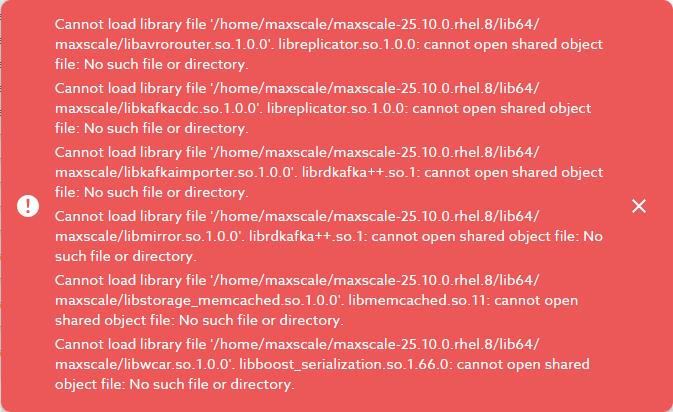
When accessing Logs Archive or Config Wizard section I got this error message complaining for missing libraries (libavrorouter.so.1.0.0 and so on):
maxscale02
[maxscale@server01 maxscale]$ ldd libavrorouter.so.1.0.0
        linux-vdso.so.1 (0x00007ffe0312a000)
        libreplicator.so.1.0.0 => not found
        libjansson.so.4 => /lib64/libjansson.so.4 (0x00007fd3ffef5000)
        liblzma.so.5 => /lib64/liblzma.so.5 (0x00007fd3ffcce000)
        libcdc.so.1.0.1 => not found
        libmaxscale-common.so.1.0.0 => not found
.
.
[maxscale@server01 maxscale]$ ll libreplicator.so.1.0.0
-rwxr-x--- 1 maxscale users 17302128 Oct 22 08:21 libreplicator.so.1.0.0
[maxscale@server01 maxscale]$ pwd
/home/maxscale/maxscale-25.10.0.rhel.8/lib64/maxscale
[maxscale@server01 maxscale]$ echo $LD_LIBRARY_PATH

[maxscale@server01 maxscale]$ export LD_LIBRARY_PATH=/home/maxscale/maxscale-25.10.0.rhel.8/lib64/maxscale
Then it failed for another bunch of library. Libkafkacdc.so.1.0.0 for example, which sounds logic with ldd::
[maxscale@server01 ~]$ ldd /home/maxscale/maxscale-25.10.0.rhel.8/lib64/maxscale/libkafkacdc.so.1.0.0
        linux-vdso.so.1 (0x00007ffcc7f3e000)
        libreplicator.so.1.0.0 => /home/maxscale/maxscale-25.10.0.rhel.8/lib64/maxscale/libreplicator.so.1.0.0 (0x00007fd8a64a2000)
        libmaxscale-common.so.1.0.0 => /home/maxscale/maxscale-25.10.0.rhel.8/lib64/maxscale/libmaxscale-common.so.1.0.0 (0x00007fd8a56ab000)
        librdkafka++.so.1 => not found
        librdkafka.so.1 => not found
.
.
Solved with:
dnf install librdkafka
Then libstorage_memcached.so.1.0.0:
[maxscale@server01 plugin]$ ldd /home/maxscale/maxscale-25.10.0.rhel.8/lib64/maxscale/libstorage_memcached.so.1.0.0
        linux-vdso.so.1 (0x00007ffe3f30c000)
        libcache.so.1.0.0 => /home/maxscale/maxscale-25.10.0.rhel.8/lib64/maxscale/libcache.so.1.0.0 (0x00007f5fcc47d000)
        libmaxscale-common.so.1.0.0 => /home/maxscale/maxscale-25.10.0.rhel.8/lib64/maxscale/libmaxscale-common.so.1.0.0 (0x00007f5fcb657000)
        libmemcached.so.11 => not found
.
.
Solved with:
dnf install libmemcached
And one last more: libwcar.so.1.0.0:
[maxscale@server01 plugin]$ ldd /home/maxscale/maxscale-25.10.0.rhel.8/lib64/maxscale/libwcar.so.1.0.0
        linux-vdso.so.1 (0x00007fff4490a000)
        libmaxscale-common.so.1.0.0 => /home/maxscale/maxscale-25.10.0.rhel.8/lib64/maxscale/libmaxscale-common.so.1.0.0 (0x00007fc44127e000)
        libboost_serialization.so.1.66.0 => not found
        libtbb.so.2 => not found
.
.