Download latest RU gold image (full installation) with AutoUpgrade
Table of contents
Preamble
If you are on a new Linux system and want to install a fresh Oracle Home with latest Release Update (RU), I am sure that, like me, you have been very frustrated to be obliged to go for 19.3 and then take latest OPatch release, latest RU and apply it.
One good initial trick would be, once you have done it once, to create your own gold image with $ORACLE_HOME/runInstaller -createGoldImage. But at each new quarterly RU you would have to do the same boring task…
With autoupgrade 26.2 they have added the gold_image parameter option to simplify this process and download from Oracle Update Advisor the gold image of your choice.
If you are lost in all the option there is a good configuration helper web site called AutoUpgrade Composer.
AutoUpgrade download
As, in my scenario, there is no Oracle Home software on my server yet, I installed OpenJDK from RedHat repository:
[oracle@server01 ~]$ java -version
openjdk version "21.0.11" 2026-04-21 LTS
OpenJDK Runtime Environment (Red_Hat-21.0.11.0.10-1) (build 21.0.11+10-LTS)
OpenJDK 64-Bit Server VM (Red_Hat-21.0.11.0.10-1) (build 21.0.11+10-LTS, mixed mode, sharing)
I will put everything in a /u01/patches directory and my plan is a 19.31 fresh Oracle Home in /u01/app/oracle/product/19.31.0/dbhome_1.
Get the latest autoupgrade.jar with (export https_proxy if like me you are behind a corporate proxy):
[oracle@server01 ~]$ cd /u01/patches/
[oracle@server01 ~]$ export https_proxy='http://proxy_account:proxy_password@proxy_server:proxy_port/'
[oracle@server01 ~]$ wget https://download.oracle.com/otn-pub/otn_software/autoupgrade.jar
.
.
.
[oracle@server01 patches]$ ll
total 10761
-rw-r--r-- 1 oracle dba 7016621 Apr  8 11:32 autoupgrade.jar
Check the version with:
[oracle@server01 patches]$ java -jar autoupgrade.jar -version
build.version 26.3.260401
build.date 2026/04/01 20:09:34 +0000
build.hash b5bb11008
build.hash_date 2026/03/27 14:05:56 +0000
build.supported_target_versions 12.2,18,19,21,23,26
build.type production
build.label (HEAD, tag: v26.3, origin/stable_devel, stable_devel)
build.MOS_NOTE KB123450
build.MOS_LINK https://support.oracle.com/support/?anchorId=&kmContentId=2485457&page=sptemplate&sptemplate=km-article
You can create a sample configuration file with, to start to study the options:
[oracle@server01 patches]$ java -jar autoupgrade.jar -create_sample_file config
Created sample configuration file /u01/patches/sample_config.cfg
AutoUpgrade keystore
To download and access those Gold Images you need to supply your MOS username and password as well as your MOS CSI in an AutoUpgrade keystore:
Create the simple keystore.cfg configuration file:
global.global_log_dir=/u01/patches/logs
global.keystore=/u01/patches/keystore
Create the keystore directory and load your MOS account and Oracle CSI:
[oracle@server01 patches]$ mkdir keystore
[oracle@server01 patches]$ java -jar autoupgrade.jar -config keystore.cfg -patch -load_password
Processing config file ...

Starting AutoUpgrade Patching Password Loader - Type help for available options
Creating new AutoUpgrade Patching keystore - Password required
Enter password:
Enter password again:
AutoUpgrade Patching keystore was successfully created

MOS> add -user mos_user@domain.com
Enter your secret/Password:
Re-enter your secret/Password:
MOS> add -csi 12345678
MOS> save
Convert the AutoUpgrade Patching keystore to auto-login [YES|NO] ? YES
MOS> exit

AutoUpgrade Patching Password Loader finished - Exiting AutoUpgrade Patching
AutoUpgrade download gold image
I have with this download.cfg configuration file:
global.global_log_dir=/u01/patches/logs
global.keystore=/u01/patches/keystore

download1.patch=RECOMMENDED
download1.folder=/u01/patches/software
download1.env=TMP=/u01/tmp
download1.target_version=19
download1.platform=LINUX.X64
download1.gold_image=yes
Then download the gold image with (the time it takes highly depends on the availability of requested image, the first one requesting it is suffering):
[oracle@server01 patches]$ java -jar autoupgrade.jar -config download.cfg -patch -mode download
AutoUpgrade Patching 26.3.260401 launched with default internal options
Processing config file ...
Loading AutoUpgrade Patching keystore
AutoUpgrade Patching keystore is loaded

Connected to Oracle Update Advisor service - Requesting gold images
AutoUpgrade Patching has finished processing the gold image requests

------------------------------------------
Downloading files to /u01/patches/software
------------------------------------------
Gold Image - 19.31.0.0.0
    File: autoupgrade_linux-x86-64_19.31.0.0.0_db_home.zip - VALIDATED

autoupgrade.jar 26.3 (April 2026)
    File: autoupgrade.jar - VALIDATED
------------------------------------------
I have also tried multiple times with download1.patch=RECOMMENDED,TOOLS, that sounds more logic/complete to me, but it always failed for:
The Oracle Update Advisor service failed to create a gold image - The Oracle Update Advisor service failed to create a gold image - UPD-04028 : System encountered an unexpected error during conflict check
AutoUpgrade create new Oracle home from gold image
Once you have this autoupgrade_linux-x86-64_19.31.0.0.0_db_home.zip you can unzip it in the folder of your choice, execute runInstaller and root.sh and you have your 19.31 Oracle Home ! But I wanted to do the AutoUpgrade exercise full so I start by creating the Oracle Home directory:
global.global_log_dir=/u01/patches/logs
global.keystore=/u01/patches/keystore

createhome1.log_dir=/u01/patches/logs/createhome1
createhome1.patch=RECOMMENDED
createhome1.folder=/u01/patches/software
createhome1.env=TMP=/u01/tmp
createhome1.target_home=/u01/app/oracle/product/19.0.0/dbhome_1
createhome1.home_settings.oracle_base=/u01/app/oracle
createhome1.home_settings.edition=EE
createhome1.home_settings.inventory_location=/u01/oraInventory
createhome1.target_version=19
createhome1.platform=LINUX.X64

createhome1.home_settings.home_name=OraDB19Home1
createhome1.home_settings.inventory_group=dba
createhome1.home_settings.osdba_group=dba
createhome1.home_settings.osoper_group=dba
createhome1.home_settings.osbackupdba_group=dba
createhome1.home_settings.osdgdba_group=dba
createhome1.home_settings.oskmdba_group=dba
createhome1.home_settings.osracdba_group=dba
Run AutoUpgrade with create_home mode:
[oracle@server01 patches]$ java -jar autoupgrade.jar -config create_home.cfg -patch -mode create_home
AutoUpgrade Patching 26.3.260401 launched with default internal options
Processing config file ...
Loading AutoUpgrade Patching keystore
AutoUpgrade Patching keystore is loaded
+-----------------------------------------+
| Starting AutoUpgrade Patching execution |
+-----------------------------------------+
Type 'help' to list console commands
patch> status

Config

        User configuration file    [/u01/patches/create_home.cfg]
        General logs location      [/u01/patches/logs/cfgtoollogs/patch/auto]
        Mode                       [CREATE_HOME]
Jobs Summary

        Total databases in configuration file [1]
        Total Non-CDB being processed         [1]
        Total Containers being processed      [0]

        Jobs finished successfully            [0]
        Jobs finished/stopped                 [0]
        Jobs in progress                      [1]

Progress
        +---+---------------------------------------------------------+
        |Job|                                                 Progress|
        +---+---------------------------------------------------------+
        |100|[|||||||||||                                       ] 20 %|
        +---+---------------------------------------------------------+

patch> Job 100 completed
------------------- Final Summary --------------------
Number of databases            [ 1 ]

Jobs finished                  [1]
Jobs failed                    [0]
Jobs restored                  [0]
Jobs pending                   [0]

# Run the root.sh script as root for the following jobs:
For create_home_1 -> /u01/app/oracle/product/19.0.0/dbhome_1/root.sh

Please check the summary report at:
/u01/patches/logs/cfgtoollogs/patch/auto/status/status.html
/u01/patches/logs/cfgtoollogs/patch/auto/status/status.log
The log result:
[oracle@server01 patches]$ cat /u01/patches/logs/cfgtoollogs/patch/auto/status/status.log
==========================================
   AutoUpgrade Patching Summary Report
==========================================
[Date]           Tue Jun 30 16:16:14 CEST 2026
[Number of Jobs] 1
==========================================
[Job ID] 100
==========================================
[DB Name]                create_home_1
[Version Before AutoUpgrade Patching] 19.0.0.0.0
[Version After AutoUpgrade Patching]  19.31.0.0.260421
------------------------------------------
[Stage Name]    PENDING
[Status]        SUCCESS
[Start Time]    2026-06-30 16:12:40
[Duration]      0:00:00
[Log Directory] /u01/patches/logs/createhome1/create_home_1/100/pending
------------------------------------------
[Stage Name]    PREACTIONS
[Status]        SUCCESS
[Start Time]    2026-06-30 16:12:40
[Duration]      0:00:00
[Log Directory] /u01/patches/logs/createhome1/create_home_1/100/preaction
------------------------------------------
[Stage Name]    EXTRACT
[Status]        SUCCESS
[Start Time]    2026-06-30 16:12:40
[Duration]      0:01:56
[Log Directory] /u01/patches/logs/createhome1/create_home_1/100/extract
------------------------------------------
[Stage Name]    DBTOOLS
[Status]        SUCCESS
[Start Time]    2026-06-30 16:14:37
[Duration]      0:00:00
[Log Directory] /u01/patches/logs/createhome1/create_home_1/100/dbtools
------------------------------------------
[Stage Name]    INSTALL
[Status]        SUCCESS
[Start Time]    2026-06-30 16:14:37
[Duration]      0:01:36
[Log Directory] /u01/patches/logs/createhome1/create_home_1/100/install
------------------------------------------
[Stage Name]    OH_PATCHING
[Status]        SUCCESS
[Start Time]    2026-06-30 16:16:13
[Duration]      0:00:00
[Log Directory] /u01/patches/logs/createhome1/create_home_1/100/opatch
------------------------------------------
[Stage Name]    OPTIONS
[Status]        SUCCESS
[Start Time]    2026-06-30 16:16:13
[Duration]      0:00:00
[Log Directory] /u01/patches/logs/createhome1/create_home_1/100/options
------------------------------------------
[Stage Name]    ROOTSH
[Status]        SUCCESS
[Start Time]    2026-06-30 16:16:13
[Duration]      0:00:00
[Log Directory] /u01/patches/logs/createhome1/create_home_1/100/rootsh
------------------------------------------
[Stage Name]    DISPATCH
[Status]        SUCCESS
[Start Time]    2026-06-30 16:16:13
[Duration]      0:00:00
[Log Directory] /u01/patches/logs/createhome1/create_home_1/100/dispatch
------------------------------------------
[Stage Name]    POSTACTIONS
[Status]        SUCCESS
[Start Time]    2026-06-30 16:16:14
[Duration]      0:00:00
[Log Directory] /u01/patches/logs/createhome1/create_home_1/100/postaction
------------------------------------------
Last action is to run the root script (as root):
[root@server01 ~]# /u01/app/oracle/product/19.0.0/dbhome_1/root.sh
Check /u01/app/oracle/product/19.0.0/dbhome_1/install/root_server01.domain.com_2026-06-30_16-21-45-664160921.log for the output of root script
[root@server01 ~]# cat /u01/app/oracle/product/19.0.0/dbhome_1/install/root_server01.domain.com_2026-06-30_16-21-45-664160921.log
Performing root user operation.

The following environment variables are set as:
    ORACLE_OWNER= oracle
    ORACLE_HOME=  /u01/app/oracle/product/19.0.0/dbhome_1
   Copying dbhome to /usr/local/bin ...
   Copying oraenv to /usr/local/bin ...
   Copying coraenv to /usr/local/bin ...

Entries will be added to the /etc/oratab file as needed by
Database Configuration Assistant when a database is created
Finished running generic part of root script.
Now product-specific root actions will be performed.
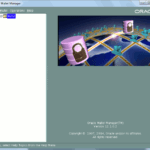
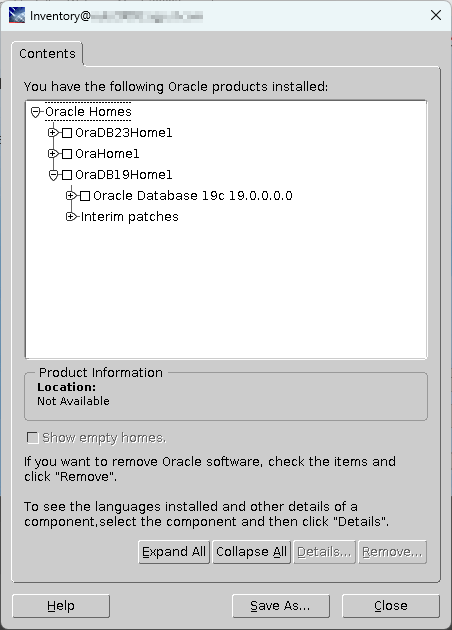
If I execute the Oracle Universal Installer from /u01/app/oracle/product/19.0.0/dbhome_1/oui/bin/runInstaller and check the installed product I get:
And we are in 19.31:
[oracle@server01 ~]$ export ORACLE_HOME=/u01/app/oracle/product/19.0.0/dbhome_1
[oracle@server01 ~]$ $ORACLE_HOME/bin/sqlplus -version

SQL*Plus: Release 19.0.0.0.0 - Production
Version 19.31.0.0.0
The last step is to launch $ORACLE_HOME/bin/dbca to create a database…
References
About Post Author