QuestDB for time series data hands-on
Table of contents
Preamble
QuestDB is the next one in my journey of storing and handling Time Series data. This candidate is coming from Time Series DBMS ranking of DB-Engines.com:

I have already tested TimescaleDB and MongoDB (not listed but their Time Series feature is interesting to look at), Prometheus and Graphite are not what I would call RDBMS and they are more an interface to create charts (with Grafana for example).
Kdb being a commercial offer I prefer to set aside for now. Apache Druid is most probably my next trial…
Worth mentionning that QuestDB developer experience is quite rich with Python, Java, Node.js, C, C++, Rust, Go and .NET…
My test server is running Red Hat Enterprise Linux release 8.10 (Ootpa) has 12 cores (24 threads) and 64GB of memory. At the time of writing this post QuestDB is availabel with releease 8.2.3.
QuestDB installation
Installation is really simple, I have created a dedicated questdb account (in my Linux dba group) and a dedicated mount point:
[questdb@server01 ~]$ df -h /questdb/
Filesystem                Size  Used Avail Use% Mounted on
/dev/vx/dsk/vgperp/lvol9  5.0G   20M  4.7G   1% /questdb
Downloaded questdb-8.2.3-rt-linux-x86-64.tar.gz and unzip it in /questdb, add /questdb/questdb-8.2.3-rt-linux-x86-64/bin path to your PATH. I have also created those aliases to ease stop/start:
alias start_questdb='questdb.sh start -d /questdb'
alias status_questdb='questdb.sh status'
alias stop_questdb='questdb.sh stop'
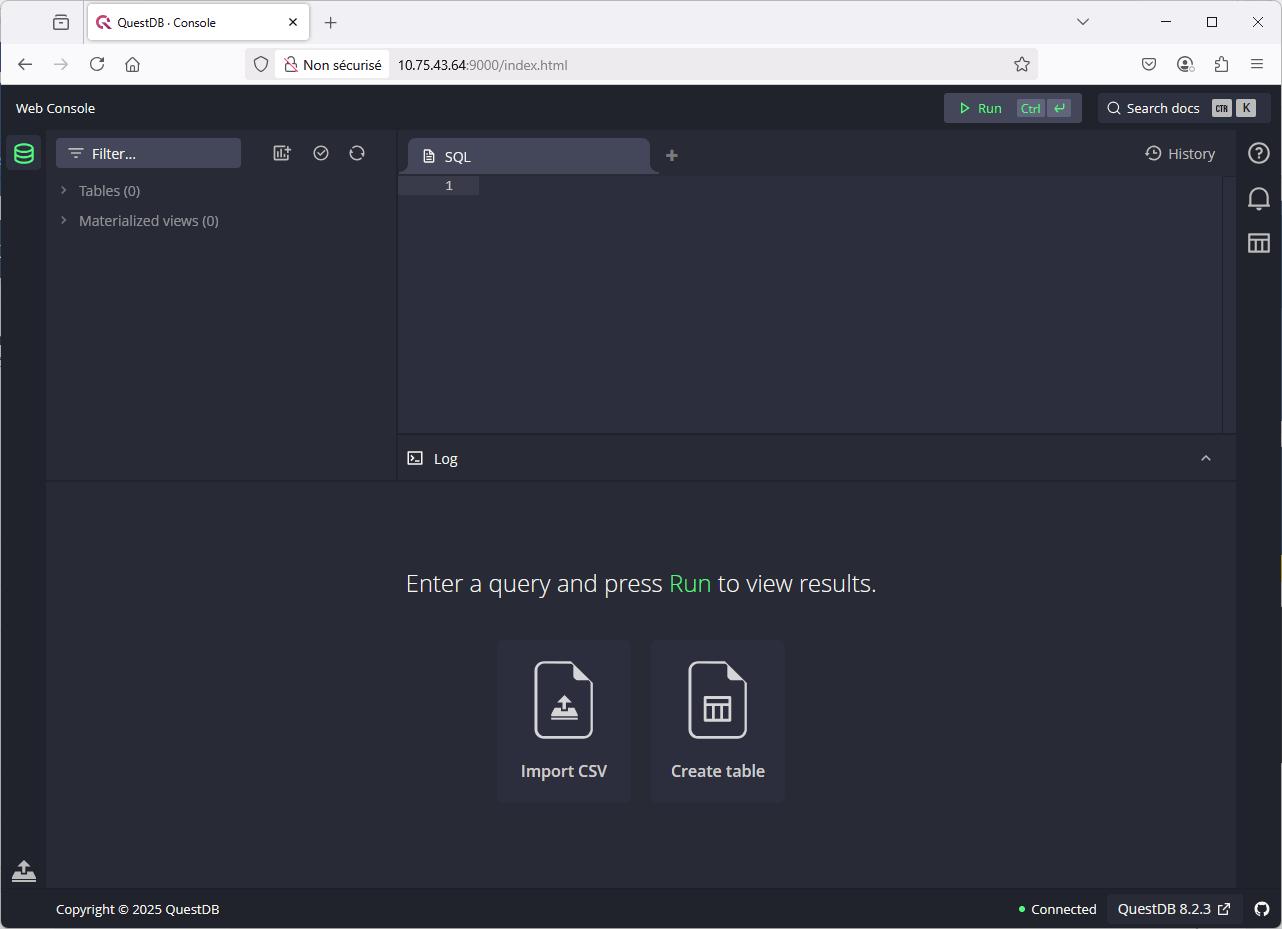
Then start QuestDB with start_questdb alias and that’s it ! Never seen an installation that simple. You can now access to the graphical interface with http://server01.domain.com:9000 (or non routable IP address in my case):
You can also connect through the Postgres Wire Protocol (PGWire) with a PostgreSQL client on port 8812 (default admin account has quest as a password):
[questdb@server01 ~]$ psql --version
psql (PostgreSQL) 17.4
[questdb@server01 ~]$ export PGPASSWORD=quest
[questdb@server01 ~]$ psql -h server01.domain.com -p 8812 -U admin
psql (17.4, server 11.3)
Type "help" for help.

admin=> show tables;
 table_name
------------
(0 rows)
Data ingestion into QuestDB
To be able to compare what I have done with TimescaleDB and MongoDB I will obviously load the NYC Yeallow Cab 2023 trips information. I have file in CSV and Parquet formats.
COPY command
To use copy command you need to configure cairo.sql.copy.root in /questdb/conf/server.conf to point to the directory where your CSVs are:
cairo.sql.copy.root=/u01/nyc
Stop and restart QuestDB to validate the change…
I have started like it is suggested, means by not creating any table to see how it goes with PostgreSQL client:
admin=> copy trips from 'yellow_tripdata_2023-01.csv' with header true;
        id
------------------
 49f8d7ca8f29d6ea
(1 row)

admin=> select * from sys.text_import_log where id = '49f8d7ca8f29d6ea' order by ts desc;
             ts             |        id        | table_name |            file             | phase |  status  | message | rows_handled | rows_imported | errors
----------------------------+------------------+------------+-----------------------------+-------+----------+---------+--------------+---------------+--------
 2025-04-10 13:08:47.122608 | 49f8d7ca8f29d6ea | trips      | yellow_tripdata_2023-01.csv |       | finished |         |      3066766 |       3066766 |      0
 2025-04-10 13:08:44.071921 | 49f8d7ca8f29d6ea | trips      | yellow_tripdata_2023-01.csv |       | started  |         |              |               |      0
(2 rows)

admin=> show columns from trips;
        column         |  type  | indexed | indexBlockCapacity | symbolCached | symbolCapacity | designated | upsertKey
-----------------------+--------+---------+--------------------+--------------+----------------+------------+-----------
 tpep_pickup_datetime  | DATE   | f       |                256 | f            |              0 | f          | f
 tpep_dropoff_datetime | DATE   | f       |                256 | f            |              0 | f          | f
 passenger_count       | DOUBLE | f       |                256 | f            |              0 | f          | f
 trip_distance         | DOUBLE | f       |                256 | f            |              0 | f          | f
 tip_amount            | DOUBLE | f       |                256 | f            |              0 | f          | f
 total_amount          | DOUBLE | f       |                256 | f            |              0 | f          | f
(6 rows)

admin=>
Remark:
The sys.text_import_log table/view does not work on the graphical query interface, you have to be in the PGWrire interface !
One problem we see is the DATA datatype instead of the TIMESTAMP one, and a Time Serie QuestDB table must have a TIMESTAMP column. In other words I would be able to load all the CSV in a table but I would have, then, to move all the rows to my final table: not very efficient ! The final create table statement would be something like:
drop table if exists trips;

create table if not exists trips
   (
   tpep_pickup_datetime timestamp,
   tpep_dropoff_datetime timestamp,
   passenger_count float,
   trip_distance float not null,
   tip_amount float,
   total_amount float
) timestamp(tpep_pickup_datetime);
Launch the COPY command through Postgres Wire Protocol (PGWire):
admin=> copy trips from 'yellow_tripdata_2023-01.csv' with header true TIMESTAMP 'tpep_pickup_datetime' FORMAT 'yyyy-MM-dd HH:mm:ss';
        id
------------------
 74294279a5c875ad
(1 row)

admin=> select * from sys.text_import_log where id = '74294279a5c875ad' order by ts desc;
             ts             |        id        | table_name |            file             | phase |  status  | message | rows_handled | rows_imported | errors
----------------------------+------------------+------------+-----------------------------+-------+----------+---------+--------------+---------------+---------
 2025-04-10 10:55:22.311386 | 74294279a5c875ad | trips      | yellow_tripdata_2023-01.csv |       | started  |         |              |               |       0
 2025-04-10 10:55:35.595800 | 74294279a5c875ad | trips      | yellow_tripdata_2023-01.csv |       | finished |         |      3066766 |          1084 | 3065682
(2 rows)

admin=> select count() from trips;
 count
-------
  1084
(1 row)
I’m missing quite a few rows… Even in using a COPY command like the one above, I still got plenty of import error…
I have also tried with the Uploading Tabular Data HTTP Rest API with:
curl -F schema='[ \
    {"name":"tpep_pickup_datetime", "type": "TIMESTAMP", "pattern": "yyyy-MM-dd HH:mm:ss"}, \
    {"name":"tpep_dropoff_datetime", "type": "TIMESTAMP", "pattern": "yyyy-MM-dd HH:mm:ss"}, \
    {"name":"passenger_count", "type": "float"} \
    {"name":"trip_distance", "type": "float"} \
    {"name":"tip_amount", "type": "float"} \
    {"name":"total_amount", "type": "float"} \
  ]' \
  -F data=@/u01/nyc/yellow_tripdata_2023-01.csv 'http://server01.domain.com:9000/imp?name=trips'
And creating text_loader.json file in conf directory:
[questdb@server01 ~]$ cat /questdb/conf/text_loader.json
{
  "date": [
    {
      "format": "dd/MM/y"
    },
    {
      "format": "yyyy-MM-dd HH:mm:ss"
    },
    {
      "format": "yyyy-MM-ddTHH:mm:ss.SSSz",
      "locale": "en-US",
      "utf8": false
    },
    {
      "format": "MM/dd/y"
    }
  ],
  "timestamp": [
    {
      "format": "yyyy-MM-ddTHH:mm:ss.SSSUUUz",
      "utf8": false
    },
    {
      "format": "yyyy-MM-dd HH:mm:ss",
      "utf8": false
    }
  ]
}
But got:
curl: (55) Send failure: Broken pipe
Must be an object[
Adding that COPY command cannot insert data in a non empty table I have decided to give up and do it in Python using Parquet initial files like it is suggested in QuestDB blog…
Python
With more flexibility I plan to create the table directly with
drop table if exists trips;

create table if not exists trips (
  started_at timestamp not null,
  ended_at timestamp not null,
  passenger_count float,
  distance float not null,
  tip_amount float,
  total_amount float
) timestamp(started_at);
I have this requirements.txt file:
questdb
pandas
pyarrow
psycopg[binary]
And I use marvelous uv tool on my Linux server (on my desktop I use Minconda):
[questdb@server01 ~]$ export HTTPS_PROXY='http://proxy_account:proxy_password@proxy_server:proxy_port'
[questdb@server01 ~]$ pip3.9 install uv
[questdb@server01 ~]$ uv venv --python 3.13 questdb
Using CPython 3.13.2
Creating virtual environment at: questdb
Activate with: source questdb/bin/activate
[questdb@server01 ~]$ source questdb/bin/activate
(questdb) [questdb@server01 ~]$ python -V
Python 3.13.2
(questdb) [questdb@server01 ~]$ uv pip install -r requirements.txt
Using Python 3.13.2 environment at: questdb
Resolved 10 packages in 1.29s
Prepared 10 packages in 8.31s
Installed 10 packages in 107ms
 + numpy==2.2.4
 + pandas==2.2.3
 + psycopg==3.2.6
 + psycopg-binary==3.2.6
 + pyarrow==19.0.1
 + python-dateutil==2.9.0.post0
 + pytz==2025.2
 + questdb==2.0.4
 + six==1.17.0
 + tzdata==2025.2
(questdb) [questdb@server01 ~]$ uv pip list
Using Python 3.13.2 environment at: questdb
Package         Version
--------------- -----------
numpy           2.2.4
pandas          2.2.3
psycopg         3.2.6
psycopg-binary  3.2.6
pyarrow         19.0.1
python-dateutil 2.9.0.post0
pytz            2025.2
questdb         2.0.4
six             1.17.0
tzdata          2025.2
One of he first error I got is:
questdb.ingress.IngressError: Unsupported dtype datetime64[us] for column 'started_at'. Raise an issue if you think it should be supported: https://github.com/questdb/py-questdb-client/issues.
And effectively my dataframe was like:
>>> df.dtypes
started_at         datetime64[us]
ended_at           datetime64[us]
passenger_count           float64
distance                  float64
tip_amount                float64
total_amount              float64
dtype: object
When trying to convert to columns datatype I had the annoying SettingWithCopyWarning warning (that will be an error in future Pandas version if I understood well) that appear randomly doing things like:
>>> df['started_at'] = df['started_at'].astype('datetime64[ns]')
python-input-14:1: SettingWithCopyWarning:
A value is trying to be set on a copy of a slice from a DataFrame.
Try using .loc[row_indexer,col_indexer] = value instead

See the caveats in the documentation: https://pandas.pydata.org/pandas-docs/stable/user_guide/indexing.html#returning-a-view-versus-a-copy
  df1['tpep_pickup_datetime'] = pd.to_datetime(df1['tpep_pickup_datetime']).astype('datetime64[ns]')
Or
>>> df['ended_at'] = pd.to_datetime(df['ended_at']).astype('datetime64[ns]')
python-input-17:1: SettingWithCopyWarning:
A value is trying to be set on a copy of a slice from a DataFrame.
Try using .loc[row_indexer,col_indexer] = value instead

See the caveats in the documentation: https://pandas.pydata.org/pandas-docs/stable/user_guide/indexing.html#returning-a-view-versus-a-copy
  df1['tpep_dropoff_datetime'] = pd.to_datetime(df1['tpep_dropoff_datetime']).astype('datetime64[ns]')
Working with loc funtion and doing things like below did not change the datatypes (bug ?) !!:
df.loc[:, 'started_at'] = df['started_at'].astype('datetime64[ns]')
When writing the dataframe I also had randomly:
questdb.ingress.IngressError: Could not flush buffer: failed to parse line protocol:errors encountered on line(s):
error in line 1: table: trips; cannot insert in non-WAL table [id: c2bf92c874e6-6, code: invalid, line: 1] - See https://py-questdb-client.readthedocs.io/en/v2.0.4/troubleshooting.html#inspecting-and-debugging-errors#flush-failed
Or
[questdb@server01 log]$ head questdb-rolling.log.20250409
2025-04-09T08:37:34.678891Z E i.q.c.l.t.LineTcpMeasurementEvent could not write line protocol measurement [tableName=trips, message=[-1] cannot insert rows out of order to non-partitioned table. Table=/questdb/db/trips
io.questdb.cairo.CairoException: [-1] cannot insert rows out of order to non-partitioned table. Table=/questdb/db/trips
        at io.questdb.cairo.CairoException.instance(CairoException.java:339)
        at io.questdb.cairo.CairoException.nonCritical(CairoException.java:128)
        at io.questdb.cairo.TableWriter.newRow(TableWriter.java:2322)
        at io.questdb.cutlass.line.tcp.LineTcpMeasurementEvent.append(LineTcpMeasurementEvent.java:116)
        at io.questdb.cutlass.line.tcp.LineTcpWriterJob.drainQueue(LineTcpWriterJob.java:162)
        at io.questdb.cutlass.line.tcp.LineTcpWriterJob.run(LineTcpWriterJob.java:87)
        at io.questdb.mp.Worker.run(Worker.java:152)
]
So decided to partition my trips table and adding a nice TTL feature to keep not more than 5 years of history. So far the partition strategy is not fully clear to me:
drop table if exists trips;

create table if not exists trips
   (
   started_at timestamp not null,
   ended_at timestamp not null,
   passenger_count float,
   distance float not null,
   tip_amount float,
   total_amount float
) timestamp(started_at)
partition by month
ttl 5 years;
The Pyhton script I have to load full 2023 of NYC yeallow cab data is:
from questdb.ingress import Sender, TimestampNanos
import pandas as pd
import os
import psycopg


# Parquet file path
directory = "/u01/nyc/"
parquet_files = [f for f in os.listdir(directory) if f.endswith('.parquet')]
# parquet_files = glob.glob(os.path.join("data", "*.parquet"))
conf = f'http::addr=server01.domain.com:9000;'

print("Truncating trips table")
with psycopg.connect("dbname=questdb host=server01.domain.com port=8812 user=admin password=quest") as connection:
  with connection.cursor() as cursor:
    cursor.execute("truncate table trips")
    connection.commit()
    connection.close()

for filename in parquet_files:
  print("Loading " + filename)
  df = pd.read_parquet(directory + filename)
  df = df[["tpep_pickup_datetime", "tpep_dropoff_datetime", "passenger_count", "trip_distance", "tip_amount", "total_amount"]]
  df = df.astype({'tpep_pickup_datetime': 'datetime64[ns]', 'tpep_dropoff_datetime': 'datetime64[ns]'})
  df.rename(columns = {'tpep_pickup_datetime': 'started_at', 'tpep_dropoff_datetime': 'ended_at', 'trip_distance': 'distance'}, inplace=True)
  with Sender.from_conf(conf) as sender:
    try:
      sender.dataframe(df, table_name="trips", at='started_at')
    except Exception as e:
      print(f"Error loading {filename}: {e}")
  print("Loaded " + filename)
It has taken 4 minutes and 47 seconds to load one full year !
QuestDB queries
As above the best is to use Postgres Wire Protocol (PGWire) as the graphical interface is a bit buggy IMHO:
admin=> tables();
 id | table_name | designatedTimestamp | partitionBy | maxUncommittedRows | o3MaxLag  | walEnabled | directoryName | dedup | ttlValue | ttlUnit | matView
----+------------+---------------------+-------------+--------------------+-----------+------------+---------------+-------+----------+---------+---------
 23 | trips      | started_at          | MONTH       |             500000 | 600000000 | t          | trips~23      | f     |        5 | YEAR    | f
(1 row)

admin=> table_columns('trips');
     column      |   type    | indexed | indexBlockCapacity | symbolCached | symbolCapacity | designated | upsertKey
-----------------+-----------+---------+--------------------+--------------+----------------+------------+-----------
 started_at      | TIMESTAMP | f       |                  0 | f            |              0 | t          | f
 ended_at        | TIMESTAMP | f       |                  0 | f            |              0 | f          | f
 passenger_count | FLOAT     | f       |                  0 | f            |              0 | f          | f
 distance        | FLOAT     | f       |                  0 | f            |              0 | f          | f
 tip_amount      | FLOAT     | f       |                  0 | f            |              0 | f          | f
 total_amount    | FLOAT     | f       |                  0 | f            |              0 | f          | f
(6 rows)

aadmin=> table_partitions('trips');
index | partitionBy |  name   |        minTimestamp        |        maxTimestamp        | numRows | diskSize  | diskSizeHuman | readOnly | active | attached | detached | attachable | isParquet | parquetFileSize
-------+-------------+---------+----------------------------+----------------------------+---------+-----------+---------------+----------+--------+----------+----------+------------+-----------+-----------------
    0 | MONTH       | 2022-10 | 2022-10-24 17:37:47.000000 | 2022-10-25 13:03:37.000000 |      11 |       352 | 352.0 B       | f        | f      | t        | f        | f          | f         |              -1
    1 | MONTH       | 2022-12 | 2022-12-31 14:24:54.000000 | 2022-12-31 23:59:48.000000 |      25 |       800 | 800.0 B       | f        | f      | t        | f        | f          | f         |              -1
    2 | MONTH       | 2023-01 | 2023-01-01 00:00:00.000000 | 2023-01-31 23:59:59.000000 | 3066726 |  98140160 | 93.6 MiB      | f        | f      | t        | f        | f          | f         |              -1
    3 | MONTH       | 2023-02 | 2023-02-01 00:00:00.000000 | 2023-02-28 23:59:59.000000 | 2914003 |  93257728 | 88.9 MiB      | f        | f      | t        | f        | f          | f         |              -1
    4 | MONTH       | 2023-03 | 2023-03-01 00:00:00.000000 | 2023-03-31 23:59:59.000000 | 3403660 | 108920832 | 103.9 MiB     | f        | f      | t        | f        | f          | f         |              -1
    5 | MONTH       | 2023-04 | 2023-04-01 00:00:00.000000 | 2023-04-30 23:59:57.000000 | 3288248 | 105223936 | 100.3 MiB     | f        | f      | t        | f        | f          | f         |              -1
    6 | MONTH       | 2023-05 | 2023-05-01 00:00:06.000000 | 2023-05-31 23:59:56.000000 | 3513664 | 112437248 | 107.2 MiB     | f        | f      | t        | f        | f          | f         |              -1
    7 | MONTH       | 2023-06 | 2023-06-01 00:00:00.000000 | 2023-06-30 23:59:59.000000 | 3307259 | 105832288 | 100.9 MiB     | f        | f      | t        | f        | f          | f         |              -1
    8 | MONTH       | 2023-07 | 2023-07-01 00:00:01.000000 | 2023-07-31 23:59:55.000000 | 2907093 |  93026976 | 88.7 MiB      | f        | f      | t        | f        | f          | f         |              -1
    9 | MONTH       | 2023-08 | 2023-08-01 00:00:00.000000 | 2023-08-31 23:59:59.000000 | 2824201 |  90374432 | 86.2 MiB      | f        | f      | t        | f        | f          | f         |              -1
   10 | MONTH       | 2023-09 | 2023-09-01 00:00:00.000000 | 2023-09-30 23:59:59.000000 | 2846741 |  91095712 | 86.9 MiB      | f        | f      | t        | f        | f          | f         |              -1
   11 | MONTH       | 2023-10 | 2023-10-01 00:00:00.000000 | 2023-10-31 23:59:58.000000 | 3522269 | 112712608 | 107.5 MiB     | f        | f      | t        | f        | f          | f         |              -1
   12 | MONTH       | 2023-11 | 2023-11-01 00:00:00.000000 | 2023-11-30 23:59:59.000000 | 3339731 | 106881024 | 101.9 MiB     | f        | f      | t        | f        | f          | f         |              -1
   13 | MONTH       | 2023-12 | 2023-12-01 00:00:00.000000 | 2023-12-31 23:59:59.000000 | 3376527 | 108048864 | 103.0 MiB     | f        | f      | t        | f        | f          | f         |              -1
   14 | MONTH       | 2024-01 | 2024-01-01 00:01:34.000000 | 2024-01-03 19:42:57.000000 |       6 | 100663296 | 96.0 MiB      | f        | t      | t        | f        | f          | f         |              -1
(15 rows)

admin=> select count() from trips;
  count
----------
 38310164
(1 row)

admin=> select * from trips limit 10;
         started_at         |          ended_at          | passenger_count | distance | tip_amount | total_amount
----------------------------+----------------------------+-----------------+----------+------------+--------------
 2022-10-24 17:37:47.000000 | 2022-10-24 17:37:51.000000 |           1.000 |    0.000 |      0.000 |      120.300
 2022-10-24 20:01:46.000000 | 2022-10-24 20:01:48.000000 |           1.000 |    0.000 |      9.060 |       54.360
 2022-10-24 21:45:35.000000 | 2022-10-24 21:45:38.000000 |           1.000 |    0.000 |     15.060 |       90.360
 2022-10-24 23:15:32.000000 | 2022-10-24 23:15:42.000000 |           1.000 |    0.000 |     14.450 |       72.250
 2022-10-25 00:42:10.000000 | 2022-10-25 00:44:22.000000 |           1.000 |    0.970 |      0.000 |        6.550
 2022-10-25 00:59:02.000000 | 2022-10-25 01:09:02.000000 |           1.000 |    2.330 |      0.000 |       10.800
 2022-10-25 03:45:46.000000 | 2022-10-25 03:45:50.000000 |           1.000 |    0.020 |      5.000 |      120.300
 2022-10-25 07:48:15.000000 | 2022-10-25 07:48:18.000000 |           2.000 |    0.760 |     15.760 |       94.560
 2022-10-25 09:06:23.000000 | 2022-10-25 09:21:36.000000 |           1.000 |    6.480 |      0.000 |       21.550
 2022-10-25 11:17:19.000000 | 2022-10-25 11:17:21.000000 |           1.000 |    0.000 |     15.160 |       90.960
(10 rows)
After loading:
[questdb@server01 ~]$ df -h /questdb
Filesystem                Size  Used Avail Use% Mounted on
/dev/vx/dsk/vgperp/lvol9  5.0G  3.2G  1.8G  65% /questdb
Finally the QuestDB similar query to get average amount, minimum and maximum amount paid by NYC customers grouped by month only on year 2023 (the original dataset has some overlapping figures in 2022 and 2024):
select /* Yannick */
  started_at,
  avg(total_amount),
  max(total_amount),
  min(total_amount)
from trips
where started_at >= '2023-01-01' and started_at <= '2023-12-31' and total_amount > 0
sample by 1M;
And the result:
admin=> \timing
Timing is on.

admin=> select /* Yannick */
admin->   started_at,
admin->   avg(total_amount),
admin->   max(total_amount),
admin->   min(total_amount)
admin-> from trips
admin-> where started_at >= '2023-01-01' and started_at <= '2023-12-31'
admin-> and total_amount > 0
admin-> sample by 1M;
         started_at         |        avg         |    max     |  min
----------------------------+--------------------+------------+-------
 2023-01-01 00:00:00.000000 | 27.448150713302457 |   1169.400 | 0.010
 2023-02-01 00:00:00.000000 |  27.34083284339691 |   2208.100 | 0.010
 2023-03-01 00:00:00.000000 | 28.269970540948066 |   2100.000 | 1.000
 2023-04-01 00:00:00.000000 | 28.763144300930357 |   2451.000 | 0.010
 2023-05-01 00:00:00.000000 |  29.46355366657552 |   6304.900 | 0.010
 2023-06-01 00:00:00.000000 | 29.596327423221652 | 386987.616 | 0.010
 2023-07-01 00:00:00.000000 | 29.166175342604756 |   1079.450 | 0.010
 2023-08-01 00:00:00.000000 | 29.253463029673103 |   1435.190 | 0.010
 2023-09-01 00:00:00.000000 | 30.381711802804357 | 187513.904 | 0.010
 2023-10-01 00:00:00.000000 | 29.767678798695812 |   6339.000 | 0.010
 2023-11-01 00:00:00.000000 | 29.306233930997777 |   1814.270 | 0.010
 2023-12-01 00:00:00.000000 | 29.229828334561315 |   4269.160 | 0.010
(12 rows)

Time: 278.285 ms
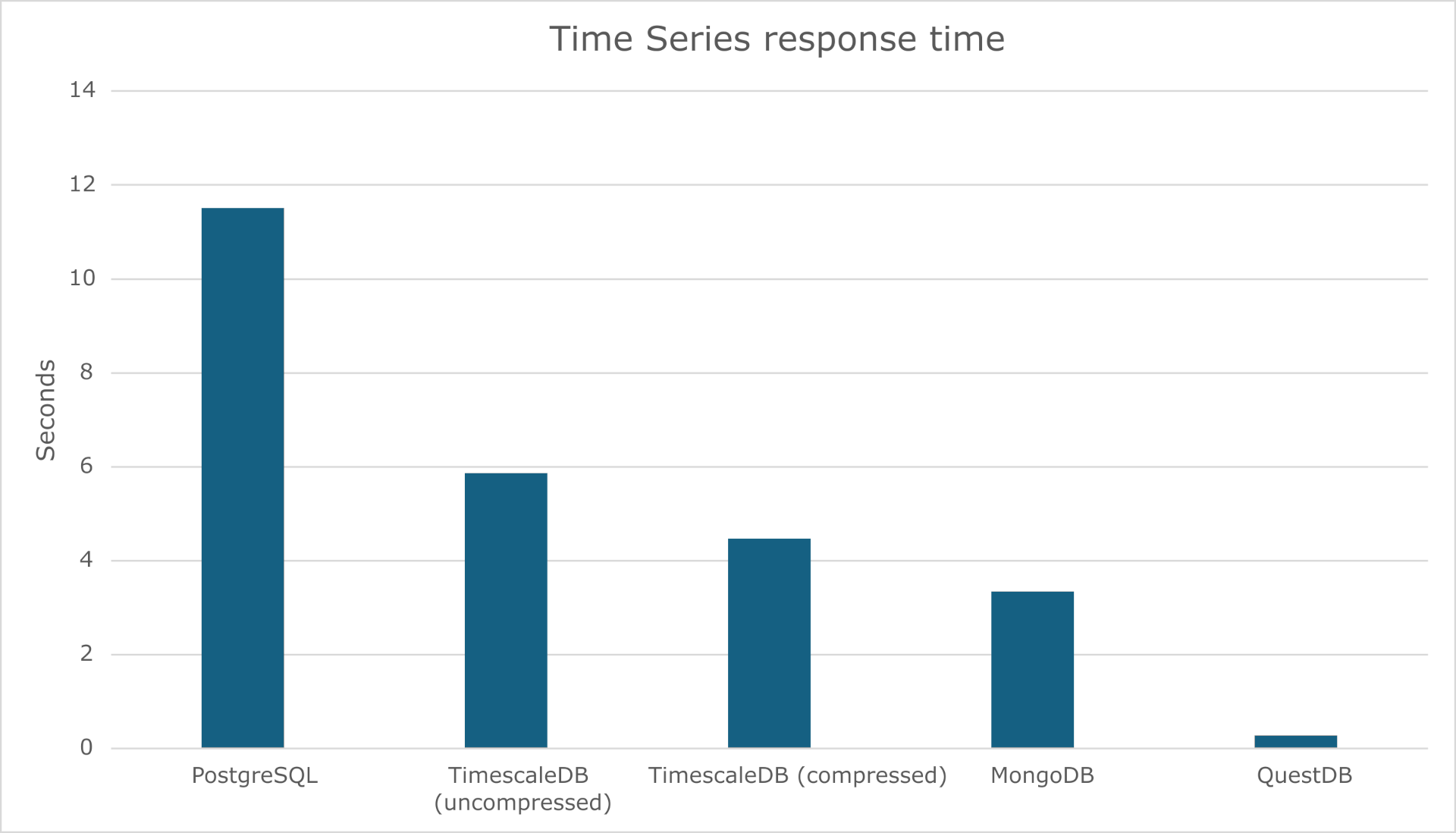
I have to say that the response time is quite amazing !! Beating with no photo finish TimescaleDB and MongoDB…
Over ten runs I got an average of 281 ms which compare to my previous testing:
References
About Post Author