Automatic In-Memory Management (AIM) hands-on
Table of contents
Preamble
Automatic In-Memory Management (AIM) is an extension to the In-Memory Enterprise Edition option that I tested back in 12cR1 (!!). As its name stand for this option put automatically objects in memory based on:
optimizes the column store through actions such evicting cold data, populating frequently accessed data, and compressing cold columns.
Or from product management team:
With Automatic In-Memory Sizing the IM column store can now be managed as part of Automatic Shared Memory Management (ASMM). This means that ASMM can grow or shrink the IM column store based on overall database workload requirements.
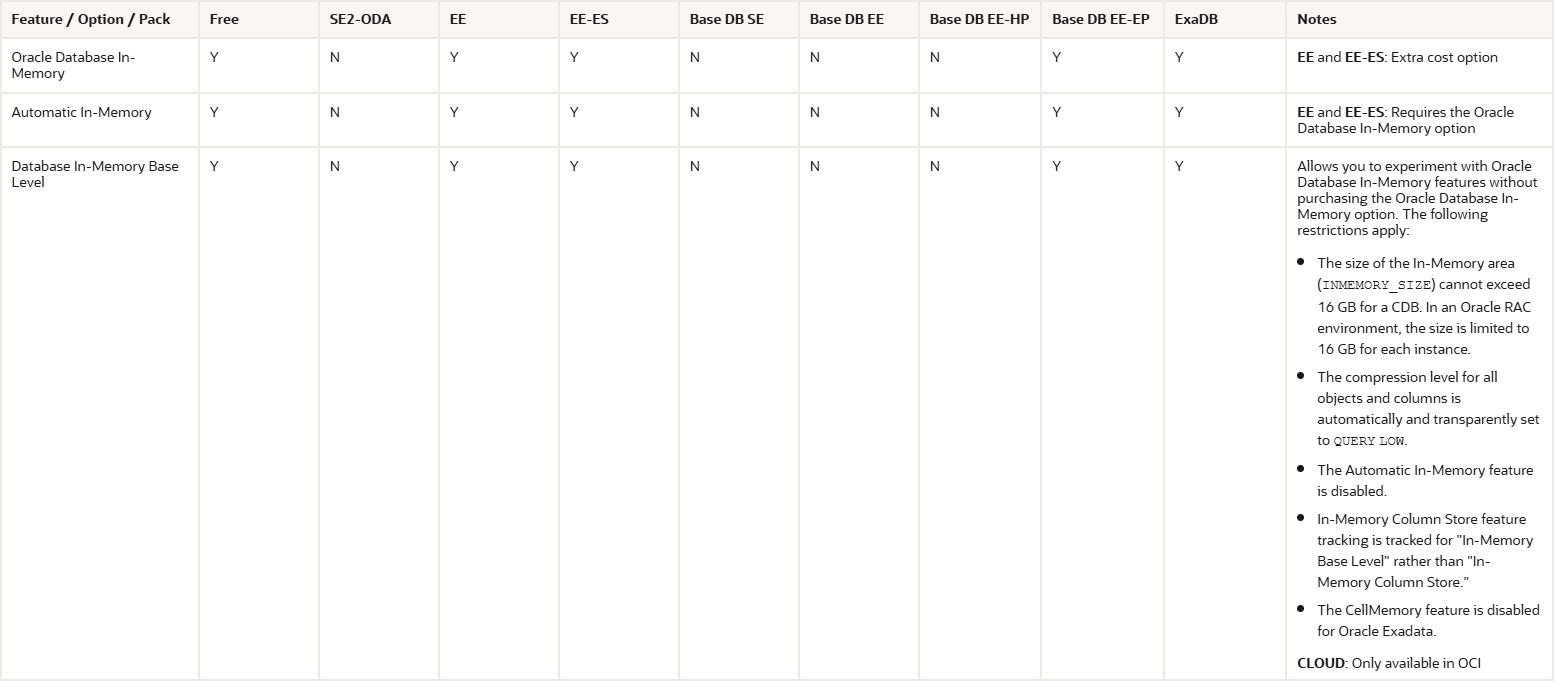
The In-Memory option is obviously not free but AIM is free. AIM is also not available with free In-Memory where you memory pool is below 16GB:
My testing has been done with Oracle AI database 26ai (23.26.3.0.0) running on Red Hat Enterprise Linux release 9.7 (Plow). My test server has 12 cores and 64GB of memory. I am obviously testing in a pluggable database as it is now mandatory with 26ai…
I initially tested in 23.26.2.0.0 and I have not been able to see the feature working. In 23.26.3.0.0 the feature works better but still the behavior is quite erratic and you can run the below example multiple times before seeing it working…
Automatic In-Memory Management (AIM) activation
There is a bunch on In-Memory parameters:
SQL> set pages 10000
SQL> show parameter %inmemory%

NAME                                 TYPE        VALUE
------------------------------------ ----------- ------------------------------
inmemory_adg_enabled                 boolean     TRUE
inmemory_automatic_level             string      OFF
inmemory_clause_default              string
inmemory_deep_vectorization          boolean     TRUE
inmemory_expressions_usage           string      ENABLE
inmemory_force                       string      DEFAULT
inmemory_graph_algorithm_execution   string      DEFAULT
inmemory_max_populate_servers        integer     0
inmemory_optimized_arithmetic        string      DISABLE
inmemory_optimized_date              string      DISABLE
inmemory_prefer_xmem_memcompress     string
inmemory_prefer_xmem_priority        string
inmemory_query                       string      ENABLE
inmemory_size                        big integer 0
inmemory_trickle_repopulate_servers_ integer     1
percent
inmemory_virtual_columns             string      MANUAL
inmemory_xmem_size                   big integer 0
optimizer_inmemory_aware             boolean     TRUE
To activate AIM I define an In-Memory size (at CDB level) and change the automatic level from OFF to LOW on my pluggable database (then bounce the instance). I also change the parallel policy to benefit from auto parallel execution:
SQL> alter session set container=pdb1;

Session altered.

SQL> alter system set inmemory_size=1G container=current scope=both;
alter system set inmemory_size=1G container=current scope=both
*
ERROR at line 1:
ORA-02097: parameter cannot be modified because specified value is invalid
ORA-64913: The Database In-Memory size cannot be increased more than 0 MB for
PDB ID 3.
Help: https://docs.oracle.com/error-help/db/ora-02097/

SQL> alter system set inmemory_automatic_level=low container=current scope=both;

System altered.

SQL> alter session set container=cdb$root;

Session altered.

SQL> alter system set inmemory_size=2G container=current scope=spfile; -- If you set only at PDB level then it is not initialized at container level, the parameter at PDB level is only to distribute the In-Memory CDB quota per PDB

System altered.

SQL> alter system set parallel_degree_policy=auto scope=both;

System altered.
Remark:
Not fully clear to me in the official documentation but if you set INMEMORY_AUTOMATIC_LEVEL to LOW then the MEMCOMPRESS AUTO level of table is not valid. The MEMCOMPRESS AUTO works fine with INMEMORY_AUTOMATIC_LEVEL set to HIGH:
SQL> alter table app01.sales inmemory memcompress auto;

Error starting at line : 1 in command -
alter table app01.sales inmemory memcompress auto
Error report -
ORA-00922: missing or invalid option
Help: https://docs.oracle.com/error-help/db/ora-00922/
If the INMEMORY_SIZE parameter has been set at CDB level then running statement like below at PDB level is working fine:
SQL> alter system set inmemory_size=1G container=current scope=spfile;

System altered.
The “small” problem I have seen with INMEMORY_AUTOMATIC_LEVEL = HIGH is that ALL objects other than owned by Oracle maintained account are by default IM enabled and have MEMCOMPRESS set to AUTO… It means you would have to unflag (NOINMEMORY) all the objects you do not want to go in memory to keep only the focus on the most important ones…
Not very flexible and I would have expected the MEMCOMPRESS AUTO also available with INMEMORY_AUTOMATIC_LEVEL = LOW to flag In-Memory objects of my choice only…
Also, an important point, to have cold segments under memory pressure evicted from Automatic In-Memory, they must be with a PRIORITY equals to NONE…
Automatic In-Memory Management (AIM) test case
I create the same data model I add in my previous testing in APP01 schema. The script for the dimension city table:
drop table if exists city;

create table if not exists city (
  code number not null,
  descr varchar2(50),
  constraint city_pk primary key (code) using index (create unique index city_pk on city (code asc) tablespace users) enable
)
tablespace users;

insert into city values (1,'Paris');
insert into city values (2,'Lyon');
insert into city values (3,'Marseille');
insert into city values (4,'Bordeaux');
insert into city values (5,'Lille');
insert into city values (6,'Toulouse');
insert into city values (7,'Nantes');
insert into city values (8,'Montpellier');
insert into city values (9,'Dijon');
insert into city values (10,'Arbois');
insert into city values (11,'Nancy');
insert into city values (12,'Troyes');
insert into city values (13,'Bourges');
insert into city values (14,'Tours');
insert into city values (15,'Rennes');
insert into city values (16,'Grenoble');
insert into city values (17,'Annecy');
insert into city values (18,'Rouen');
insert into city values (19,'Brest');
insert into city values (20,'Poitiers');
insert into city values (21,'Metz');
insert into city values (22,'Reims');
insert into city values (23,'Amiens');
insert into city values (24,'Caen');
insert into city values (25,'Le Havre');
insert into city values (26,'Quimper');
insert into city values (27,'Saint-Nazaire');
insert into city values (28,'Carcassonne');
insert into city values (29,'Nimes');
insert into city values (30,'Cannes');

commit;

exec dbms_stats.gather_table_stats(ownname => 'app01', tabname => 'city');
And a sales fact tables that is quite big, you are free to tune the parameter of the PL/SQL block to increase the number of rows, I set this table to NOLOGGING to avoid generating too much redo log:
drop table if exists sales;

create table if not exists sales(invoice_id number, invoice_date date, city__code number, qty number, val varchar2(100)) nologging tablespace users;

declare
  i number;
  nbrows number;
begin
  i:=1;
  nbrows:=10000000;
  loop
    exit when i>nbrows;
    insert into sales values(i, to_date(trunc(dbms_random.value(to_char(date '2000-01-01','j'), to_char(date '2020-01-01','j'))),'j'), round(dbms_random.value(1,30)), round(dbms_random.value(1,10000)), dbms_random.value(1,10000));
    if (mod(i,100000) = 0) then
      commit;
    end if;
    i:=i+1;
  end loop;
  commit;
end;
/

exec dbms_stats.gather_table_stats(ownname => 'app01', tabname => 'sales');

create table sales2 nologging tablespace users as select * from sales;

exec dbms_stats.gather_table_stats(ownname => 'app01', tabname => 'sales2');
The tables have already a good size, in fact a bit below the 1GB of my In-Memory pool but I cannot store them concurrently in memory::
SQL> select segment_name, sum(bytes)/(1024*1024) as "Size MB" from dba_extents where owner='APP01' and segment_name in ('SALES', 'SALES2') group by segment_name;

SEGMENT_NAME       Size MB
_______________ __________
SALES                  728
SALES2                 728
Automatic In-Memory Management (AIM) testing
My tables are initially not in memory:
SQL> select
       table_name, inmemory, inmemory_priority, inmemory_distribute, inmemory_compression, inmemory_duplicate
     from dba_tables
     where owner='APP01'
     and table_name in ('CITY', 'SALES', 'SALES2')
     order by table_name;

TABLE_NAME    INMEMORY    INMEMORY_PRIORITY    INMEMORY_DISTRIBUTE    INMEMORY_COMPRESSION    INMEMORY_DUPLICATE
_____________ ___________ ____________________ ______________________ _______________________ _____________________
CITY          DISABLED
SALES         DISABLED
SALES2        DISABLED

SQL> select
       segment_name,inmemory_size,bytes,bytes_not_populated,populate_status,inmemory_priority,inmemory_distribute,inmemory_duplicate,inmemory_compression
     from v$im_segments
     order by segment_name;

no rows selected
And the In-Memory pool is empty:
SQL> select * from v$inmemory_area;

POOL                   ALLOC_BYTES    USED_BYTES POPULATE_STATUS       CON_ID
___________________ ______________ _____________ __________________ _________
1MB POOL                 738197504             0 DONE                       3
64KB POOL                318767104             0 DONE                       3

SQL> select pool, alloc_bytes, used_bytes, round(used_bytes*100/alloc_bytes) as percentage_used from v$inmemory_area;

POOL            ALLOC_BYTES    USED_BYTES    PERCENTAGE_USED
____________ ______________ _____________ __________________
1MB POOL          746586112             0                  0
64KB POOL         318767104             0                  0
Testing with INMEMORY_AUTOMATIC_LEVEL = LOW I cannot use the AUTO MEMCOMPRESS so using below and overwriting PRIORITY even if NONE is the default mode:
SQL> alter table app01.sales inmemory memcompress for query low priority none;

Table APP01.SALES altered.

SQL> alter table app01.sales2 inmemory memcompress for query low priority none;

Table APP01.SALES2 altered.
The tables’ properties have changed but before the first select, nothing is in memory pool:
SQL> select
       table_name, inmemory, inmemory_priority, inmemory_distribute, inmemory_compression, inmemory_duplicate
     from dba_tables
     where owner='APP01'
     and table_name in ('CITY', 'SALES', 'SALES2')
     order by table_name;

OWNER    TABLE_NAME    INMEMORY    INMEMORY_PRIORITY    INMEMORY_DISTRIBUTE    INMEMORY_COMPRESSION    INMEMORY_DUPLICATE
________ _____________ ___________ ____________________ ______________________ _______________________ _____________________
APP01    CITY          DISABLED
APP01    SALES         ENABLED     NONE                 AUTO                   FOR QUERY LOW           NO DUPLICATE
APP01    SALES2        ENABLED     NONE                 AUTO                   FOR QUERY LOW           NO DUPLICATE

SQL> select segment_name,inmemory_size,bytes,bytes_not_populated,populate_status,inmemory_priority,inmemory_distribute,inmemory_duplicate,inmemory_compression
     from v$im_segments
     order by segment_name;

no rows selected
I could have used the typical query that would benefit from In-Memory on SALES table. But at the end a simple Full Table Scan (FTS) on my two test tables is giving the expected result. As usual the /* Yannick * / comment is to find myself in V$SQL:
SQL> alter session set statistics_level=all;

Session altered.

SQL> set timing on
SQL> select /* Yannick */ b.descr,sum(qty) as qty, sum(val) as val
     from sales a, city b
     where a.city__code=b.code
     group by b.descr
     order by b.descr;

SQL> select /* Yannick */ /*+ full(s) */ count(*) from app01.sales s;
The first run is triggering the load in the In-Memory pool and we see that second run is much faster:
SQL> alter session set statistics_level=all;

Session altered.

SQL> set timing on
SQL> select /* Yannick */ /*+ full(s) */ count(*) from app01.sales s;

   COUNT(*)
___________
   10000000

Elapsed: 00:00:03.376

SQL> select /* Yannick */ /*+ full(s) */ count(*) from app01.sales s;

   COUNT(*)
___________
   10000000

Elapsed: 00:00:00.184
The SALES table fit perfectly inside the In-Memory pool:
SQL> select
       segment_name,inmemory_size,bytes,bytes_not_populated,populate_status,inmemory_priority,inmemory_distribute,inmemory_duplicate,inmemory_compression
     from v$im_segments
     order by segment_name;

SEGMENT_NAME       INMEMORY_SIZE        BYTES    BYTES_NOT_POPULATED POPULATE_STATUS    INMEMORY_PRIORITY    INMEMORY_DISTRIBUTE    INMEMORY_DUPLICATE    INMEMORY_COMPRESSION
_______________ ________________ ____________ ______________________ __________________ ____________________ ______________________ _____________________ _______________________
SALES                  723124224    759537664                      0 COMPLETED          NONE                 AUTO                   NO DUPLICATE          FOR QUERY LOW

SQL> select pool, alloc_bytes, used_bytes, round(used_bytes*100/alloc_bytes) as percentage_used from v$inmemory_area;

POOL            ALLOC_BYTES    USED_BYTES    PERCENTAGE_USED
____________ ______________ _____________ __________________
1MB POOL          746586112     746586112                100
64KB POOL         318767104       4456448                  1
The expected FTS plan:
SQL> set pages 10000
SQL> select
       sql_id,child_number,plan_hash_value,is_bind_sensitive,is_bind_aware,is_shareable,is_obsolete,sql_plan_baseline
     from v$sql
     where sql_text like 'select /* Yannick%';

SQL_ID              CHILD_NUMBER    PLAN_HASH_VALUE IS_BIND_SENSITIVE    IS_BIND_AWARE    IS_SHAREABLE    IS_OBSOLETE    SQL_PLAN_BASELINE
________________ _______________ __________________ ____________________ ________________ _______________ ______________ ____________________
0hpzr53am37wx                  0         1047182207 N                    N                Y               N

SQL> select * from table(dbms_xplan.display_cursor(sql_id => '0hpzr53am37wx', cursor_child_no => '0', format => 'all adaptive allstats'));
PLAN_TABLE_OUTPUT
___________________________________________________________________________________________________________________________________
SQL_ID 0hpzr53am37wx, child number 0
-------------------------------------
select /* Yannick */ /*+ full(s) */ count(*) from app01.sales s

Plan hash value: 1047182207

--------------------------------------------------------------------------------------------------------------------------------
| Id  | Operation                   | Name  | Starts | E-Rows | Cost (%CPU)| E-Time   | A-Rows |   A-Time   | Buffers | Reads  |
--------------------------------------------------------------------------------------------------------------------------------
|   0 | SELECT STATEMENT            |       |      2 |        | 25158 (100)|          |      2 |00:00:03.27 |   92478 |  92461 |
|   1 |  SORT AGGREGATE             |       |      2 |      1 |            |          |      2 |00:00:03.27 |   92478 |  92461 |
|   2 |   TABLE ACCESS INMEMORY FULL| SALES |      2 |     10M| 25158   (1)| 00:00:01 |     20M|00:00:03.25 |   92478 |  92461
--------------------------------------------------------------------------------------------------------------------------------

Query Block Name / Object Alias (identified by operation id):
-------------------------------------------------------------

1 - SEL$1
2 - SEL$1 / "S"@"SEL$1"

Column Projection Information (identified by operation id):
-----------------------------------------------------------

1 - (#keys=0) COUNT(*)[22]
2 - (rowset=5377)

Hint Report (identified by operation id / Query Block Name / Object Alias):
Total hints for statement: 1
---------------------------------------------------------------------------

2 - SEL$1 / "S"@"SEL$1"
- full(s)

Note
-----
- automatic DOP: Computed Degree of Parallelism is 1 because of no expensive parallel operation

37 rows selected.
Now if I execute the same FTS on SALES2 table, the first run will not use in memory but the second will. I can tell it from the execution time (as with the plan you cannot say):
SQL> alter session set statistics_level=all;

Session altered.

SQL> set timing on
SQL> select /* Yannick */ /*+ full(s) */ count(*) from app01.sales2 s;

   COUNT(*)
___________
   10000000

Elapsed: 00:00:02.641
SQL> select /* Yannick */ /*+ full(s) */ count(*) from app01.sales2 s;

   COUNT(*)
___________
   10000000

Elapsed: 00:00:00.193
If we check the AIM tasks and latest tasks operations we see that SALES got evicted and SALES2 got populated:
SQL> select * from dba_inmemory_aimtasks order by task_id desc fetch first 5 rows only;

   TASK_ID CREATION_TIME                  STATE
__________ ______________________________ ________
      2311 22/07/26 16:40:21,000000000    DONE
      2310 22/07/26 16:23:40,000000000    DONE
      2309 22/07/26 16:21:39,000000000    DONE
      2308 22/07/26 16:19:39,000000000    DONE
      2307 22/07/26 16:17:39,000000000    DONE

SQL> select * from dba_inmemory_aimtaskdetails where where object_owner='APP01' and task_id=2311;

   TASK_ID OBJECT_OWNER    OBJECT_NAME                      SUBOBJECT_NAME                             ACTION       STATE
__________ _______________ ________________________________ __________________________________________ ____________ ________
      2311 APP01           SALES2                                                                      NO ACTION    DONE
      2311 APP01           SALES                                                                       EVICT        DONE

2 rows selected.

SQL> select * from dba_inmemory_aimtaskdetails where object_owner='APP01' and task_id=2310;

   TASK_ID OBJECT_OWNER    OBJECT_NAME                      SUBOBJECT_NAME                             ACTION       STATE
__________ _______________ ________________________________ __________________________________________ ____________ ________
      2310 APP01           SALES2                                                                      POPULATE     DONE
      2310 APP01           SALES                                                                       EVICT        DONE

2 rows selected.
The In-Memory area is now filled only with SALES2:
SQL> select
       segment_name,inmemory_size,bytes,bytes_not_populated,populate_status,inmemory_priority,inmemory_distribute,inmemory_duplicate,inmemory_compression
     from v$im_segments
     order by segment_name;

SEGMENT_NAME       INMEMORY_SIZE        BYTES    BYTES_NOT_POPULATED POPULATE_STATUS    INMEMORY_PRIORITY    INMEMORY_DISTRIBUTE    INMEMORY_DUPLICATE    INMEMORY_COMPRESSION
_______________ ________________ ____________ ______________________ __________________ ____________________ ______________________ _____________________ _______________________
SALES2                 743440384    757800960                      0 COMPLETED          NONE                 AUTO                   NO DUPLICATE          FOR QUERY LOW

SQL> select pool, alloc_bytes, used_bytes, round(used_bytes*100/alloc_bytes) as percentage_used from v$inmemory_area;

POOL            ALLOC_BYTES    USED_BYTES    PERCENTAGE_USED
____________ ______________ _____________ __________________
1MB POOL          746586112     739246080                 99
64KB POOL         318767104       4194304                  1
The explain plan is an TABLE ACCESS INMEMORY FULL. But doing various testing I have discovered that even if the table is not In-Memory then Oracle will say it did a TABLE ACCESS INMEMORY FULL thinking the table could be In-Memory or trying to put it in memory even if the In-Memory pool does not allow it:
SQL> select
       sql_id,child_number,plan_hash_value,is_bind_sensitive,is_bind_aware,is_shareable,is_obsolete,sql_plan_baseline
     from v$sql
     where sql_text LIKE 'select /* Yannick%';

SQL_ID              CHILD_NUMBER    PLAN_HASH_VALUE IS_BIND_SENSITIVE    IS_BIND_AWARE    IS_SHAREABLE    IS_OBSOLETE    SQL_PLAN_BASELINE
________________ _______________ __________________ ____________________ ________________ _______________ ______________ ____________________
fj02mp831tkqp                  0         2862189843 N                    N                Y               N
0hpzr53am37wx                  0         1047182207 N                    N                Y               N

SQL> select * from table(dbms_xplan.display_cursor(sql_id => 'fj02mp831tkqp', cursor_child_no => '0', format => 'all adaptive allstats'));

PLAN_TABLE_OUTPUT
____________________________________________________________________________________________________________________________________
SQL_ID  fj02mp831tkqp, child number 0
-------------------------------------
select /* Yannick */ /*+ full(s) */ count(*) from app01.sales2 s

Plan hash value: 2862189843

---------------------------------------------------------------------------------------------------------------------------------
| Id  | Operation                   | Name   | Starts | E-Rows | Cost (%CPU)| E-Time   | A-Rows |   A-Time   | Buffers | Reads  |
---------------------------------------------------------------------------------------------------------------------------------
|   0 | SELECT STATEMENT            |        |      1 |        | 25227 (100)|          |      1 |00:00:02.55 |   92510 |  92505 |
|   1 |  SORT AGGREGATE             |        |      1 |      1 |            |          |      1 |00:00:02.55 |   92510 |  92505 |
|   2 |   TABLE ACCESS INMEMORY FULL| SALES2 |      1 |     10M| 25227   (1)| 00:00:01 |     10M|00:00:02.54 |   92510 |  92505 |
---------------------------------------------------------------------------------------------------------------------------------

Query Block Name / Object Alias (identified by operation id):
-------------------------------------------------------------

   1 - SEL$1
   2 - SEL$1 / "S"@"SEL$1"

Column Projection Information (identified by operation id):
-----------------------------------------------------------

   1 - (#keys=0) COUNT(*)[22]
   2 - (rowset=5377)

Hint Report (identified by operation id / Query Block Name / Object Alias):
Total hints for statement: 1
---------------------------------------------------------------------------

   2 -  SEL$1 / "S"@"SEL$1"
           -  full(s)

Note
-----
   - automatic DOP: Computed Degree of Parallelism is 1 because of no expensive parallel operation

37 rows selected.
I have also tried to plan with DBMS_AUTOIM.ACTIVITY_REPORT procedure, but it did not display anything:
SQL> set pages 10000
SQL> set long 32000
SQL> select dbms_autoim.activity_report(start_time => sysdate -1, end_time => sysdate, type => 'TEXT', level => 'DETAILED') as aim_report from dual;

AIM_REPORT
__________________________________________________________________________________
REPORT SUMMARY
-------------------------------------------------------------------------------
 Start time                            : 23-JUL-2026 10:36:51
 End time                              : 24-JUL-2026 10:36:51
 No. of times auto task scheduled      : 3
 Statements Analyzed                   : 0
 IM Performance Candidates Identified  : 0
 Statements Verified                   : 0
 IM Performance Candidates Accepted    :
-------------------------------------------------------------------------------
Automatic In-Memory Management (AIM) with Automatic Data Optimization (ADO)
You can club ADO policies with AIM to fine tune the behavior of you IM area, the followed algorithm is described in Oracle official documentation:

SQL> alter table app01.sales ilm add policy no inmemory after 7 days of no access;

Table APP01.SALES altered.
You can check the ILM tables to see the implemented ADO policies:
SQL> select * from dba_ilmpolicies;

POLICY_NAME    POLICY_TYPE      TABLESPACE    ENABLED    DELETED
______________ ________________ _____________ __________ __________
P1             DATA MOVEMENT                  YES        NO

SQL> select * from dba_ilmdatamovementpolicies;

POLICY_NAME    ACTION_TYPE    SCOPE      COMPRESSION_LEVEL    TIER_TABLESPACE    TIER_STATUS    CONDITION_TYPE         CONDITION_DAYS CUSTOM_FUNCTION    POLICY_SUBTYPE    ACTION_CLAUSE    TIER_TO
______________ ______________ __________ ____________________ __________________ ______________ ___________________ _________________ __________________ _________________ ________________ __________
P1             EVICT          SEGMENT                                                           LAST ACCESS TIME                    7                    INMEMORY          no inmemory
You can also more compress objects after a period of no DML, this would more apply with partitioning with a rolling strategy of current partitions (per day, week or month):
SQL> alter table app01.sales ilm add policy modify inmemory memcompress for query high after 2 days of no modification;

Table APP01.SALES altered.

SQL> select * from dba_ilmpolicies;

POLICY_NAME    POLICY_TYPE      TABLESPACE    ENABLED    DELETED
______________ ________________ _____________ __________ __________
P1             DATA MOVEMENT                  YES        NO
P2             DATA MOVEMENT                  YES        NO

SQL> select * from dba_ilmdatamovementpolicies;

POLICY_NAME    ACTION_TYPE    SCOPE      COMPRESSION_LEVEL             TIER_TABLESPACE    TIER_STATUS    CONDITION_TYPE               CONDITION_DAYS CUSTOM_FUNCTION    POLICY_SUBTYPE    ACTION_CLAUSE                           TIER_TO
______________ ______________ __________ _____________________________ __________________ ______________ _________________________ _________________ __________________ _________________ _______________________________________ __________
P1             EVICT          SEGMENT                                                                    LAST ACCESS TIME                          7                    INMEMORY          no inmemory
P2             COMPRESSION    SEGMENT    MEMCOMPRESS FOR QUERY HIGH                                      LAST MODIFICATION TIME                    2                    INMEMORY          inmemory memcompress for query high
Issues encountered
Automatic In-Memory task running forever
The AIM task got stuck in RUNNING state for more than a day:
SQL> select * from dba_inmemory_aimtasks order by task_id desc fetch first 5 rows only;

   TASK_ID CREATION_TIME                  STATE
__________ ______________________________ __________
      2311 22/07/26 16:40:21,000000000    RUNNING
      2310 22/07/26 16:23:40,000000000    DONE
      2309 22/07/26 16:21:39,000000000    DONE
      2308 22/07/26 16:19:39,000000000    DONE
      2307 22/07/26 16:17:39,000000000    DONE
I have tried to stop/start the pluggable database and even the whole instance but it solved nothing. I unlocked the situation with a bunch of INMEMORY_AUTOMATIC_LEVEL value change:
SQL> alter system set inmemory_automatic_level=off scope=memory;

System altered.

SQL> alter system set inmemory_automatic_level=high scope=memory;

System altered.

SQL> alter system set inmemory_automatic_level=low scope=memory;

System altered.
And finally:
SQL> select * from dba_inmemory_aimtasks order by task_id desc fetch first 5 rows only;

   TASK_ID CREATION_TIME                  STATE
__________ ______________________________ __________
      2332 23/07/26 11:05:31,000000000    DONE
      2311 22/07/26 16:40:21,000000000    RUNNING
      2310 22/07/26 16:23:40,000000000    DONE
      2309 22/07/26 16:21:39,000000000    DONE
      2308 22/07/26 16:19:39,000000000    DONE
References
- New Database In-Memory Features in Oracle AI Database 26ai
- Automatic In-Memory
- Automatic Data Optimization for Database In-Memory
- When and How to use Oracle Database In-Memory Advisor
About Post Author