Transparent Application Failover (TAF) can be tested with a simple active/passive OS cluster (Pacemaker in my case) and you must use the JDBC OCI driver not the Thin one !
The principle is a primary node switchover to secondary node. In initial state my database is running on server2.domain.com:
[root@server2 ~]# pcs status
Cluster name: cluster01
Stack: corosync
Current DC: server2.domain.com (version 1.1.16-12.el7-94ff4df) - partition with quorum
Last updated: Wed Dec 20 15:56:27 2017
Last change: Wed Dec 20 15:55:54 2017 by root via cibadmin on server2.domain.com

2 nodes configured
5 resources configured

Online: [ server2.domain.com server3.domain.com ]

Full list of resources:

 Resource Group: oracle
     virtualip  (ocf::heartbeat:IPaddr2):       Started server2.domain.com
     vg01       (ocf::heartbeat:LVM):   Started server2.domain.com
     u01        (ocf::heartbeat:Filesystem):    Started server2.domain.com
     orcl       (ocf::heartbeat:oracle):        Started server2.domain.com
     listener_orcl      (ocf::heartbeat:oralsnr):       Started server2.domain.com

Daemon Status:
  corosync: active/enabled
  pacemaker: active/enabled
  pcsd: active/enabled
And I simply set the primary node to standby node with following command (that can be executed from any node of the cluster):
To finally reach below situation where all resources have been restarted on server3.domain.com:
[root@server2 ~]# pcs status
Cluster name: cluster01
Stack: corosync
Current DC: server2.domain.com (version 1.1.16-12.el7-94ff4df) - partition with quorum
Last updated: Wed Dec 20 17:42:49 2017
Last change: Wed Dec 20 17:35:52 2017 by root via cibadmin on server2.domain.com

2 nodes configured
5 resources configured

Node server2.domain.com: standby
Online: [ server3.domain.com ]

Full list of resources:

 Resource Group: oracle
     virtualip  (ocf::heartbeat:IPaddr2):       Started server3.domain.com
     vg01       (ocf::heartbeat:LVM):   Started server3.domain.com
     u01        (ocf::heartbeat:Filesystem):    Started server3.domain.com
     orcl       (ocf::heartbeat:oracle):        Started server3.domain.com
     listener_orcl      (ocf::heartbeat:oralsnr):       Started server3.domain.com

Daemon Status:
  corosync: active/enabled
  pacemaker: active/enabled
  pcsd: active/enabled
The test code I am using is (running under Eclipse). You need to add ojdbc8.jar file to your project (classpath):
package taf01;

import java.sql.Connection;
import java.sql.ResultSet;
import java.sql.SQLException;
import java.time.LocalDateTime;
import java.time.format.DateTimeFormatter;

import oracle.jdbc.pool.OracleDataSource;
import oracle.jdbc.OracleConnection;

public class taf01 {
  // Make Oracle connection and return a connection object
  private static Connection oracle_connection() throws Exception {
    Connection connection1 = null;
    CallBack function_callback = new CallBack();
    String callback_message = null;
    OracleDataSource ods1 = new OracleDataSource();

    try {
      Class.forName("oracle.jdbc.driver.OracleDriver");
    }
    catch (ClassNotFoundException e) {
      System.out.println("Where is your Oracle JDBC driver ?");
      e.printStackTrace();
      return null;
    }

    System.out.println("Oracle JDBC Driver Registered!");

    try {
      ods1.setUser("yjaquier");
      ods1.setPassword("secure_password");
      ods1.setURL("jdbc:oracle:oci:@//192.168.56.99:1531/pdb1");
      connection1 = ods1.getConnection();
    }
    catch (SQLException e) {
      System.out.println("Connection Failed! Check output console");
      e.printStackTrace();
      return null;
    }
    System.out.println("Connected to Oracle database...");
    return connection1;
  }

  public static void main(String[] args) throws Exception {
    Connection connection1=null;
    String query1 = null;
    ResultSet resultset1 = null;

    // To set TNS_ADMIN variable in Java
    System.setProperty("oracle.net.tns_admin","C:/oracle/product/12.2.0/client_1/network/admin");
    connection1=oracle_connection();
    if (connection1==null) {
      System.exit(1);
    }
    query1="select HOST_NAME from v$instance";
    for(int i=1; i <= 10000; i++) {
      System.out.println("\nQuery "+i+" at "+LocalDateTime.now().format(DateTimeFormatter.ofPattern("dd-MM-yyyy HH:mm:ss"))+": ");
      if (connection1!=null) {
        try {
          resultset1 = connection1.createStatement().executeQuery(query1);
          while (resultset1.next()) {
            System.out.println("Server used: "+resultset1.getString(1));
          }
        }
        catch (SQLException e) {
          System.out.println("Query has failed...");
        }
      }
      Thread.sleep(2000);
    }
    resultset1.close();
    connection1.close();
  }
}
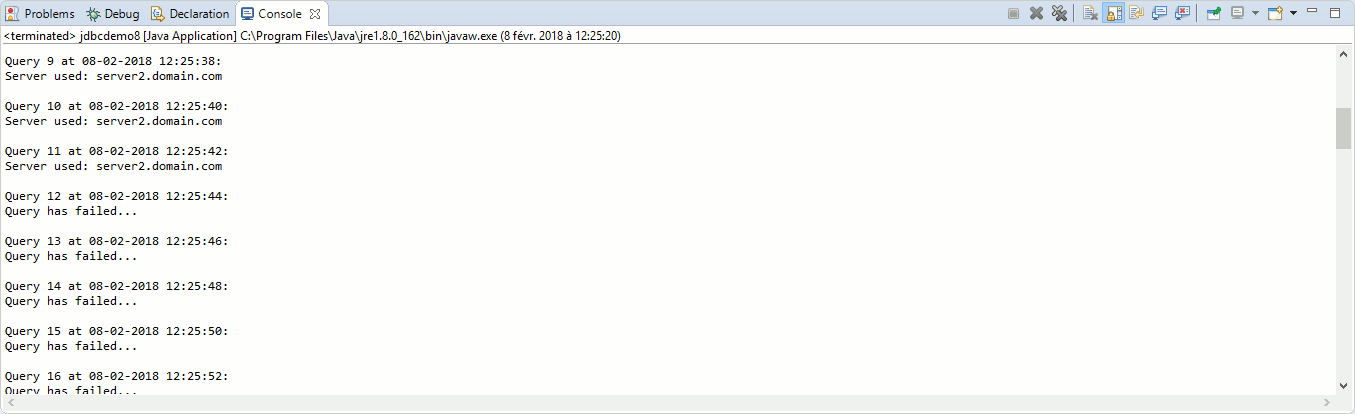
With JDBC Thin driver my sample code does not fail but never ever reconnected to second node where the database is restarted (using jdbc:oracle:thin:@//192.168.56.99:1531/pdb1 as connect string):
taf01
Remark: By the way we knew by looking at above table TAF is NOT available with JDBC Thin driver.
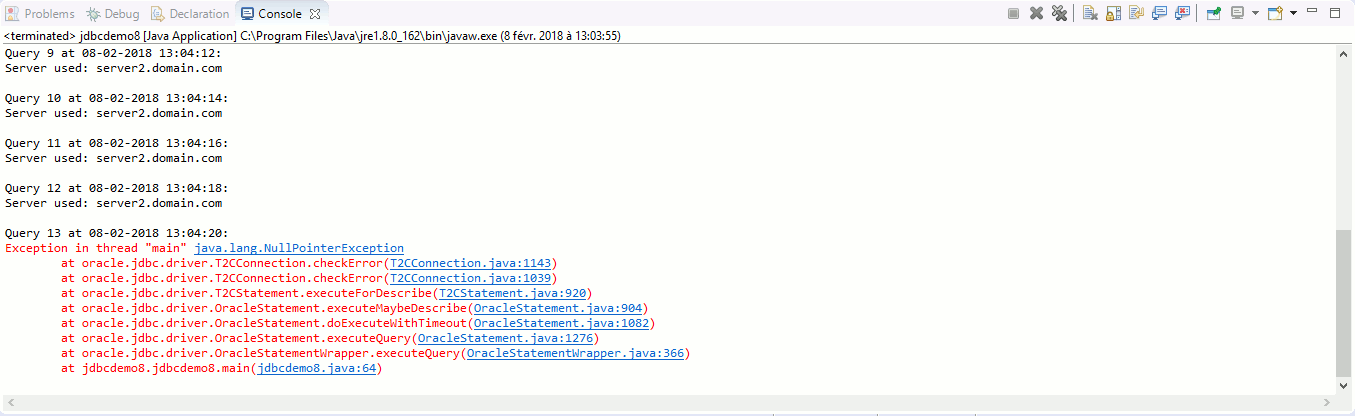
With JDBC OCI driver it is just simply failing (using jdbc:oracle:oci:@//192.168.56.99:1531/pdb1 as connect string):
taf02
If I try to use below TNS entry, either directly is Java program with:
I have the same exact behavior even if from database standpoint it looks better:
SQL> set lines 200 pages 1000
SQL> select module, failover_type, failover_method, failed_over, service_name
     from v$session
     where username='YJAQUIER';

MODULE                                                         FAILOVER_TYPE FAILOVER_M FAI SERVICE_NAME
-------------------------------------------------------------- ------------- ---------- --- ----------------------------------------------------------------
javaw.exe                                                      SELECT        BASIC      NO  pdb1
SQL Developer                                                  NONE          NONE       NO  pdb1
SQL> set lines 200 pages 1000
SQL> col name for a10
SQL> select name,failover_delay, failover_method,failover_restore,failover_retries,failover_type
     from dba_services;

NAME       FAILOVER_DELAY FAILOVER_METHOD                              FAILOV FAILOVER_RETRIES FAILOVER_TYPE
---------- -------------- -------------------------------------------- ------ ---------------- --------------------------------------------
pdb1
Clearly implementing TAF and having a professional looking application requires a bit more of effort, let see how we can achieve this... If you dig in JDBC Developer's Guide you have a complete chapter on JDBC OCI driver TAF implementation.
Roughly this is achieved by creating a callback function that will handle the re-connection in case the connection has failed. You have multiple My Oracle Support (MOS) notes on the subject. It is also mandatory to use a TNS entry that is TAF enable. Refer to Net Services Administrator's Guide to know how to use it. The code I am using is:
package taf01;

import java.sql.Connection;
import java.sql.ResultSet;
import java.sql.SQLException;
import java.time.LocalDateTime;
import java.time.format.DateTimeFormatter;

import oracle.jdbc.OracleOCIFailover;
import oracle.jdbc.pool.OracleDataSource;
import oracle.jdbc.OracleConnection;

public class taf01 {
  // Make Oracle connection and return a connection object
  private static Connection oracle_connection() throws Exception {
    Connection connection1 = null;
    CallBack function_callback = new CallBack();
    String callback_message = null;
    OracleDataSource ods1 = new OracleDataSource();

    try {
      Class.forName("oracle.jdbc.driver.OracleDriver");
    }
    catch (ClassNotFoundException e) {
      System.out.println("Where is your Oracle JDBC Thin driver ?");
      e.printStackTrace();
      return null;
    }

    System.out.println("Oracle JDBC Driver Registered!");

    try {
      ods1.setUser("yjaquier");
      ods1.setPassword("secure_password");
      ods1.setURL("jdbc:oracle:oci:@pdb1");
      connection1 = ods1.getConnection();
      ((OracleConnection) connection1).registerTAFCallback(function_callback, callback_message);
    }
    catch (SQLException e) {
      System.out.println("Connection Failed! Check output console");
      e.printStackTrace();
      return null;
    }
    System.out.println("Connected to Oracle database...");
    return connection1;
  }

  public static void main(String[] args) throws Exception {
    Connection connection1=null;
    String query1 = null;
    ResultSet resultset1 = null;

    // To set TNS_ADMIN variable in Java
    System.setProperty("oracle.net.tns_admin","C:/oracle/product/12.2.0/client_1/network/admin");
    connection1=oracle_connection();
    if (connection1==null) {
      System.exit(1);
    }
    query1="select HOST_NAME from v$instance";
    for(int i=1; i <= 10000; i++) {
      System.out.println("\nQuery "+i+" at "+LocalDateTime.now().format(DateTimeFormatter.ofPattern("dd-MM-yyyy HH:mm:ss"))+": ");
      if (connection1!=null) {
        try {
          resultset1 = connection1.createStatement().executeQuery(query1);
          while (resultset1.next()) {
            System.out.println("Server used: "+resultset1.getString(1));
          }
        }
        catch (SQLException e) {
          System.out.println("Query has failed...");
        }
      }
      Thread.sleep(2000);
    }
    resultset1.close();
    connection1.close();
  }
}

// Define class CallBack
class CallBack implements OracleOCIFailover {
  // TAF callback function
  public int callbackFn (Connection conn, Object ctxt, int type, int event) {
    String failover_type = null;

    switch (type) {
    case FO_SESSION:
      failover_type = "SESSION";
      break;
    case FO_SELECT:
      failover_type = "SELECT";
      break;
    default:
      failover_type = "NONE";
    }

    switch (event) {
    case FO_BEGIN:
      System.out.println(ctxt + ": "+ failover_type + " failing over...");
      break;
    case FO_END:
      System.out.println(ctxt + ": failover ended");
      break;
    case FO_ABORT:
      System.out.println(ctxt + ": failover aborted.");
      break;
    case FO_REAUTH:
      System.out.println(ctxt + ": failover.");
      break;
    case FO_ERROR:
      System.out.println(ctxt + ": failover error gotten. Sleeping...");
      // Sleep for a while
      try {
        Thread.sleep(1000);
      }
      catch (InterruptedException e) {
        System.out.println("Thread.sleep has problem: " + e.toString());
      }
      return FO_RETRY;
    default:
      System.out.println(ctxt + ": bad failover event.");
      break;
    }
    return 0;
  }
}
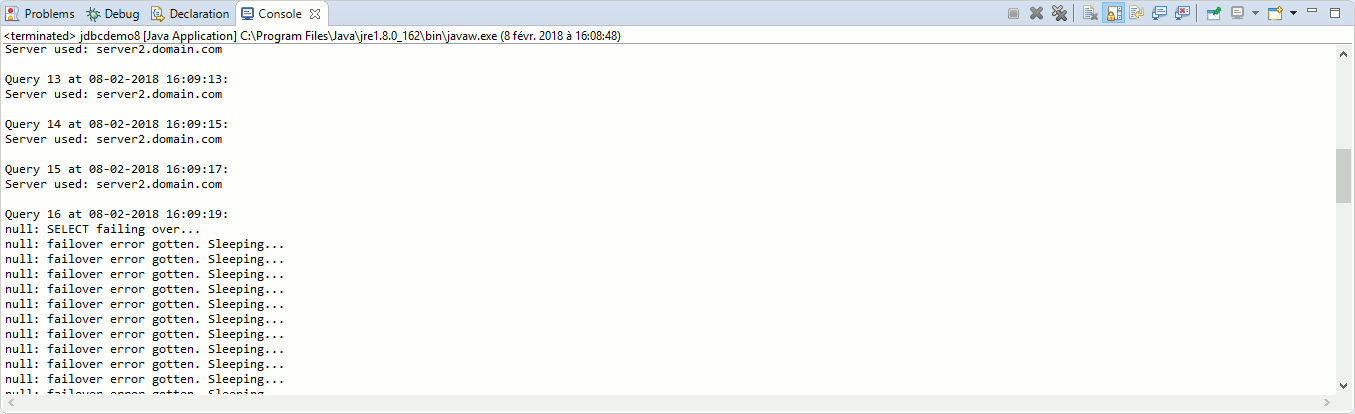
I start the Java program when the database is running on server2.domain.com:
taf03
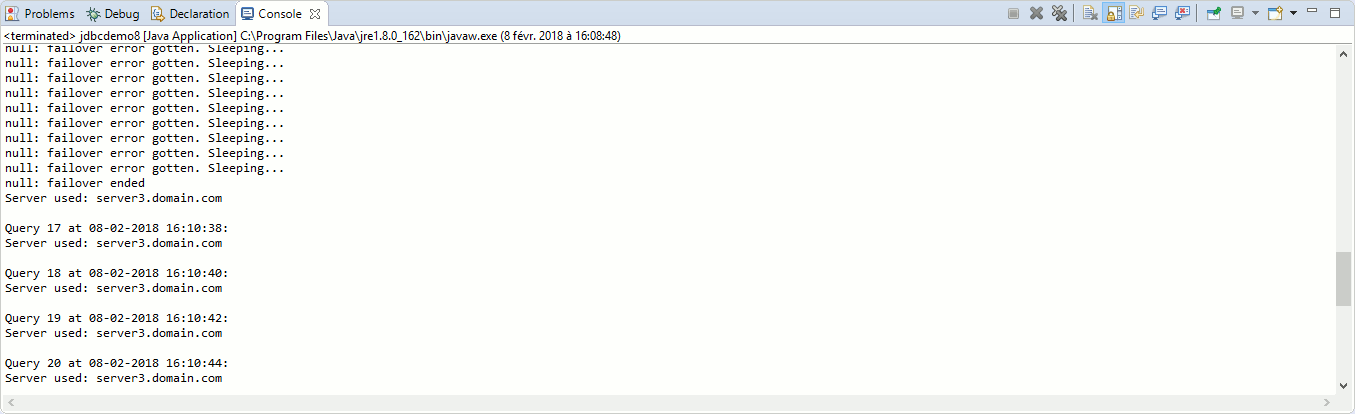
When the database switch to server3.domain.com the Java does not fail and wait until it is possible to re-initiate the connection and continue on server3.domain.com
taf04
Remark: All what we have seen here above would be more than true with a RAC cluster. I have chosen to use a basic primary/secondary active/passive implementation because it is much more common in real life and also because it requires much less effort to build and maintain.